ആമുഖം
CZE തിരഞ്ഞെടുത്തതിന് നന്ദി.view Video Baby Monitor. This device is designed to provide comprehensive monitoring of your baby or pet, offering peace of mind with advanced features such as 2K resolution, night vision, pan/tilt functionality, lullabies, cry/motion detection, two-way talk, and temperature & humidity sensing. This manual will guide you through the setup, operation, and maintenance of your monitor.

ഫ്രണ്ട് view CZE യുടെview Video Baby Monitor, featuring a white body with decorative cat ears and a central camera lens.
പാക്കേജ് ഉള്ളടക്കം
അൺബോക്സിംഗ് ചെയ്യുമ്പോൾ പാക്കേജ് ഉള്ളടക്കങ്ങൾ പരിശോധിക്കുക:
- CZEview Video Baby Monitor (Model: ZY-D1)
- പവർ അഡാപ്റ്റർ
- USB കേബിൾ
- മൗണ്ടിംഗ് കിറ്റ് (സ്ക്രൂകളും വാൾ പ്ലഗുകളും)
- ഉപയോക്തൃ മാനുവൽ (ഈ പ്രമാണം)
സജ്ജമാക്കുക
1. പവർ ചെയ്യുന്നു
- Connect the USB cable to the monitor's power port.
- പവർ അഡാപ്റ്റർ ഒരു സാധാരണ ഇലക്ട്രിക്കൽ ഔട്ട്ലെറ്റിലേക്ക് പ്ലഗ് ചെയ്യുക.
- The monitor will power on automatically, and the indicator light will illuminate.
2. ആപ്പ് ഇൻസ്റ്റാളേഷനും അക്കൗണ്ട് സൃഷ്ടിയും
Download the "Elemage Cam" app from your smartphone's app store (iOS App Store or Google Play Store). Follow the on-screen instructions to create an account and log in.
3. Wi-Fi-ലേക്ക് ബന്ധിപ്പിക്കുന്നു
സി.ഇ.ഇ.view monitor supports both 2.4GHz and 5GHz Wi-Fi bands for a stronger and more stable connection.
- Open the Elemage Cam app and tap "Add Device" or the "+" icon.
- Select your CZEview monitor model from the list.
- Follow the in-app instructions to connect the monitor to your home Wi-Fi network. This typically involves scanning a QR code generated by the app with the monitor's camera.
- Ensure your Wi-Fi password is correct and your phone is connected to the same Wi-Fi network you intend to connect the monitor to.

സി.ഇ.ഇ.view monitor supports both 2.4GHz and 5GHz Wi-Fi for enhanced connectivity.
4. പ്ലേസ്മെന്റും മൗണ്ടിംഗും
Place the monitor on a flat, stable surface or use the included mounting kit to secure it to a wall. Ensure the camera has a clear, unobstructed view നിങ്ങൾ നിരീക്ഷിക്കാൻ ആഗ്രഹിക്കുന്ന പ്രദേശത്തിന്റെ.
പ്രധാനപ്പെട്ടത്: For optimal performance, place the monitor within range of your Wi-Fi router. Avoid placing it near sources of interference like microwaves or large metal objects.
പ്രവർത്തന നിർദ്ദേശങ്ങൾ
1. തത്സമയം View കൂടാതെ പാൻ/ടിൽറ്റ് നിയന്ത്രണം
Once connected, open the Elemage Cam app to access the live video feed. Use the on-screen controls to pan (horizontal movement) and tilt (vertical movement) the camera to adjust the viewing angle. The monitor offers 355° pan and 100° tilt capabilities.

The monitor's pan and tilt functionality allows for wide area coverage and auto-tracking.
2. ടു-വേ ടോക്ക്
Tap the microphone icon in the app to activate two-way talk. You can speak through your phone, and your voice will be projected through the monitor's speaker, allowing you to comfort your baby or communicate with your pet.

Engage in two-way communication with your child or pet directly through the app.
3. നൈറ്റ് വിഷൻ
The monitor automatically switches to night vision mode in low-light conditions, providing clear black-and-white video.
4. Cry/Motion Detection & Alerts
Enable cry and motion detection in the app settings. You will receive instant notifications on your smartphone when sound or movement is detected in the monitored area. Sensitivity levels can be adjusted.
5. ലാലേട്ടൻ
The monitor can play lullabies to soothe your baby. Access this feature through the Elemage Cam app. Note: Some lullaby features may require an inserted SD card.
6. Temperature & Humidity Sensor
View real-time temperature and humidity readings of the room directly within the app to ensure a comfortable environment.
7. Colorful Night Light
The monitor features an adjustable night light with various colors. Control the light settings (on/off, color, brightness, breathing light mode) via the app.
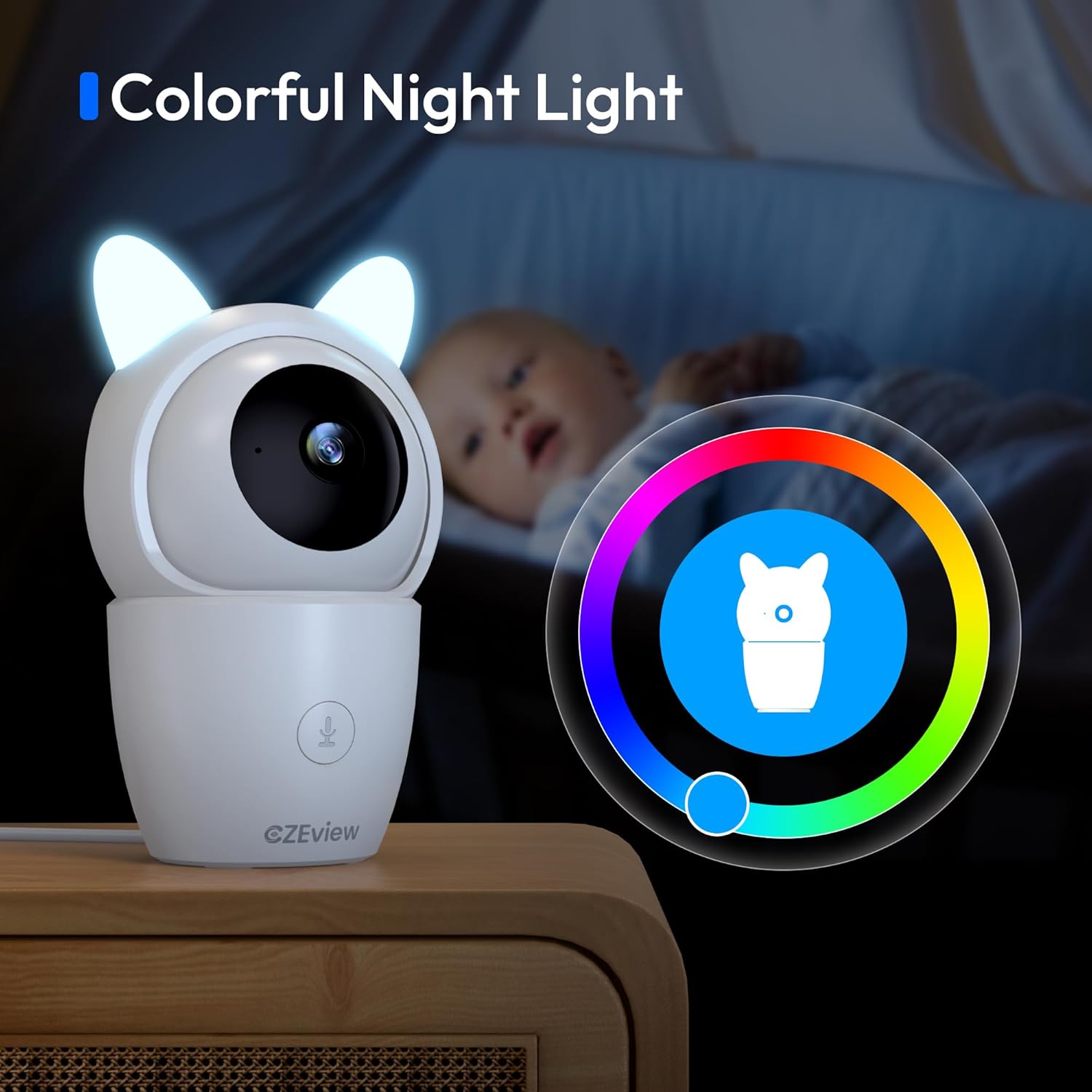
The integrated colorful night light provides gentle illumination for the room.
8. വീഡിയോ റെക്കോർഡിംഗും സംഭരണവും
The monitor supports local storage via a MicroSD card (not included) for continuous recording or event-triggered recordings. Cloud storage options may also be available through the app (subscription may be required).

Review recorded events and daily activities through the app's timeline feature.
9. സ്വകാര്യത മോഡ്
For privacy, you can turn off the camera lens via the app when monitoring is not required.
10. സ്മാർട്ട് ഹോം ഇന്റഗ്രേഷൻ
സി.ഇ.ഇ.view monitor is compatible with certain smart home platforms, such as Amazon Alexa. You can use voice commands to view അനുയോജ്യമായ സ്മാർട്ട് ഡിസ്പ്ലേകളിലെ ക്യാമറ ഫീഡ്.

Integrate with smart home devices like Amazon Alexa for convenient voice control.
മെയിൻ്റനൻസ്
- വൃത്തിയാക്കൽ: Use a soft, dry cloth to clean the monitor's exterior. Do not use liquid cleaners or aerosols.
- ലെൻസ് കെയർ: Gently wipe the camera lens with a microfiber cloth to remove dust or smudges.
- സോഫ്റ്റ്വെയർ അപ്ഡേറ്റുകൾ: Regularly check the Elemage Cam app for firmware updates to ensure optimal performance and security.
- സംഭരണം: മോണിറ്റർ ദീർഘനേരം സൂക്ഷിക്കുകയാണെങ്കിൽ, അത് വൈദ്യുതിയിൽ നിന്ന് വിച്ഛേദിച്ച് തണുത്തതും വരണ്ടതുമായ സ്ഥലത്ത് സൂക്ഷിക്കുക.
ട്രബിൾഷൂട്ടിംഗ്
| പ്രശ്നം | സാധ്യമായ പരിഹാരം |
|---|---|
| മോണിറ്റർ ഓണാക്കുന്നില്ല. | Ensure the power adapter is securely connected to both the monitor and a working electrical outlet. Try a different outlet. |
| വൈഫൈയിലേക്ക് കണക്റ്റ് ചെയ്യാനാവുന്നില്ല. |
|
| Poor video quality or lag. |
|
| No sound from two-way talk. |
|
| Motion/Cry detection not working. |
|
സ്പെസിഫിക്കേഷനുകൾ
| ഫീച്ചർ | വിശദാംശങ്ങൾ |
|---|---|
| ബ്രാൻഡ് | CZEview |
| മോഡൽ നമ്പർ | ZY-D1 |
| ഉൽപ്പന്ന അളവുകൾ (L x W x H) | 5 x 3 x 3 ഇഞ്ച് |
| ഫോം ഫാക്ടർ | താഴികക്കുടം |
| വീഡിയോ ക്യാപ്ചർ റെസല്യൂഷൻ | 2K |
| വീഡിയോ ക്യാപ്ചർ ഫോർമാറ്റ് | MPEG-4 |
| വയർലെസ് കമ്മ്യൂണിക്കേഷൻ ടെക്നോളജി | വൈഫൈ (2.4GHz & 5GHz) |
| പാൻ/ടിൽറ്റ് ശ്രേണി | 355° പാൻ, 100° ചരിവ് |
| അലേർട്ട് തരം | ഓഡിയോയും ചലനവും |
| മൗണ്ടിംഗ് തരം | മതിൽ മൗണ്ട് |
| അന്താരാഷ്ട്ര സംരക്ഷണ റേറ്റിംഗ് | IP65 |
വാറൻ്റിയും പിന്തുണയും
CZEview products come with a standard manufacturer's warranty. For detailed warranty information, please refer to the warranty card included in your product packaging or visit the official CZEview webസൈറ്റ്.
For technical support, troubleshooting assistance, or any inquiries regarding your CZEview Video Baby Monitor, please contact our customer support team:
- ഇമെയിൽ: സപ്പോർട്ട്@czeview.com
- Webസൈറ്റ്: www.czeview.com (ദയവായി പരിശോധിക്കുക website for the most up-to-date contact information and FAQs.)
Please have your model number (ZY-D1) and purchase date ready when contacting support.


