1. ഉൽപ്പന്നം കഴിഞ്ഞുview
The NOYAFA NF-8509 is a versatile testing instrument combining the functionalities of a network cable tester and a digital multimeter. It is designed for professionals and enthusiasts to perform various network and electrical measurements efficiently.

Image 1.1: The NOYAFA NF-8509 device, showcasing its main unit and receiver, along with test leads.
പ്രധാന സവിശേഷതകൾ:
- Network Cable Testing: Includes POE tester, RJ45/RJ11 CAT5/CAT6 cable testing, continuity testing, port flashing, and anti-jamming wire tracing.
- മൾട്ടിമീറ്റർ പ്രവർത്തനങ്ങൾ: AC/DC വോളിയം അളക്കുന്നുtage, AC/DC current, resistance, continuity, diode, and temperature.
- Time Domain Reflectometry (TDR): Measures cable length from 5 to 200 meters and calibrates Velocity of Propagation (VoP) values.
- POE Tester: Identifies standard PoE device information such as voltage, power supply polarity, power supply mode, and PSE type (af or at standard).
- പോർട്ട് ഫ്ലാഷിംഗ്: Automatically detects and switches between 10M/100M/1000M modes to locate network ports by flashing the port light on hubs and switches.
- NCV (നോൺ-കോൺടാക്റ്റ് വോളിയംtagഇ) കണ്ടെത്തൽ: Provides non-contact AC signal detection with an alarm for safety.
- Anti-Burnout Protection: Intelligent protection against incorrect operation up to 250V.
2. ഉപകരണ ഘടകങ്ങൾ
The NF-8509 consists of a main transmitter unit and a receiver unit. Familiarize yourself with the components before operation.

Image 2.1: Diagram illustrating the various buttons, ports, and display elements on both the transmitter and receiver units of the NF-8509.
ട്രാൻസ്മിറ്റർ യൂണിറ്റ്:
- ഡിസ്പ്ലേ സ്ക്രീൻ: Shows measurement results, battery level, and function indicators.
- Multimeter Probe Sockets: For connecting test leads for electrical measurements.
- RJ45/RJ11 Ports: For network and telephone cable testing.
- ഫംഗ്ഷൻ ബട്ടണുകൾ: For selecting modes (SCAN, CONT, Flash, Length, POE), holding readings, and switching multimeter functions.
- ടൈപ്പ്-സി ഇന്റർഫേസ്: ഉപകരണം ചാർജ് ചെയ്യുന്നതിനായി.
റിസീവർ യൂണിറ്റ്:
- Signal Probe: Used for tracing cables.
- പവർ ബട്ടൺ: To turn the receiver on/off.
- സെൻസിറ്റിവിറ്റി അഡ്ജസ്റ്റ്മെന്റ്: Dial to adjust the sensitivity of the wire tracing function.
- മോഡ് സ്വിച്ച് ബട്ടൺ: Toggles between Analog and Digital scanning modes.
- ഫ്ലാഷ്ലൈറ്റ്: ഇരുണ്ട അന്തരീക്ഷത്തിൽ പ്രകാശത്തിനായി.
- 3.5 എംഎം ഹെഡ്ഫോൺ ജാക്ക്: For private listening during wire tracing.
3. സജ്ജീകരണവും പ്രാരംഭ ഉപയോഗവും
Before using the NF-8509, ensure it is properly set up.
3.1 ഉപകരണം ചാർജ് ചെയ്യുന്നു
- Connect the provided USB Type-C cable to the Type-C interface on the transmitter unit and to a standard USB power adapter (not included).
- The battery indicator on the display will show charging status. Ensure the device is fully charged for optimal performance.
3.2 പവർ ഓൺ/ഓഫ്
- ട്രാൻസ്മിറ്റർ: Press and hold the power button (usually the central button) until the screen illuminates. Press and hold again to power off.
- റിസീവർ: Rotate the power/scan dial clockwise to turn on. Rotate counter-clockwise to turn off.
3.3 Connecting Test Leads (for Multimeter Functions)
- Insert the red test lead into the 'VΩHz' input jack.
- Insert the black test lead into the 'COM' input jack.
- For current measurements, insert the red test lead into the '5A' input jack.
4. പ്രവർത്തന നിർദ്ദേശങ്ങൾ
This section details the various functions of the NOYAFA NF-8509.
4.1 Network Cable Testing

Image 4.1: The NF-8509 display showing a network cable continuity test, indicating wire mapping.
4.1.1 Wire Map (Continuity) Test
- Connect one end of the RJ45 or RJ11 cable to the corresponding port on the transmitter unit.
- Connect the other end of the cable to the remote unit (if testing a long cable run) or directly to the receiver's RJ45 port for a direct test.
- On the transmitter, select the 'CONT' mode.
- The display will show the wire map, indicating continuity for each pin. Any breaks or miswires will be clearly displayed.
4.1.2 Cable Length Measurement (TDR)

Image 4.2: The NF-8509 in use, demonstrating its Time Domain Reflectometry (TDR) technology for precision cable length measurement.
- Ensure the cable to be measured is disconnected from all network devices.
- Connect one end of the cable to the RJ45 port on the transmitter unit.
- Select the 'Length' mode on the transmitter.
- The device will display the estimated length of the cable. The Velocity of Propagation (VoP) can be calibrated for improved accuracy.
4.1.3 പോർട്ട് ഫ്ലാഷിംഗ്
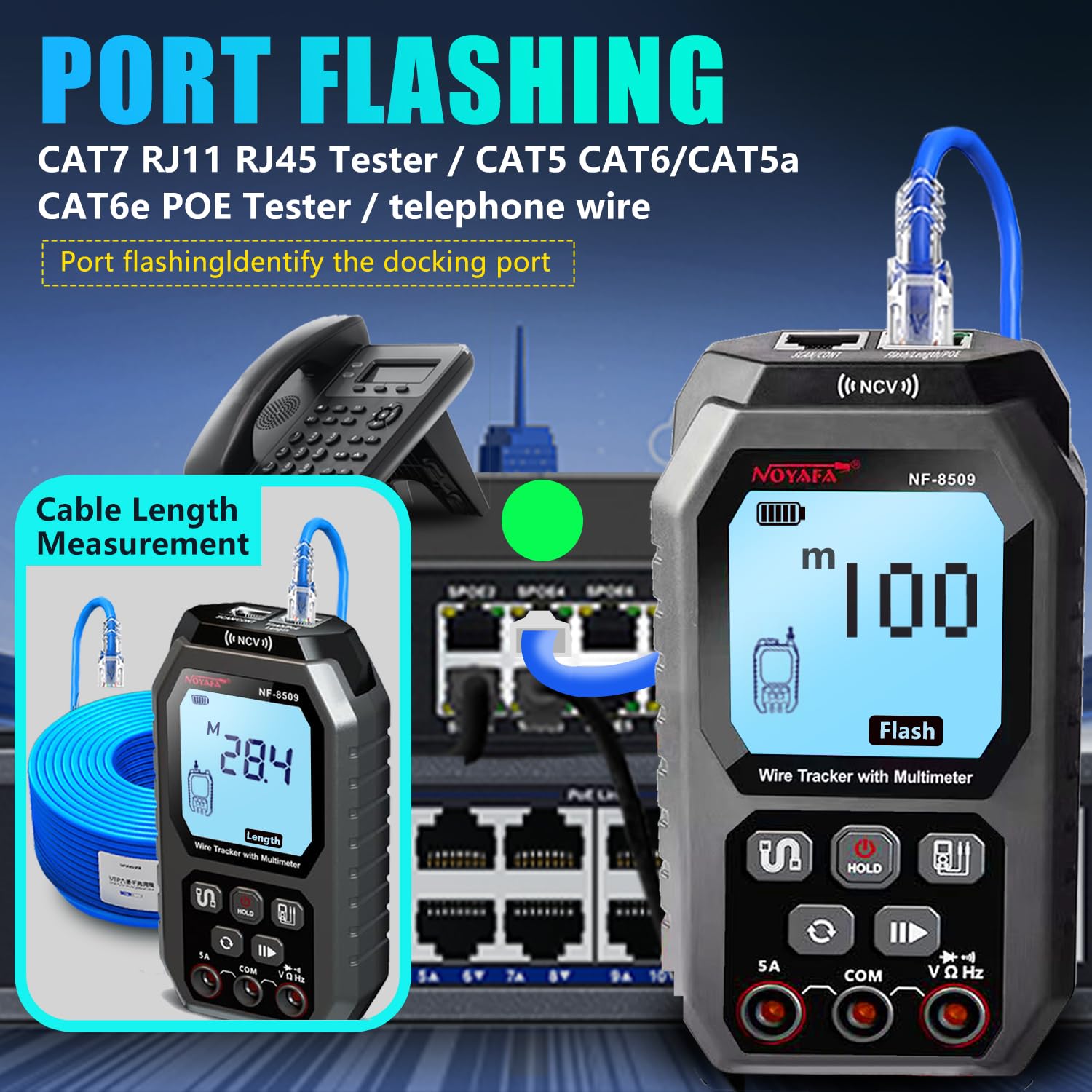
Image 4.3: The NF-8509 connected to a network switch, illustrating the port flashing function to identify the connected port, alongside a cable length measurement display.
- Connect the RJ45 cable from the transmitter unit to a port on a network switch or hub.
- Select the 'Flash' mode on the transmitter.
- The corresponding port light on the connected network device will flash, allowing for easy identification of the cable's termination point.
4.1.4 Wire Tracing (SCAN Mode)
- Connect the cable to be traced to the RJ45 port on the transmitter unit.
- Select the 'SCAN' mode on the transmitter.
- റിസീവർ യൂണിറ്റ് ഓണാക്കി അതിന്റെ സെൻസിറ്റിവിറ്റി ക്രമീകരിക്കുക.
- Use the receiver's probe to scan along the cable path. The receiver will emit an audible tone when it detects the signal from the transmitter, helping to locate the specific cable within a bundle.
- Switch between Analog and Digital modes on the receiver for different tracing environments and interference levels.
4.1.5 POE Testing

Image 4.4: The NF-8509 transmitter unit displaying POE test results, indicating power over Ethernet detection.
- Connect the RJ45 cable from a PoE-enabled port to the RJ45 port on the transmitter unit.
- Select the 'POE' mode on the transmitter.
- The device will display information about the PoE connection, including voltage, power supply polarity, power mode, and the type of Power Sourcing Equipment (PSE) (e.g., 802.3af or 802.3at).
4.2 മൾട്ടിമീറ്റർ പ്രവർത്തനങ്ങൾ

Image 4.5: A collage of the NF-8509 display showing different autoranging functional measurements, including AC/DC voltage, resistance, AC/DC current, and buzzer continuity tests.
Ensure test leads are correctly connected to the 'VΩHz' and 'COM' jacks for most measurements, and '5A' for current measurements.
4.2.1 എസി/ഡിസി വോളിയംtagഇ അളവ്
- അനുയോജ്യമായ വോളിയം തിരഞ്ഞെടുക്കുകtage mode (AC V or DC V) using the function switch button.
- Connect the test leads across the circuit or component to measure voltage.
- ഡിസ്പ്ലേ വോളിയം കാണിക്കുംtagഇ വായന.
4.2.2 എസി/ഡിസി കറന്റ് അളവ്
- Ensure the red test lead is in the '5A' jack and the black lead in 'COM'.
- Select the appropriate current mode (AC A or DC A).
- Break the circuit and connect the test leads in series with the component to measure current.
- The display will show the current reading.
4.2.3 പ്രതിരോധം അളക്കൽ
- Select the resistance mode (Ω).
- സർക്യൂട്ട് ഡീ-എനർജൈസ്ഡ് ആണെന്ന് ഉറപ്പാക്കുക. പ്രതിരോധം അളക്കാൻ ഘടകത്തിലുടനീളം ടെസ്റ്റ് ലീഡുകൾ ബന്ധിപ്പിക്കുക.
- The display will show the resistance value.
4.2.4 Continuity Test (Buzzer)
- Select the continuity mode (usually indicated by a buzzer icon).
- സർക്യൂട്ടിലോ ഘടകത്തിലോ ഉടനീളം ടെസ്റ്റ് ലീഡുകൾ ബന്ധിപ്പിക്കുക.
- If continuity exists (low resistance), the device will emit an audible beep.
4.2.5 ഡയോഡ് ടെസ്റ്റ്
- ഡയോഡ് ടെസ്റ്റ് മോഡ് തിരഞ്ഞെടുക്കുക (സാധാരണയായി ഒരു ഡയോഡ് ചിഹ്നത്താൽ സൂചിപ്പിക്കും).
- Connect the test leads across the diode.
- ഡിസ്പ്ലേ ഫോർവേഡ് വോളിയം കാണിക്കുംtagഇ ഡ്രോപ്പ് ചെയ്യുക. ഓപ്പൺ സർക്യൂട്ട് പരിശോധിക്കാൻ ലീഡുകൾ റിവേഴ്സ് ചെയ്യുക.
4.2.6 എൻസിവി (നോൺ-കോൺടാക്റ്റ് വോളിയംtagഇ) കണ്ടെത്തൽ

Image 4.6: The NF-8509 performing NCV (Non-Contact Voltage) detection, showing the device detecting an AC signal near a wall outlet.
- Select the NCV mode.
- Bring the top part of the transmitter unit (where the NCV sensor is located) close to an AC voltage source (e.g., live wire, electrical outlet).
- The device will emit an alarm and indicate the presence of AC voltagനേരിട്ട് ബന്ധപ്പെടാതെ ഇ.
4.2.7 താപനില അളക്കൽ
If your model includes a temperature probe (not always standard), connect it to the appropriate input jacks and select the temperature mode (°C/°F) to measure temperature.
5. പരിപാലനം
Proper maintenance ensures the longevity and accuracy of your NF-8509.
5.1 വൃത്തിയാക്കൽ
- സോഫ്റ്റ്, ഡി ഉപയോഗിച്ച് ഉപകരണം തുടയ്ക്കുകamp തുണി. ഉരച്ചിലുകളുള്ള ക്ലീനറുകളോ ലായകങ്ങളോ ഉപയോഗിക്കരുത്.
- Ensure no moisture enters the ports or openings.
5.2 സംഭരണം
- നേരിട്ടുള്ള സൂര്യപ്രകാശത്തിൽ നിന്നും കടുത്ത താപനിലയിൽ നിന്നും മാറി തണുത്തതും വരണ്ടതുമായ സ്ഥലത്ത് ഉപകരണം സൂക്ഷിക്കുക.
- If storing for extended periods, ensure the battery is partially charged (around 50%) to prolong battery life.
5.3 ബാറ്ററി കെയർ
- ബാറ്ററി ഇൻഡിക്കേറ്റർ കുറഞ്ഞ പവർ കാണിക്കുമ്പോൾ ഉപകരണം റീചാർജ് ചെയ്യുക.
- ബാറ്ററി ഇടയ്ക്കിടെ പൂർണ്ണമായും കളയുന്നത് ഒഴിവാക്കുക.
6. പ്രശ്നപരിഹാരം
If you encounter issues with your NF-8509, refer to the following common troubleshooting steps.
- ഉപകരണം പവർ ഓൺ ചെയ്യുന്നില്ല: Check battery level and ensure it is charged. If using test leads, ensure they are correctly inserted.
- കൃത്യമല്ലാത്ത അളവുകൾ: Ensure proper connection of cables/test leads. Verify the correct mode is selected for the measurement. Calibrate TDR VoP if cable length measurements are inconsistent.
- Wire tracing signal is weak or noisy: Adjust the sensitivity dial on the receiver. Ensure the transmitter is in SCAN mode. Check for strong electromagnetic interference in the environment.
- POE test fails or times out: Verify the connected port is indeed PoE-enabled. Ensure the cable is functional and correctly connected.
- Display is blank or frozen: ഉപകരണം പുനരാരംഭിക്കാൻ ശ്രമിക്കുക. പ്രശ്നം നിലനിൽക്കുകയാണെങ്കിൽ, ഉപഭോക്തൃ പിന്തുണയുമായി ബന്ധപ്പെടുക.
7 സ്പെസിഫിക്കേഷനുകൾ
| ഫീച്ചർ | സ്പെസിഫിക്കേഷൻ |
|---|---|
| മോഡൽ നമ്പർ | NF-8509 |
| ഉൽപ്പന്ന അളവുകൾ | 6 x 2.5 x 2 ഇഞ്ച് |
| ഇനത്തിൻ്റെ ഭാരം | 1.34 പൗണ്ട് |
| പവർ ഉറവിടം | ബാറ്ററി പവർ |
| നിറം | കറുപ്പ് |
| കേബിൾ നീളം അളക്കൽ ശ്രേണി | 5 മുതൽ 200 മീറ്റർ വരെ |
| പിന്തുണയ്ക്കുന്ന കേബിൾ തരങ്ങൾ | RJ45, RJ11, CAT5, CAT6 |
| സുരക്ഷാ മാനദണ്ഡം | FCC |
| നിർമ്മാതാവ് | നോയാഫ |
8. വാറൻ്റിയും പിന്തുണയും
NOYAFA is committed to providing high-quality products. For warranty information, technical support, or service inquiries, please refer to the official NOYAFA webസൈറ്റ് അല്ലെങ്കിൽ അവരുടെ ഉപഭോക്തൃ സേവനവുമായി നേരിട്ട് ബന്ധപ്പെടുക.
You can visit the official NOYAFA store for more information and support: ആമസോണിലെ NOYAFA സ്റ്റോർ


