1. പ്രധാന സുരക്ഷാ നിർദ്ദേശങ്ങൾ
ഈ ഉൽപ്പന്നം ഉപയോഗിക്കുന്നതിന് മുമ്പ് ദയവായി എല്ലാ സുരക്ഷാ നിർദ്ദേശങ്ങളും വായിച്ച് മനസ്സിലാക്കുക. ഭാവിയിലെ റഫറൻസിനായി ഈ മാനുവൽ സൂക്ഷിക്കുക.
- ഊർജ്ജ സ്രോതസ്സ്: Use only the provided DC 5V 1A power adapter. Ensure the voltage matches the power supply before connecting.
- ജലവും ഈർപ്പവും: യൂണിറ്റിൽ മഴ, ഈർപ്പം, ദ്രാവകങ്ങൾ എന്നിവ ഏൽക്കരുത്. പാത്രങ്ങൾ പോലുള്ള ദ്രാവകങ്ങൾ നിറച്ച വസ്തുക്കൾ യൂണിറ്റിൽ വയ്ക്കരുത്.
- ചൂട്: റേഡിയേറ്ററുകൾ, ഹീറ്റ് രജിസ്റ്ററുകൾ, സ്റ്റൗകൾ അല്ലെങ്കിൽ മറ്റ് ഉപകരണങ്ങൾ (ഉൾപ്പെടെ) പോലുള്ള താപ സ്രോതസ്സുകളിൽ നിന്ന് യൂണിറ്റ് അകറ്റി നിർത്തുക. ampലൈഫയറുകൾ) ചൂട് ഉത്പാദിപ്പിക്കുന്നത്.
- വെൻ്റിലേഷൻ: ശരിയായ വായുസഞ്ചാരം ഉറപ്പാക്കുക. വായുസഞ്ചാര ദ്വാരങ്ങളൊന്നും തടയരുത്.
- വൃത്തിയാക്കൽ: Clean only with a dry cloth. Unplug the unit from the power outlet before cleaning.
- സേവനം: ഈ ഉൽപ്പന്നം സ്വയം സേവിക്കാൻ ശ്രമിക്കരുത്. യോഗ്യതയുള്ള സേവന ഉദ്യോഗസ്ഥർക്ക് എല്ലാ സേവനങ്ങളും റഫർ ചെയ്യുക.
- പ്ലേസ്മെൻ്റ്: യൂണിറ്റ് വീഴുന്നത് തടയാൻ സ്ഥിരതയുള്ളതും പരന്നതുമായ ഒരു പ്രതലത്തിൽ വയ്ക്കുക.
- സ്റ്റൈലസ്: Handle the stylus carefully to avoid damage. Keep out of reach of children.
2. പാക്കേജ് ഉള്ളടക്കം
താഴെ ലിസ്റ്റ് ചെയ്തിരിക്കുന്ന എല്ലാ ഇനങ്ങളും നിങ്ങളുടെ പാക്കേജിൽ ഉൾപ്പെടുത്തിയിട്ടുണ്ടെന്ന് ഉറപ്പാക്കുക:
- 1x Linen Suitcase Turntable
- 1x ഉപയോക്തൃ മാനുവൽ
- 1x 7-inch Turntable Pad & Extra Stylus
- 1x 45RPM Adapter & DC 5V 1A Power Adapter
3. ഉൽപ്പന്നം കഴിഞ്ഞുview
3.1 പ്രധാന ഘടകങ്ങൾ

ചിത്രം 1: മൊത്തത്തിൽ view of the TANLANIN TE-001D Record Player. This image shows the open suitcase design, the turntable platter with a pink record, the tone arm, and the built-in speakers.
The TANLANIN TE-001D is a portable suitcase-style vinyl record player designed for ease of use and versatility. Key components include:
- ടേൺടേബിൾ പ്ലാറ്റർ: Where vinyl records are placed for playback.
- ടോൺ ആം: Holds the stylus and tracks the grooves of the record.
- സ്റ്റൈലസ്: The needle that reads the record's grooves.
- ബിൽറ്റ്-ഇൻ സ്പീക്കറുകൾ: For direct audio output.
- നിയന്ത്രണ പാനൽ: Located on the top surface, featuring various buttons and ports.
- Suitcase Casing: Provides portability and protection.
3.2 നിയന്ത്രണ പാനലും കണക്ഷനുകളും
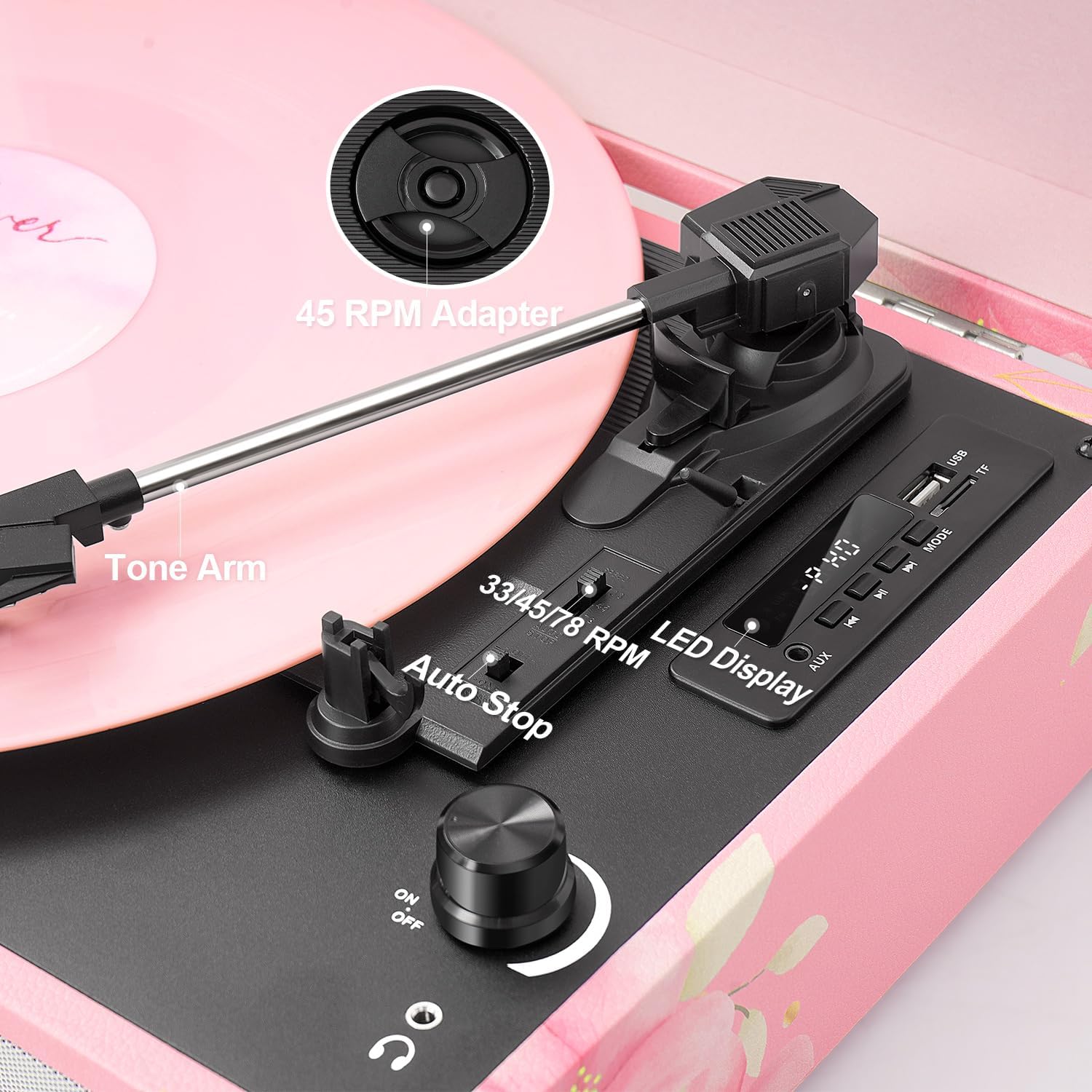
Figure 2: Close-up of the turntable's control area, showing the speed selector, auto-stop switch, and tone arm components.
ഇനിപ്പറയുന്ന നിയന്ത്രണങ്ങളും കണക്ഷനുകളും ഉപയോഗിച്ച് സ്വയം പരിചയപ്പെടുക:
- 33/45/78 RPM Selector: Switch to select playback speed for vinyl records.
- ഓട്ടോ സ്റ്റോപ്പ് സ്വിച്ച്: Enables or disables the automatic stop function at the end of a record.
- പവർ ഓൺ/ഓഫ് & വോളിയം നോബ്: യൂണിറ്റ് ഓൺ/ഓഫ് ചെയ്ത് സ്പീക്കർ വോളിയം ക്രമീകരിക്കുന്നു.
- മോഡ് ബട്ടൺ: Cycles through input modes (Phono, Bluetooth, AUX, USB, TF).
- EQ മോഡുകൾ: Selectable sound equalization presets (Pop, Rock, Jazz, Classic, Flat).
- USB പോർട്ട്: യുഎസ്ബി ഡ്രൈവ് പ്ലേബാക്കിനും റെക്കോർഡിംഗിനും.
- ടിഎഫ് കാർഡ് സ്ലോട്ട്: TF കാർഡ് പ്ലേബാക്കിനും റെക്കോർഡിംഗിനും.
- LED ഡിസ്പ്ലേ: നിലവിലെ മോഡും ട്രാക്ക് വിവരങ്ങളും കാണിക്കുന്നു.
- AUX ഇൻപുട്ട്: ബാഹ്യ ഓഡിയോ ഉപകരണങ്ങൾ ബന്ധിപ്പിക്കുന്നതിനുള്ള 3.5mm ജാക്ക്.
- ആർസിഎ putട്ട്പുട്ട്: ബാഹ്യ ഉപകരണങ്ങളുമായി ബന്ധിപ്പിക്കുന്നതിന് ampലൈഫറുകൾ അല്ലെങ്കിൽ പവർ സ്പീക്കറുകൾ.
- ഹെഡ്ഫോൺ ജാക്ക്: സ്വകാര്യ ശ്രവണത്തിനായി 3.5mm ജാക്ക്.
- തുറമുഖത്ത് ഡിസി: പവർ അഡാപ്റ്റർ ബന്ധിപ്പിക്കുന്നതിന്.
4. സജ്ജീകരണം
- അൺപാക്ക്: റെക്കോർഡ് പ്ലെയർ അതിന്റെ പാക്കേജിംഗിൽ നിന്ന് ശ്രദ്ധാപൂർവ്വം നീക്കം ചെയ്യുക.
- പ്ലേസ്മെൻ്റ്: നേരിട്ടുള്ള സൂര്യപ്രകാശം, താപ സ്രോതസ്സുകൾ, അമിതമായ പൊടി അല്ലെങ്കിൽ വൈബ്രേഷൻ എന്നിവയിൽ നിന്ന് അകലെ ഒരു പരന്നതും സ്ഥിരതയുള്ളതുമായ പ്രതലത്തിൽ യൂണിറ്റ് സ്ഥാപിക്കുക.
- പവർ കണക്ഷൻ: Connect the DC 5V 1A power adapter to the DC IN port on the back of the unit, then plug the adapter into a wall outlet.
- പൊടി കവർ: Open the suitcase lid. Remove any protective materials from the turntable platter and tone arm.
- Turntable Pad: Place the included 7-inch turntable pad on the platter.
5. പ്രവർത്തന നിർദ്ദേശങ്ങൾ
5.1 വിനൈൽ റെക്കോർഡുകൾ പ്ലേ ചെയ്യുന്നു
- പവർ ഓൺ: യൂണിറ്റ് ഓണാക്കാൻ പവർ ഓൺ/ഓഫ് & വോളിയം നോബ് ഘടികാരദിശയിൽ തിരിക്കുക.
- മോഡ് തിരഞ്ഞെടുക്കുക: Press the Mode button until 'PHONO' is displayed.
- സ്ഥല രേഖ: Place a vinyl record on the turntable platter. If playing a 45 RPM single, place the 45 RPM adapter on the center spindle first.
- വേഗത തിരഞ്ഞെടുക്കുക: Set the 33/45/78 RPM selector to match the speed of your record.
- ഓട്ടോ സ്റ്റോപ്പ്: Set the Auto Stop switch to ON if you want the platter to stop automatically at the end of the record. Set to OFF for continuous play or for some records that may trigger auto-stop prematurely.
- പ്ലേബാക്ക് ആരംഭിക്കുക: Gently lift the tone arm using the cue lever and position the stylus over the desired starting groove of the record. Slowly lower the tone arm onto the record.
- വോളിയം ക്രമീകരിക്കുക: Rotate the Power ON/OFF & Volume knob to adjust the sound level.
- പ്ലേബാക്ക് അവസാനിപ്പിക്കുക: At the end of the record (or when manually stopping), gently lift the tone arm using the cue lever and return it to the tone arm rest. Secure it with the tone arm clip.
5.2 ബ്ലൂടൂത്ത് മോഡ്

Figure 3: The record player connected via Bluetooth to a smartphone, enabling wireless music streaming.
- മോഡ് തിരഞ്ഞെടുക്കുക: Press the Mode button until 'BLUE' (or 'BT') is displayed on the LED screen. The unit will emit an audible tone, indicating it is in pairing mode.
- ബ്ലൂടൂത്ത് പ്രവർത്തനക്ഷമമാക്കുക: നിങ്ങളുടെ മൊബൈൽ ഉപകരണത്തിൽ (സ്മാർട്ട്ഫോൺ, ടാബ്ലെറ്റ് മുതലായവ), ബ്ലൂടൂത്ത് പ്രവർത്തനക്ഷമമാക്കി ലഭ്യമായ ഉപകരണങ്ങൾക്കായി തിരയുക.
- ജോടി: Select 'TANLANIN' (or similar device name) from the list of found devices. Once paired, the unit will emit another audible tone.
- സംഗീതം പ്ലേ ചെയ്യുക: You can now play music from your device through the record player's speakers. Adjust volume using both the record player's knob and your device's volume controls.
5.3 USB/TF കാർഡ് പ്ലേബാക്ക്

Figure 4: The control panel showing a USB drive inserted, indicating readiness for USB/TF playback or recording.
- മീഡിയ ചേർക്കുക: Insert a USB drive into the USB port or a TF card into the TF card slot.
- മോഡ് തിരഞ്ഞെടുക്കുക: Press the Mode button until 'USB' or 'TF' is displayed. The unit will automatically begin playing MP3 fileചേർത്ത മീഡിയയിൽ നിന്നുള്ള s.
- നിയന്ത്രണങ്ങൾ: Use the playback control buttons (Play/Pause, Next Track, Previous Track) on the control panel to manage your music.
5.4 USB/TF Card Recording (Vinyl to Digital)
- മീഡിയ ചേർക്കുക: Ensure a USB drive or TF card is inserted into the corresponding slot.
- ഫോണോ മോഡ് തിരഞ്ഞെടുക്കുക: Press the Mode button until 'PHONO' is displayed.
- റെക്കോർഡിംഗ് ആരംഭിക്കുക: While a record is playing, press and hold the 'REC' button (often combined with the Play/Pause button) on the control panel. The LED display may indicate 'REC' or a recording timer.
- റെക്കോർഡിംഗ് നിർത്തുക: Press the 'REC' button again to stop recording. The recorded audio will be saved as an MP3 file on your USB drive or TF card.
5.5 EQ മോഡുകൾ
The unit features five equalization modes to customize your listening experience:
- പോപ്പ്
- പാറ
- ജാസ്
- ക്ലാസിക്
- ഫ്ലാറ്റ് (default, no equalization)
To select an EQ mode, press the 'EQ' button (often combined with the Mode button or a dedicated button) repeatedly until the desired mode is displayed on the LED screen.
5.6 ബാഹ്യ കണക്ഷനുകൾ
- AUX ഇൻപുട്ട്: Connect an external audio source (e.g., MP3 player, smartphone) to the AUX IN jack using a 3.5mm audio cable. Select 'AUX' mode on the record player.
- ആർസിഎ putട്ട്പുട്ട്: Connect the RCA OUT jacks (red for right, white for left) to an external ampമെച്ചപ്പെടുത്തിയ ശബ്ദത്തിനായി ലിഫയർ അല്ലെങ്കിൽ പവർഡ് സ്പീക്കറുകൾ.
- ഹെഡ്ഫോൺ ജാക്ക്: Plug 3.5mm headphones into the headphone jack for private listening. The built-in speakers will be muted when headphones are connected.
6. പരിപാലനം
6.1 യൂണിറ്റ് വൃത്തിയാക്കൽ
- വൃത്തിയാക്കുന്നതിന് മുമ്പ് എല്ലായ്പ്പോഴും പവർ ഔട്ട്ലെറ്റിൽ നിന്ന് യൂണിറ്റ് അൺപ്ലഗ് ചെയ്യുക.
- പുറംഭാഗങ്ങൾ തുടയ്ക്കാൻ മൃദുവായതും ഉണങ്ങിയതുമായ തുണി ഉപയോഗിക്കുക. അബ്രസീവ് ക്ലീനറുകൾ, മെഴുക് അല്ലെങ്കിൽ ലായകങ്ങൾ ഉപയോഗിക്കരുത്.
- Gently wipe the dust cover with a soft cloth.
6.2 സ്റ്റൈലസ് കെയർ
- സ്റ്റൈലസ് അതിലോലമാണ്. അതീവ ശ്രദ്ധയോടെ കൈകാര്യം ചെയ്യുക.
- മൃദുവായ ബ്രഷ് ഉപയോഗിച്ച് സ്റ്റൈലസ് ഇടയ്ക്കിടെ വൃത്തിയാക്കുക, പിന്നിൽ നിന്ന് മുന്നിലേക്ക് സൌമ്യമായി ബ്രഷ് ചെയ്യുക.
- A worn stylus can damage records and degrade sound quality. Replace the stylus after approximately 200-300 hours of playback.
6.3 Replacing the Stylus
Refer to the diagram below for stylus replacement. If unsure, consult a qualified technician.
- Gently pull the old stylus cartridge downwards and forwards to detach it.
- Align the new stylus cartridge and push it upwards and backwards until it clicks into place.
7. പ്രശ്നപരിഹാരം
| പ്രശ്നം | സാധ്യമായ കാരണം | പരിഹാരം |
|---|---|---|
| ശക്തിയില്ല | പവർ അഡാപ്റ്റർ ബന്ധിപ്പിച്ചിട്ടില്ല; പവർ സ്വിച്ച് ഓഫാണ്. | Ensure power adapter is securely connected and plugged into a working outlet. Turn the Power ON/OFF knob clockwise. |
| ശബ്ദമില്ല | Volume too low; Headphones connected; Incorrect mode selected | Increase volume. Disconnect headphones. Select the correct input mode (e.g., PHONO for records). |
| റെക്കോർഡ് ഒഴിവാക്കൽ | Dirty record; Worn stylus; Unit not level | Clean the record. Replace the stylus. Place the unit on a stable, level surface. |
| ബ്ലൂടൂത്ത് കണക്റ്റ് ചെയ്യുന്നില്ല | Not in Bluetooth mode; Device too far; Already connected to another device | Ensure unit is in Bluetooth mode. Move device closer. Disconnect from other Bluetooth devices. |
| USB/TF not playing | Incorrect mode; Unsupported file format; Corrupted media | Select USB/TF mode. Ensure files are MP3 format. Try different USB/TF media. |
8 സ്പെസിഫിക്കേഷനുകൾ

Figure 5: Product dimensions for the TANLANIN TE-001D.
| ഫീച്ചർ | വിശദാംശങ്ങൾ |
|---|---|
| മോഡലിൻ്റെ പേര് | TE-001D |
| ബ്രാൻഡ് | ടാൻലാനിൻ |
| ഉൽപ്പന്ന അളവുകൾ | 13.5 x 10.5 x 5 ഇഞ്ച് |
| ഇനത്തിൻ്റെ ഭാരം | 6 പൗണ്ട് |
| പരമാവധി റൊട്ടേഷണൽ സ്പീഡ് | 78 RPM (Supports 33, 45, 78 RPM) |
| കണക്റ്റിവിറ്റി | Bluetooth 5.0, USB, TF Card, AUX Input, RCA Output, Headphone Jack |
| പ്രത്യേക സവിശേഷതകൾ | Anti-Resonance, Digital Recorder (Vinyl to USB/TF), Headphone Jack Output, EQ Modes |
| മെറ്റീരിയൽ | Engineered Wood, Metal, Plastic |
| വൈദ്യുതി ഉപഭോഗം (ഓൺ-മോഡ്) | 5 വാട്ട്സ് |
| ഉൾപ്പെടുത്തിയ ഘടകങ്ങൾ | 1x 45RPM Adapter, 1x DC 5V 1A Power Adapter, 1x 7-inch Turntable Pad, 1x Extra Stylus, 1x Linen Suitcase Turntable, 1x User Manual |
9. വാറൻ്റിയും പിന്തുണയും
This product comes with a standard manufacturer's warranty. For detailed warranty information, please refer to the warranty card included in your package or contact TANLANIN customer support.
If you encounter any issues or have questions regarding your TANLANIN TE-001D record player, please contact our customer support team through the retailer's platform or the contact information provided in your product documentation. Please have your model number (TE-001D) and purchase date ready when contacting support.


