ആമുഖം
The Ulefone Armor 23 Ultra is a state-of-the-art 5G rugged smartphone designed for durability and high performance. It features advanced communication capabilities, including two-way satellite messaging, powerful processing, and a versatile camera system. This manual provides essential information for setting up, operating, maintaining, and troubleshooting your device to ensure optimal performance and longevity.

Figure 1: Ulefone Armor 23 Ultra 5G Rugged Smartphone, showcasing its robust design and key features like 5G connectivity, 24GB RAM, 512GB storage, and 120W fast charging.
ബോക്സിൽ എന്താണുള്ളത്
Upon unboxing your Ulefone Armor 23 Ultra, please verify that all the following items are included:
- Ulefone Armor 23 Ultra Smartphone
- 120W പവർ അഡാപ്റ്റർ
- യുഎസ്ബി ടൈപ്പ്-സി മുതൽ ടൈപ്പ്-സി കേബിൾ വരെ
- സിം എജക്ടർ ഉപകരണം
- ഉപയോക്തൃ മാനുവൽ
- വാറൻ്റി കാർഡ്
- Tempered Glass Screen Protector (pre-applied or included separately)

Figure 2: The Ulefone Armor 23 Ultra packaging and its included accessories, such as the 120W charger and USB-C cable.
ഫിസിക്കൽ ഓവർview
Familiarize yourself with the physical components of your Ulefone Armor 23 Ultra:
- മുൻഭാഗം: 6.78-inch FHD+ 120Hz display, 50MP front camera, earpiece, sensors.
- പിൻഭാഗം: 50MP main camera, 64MP night vision camera, 50MP ultra-wide camera, 3.2X telephoto lens, LED flash, NFC area, wireless charging coil.
- വലത് വശം: Power button (with integrated fingerprint sensor), volume up/down buttons.
- ഇടത് വശം: Customizable shortcut key, TF/SIM card slot.
- മുകളിൽ: ഐആർ ബ്ലാസ്റ്റർ.
- താഴെ: USB Type-C port, microphone, speaker.

Figure 3: The rear view of the Ulefone Armor 23 Ultra, highlighting its IP68/IP69K and MIL-STD-810H certifications for water, shock, and dust resistance.
സജ്ജമാക്കുക
1. SIM/TF Card Installation
- ഉപകരണത്തിന്റെ ഇടതുവശത്ത് സിം/ടിഎഫ് കാർഡ് സ്ലോട്ട് കണ്ടെത്തുക.
- ട്രേയുടെ അടുത്തുള്ള ചെറിയ ദ്വാരത്തിലേക്ക് സിം എജക്റ്റർ ഉപകരണം തിരുകുക, ട്രേ പുറത്തേക്ക് വരുന്നത് വരെ സൌമ്യമായി അമർത്തുക.
- Place your Nano-SIM cards (up to two) and/or a TF card (for storage expansion) into the designated slots on the tray. Ensure they are correctly oriented.
- ഫോണിന്റെ ബോഡിയുമായി ഫ്ലഷ് ആകുന്നതുവരെ ട്രേ ശ്രദ്ധാപൂർവ്വം സ്ലോട്ടിലേക്ക് തിരികെ തള്ളുക.
2. Initial Power On & Language Selection
- Press and hold the power button on the right side until the Ulefone logo appears.
- നിങ്ങളുടെ ഇഷ്ടപ്പെട്ട ഭാഷയും പ്രദേശവും തിരഞ്ഞെടുക്കാൻ ഓൺ-സ്ക്രീൻ നിർദ്ദേശങ്ങൾ പാലിക്കുക.
3. വൈഫൈ കണക്ഷൻ
- പ്രാരംഭ സജ്ജീകരണ സമയത്ത്, ഒരു വൈഫൈ നെറ്റ്വർക്കിലേക്ക് കണക്റ്റുചെയ്യാൻ നിങ്ങളോട് ആവശ്യപ്പെടും. ലിസ്റ്റിൽ നിന്ന് നിങ്ങളുടെ നെറ്റ്വർക്ക് തിരഞ്ഞെടുക്കുക.
- Enter the Wi-Fi password if required and tap 'Connect'.
4. Google Account Setup
- Sign in with your existing Google account or create a new one. This is essential for accessing the Google Play Store, Gmail, and other Google services.
നിങ്ങളുടെ ഉപകരണം പ്രവർത്തിപ്പിക്കുന്നു
ഡിസ്പ്ലേ സവിശേഷതകൾ
The Armor 23 Ultra boasts a 6.78-inch FHD+ display with a 120Hz refresh rate, providing a smooth and immersive visual experience for all content.

Figure 4: The vibrant 6.78-inch FHD+ display of the Ulefone Armor 23 Ultra, emphasizing its 120Hz ultra-high refresh rate for smooth visuals.
പ്രകടനം
Powered by the Octa-Core MediaTek Dimensity 8020 5G chipset and accompanied by the Arm Mali-G77 GPU, the device offers robust performance. With 12GB physical RAM and an additional 12GB virtual memory (totaling 24GB), multitasking and demanding applications run smoothly. The 512GB internal storage, expandable up to 2TB, provides ampനിങ്ങളുടെ എല്ലാവർക്കുമായി ഒരു സ്ഥലം files.
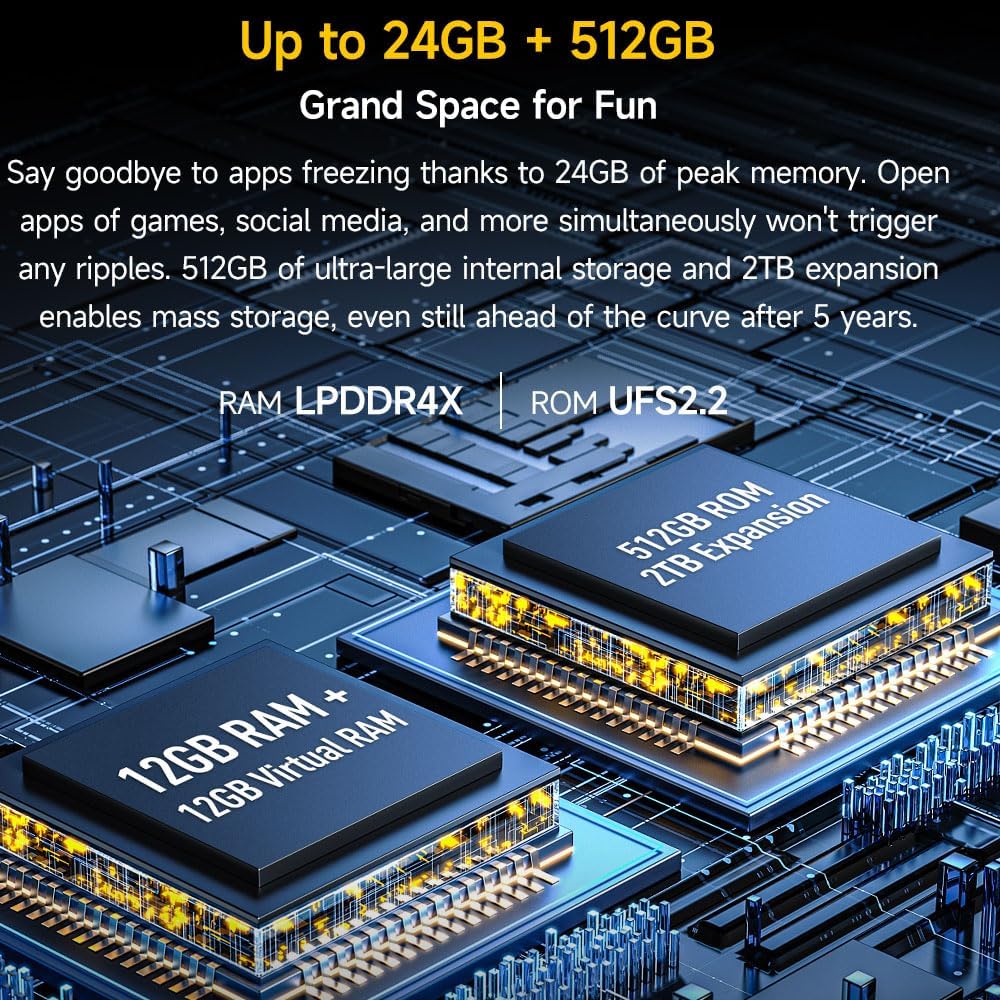
Figure 5: Visual representation of the Ulefone Armor 23 Ultra's memory configuration, showing 12GB RAM + 12GB Virtual RAM and 512GB ROM with 2TB expansion capability.

Figure 6: A close-up of the MediaTek Dimensity 8020 5G chipset, highlighting its role as a performance pioneer in the Ulefone Armor 23 Ultra.
ബാറ്ററിയും ചാർജിംഗും
The 5280mAh battery provides extended usage times. With 120W fast charging, the device can reach 60% battery in just 10 minutes. It also supports 50W wireless charging and OTG reverse charging for other devices.

Figure 7: Illustration of the Ulefone Armor 23 Ultra's 120W Flash Charging capability, showing rapid charging times to 60% in 10 minutes and 100% in 23 minutes.

Figure 8: Diagram illustrating the 5280mAh long-life battery of the Ulefone Armor 23 Ultra, highlighting its high voltage and 800 life cycles.
ക്യാമറ സവിശേഷതകൾ
The Armor 23 Ultra features a versatile quad-camera system: a 50MP super main camera, a 64MP night vision camera, a 50MP 117° ultra-wide camera, and an 8MP depth camera. The front-facing camera is a 50MP HD selfie camera.

Figure 9: Close-up of the Ulefone Armor 23 Ultra's 50MP wide-angle camera with its 1/1.31" ultra-large lens, designed for capturing detailed and vibrant images.
കണക്റ്റിവിറ്റി
The device supports Dual 5G global networks (T-Mobile and Verizon only), NFC for Google Pay, Bluetooth, USB, and Wi-Fi 6. It also includes comprehensive GPS, Beidou, GLONASS, and Galileo navigation systems.
പ്രത്യേക സവിശേഷതകൾ
- Satellite Messaging: The Armor 23 Ultra is powered by Bullitt satellite messenger, offering two-way satellite messaging when cellular or Wi-Fi coverage is unavailable. This feature allows you to stay connected in remote areas.
- Customized Shortcut Button: Assign up to 7 functions to a customizable shortcut button for quick access.
- ഐആർ ബ്ലാസ്റ്റർ: Control compatible infrared devices directly from your phone.
- ഗ്ലൗ മോഡ്: Enables perfect screen operation even when wearing gloves.

Figure 10: The Bullitt Satellite Messenger App interface on the Ulefone Armor 23 Ultra, demonstrating its two-way satellite messaging capabilities for staying connected off-grid.
ഓപ്പറേറ്റിംഗ് സിസ്റ്റം
The smartphone runs on Android 13.0, providing a secure and user-friendly experience with access to a vast ecosystem of applications from the Google Play Store.
പരിപാലനവും പരിചരണവും
- പരുഷത: The Armor 23 Ultra is IP68/IP69K and MIL-STD-810H certified, making it water, shock, and dust proof. While highly durable, avoid intentional misuse or extreme conditions beyond its ratings.
- വൃത്തിയാക്കൽ: സ്ക്രീനും ബോഡിയും വൃത്തിയാക്കാൻ മൃദുവായ, ലിന്റ് രഹിത തുണി ഉപയോഗിക്കുക. കഠിനമായ അഴുക്കിന്, അൽപ്പം ഡി.amp തുണി ഉപയോഗിക്കാം. കഠിനമായ രാസവസ്തുക്കൾ ഒഴിവാക്കുക.
- ബാറ്ററി കെയർ: To prolong battery life, avoid extreme temperatures. Do not fully discharge the battery regularly. Use the provided 120W charger for optimal charging speed and battery health.
ട്രബിൾഷൂട്ടിംഗ്
- ഉപകരണം മരവിപ്പിക്കൽ/പ്രതികരിക്കാത്തത്: റീസ്റ്റാർട്ട് ചെയ്യാൻ പവർ ബട്ടൺ ഏകദേശം 10-15 സെക്കൻഡ് അമർത്തിപ്പിടിക്കുക.
- ബാറ്ററി വേഗത്തിൽ തീർന്നു: Check background app usage, reduce screen brightness, disable unnecessary features like GPS or Bluetooth when not in use. Ensure optimal charging practices.
- നെറ്റ്വർക്ക് കണക്റ്റിവിറ്റി പ്രശ്നങ്ങൾ: Verify SIM card installation. Check network settings (APN, preferred network type). Restart the device. Contact your carrier if issues persist.
- ആപ്പ് ക്രാഷുകൾ: Clear the app's cache and data in settings. Reinstall the app if necessary. Ensure the device's software is up to date.
സ്പെസിഫിക്കേഷനുകൾ
| ഫീച്ചർ | സ്പെസിഫിക്കേഷൻ |
|---|---|
| മോഡലിൻ്റെ പേര് | യുലെഫോൺ ആർമർ 23 അൾട്രാ |
| ഓപ്പറേറ്റിംഗ് സിസ്റ്റം | ആൻഡ്രോയിഡ് 13.0 |
| പ്രോസസ്സർ | MediaTek Dimensity 8020 5G (Octa-Core) |
| റാം | 24 ജിബി (12 ജിബി ഫിസിക്കൽ + 12 ജിബി വെർച്വൽ) |
| ആന്തരിക സംഭരണം | 512 ജിബി (2 ടിബി വരെ വികസിപ്പിക്കാവുന്നതാണ്) |
| ഡിസ്പ്ലേ വലിപ്പം | 6.78 ഇഞ്ച് |
| ഡിസ്പ്ലേ റെസല്യൂഷൻ | 1080 x 2460 (FHD+) |
| പുതുക്കിയ നിരക്ക് | 120 Hz |
| പിൻ ക്യാമറ | 50MP Main + 64MP Night Vision + 50MP Ultra-Wide + 3.2X Telephoto |
| മുൻ ക്യാമറ | 50എംപി |
| ബാറ്ററി ശേഷി | 5280 mAh |
| വയർഡ് ചാർജിംഗ് | 120W ഫാസ്റ്റ് ചാർജിംഗ് |
| വയർലെസ് ചാർജിംഗ് | 50W വയർലെസ് ചാർജിംഗ് |
| ഈട് | IP68/IP69K, MIL-STD-810H സർട്ടിഫൈഡ് |
| അളവുകൾ | 6.9 x 3.2 x 0.5 ഇഞ്ച് |
| ഇനത്തിൻ്റെ ഭാരം | 1.8 പൗണ്ട് |
വാറൻ്റി & പിന്തുണ
Ulefone provides a 1-year warranty for the Armor 23 Ultra. For any questions or support regarding your mobile phone, please contact Ulefone customer service. Refer to the warranty card included in your product packaging for detailed terms and conditions.


