ആമുഖം
The Vox amPlug 3 AC30 is a compact headphone guitar amplifier designed for convenient practice anywhere, anytime. It replicates the iconic VOX AC30 sound, offering both warm clean tones and bright top-boost drive. This device features built-in stereo effects and rhythm patterns, providing a comprehensive sonic experience for guitarists.

Image: The Vox AmPlug 3 AC30 amplifier, bundled with headphones, guitar picks, and a polishing cloth, showcasing പൂർണ്ണ പാക്കേജ്.
പാക്കേജ് ഉള്ളടക്കം
പാക്കേജിൽ എല്ലാ ഇനങ്ങളും ഉണ്ടെന്ന് ഉറപ്പാക്കുക:
- വോക്സ് AmPlug 3 AC30 Headphone Guitar Ampജീവപര്യന്തം
- വയർഡ് ഹെഡ്ഫോണുകൾ
- ഗിറ്റാർ പിക്കുകൾ
- പോളിഷിംഗ് തുണി
- AAA Batteries x 2 (for operation check)
ഉൽപ്പന്നം കഴിഞ്ഞുview
The Vox AmPlug 3 AC30 is a compact and portable device designed to plug directly into your guitar's output jack. It features a multi-position swivel jack for compatibility with various guitar body styles.

ചിത്രം: ആംഗിൾഡ് view of the Vox AmPlug 3 AC30, highlighting its compact design.
നിയന്ത്രണങ്ങളും സവിശേഷതകളും
ദി AmPlug 3 AC30 features intuitive controls for adjusting your sound:
- ഗെയിൻ നോബ്: Adjusts the input gain, controlling the amount of distortion or overdrive.
- ടോൺ നോബ്: Shapes the overall tonal character, from darker to brighter sounds.
- വോളിയം നോബ്: നിങ്ങളുടെ ഹെഡ്ഫോണുകളിലേക്കുള്ള മൊത്തത്തിലുള്ള ഔട്ട്പുട്ട് വോളിയം നിയന്ത്രിക്കുന്നു.
- FX/RHYTHM Knob: Selects and adjusts the built-in effects (Reverb, Chorus, Tremolo, Delay) and rhythm patterns.
- ടാപ്പ് ബട്ടൺ: Used to set the tempo for effects and rhythm patterns.
- ചാനൽ സ്വിച്ച്: Toggles between Channel 1 (cleaner, normal AC30 sound) and Channel 2 (bright Top-Boost sound with more drive).
- AUX Jack (3.5mm TRRS): Allows connection of external audio devices (e.g., smartphone, tablet) for jamming along, or for recording your playing.
- Phones Jack (3.5mm): ഹെഡ്ഫോണുകൾ ബന്ധിപ്പിക്കുന്നതിന്.

ചിത്രം: വശം view യുടെ AmPlug 3 AC30, detailing the control knobs for Gain, Tone, Volume, and FX/Rhythm, along with the AUX input.
സജ്ജമാക്കുക
1. ബാറ്ററി ഇൻസ്റ്റാളേഷൻ
ദി AmPlug 3 AC30 requires two AAA batteries. To install:
- യൂണിറ്റിന്റെ അടിഭാഗത്ത് ബാറ്ററി കമ്പാർട്ട്മെന്റ് കണ്ടെത്തുക.
- സ്ലൈഡ് ചെയ്ത് ബാറ്ററി കവർ തുറക്കുക.
- ശരിയായ പോളാരിറ്റി (+/-) ഉറപ്പാക്കിക്കൊണ്ട് രണ്ട് AAA ബാറ്ററികൾ ഇടുക.
- ബാറ്ററി കവർ സുരക്ഷിതമായി അടയ്ക്കുക.
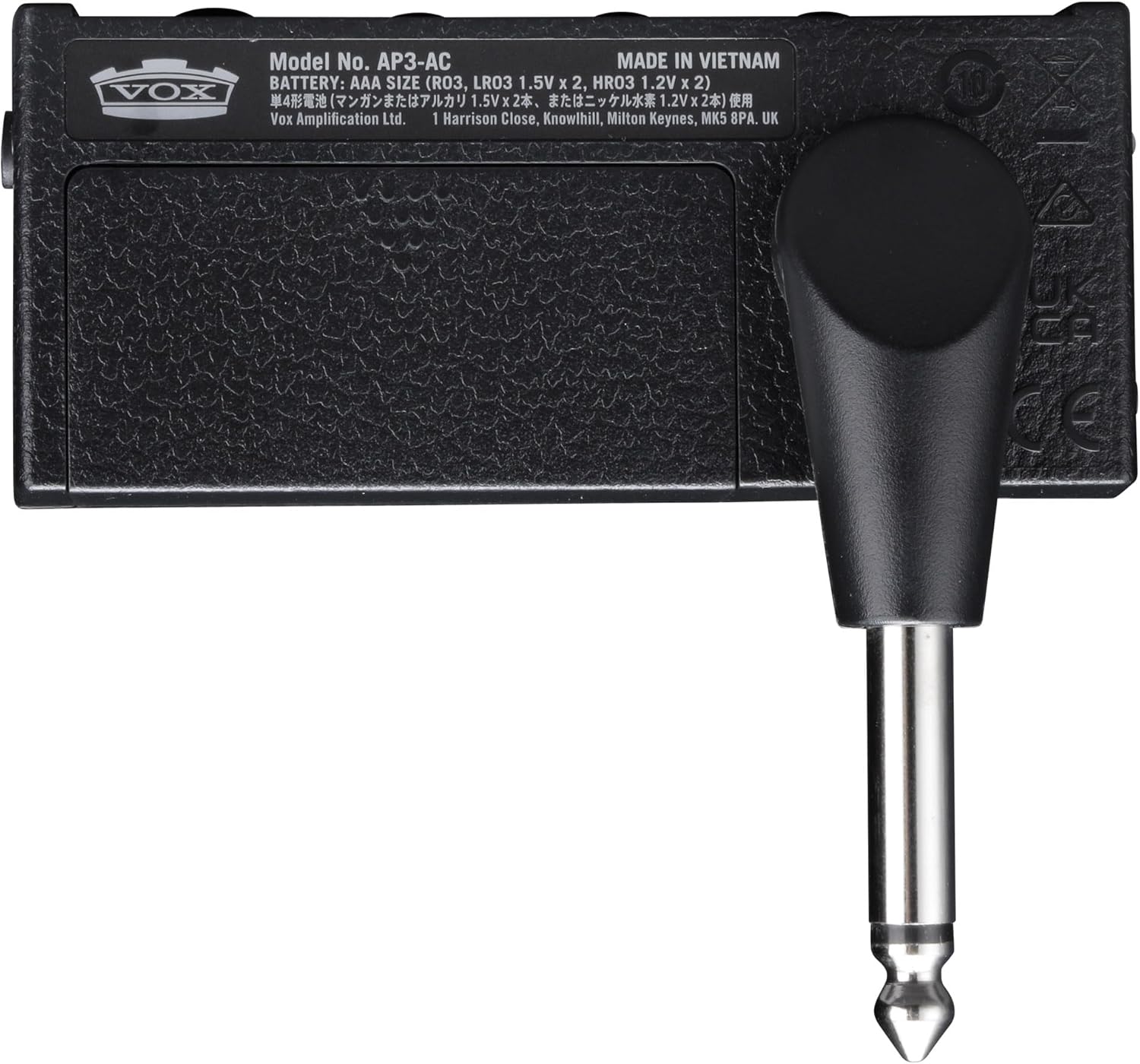
Image: Underside of the AmPlug 3 AC30, showing the battery compartment and model information.
2. Connecting Your Guitar and Headphones
- പ്ലഗ് ചെയ്യുക AmPlug 3 AC30 directly into your guitar's output jack. Adjust the swivel jack to fit comfortably.
- Connect your headphones to the 3.5mm Phones jack on the AmPlug 3 AC30.
3. Connecting External Audio (Optional)
To play along with music or backing tracks:
- Connect your smartphone, tablet, or other audio device to the AUX jack (CTIA-compliant 3.5mm TRRS mini phone jack) on the AmPlug 3 AC30 using an appropriate audio cable.
- You can also record your playing by connecting the AUX jack to a smartphone or laptop with an optional TRRS cable.
പ്രവർത്തന നിർദ്ദേശങ്ങൾ
പവർ ഓൺ/ഓഫ്
Press and hold the power button (located near the jack) to turn the unit on or off. An LED indicator will illuminate when the unit is powered on.
Adjusting Your Tone
- ചാനൽ തിരഞ്ഞെടുക്കൽ: Use the channel switch button to toggle between Channel 1 (Normal) for clean tones and Channel 2 (Top-Boost) for driven tones. The LED indicator will change color to show the selected channel (e.g., green for Channel 1, red for Channel 2).
- നേട്ടം: Rotate the GAIN knob to increase or decrease the amount of distortion.
- ടോൺ: Adjust the TONE knob to brighten or darken your sound.
- വോളിയം: Control the overall headphone volume with the VOLUME knob.
Using Effects and Rhythms
ദി AmPlug 3 AC30 includes built-in stereo effects and rhythm patterns:
- ഇഫക്റ്റ് തിരഞ്ഞെടുക്കൽ: Turn the FX/RHYTHM knob to select different effects (Tremolo, Chorus, Delay, Reverb) or rhythm patterns (Rock1, Blues, Surf, Pop1, Pop2, Funk1, Metal1, Jazz, Metronome).
- Effect Intensity/Tempo: The intensity of the selected effect or the tempo of the rhythm pattern can be adjusted. For effects, rotate the FX/RHYTHM knob. For rhythms, the tempo can be adjusted from 40 to 240 BPM.
- ടെമ്പോ ടാപ്പ് ചെയ്യുക: Press the TAP button multiple times in rhythm to set the desired tempo for delay effects or rhythm patterns.
Video: A demonstration of the Vox AmPlug 3 AC30 Headphone Guitar Ampലിഫയർ, ഷോക്asing its features, sound capabilities, and ease of use.
മെയിൻ്റനൻസ്
- വൃത്തിയാക്കൽ: Use the included polishing cloth or a soft, dry cloth to clean the unit. Do not use abrasive cleaners or solvents.
- ബാറ്ററി കെയർ: ചോർച്ച തടയാൻ യൂണിറ്റ് ദീർഘനേരം ഉപയോഗിക്കുന്നില്ലെങ്കിൽ ബാറ്ററികൾ നീക്കം ചെയ്യുക.
- സംഭരണം: സംഭരിക്കുക AmPlug 3 AC30 in a cool, dry place away from direct sunlight and extreme temperatures.
- കൈകാര്യം ചെയ്യൽ: യൂണിറ്റ് താഴെയിടുകയോ ശക്തമായ ആഘാതങ്ങൾക്ക് വിധേയമാക്കുകയോ ചെയ്യുന്നത് ഒഴിവാക്കുക.
ട്രബിൾഷൂട്ടിംഗ്
| പ്രശ്നം | സാധ്യമായ കാരണം | പരിഹാരം |
|---|---|---|
| ശബ്ദമില്ല | കുറഞ്ഞതോ അല്ലാത്തതോ ആയ ബാറ്ററികൾ | ബാറ്ററികൾ മാറ്റിസ്ഥാപിക്കുക. |
| ശബ്ദമില്ല | Headphones not properly connected | Ensure headphones are fully plugged into the Phones jack. |
| ശബ്ദമില്ല | AmPlug not fully inserted into guitar jack | ഉറപ്പാക്കുക AmPlug is securely connected to the guitar. |
| Distorted/Unclear sound | GAIN or VOLUME knob set too high | Adjust GAIN and VOLUME knobs to appropriate levels. |
| ഇഫക്റ്റുകൾ പ്രവർത്തിക്കുന്നില്ല | FX/RHYTHM knob not set to an effect | Rotate FX/RHYTHM knob to select a desired effect. |
സ്പെസിഫിക്കേഷനുകൾ
- മോഡൽ: AUS-AP3AC-COMBO-STD
- കണക്ഷനുകൾ: Phones jack (3.5mm), AUX jack (CTIA-compliant 3.5mm TRRS mini phone jack)
- വൈദ്യുതി വിതരണം: AAA ബാറ്ററികൾ x 2
- ബാറ്ററി ലൈഫ് (ഏകദേശം):
- 10 hours (alkaline, FX or RHYTHM on)
- 16 hours (alkaline, FX and RHYTHM off)
- 3 hours (manganese battery, FX or RHYTHM on)
- 5 hours (manganese battery, FX and RHYTHM off)
- അളവുകൾ (L x W x H): 3.43" x 1.3" x 1.54"
- ഭാരം: 1.6 ഔൺസ്
- ഇഫക്റ്റുകൾ: Tremolo, Chorus, Delay, Reverb
- റിഥം പാറ്റേണുകൾ: Rock1, Blues, Surf, Pop1, Pop2, Funk1, Metal1, Jazz, Metronome
- ടെമ്പോ ശ്രേണി: 40 മുതൽ 240 വരെ ബിപിഎം
വാറൻ്റിയും പിന്തുണയും
വാറന്റി വിവരങ്ങൾക്കും സാങ്കേതിക പിന്തുണയ്ക്കും, ദയവായി നിർമ്മാതാവിന്റെ ഉദ്യോഗസ്ഥനെ കാണുക. webസൈറ്റിൽ ബന്ധപ്പെടുകയോ അവരുടെ ഉപഭോക്തൃ സേവന വിഭാഗവുമായി ബന്ധപ്പെടുകയോ ചെയ്യുക. വാറന്റി ക്ലെയിമുകൾക്കായി നിങ്ങളുടെ വാങ്ങൽ രസീത് സൂക്ഷിക്കുക.


