ആമുഖം
Thank you for choosing the seenda Ergonomic Mouse MOU-302. This vertical wireless mouse is designed to provide enhanced comfort and versatile connectivity for various computing environments. Please read this manual carefully to ensure proper setup and optimal performance of your device.

Image: The seenda Ergonomic Mouse MOU-302, showcasing its unique vertical design and purple and mint green color scheme.
പ്രധാന സവിശേഷതകൾ
- എർഗണോമിക് കംഫർട്ട്: Designed to allow the hand to grasp the mouse naturally, aligning the wrist and palm to relieve pressure and enhance comfort.
- ബഹുമുഖ കണക്റ്റിവിറ്റി: Connects to up to 3 devices via Bluetooth 5.0, Bluetooth 3.0, and 2.4G wireless technology. Seamless switching between devices with a single click.
- നിശബ്ദ പ്രവർത്തനം: Features 7 non-programmable buttons with options for noiseless and voiced clicks on the left and right buttons, suitable for various tasks.
- സൗകര്യപ്രദമായ റീചാർജിംഗ്: Equipped with a built-in rechargeable 500mAh battery, offering up to 2 months of continuous use on a single charge. A Type-C charger is included.
- Enhanced Multimedia Control: Integrated volume control knob allows for easy pause, play, and volume adjustment directly from the mouse.
- വിശാലമായ അനുയോജ്യത: Supports Windows, Android, Mac OS, and iOS, compatible with virtually all Bluetooth-enabled devices and those with USB ports.
പാക്കേജ് ഉള്ളടക്കം
പാക്കേജിൽ ഇനിപ്പറയുന്ന ഇനങ്ങൾ ഉണ്ടോ എന്ന് പരിശോധിക്കുക:
- seenda Ergonomic Mouse MOU-302
- യുഎസ്ബി റിസീവർ (2.4G)
- USB-C ചാർജിംഗ് കേബിൾ
- ഉപയോക്തൃ മാനുവൽ
ഉൽപ്പന്നം കഴിഞ്ഞുview
Familiarize yourself with the buttons and features of your seenda Ergonomic Mouse MOU-302.
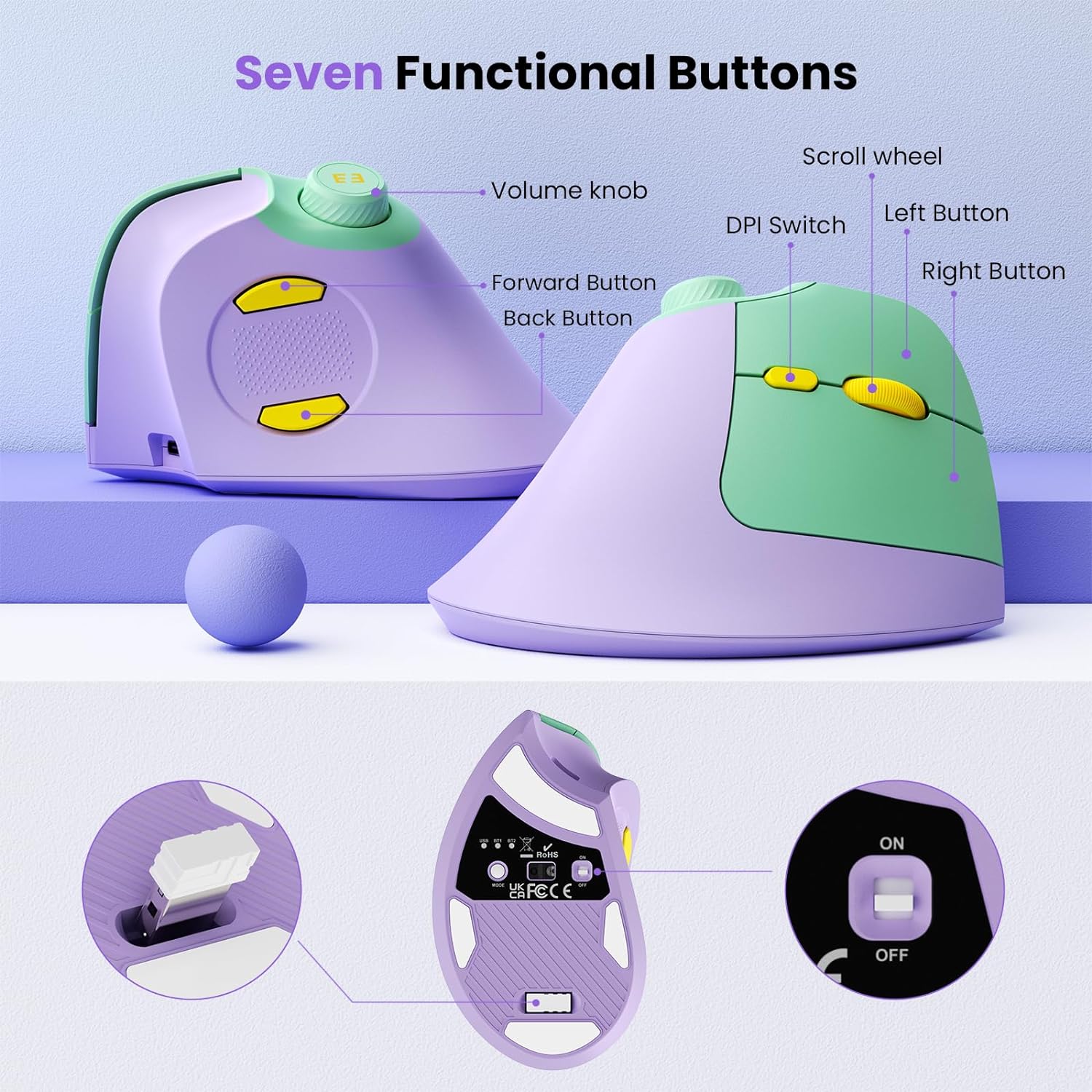
Image: Detailed diagram illustrating the seven functional buttons of the mouse, including the volume knob, scroll wheel, DPI switch, left/right buttons, and forward/back buttons.
- വോളിയം നോബ്: Rotate to adjust volume, press to play/pause media.
- സ്ക്രോൾ വീൽ: ലംബ സ്ക്രോളിംഗിനായി.
- DPI സ്വിച്ച്: Adjusts mouse sensitivity (DPI).
- ഇടത് ബട്ടൺ: സ്റ്റാൻഡേർഡ് ഇടത്-ക്ലിക്ക് പ്രവർത്തനം.
- വലത് ബട്ടൺ: സ്റ്റാൻഡേർഡ് റൈറ്റ്-ക്ലിക്ക് ഫംഗ്ഷൻ.
- ഫോർവേഡ് ബട്ടൺ: മുന്നോട്ട് നാവിഗേറ്റ് ചെയ്യുന്നു web ബ്രൗസറുകൾ അല്ലെങ്കിൽ file പര്യവേക്ഷകർ.
- ബാക്ക് ബട്ടൺ: പിന്നിലേക്ക് നാവിഗേറ്റ് ചെയ്യുന്നു web ബ്രൗസറുകൾ അല്ലെങ്കിൽ file പര്യവേക്ഷകർ.
- മോഡ് സ്വിച്ച് ബട്ടൺ: Located on the bottom, cycles between USB 2.4G, Bluetooth 1, and Bluetooth 2 modes.
- പവർ ഓൺ/ഓഫ് സ്വിച്ച്: Located on the bottom.
- USB-C ചാർജിംഗ് പോർട്ട്: ആന്തരിക ബാറ്ററി റീചാർജ് ചെയ്യുന്നതിന്.
- USB Receiver Storage Slot: Located on the bottom for convenient storage of the 2.4G USB receiver.
സജ്ജീകരണ നിർദ്ദേശങ്ങൾ
1. 2.4G വയർലെസ് കണക്ഷൻ
- Take out the USB receiver from the storage slot at the bottom of the mouse.
- നിങ്ങളുടെ കമ്പ്യൂട്ടറിൽ ലഭ്യമായ USB പോർട്ടിലേക്ക് USB റിസീവർ പ്ലഗ് ചെയ്യുക.
- താഴെ സ്ഥിതിചെയ്യുന്ന ഓൺ/ഓഫ് സ്വിച്ച് ഉപയോഗിച്ച് മൗസ് ഓണാക്കുക.
- Press the Mode Switch button on the bottom until the "USB" indicator light is illuminated. The mouse should now be connected and ready for use.
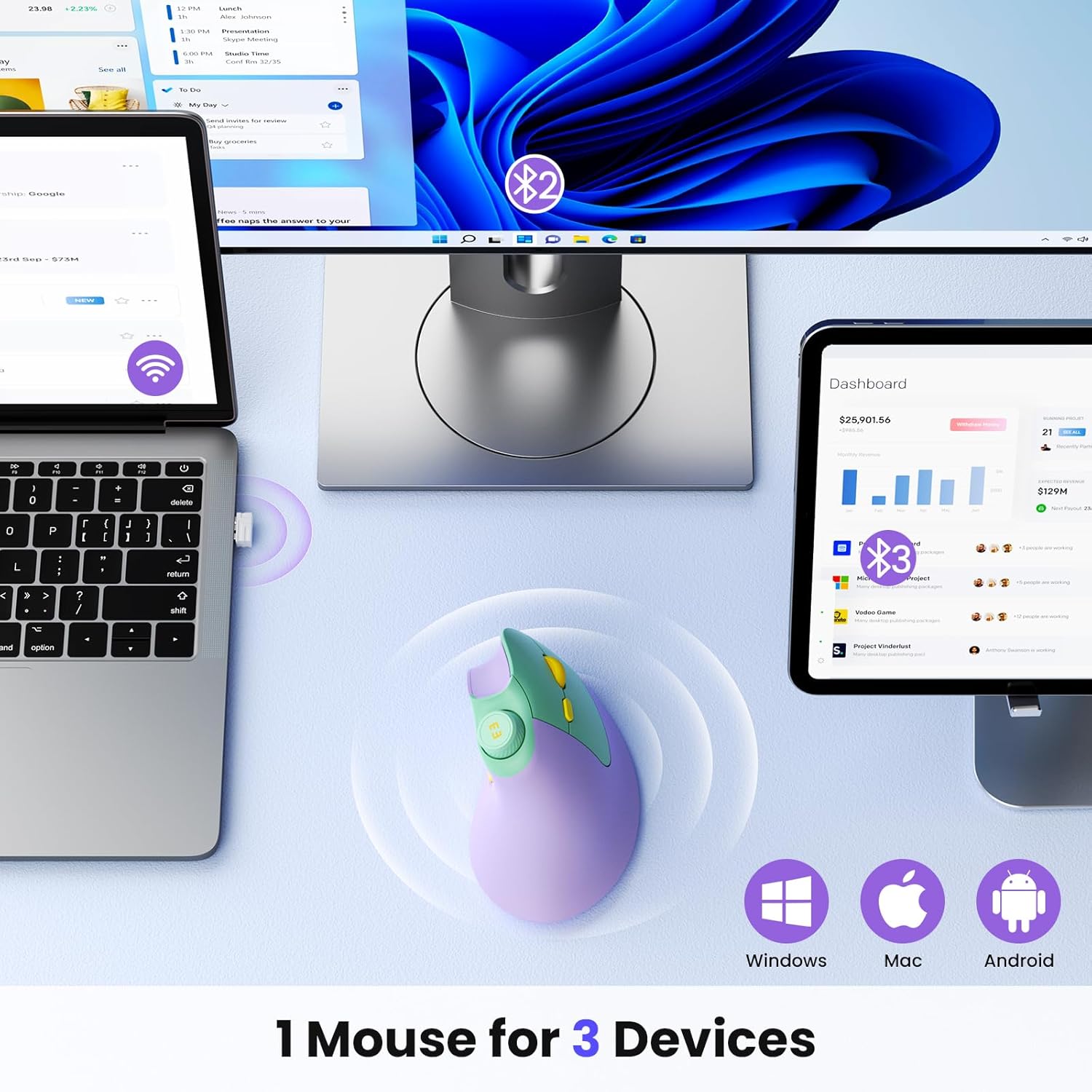
Image: Illustration demonstrating the multi-device connectivity of the mouse, including 2.4G USB and dual Bluetooth connections to a laptop, monitor, and tablet.
2. ബ്ലൂടൂത്ത് കണക്ഷൻ (BT1 / BT2)
- താഴെ സ്ഥിതിചെയ്യുന്ന ഓൺ/ഓഫ് സ്വിച്ച് ഉപയോഗിച്ച് മൗസ് ഓണാക്കുക.
- Press the Mode Switch button on the bottom to select either "BT1" or "BT2". The corresponding indicator light will flash slowly, indicating it's in pairing mode.
- നിങ്ങളുടെ ഉപകരണത്തിൽ (കമ്പ്യൂട്ടർ, ടാബ്ലെറ്റ്, സ്മാർട്ട്ഫോൺ), ബ്ലൂടൂത്ത് ക്രമീകരണങ്ങളിലേക്ക് പോയി പുതിയ ഉപകരണങ്ങൾക്കായി തിരയുക.
- Select "seenda MOU-302" from the list of available devices to pair.
- Once paired, the "BT1" or "BT2" indicator light will stop flashing and remain solid. The mouse is now connected.
- To connect to a second Bluetooth device, repeat steps 2-4, selecting the other Bluetooth channel (BT1 if you used BT2, or vice-versa).
പ്രവർത്തന നിർദ്ദേശങ്ങൾ
എർഗണോമിക് ഗ്രിപ്പ്
Hold the mouse with your hand in a natural handshake position. This vertical orientation helps maintain a neutral wrist posture, reducing strain compared to traditional horizontal mice.
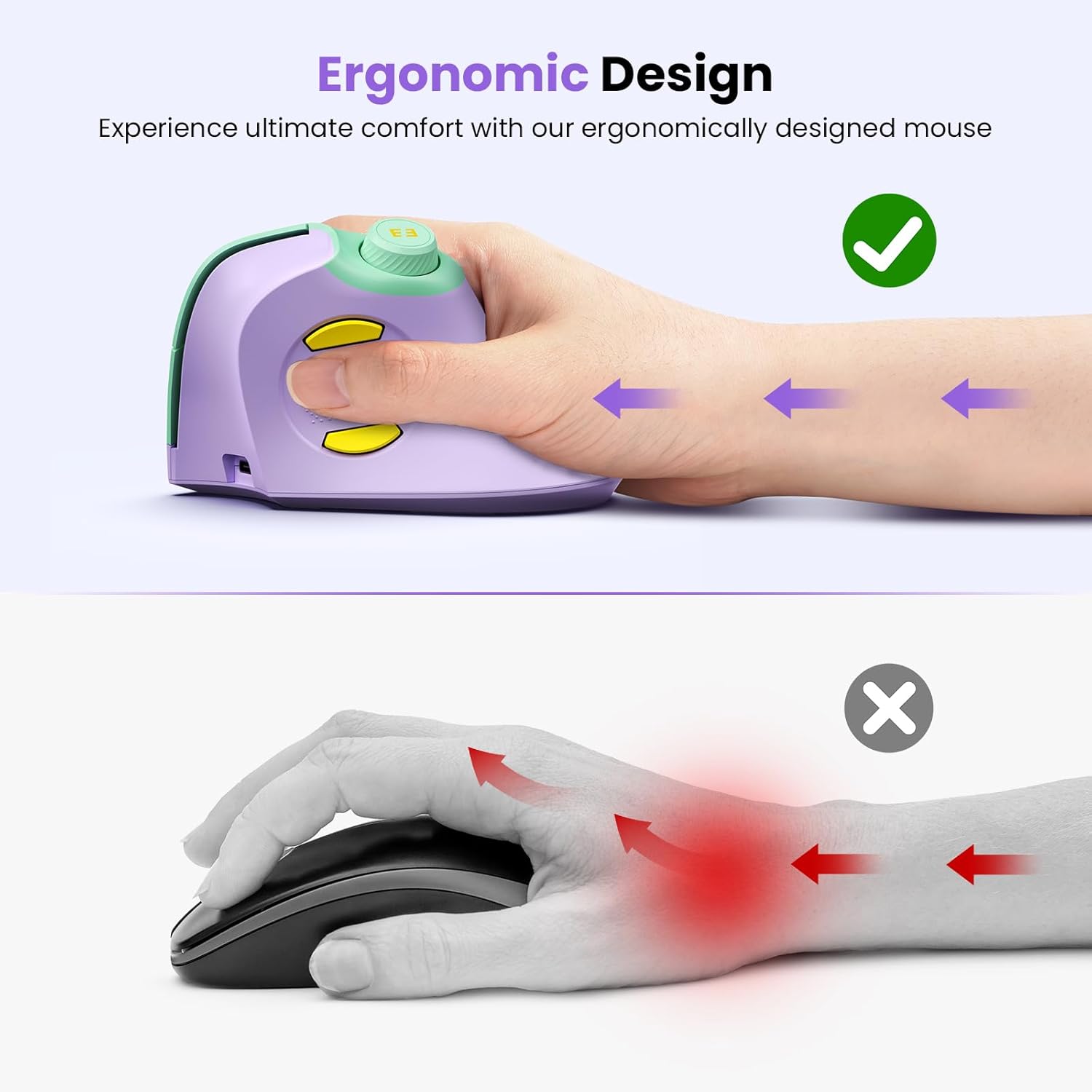
Image: A hand comfortably gripping the seenda ergonomic mouse, demonstrating the natural, vertical hand position that reduces wrist strain.
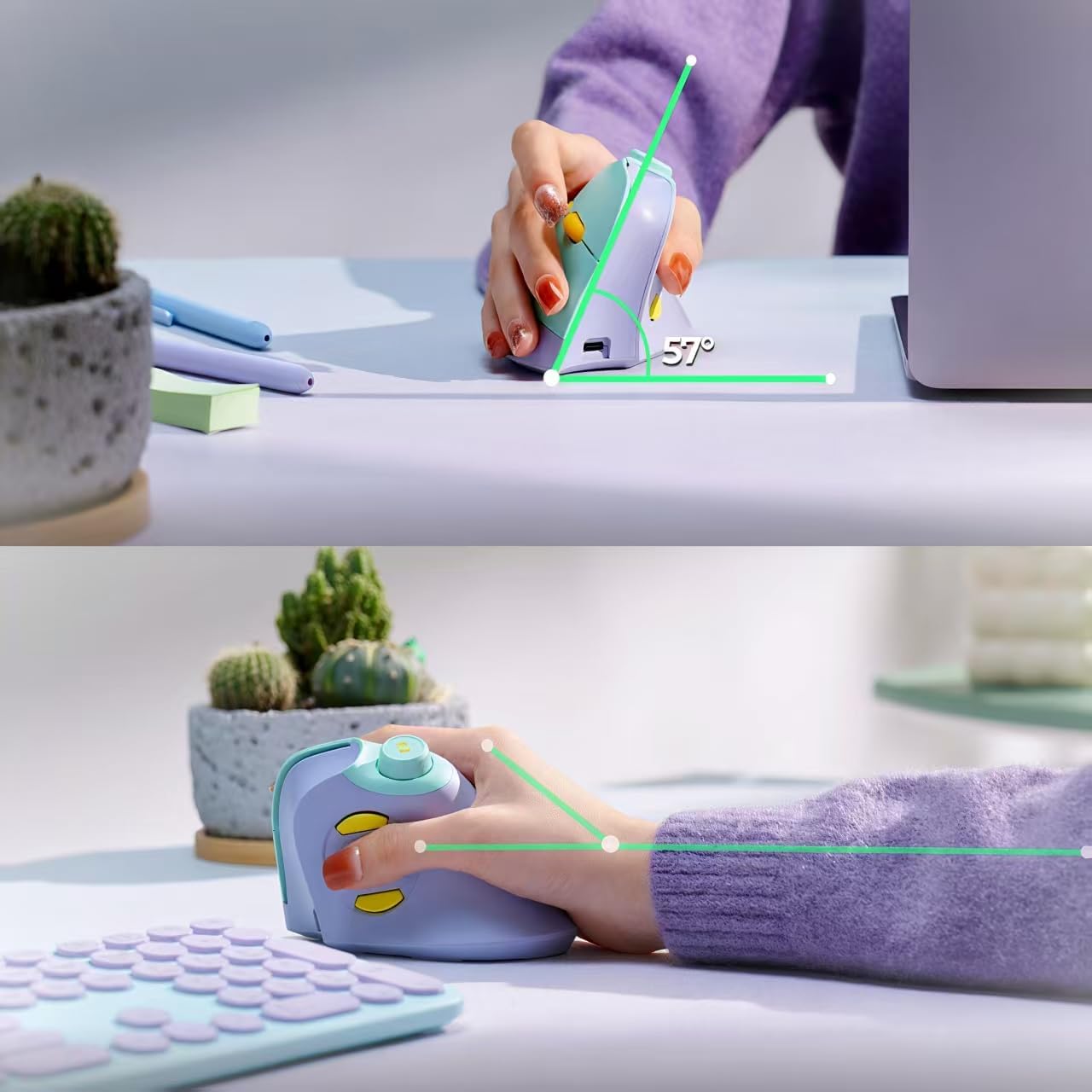
ചിത്രം: ഒരു വശം view of the mouse in use, highlighting its 57-degree ergonomic angle designed for optimal wrist comfort.
ബട്ടൺ പ്രവർത്തനങ്ങൾ
- ഇടത്/വലത് ക്ലിക്ക്: Perform standard click actions. The mouse offers both noiseless and voiced click options for these buttons.
- സ്ക്രോൾ വീൽ: Rotate to scroll up or down through documents and web പേജുകൾ.
- DPI സ്വിച്ച്: Press to cycle through different DPI settings (mouse sensitivity). Adjust to your preference for cursor speed.
- ഫോർവേഡ്/ബാക്ക് ബട്ടണുകൾ: Use these buttons for quick navigation in web ബ്രൗസറുകൾ അല്ലെങ്കിൽ file പര്യവേക്ഷകർ.
- വോളിയം നോബ്:
- വോളിയം കൂട്ടാൻ ഘടികാരദിശയിൽ തിരിക്കുക.
- ശബ്ദം കുറയ്ക്കാൻ എതിർ ഘടികാരദിശയിൽ തിരിക്കുക.
- Press the knob to play or pause media playback.
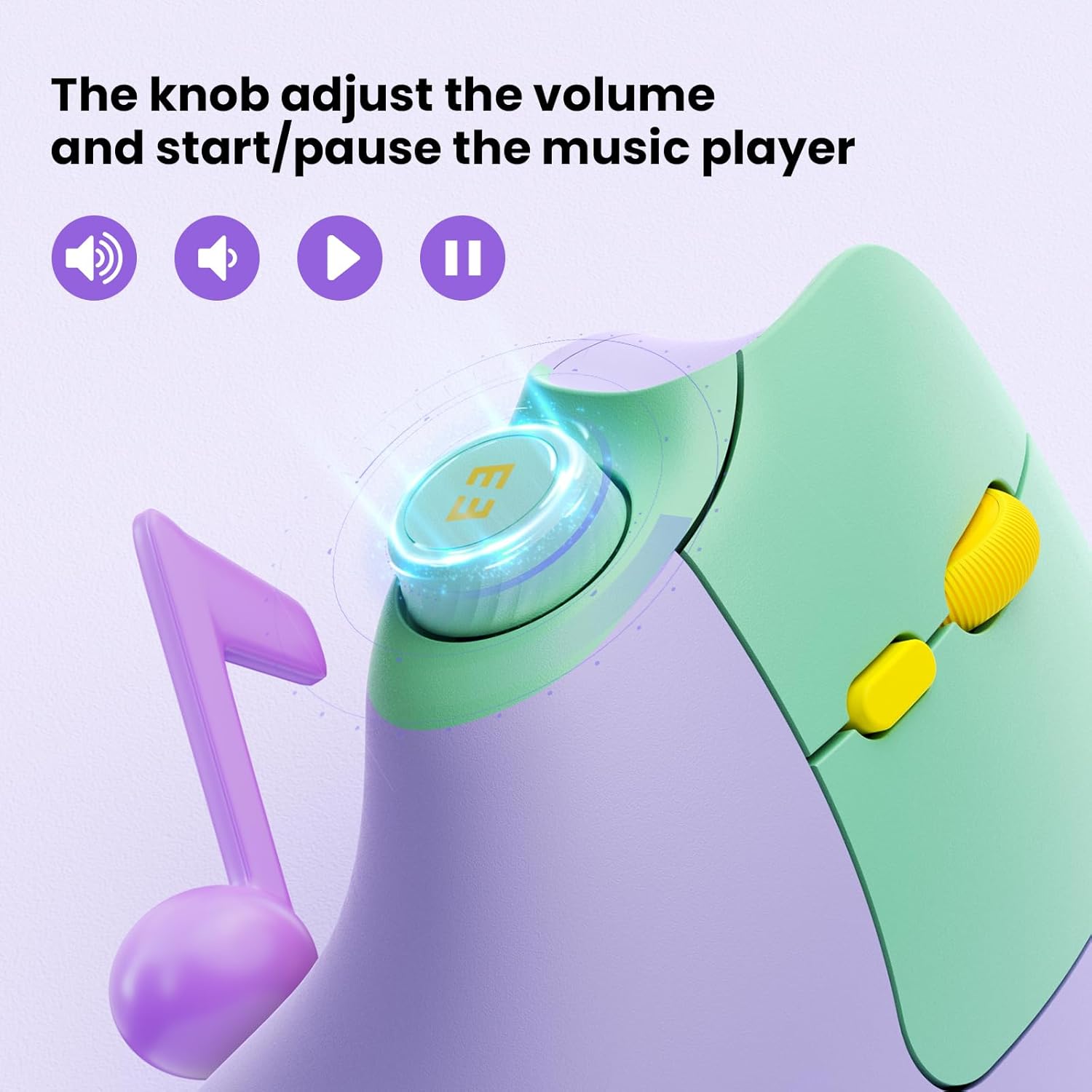
ചിത്രം: ഒരു ക്ലോസ്-അപ്പ് view of the mouse's volume knob, indicating its functions for adjusting volume and playing/pausing media.
മൗസ് ചാർജ് ചെയ്യുന്നു
The seenda Ergonomic Mouse MOU-302 features a built-in 500mAh rechargeable battery.
- Locate the USB-C charging port on the front of the mouse.
- Connect the provided USB-C charging cable to the mouse.
- Plug the other end of the USB-C cable into a USB power source (e.g., computer USB port, wall adapter).
- The indicator light on the mouse will show charging status. Once fully charged, the light will change or turn off.
A full charge can provide up to 2 months of continuous usage. You can continue to use the mouse while it is charging.

Image: The seenda ergonomic mouse being charged via its USB-C port, highlighting the 500mAh rechargeable battery.
അനുയോജ്യത
The seenda Ergonomic Mouse MOU-302 offers broad compatibility with various operating systems and devices:
- ഓപ്പറേറ്റിംഗ് സിസ്റ്റങ്ങൾ: Windows, Android, Mac OS, iOS.
- ഉപകരണങ്ങൾ: Compatible with virtually all Bluetooth-enabled devices and those with available USB ports.
മെയിൻ്റനൻസ്
- മൃദുവായതും ഉണങ്ങിയതുമായ തുണി ഉപയോഗിച്ച് മൗസ് പതിവായി വൃത്തിയാക്കുക. കഠിനമായ രാസവസ്തുക്കളോ ഉരച്ചിലുകളോ ഉള്ള വസ്തുക്കൾ ഉപയോഗിക്കുന്നത് ഒഴിവാക്കുക.
- Keep the optical sensor on the bottom of the mouse clean for accurate tracking.
- Store the USB receiver in its designated slot when not in use to prevent loss.
- Avoid exposing the mouse to extreme temperatures or direct sunlight.
ട്രബിൾഷൂട്ടിംഗ്
- മൗസ് പ്രതികരിക്കുന്നില്ല:
- മൗസ് ഓൺ ചെയ്തിട്ടുണ്ടെന്ന് ഉറപ്പാക്കുക.
- ബാറ്ററി ലെവൽ പരിശോധിച്ച് ആവശ്യമെങ്കിൽ ചാർജ് ചെയ്യുക.
- For 2.4G connection, ensure the USB receiver is securely plugged in and the mouse is in USB mode.
- For Bluetooth connection, ensure the mouse is in the correct BT1/BT2 mode and successfully paired with your device. Try re-pairing if necessary.
- ഇടവിട്ടുള്ള കണക്ഷൻ:
- മൗസ് റിസീവറിന്റെ/ഉപകരണത്തിന്റെ അടുത്തേക്ക് നീക്കുക.
- Avoid using the mouse on metallic surfaces, which can interfere with wireless signals.
- Ensure there are no other devices causing wireless interference.
- കഴ്സർ ചലനം ക്രമരഹിതമാണ്:
- മൗസിന്റെ അടിയിലുള്ള ഒപ്റ്റിക്കൽ സെൻസർ വൃത്തിയാക്കുക.
- Try using the mouse on a different surface or a mouse pad.
- DPI സ്വിച്ച് ഉപയോഗിച്ച് DPI ക്രമീകരണം ക്രമീകരിക്കുക.
സ്പെസിഫിക്കേഷനുകൾ
| ഫീച്ചർ | വിശദാംശങ്ങൾ |
|---|---|
| മോഡൽ നമ്പർ | MOU-302 |
| കണക്റ്റിവിറ്റി ടെക്നോളജി | Bluetooth (5.0, 3.0), 2.4G Wireless (USB) |
| മൂവ്മെന്റ് ഡിറ്റക്ഷൻ ടെക്നോളജി | ഒപ്റ്റിക്കൽ |
| പ്രത്യേക സവിശേഷതകൾ | Ergonomic Design, Volume Control Knob, Quiet Clicks |
| ബാറ്ററി | 500mAh Rechargeable (1 C battery included) |
| ഇനത്തിൻ്റെ ഭാരം | 5.9 ഔൺസ് |
| പാക്കേജ് അളവുകൾ | 5.16 x 3.23 x 3.11 ഇഞ്ച് |
വാറൻ്റിയും പിന്തുണയും
വാറന്റി വിവരങ്ങൾ, സാങ്കേതിക പിന്തുണ, അല്ലെങ്കിൽ ഉപഭോക്തൃ സേവന അന്വേഷണങ്ങൾ എന്നിവയ്ക്കായി, ഉൽപ്പന്ന പാക്കേജിംഗിൽ നൽകിയിരിക്കുന്ന കോൺടാക്റ്റ് വിശദാംശങ്ങൾ പരിശോധിക്കുകയോ ഔദ്യോഗിക സീൻഡ സന്ദർശിക്കുകയോ ചെയ്യുക. webസൈറ്റ്.


