1. ആമുഖം
Welcome to the user manual for your new SGIN 17 inch Laptop. This guide provides essential information to help you set up, operate, maintain, and troubleshoot your device. Please read this manual carefully before using your laptop to ensure proper function and safety.
1.1 സുരക്ഷാ വിവരങ്ങൾ
- ലാപ്ടോപ്പിനെ തീവ്രമായ താപനില, ഈർപ്പം, നേരിട്ടുള്ള സൂര്യപ്രകാശം എന്നിവയ്ക്ക് വിധേയമാക്കരുത്.
- ലാപ്ടോപ്പിൽ ഭാരമുള്ള വസ്തുക്കൾ വയ്ക്കുന്നത് ഒഴിവാക്കുക.
- വൈദ്യുതാഘാതമോ കേടുപാടുകളോ ഒഴിവാക്കാൻ ദ്രാവകങ്ങൾ ഉപകരണത്തിൽ നിന്ന് അകറ്റി നിർത്തുക.
- നിങ്ങളുടെ ലാപ്ടോപ്പിനൊപ്പം നൽകിയിരിക്കുന്ന യഥാർത്ഥ പവർ അഡാപ്റ്റർ മാത്രം ഉപയോഗിക്കുക.
- ലാപ്ടോപ്പ് സ്വയം വേർപെടുത്താനോ നന്നാക്കാനോ ശ്രമിക്കരുത്. യോഗ്യതയുള്ള സർവീസ് ഉദ്യോഗസ്ഥരെ സമീപിക്കുക.
- അമിതമായി ചൂടാക്കുന്നത് തടയാൻ ഉപയോഗ സമയത്ത് ശരിയായ വായുസഞ്ചാരം ഉറപ്പാക്കുക.
2. ഉൽപ്പന്നം കഴിഞ്ഞുview
Familiarize yourself with the components and ports of your SGIN 17 inch Laptop.

ചിത്രം 2.1: മുൻഭാഗം view of the SGIN 17 inch Laptop, showcasing its large 17.3-inch display, full-size keyboard, and touchpad.
2.1 ഘടകങ്ങളും തുറമുഖങ്ങളും
Your laptop is equipped with various ports for connectivity and expansion.
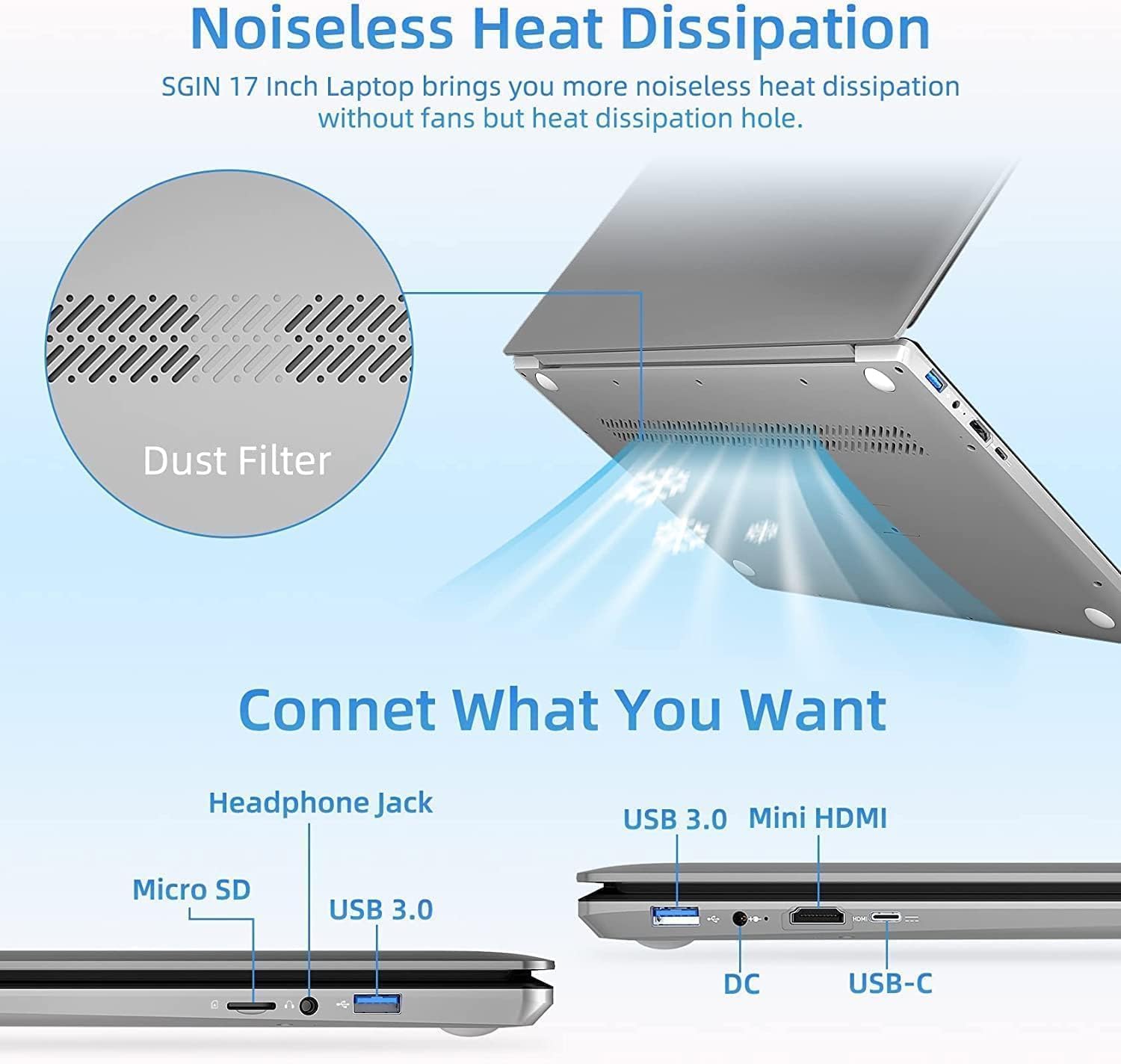
ചിത്രം 2.2: വശം view of the SGIN 17 inch Laptop highlighting the various input/output ports including USB 3.0, USB-C, Mini HDMI, Headphone Jack, Micro SD card slot, and DC power input.
- ഡിസ്പ്ലേ: 17.3-inch Full HD (1920x1080) LED screen.
- Webക്യാം: സംയോജിപ്പിച്ചത് webവീഡിയോ കോളുകൾക്കും കോൺഫറൻസിംഗിനുമുള്ള ക്യാമറ.
- കീബോർഡ്: Full-size keyboard with numeric keypad for comfortable typing.
- ടച്ച്പാഡ്: Multi-touch enabled touchpad for precise navigation.
- USB 3.2 പോർട്ടുകൾ: For high-speed data transfer and connecting peripherals.
- ടൈപ്പ്-സി പോർട്ട്: Versatile port for data, display, and power delivery.
- മിനി HDMI പോർട്ട്: ബാഹ്യ ഡിസ്പ്ലേകളിലേക്കോ പ്രൊജക്ടറുകളിലേക്കോ ബന്ധിപ്പിക്കുന്നതിന്.
- ഹെഡ്ഫോൺ ജാക്ക്: ഹെഡ്ഫോണുകളിലേക്കോ ബാഹ്യ സ്പീക്കറുകളിലേക്കോ ഉള്ള ഓഡിയോ ഔട്ട്പുട്ടിനായി.
- മൈക്രോ എസ്ഡി കാർഡ് സ്ലോട്ട്: സംഭരണം വികസിപ്പിക്കുന്നതിനോ മെമ്മറി കാർഡുകളിൽ നിന്ന് ഡാറ്റ കൈമാറുന്നതിനോ വേണ്ടി.
- DC-in Port: ലാപ്ടോപ്പ് ചാർജ് ചെയ്യുന്നതിനായി പവർ അഡാപ്റ്റർ ബന്ധിപ്പിക്കുന്നതിന്.
3. സജ്ജീകരണം
3.1 പ്രാരംഭ ചാർജിംഗ്
Before first use, it is recommended to fully charge your laptop's battery. Connect the provided power adapter to the DC-in port on the laptop and then plug it into a power outlet. The charging indicator light will illuminate.
3.2 ആദ്യ ബൂട്ടും ഓപ്പറേറ്റിംഗ് സിസ്റ്റം സജ്ജീകരണവും
- ലാപ്ടോപ്പ് ഓണാക്കാൻ പവർ ബട്ടൺ അമർത്തുക.
- Follow the on-screen instructions to complete the initial setup of the Windows 8.1 operating system. This includes selecting your language, region, accepting terms, and setting up user accounts.
- Connect to a Wi-Fi network when prompted to enable internet access.
4. നിങ്ങളുടെ ലാപ്ടോപ്പ് പ്രവർത്തിപ്പിക്കുക
4.1 പവർ മാനേജ്മെൻ്റ്
- ഓണാക്കുന്നു: കീബോർഡ് ഡെക്കിൽ സ്ഥിതിചെയ്യുന്ന പവർ ബട്ടൺ അമർത്തുക.
- ഓഫാക്കുന്നു: ആരംഭിക്കുക ബട്ടൺ ക്ലിക്കുചെയ്യുക, തുടർന്ന് പവർ > ഷട്ട് ഡൗൺ ചെയ്യുക.
- സ്ലീപ്പ് മോഡ്: ആരംഭ ബട്ടൺ ക്ലിക്കുചെയ്യുക, തുടർന്ന് പവർ > സ്ലീപ്പ് ക്ലിക്കുചെയ്യുക, അല്ലെങ്കിൽ ലാപ്ടോപ്പ് ലിഡ് അടയ്ക്കുക.
- പുനരാരംഭിക്കുക: ആരംഭിക്കുക ബട്ടൺ ക്ലിക്കുചെയ്യുക, തുടർന്ന് പവർ > പുനരാരംഭിക്കുക.
4.2 കീബോർഡും ടച്ച്പാഡും ഉപയോഗിക്കൽ

ചിത്രം 4.1: ക്ലോസപ്പ് view of the SGIN 17 inch Laptop's full-size keyboard and integrated numeric keypad, designed for comfortable and efficient typing.
The laptop features a full-size keyboard for comfortable typing and a dedicated numeric keypad for data entry. The touchpad supports multi-touch gestures for intuitive navigation, including scrolling, zooming, and switching applications.
4.3 നെറ്റ്വർക്കുകളിലേക്ക് ബന്ധിപ്പിക്കുന്നു
ഒരു Wi-Fi നെറ്റ്വർക്കിലേക്ക് കണക്റ്റുചെയ്യാൻ:
- സിസ്റ്റം ട്രേയിലെ (സ്ക്രീനിന്റെ താഴെ വലത് കോണിലുള്ള) Wi-Fi ഐക്കണിൽ ക്ലിക്ക് ചെയ്യുക.
- ലിസ്റ്റിൽ നിന്ന് നിങ്ങൾക്ക് ആവശ്യമുള്ള നെറ്റ്വർക്ക് തിരഞ്ഞെടുക്കുക.
- Enter the network security key (password) if prompted, then click Connect.
4.4 ബാഹ്യ ഡിസ്പ്ലേ കണക്ഷൻ
Use the Mini HDMI port to connect your laptop to an external monitor or projector. Connect one end of a Mini HDMI cable to your laptop and the other end to the display device. You may need to adjust display settings in Windows to extend or duplicate your screen.
4.5 ഡാറ്റ കൈമാറ്റം
Utilize the USB 3.2 ports for connecting external hard drives, USB flash drives, and other peripherals for fast data transfer. The Micro SD card slot allows for easy access to data on compatible memory cards.
5. പരിപാലനം
5.1 ലാപ്ടോപ്പ് വൃത്തിയാക്കൽ
- മൃദുവായ, ലിൻ്റ് രഹിത തുണി ഉപയോഗിക്കുകampഡിസ്പ്ലേ വൃത്തിയാക്കാൻ വെള്ളമോ സ്ക്രീൻ ക്ലീനറോ ഉപയോഗിച്ച് നനയ്ക്കുക.
- കീബോർഡിനും ഷാസിക്കും മൃദുവായതും ഉണങ്ങിയതുമായ തുണി ഉപയോഗിക്കുക. അബ്രസീവ് ക്ലീനറുകൾ ഒഴിവാക്കുക.
- മികച്ച തണുപ്പ് നിലനിർത്താൻ ഇടയ്ക്കിടെ കംപ്രസ് ചെയ്ത വായു ഉപയോഗിച്ച് വെന്റുകളിൽ നിന്ന് പൊടി നീക്കം ചെയ്യുക.
5.2 ബാറ്ററി കെയർ

Figure 5.1: Illustration of the SGIN 17 inch Laptop's battery capacity (7.6V 8000mAh, 38Wh) and estimated usage time (up to 8 hours of video playback).
- ബാറ്ററി ലൈഫ് വർദ്ധിപ്പിക്കാൻ, ബാറ്ററി ഇടയ്ക്കിടെ പൂർണ്ണമായും ഡിസ്ചാർജ് ചെയ്യുന്നത് ഒഴിവാക്കുക.
- ലാപ്ടോപ്പ് ദീർഘനേരം ഉപയോഗിച്ചിട്ടില്ലെങ്കിൽ തണുത്തതും വരണ്ടതുമായ സ്ഥലത്ത് സൂക്ഷിക്കുക.
- It is normal for battery capacity to decrease over time with usage.
5.3 സംഭരണവും കൈകാര്യം ചെയ്യലും
When transporting your laptop, use a protective sleeve or bag to prevent scratches and impacts. Avoid exposing the laptop to strong magnetic fields.
6. പ്രശ്നപരിഹാരം
This section addresses common issues you might encounter and provides basic solutions.
| പ്രശ്നം | സാധ്യമായ കാരണം | പരിഹാരം |
|---|---|---|
| ലാപ്ടോപ്പ് പവർ ഓൺ ആകുന്നില്ല. | Battery is drained or power adapter is not connected properly. | Connect the power adapter and ensure it's plugged into a working outlet. Allow it to charge for a few minutes before attempting to power on again. |
| ഡിസ്പ്ലേ ശൂന്യമാണ് അല്ലെങ്കിൽ മിന്നിമറയുന്നു. | Incorrect display settings, loose cable (if external monitor), or driver issue. | Press Fn + F7 (or similar function key) to cycle through display modes. Restart the laptop. Update graphics drivers if possible. |
| വൈഫൈ കണക്ഷൻ പ്രശ്നങ്ങൾ. | വൈഫൈ അഡാപ്റ്റർ ഓഫാണ്, തെറ്റായ പാസ്വേഡ് അല്ലെങ്കിൽ റൂട്ടർ പ്രശ്നം. | Ensure Wi-Fi is enabled (Fn + F5 or check settings). Re-enter Wi-Fi password. Restart your router and laptop. |
| ലാപ്ടോപ്പ് മന്ദഗതിയിലാണ് പ്രവർത്തിക്കുന്നത്. | Too many applications open, low storage space, or malware. | Close unnecessary applications. Free up disk space. Run a virus scan. |
ഈ പരിഹാരങ്ങൾ പരീക്ഷിച്ചതിന് ശേഷവും പ്രശ്നം നിലനിൽക്കുകയാണെങ്കിൽ, ദയവായി ഉപഭോക്തൃ പിന്തുണയുമായി ബന്ധപ്പെടുക.
7 സാങ്കേതിക സവിശേഷതകൾ
Detailed specifications for your SGIN 17 inch Laptop (SGIN-M17S).

Figure 7.1: Diagram illustrating the Intel Core i3-5005U Processor, which powers the SGIN 17 inch Laptop, providing efficient performance.
| ഫീച്ചർ | സ്പെസിഫിക്കേഷൻ |
|---|---|
| മോഡലിൻ്റെ പേര് | SGIN-M17S |
| സ്ക്രീൻ വലിപ്പം | 17.3 ഇഞ്ച് |
| സ്ക്രീൻ റെസല്യൂഷൻ | 1920 x 1080 പിക്സലുകൾ (ഫുൾ എച്ച്ഡി) |
| പ്രോസസ്സർ | ഇന്റൽ കോർ i3-5005U (2.4 GHz) |
| റാം | 4 ജിബി ഡിഡിആർ4 എസ്ഡിആർഎഎം |
| ഹാർഡ് ഡ്രൈവ് | 128 GB SSD (NVMe interface) |
| ഗ്രാഫിക്സ് കോപ്രൊസസർ | ഇൻ്റൽ എച്ച്ഡി ഗ്രാഫിക്സ് 5500 |
| ഓപ്പറേറ്റിംഗ് സിസ്റ്റം | വിൻഡോസ് 8.1 |
| വയർലെസ് തരം | 802.11b Wi-Fi |
| ബാറ്ററി | 1 Lithium Ion battery (8000Wh, 38Wh, up to 8 hours video play) |
| ഇനത്തിൻ്റെ ഭാരം | 6.34 പൗണ്ട് |
| ഉൽപ്പന്ന അളവുകൾ | 17.3 x 10 x 0.6 ഇഞ്ച് |
8. വാറൻ്റിയും പിന്തുണയും
8.1 വാറൻ്റി വിവരങ്ങൾ
Your SGIN 17 inch Laptop comes with a 1 വർഷത്തെ വാറൻ്റി വാങ്ങിയ തീയതി മുതൽ. സാധാരണ ഉപയോഗത്തിലുള്ള നിർമ്മാണ വൈകല്യങ്ങളും തകരാറുകളും ഈ വാറന്റി ഉൾക്കൊള്ളുന്നു. ദുരുപയോഗം, അപകടങ്ങൾ, അനധികൃത അറ്റകുറ്റപ്പണികൾ അല്ലെങ്കിൽ പ്രകൃതി ദുരന്തങ്ങൾ എന്നിവ മൂലമുണ്ടാകുന്ന നാശനഷ്ടങ്ങൾക്ക് ഇത് പരിരക്ഷ നൽകുന്നില്ല.
വാറൻ്റി ക്ലെയിമുകൾക്കായി നിങ്ങളുടെ വാങ്ങിയതിൻ്റെ തെളിവ് സൂക്ഷിക്കുക.
8.2 ഉപഭോക്തൃ പിന്തുണ
For technical assistance, warranty claims, or any other inquiries, please contact SGIN customer support through the official channels provided at the time of purchase or on the SGIN official website. When contacting support, please have your laptop's model number (SGIN-M17S) and purchase details ready.


