1. ആമുഖം
This manual provides essential information for the safe and efficient operation of your Metz MUD8500Z 43-inch 4K UHD Google Smart TV. Please read these instructions thoroughly before using the television and retain them for future reference. This television features a 43-inch Direct LED display with UHD 4K HDR resolution, integrated Google TV operating system, and a built-in soundbar with Wonder Audio technology.
2. ബോക്സിൽ എന്താണുള്ളത്?
നിങ്ങളുടെ ടെലിവിഷൻ ശ്രദ്ധാപൂർവ്വം അൺപാക്ക് ചെയ്ത് ഇനിപ്പറയുന്ന എല്ലാ ഇനങ്ങളും ഉൾപ്പെടുത്തിയിട്ടുണ്ടോയെന്ന് പരിശോധിക്കുക:
- Metz MUD8500Z 43-inch Smart TV
- പവർ അഡാപ്റ്റർ
- റിമോട്ട് കൺട്രോൾ
- ഉപയോക്തൃ മാനുവൽ (ഈ പ്രമാണം)
- ടിവി സ്റ്റാൻഡ് ഘടകങ്ങൾ (ബാധകമെങ്കിൽ)
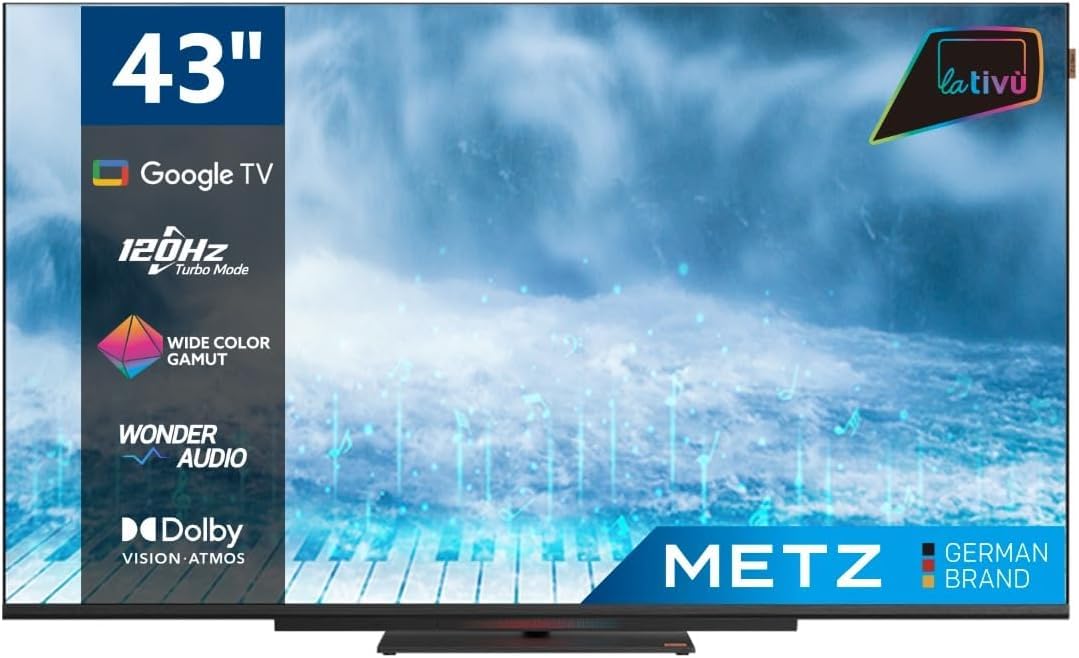
ചിത്രം: മുൻഭാഗം view of the Metz MUD8500Z 43-inch Smart TV.
3. സജ്ജീകരണം
3.1. പായ്ക്ക് ചെയ്യലും പ്ലേസ്മെന്റും
Remove the TV from its packaging. Place the TV on a stable, flat surface or mount it on a wall using a compatible VESA mount (sold separately). Ensure adequate ventilation around the TV.

Image: Diagram showing the dimensions of the Metz MUD8500Z TV (96.6cm width, 57cm height, 11cm depth).
3.2. പവർ ബന്ധിപ്പിക്കുന്നു
Connect the power adapter to the TV's power input, then plug the adapter into a wall outlet. The TV will enter standby mode.
3.3. Initial Setup (Google TV)
ആദ്യമായി പവർ-ഓൺ ചെയ്യുമ്പോൾ, പ്രാരംഭ സജ്ജീകരണ പ്രക്രിയയിലൂടെ ടിവി നിങ്ങളെ നയിക്കും. ഇതിൽ ഇവ ഉൾപ്പെടുന്നു:
- ഭാഷ തിരഞ്ഞെടുക്കൽ: നിങ്ങൾ തിരഞ്ഞെടുത്ത ഭാഷ തിരഞ്ഞെടുക്കുക.
- നെറ്റ്വർക്ക് കണക്ഷൻ: Connect the TV to your home Wi-Fi network or via an Ethernet cable.
- Google അക്കൗണ്ട് സൈൻ-ഇൻ: Google TV ഫീച്ചറുകൾ, ആപ്പുകൾ, വ്യക്തിപരമാക്കിയ നിർദ്ദേശങ്ങൾ എന്നിവ ആക്സസ് ചെയ്യാൻ നിങ്ങളുടെ Google അക്കൗണ്ട് ഉപയോഗിച്ച് സൈൻ ഇൻ ചെയ്യുക.
- ചാനൽ സ്കാൻ: ലഭ്യമായ ടിവി ചാനലുകൾക്കായി സ്കാൻ ചെയ്യുക (ആന്റിന/കേബിൾ).
4. പ്രവർത്തന നിർദ്ദേശങ്ങൾ
4.1. അടിസ്ഥാന ടിവി പ്രവർത്തനങ്ങൾ
- പവർ ഓൺ/ഓഫ്: റിമോട്ട് കൺട്രോളിലോ ടിവിയിലോ പവർ ബട്ടൺ അമർത്തുക.
- വോളിയം നിയന്ത്രണം: റിമോട്ടിലെ വോളിയം അപ്പ്/ഡൗൺ ബട്ടണുകൾ ഉപയോഗിക്കുക.
- ചാനൽ തിരഞ്ഞെടുക്കൽ: ചാനൽ അപ്പ്/ഡൗൺ ബട്ടണുകൾ അല്ലെങ്കിൽ നമ്പർ പാഡ് ഉപയോഗിക്കുക.
- ഇൻപുട്ട് ഉറവിടം: Press the 'Input' button to select HDMI, AV, or other connected devices.
4.2. ഗൂഗിൾ ടിവി നാവിഗേഷൻ
The Google TV interface provides access to streaming services, apps, and live TV. Use the directional pad and 'OK' button on your remote to navigate menus and select items.

Image: Remote control for the Metz Smart TV, highlighting dedicated buttons for popular streaming services and Google Assistant.
4.3. ഗൂഗിൾ അസിസ്റ്റൻ്റ്
Your TV has an integrated Google Assistant. Press the Google Assistant button on your remote or use the built-in microphone for voice commands to search for content, control smart home devices, and more.
4.4. App Access
Access a wide range of applications from the Google Play Store directly on your TV. Navigate to the 'Apps' section on the Google TV home screen to browse, download, and manage your applications.

Image: Screenshot of the Google TV interface displaying various streaming applications.
5. സവിശേഷതകൾ
5.1. UHD 4K Resolution and HDR
Experience stunning visuals with a resolution of 3840x2160 pixels, providing exceptional clarity and detail. The 4K HDR (High Dynamic Range) support enhances contrast and color accuracy for a more lifelike picture.
5.2. Wide Color Gamut
The Wide Color Gamut technology allows the TV to display a broader spectrum of colors, resulting in more vibrant and realistic images.

Image: A visual comparison demonstrating the enhanced color range with Wide Color Gamut versus normal display.
5.3. Wonder Audio Soundbar
The integrated soundbar with Wonder Audio technology delivers an immersive and clear audio experience. This advanced sound processing algorithm improves treble and bass, offering a more realistic virtual surround sound.

Image: Diagram illustrating the internal structure of the Surging Soundbar, showing increased diaphragm area and net sound cavity volume.
5.4. Google TV Operating System
Powered by Google TV, this television provides a personalized experience with easy access to your favorite movies, shows, live TV, and apps from across your subscriptions. It also offers smart recommendations based on your viewശീലങ്ങൾ.
5.5. 120Hz Turbo Mode
The 120Hz Turbo Mode enhances motion clarity, making fast-paced scenes and gaming content appear smoother and more fluid.

Image: Visual representation of the 120Hz Turbo Mode, illustrating enhanced smoothness for dynamic content.
5.6. Dolby Vision and Dolby Atmos
Enjoy cinematic picture quality with Dolby Vision, offering incredible brightness, contrast, and color. Dolby Atmos provides immersive, multi-dimensional audio that flows around you.
6. കണക്ഷനുകൾ
Your Metz MUD8500Z TV offers various ports for connecting external devices:
- എച്ച്ഡിഎംഐ (x3): ബ്ലൂ-റേ പ്ലെയറുകൾ, ഗെയിം കൺസോളുകൾ, സെറ്റ്-ടോപ്പ് ബോക്സുകൾ മുതലായവ ബന്ധിപ്പിക്കുക.
- USB 2.0 (x2): മീഡിയ പ്ലേബാക്കിനായി USB സംഭരണ ഉപകരണങ്ങൾ ബന്ധിപ്പിക്കുക.
- ലാൻ (ഇഥർനെറ്റ്): വയർഡ് ഇന്റർനെറ്റ് കണക്ഷന്.
- AV IN: കമ്പോസിറ്റ് വീഡിയോ, സ്റ്റീരിയോ ഓഡിയോ ഔട്ട്പുട്ടുകൾ ഉപയോഗിച്ച് പഴയ ഉപകരണങ്ങൾ ബന്ധിപ്പിക്കുക.
- RF Input (Antenna/Satellite): Connect your terrestrial or satellite antenna.
- ഒപ്റ്റിക്കൽ ഔട്ട്: For digital audio output to a sound system or soundbar.
- സിഐ സ്ലോട്ട്: കോമൺ ഇന്റർഫേസ് മൊഡ്യൂളുകൾക്കായി (ഉദാഹരണത്തിന്, പേ-ടിവി സേവനങ്ങൾക്ക്).

ചിത്രം: വിശദമായത് view of the rear panel connections, including CI, AV IN, RF Input, USB 2.0, HDMI, Optical Out, and LAN ports.
7 സ്പെസിഫിക്കേഷനുകൾ
| പരാമീറ്റർ | മൂല്യം |
|---|---|
| മോഡൽ നമ്പർ | MUD8500Z (S9147779) |
| സ്ക്രീൻ വലിപ്പം | 43 ഇഞ്ച് (108 സെ.മീ) |
| ഡിസ്പ്ലേ ടെക്നോളജി | എൽഇഡി |
| റെസലൂഷൻ | 4K UHD (3840x2160) |
| പുതുക്കിയ നിരക്ക് | 60 Hz (with 120Hz Turbo Mode) |
| വീക്ഷണാനുപാതം | 16:9 |
| കണക്റ്റിവിറ്റി | Ethernet, HDMI (x3), USB (x2), Wi-Fi |
| പ്രത്യേക സവിശേഷതകൾ | Flat Screen, Google TV, Google Assistant, Wonder Audio Soundbar, HDR, Wide Color Gamut |
| ഉൽപ്പന്ന അളവുകൾ (WxDxH) | 96.6 x 10.9 x 56.9 സെ.മീ |
| ഭാരം | 8.2 കി.ഗ്രാം |
| എനർജി എഫിഷ്യൻസി ക്ലാസ് (SDR) | F |
| വൈദ്യുതി ഉപഭോഗം (SDR) | 50.0 W |
| എനർജി എഫിഷ്യൻസി ക്ലാസ് (HDR) | G |
| വൈദ്യുതി ഉപഭോഗം (HDR) | 90.0 W |
| സ്റ്റാൻഡ്-ബൈ പവർ | 0.4 W |
For detailed energy information, please refer to the official EU energy label: https://eprel.ec.europa.eu/qr/1530402
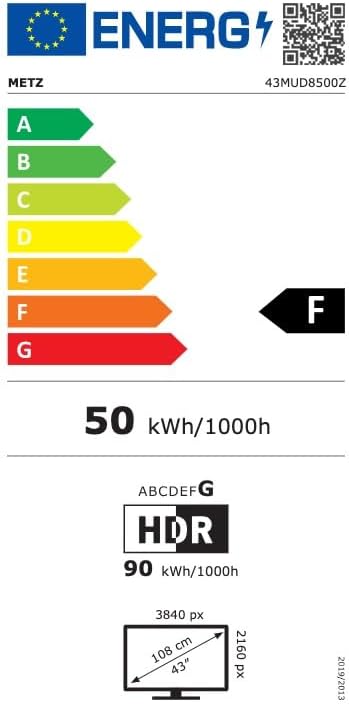
Image: EU Energy Label for the Metz MUD8500Z television, showing energy efficiency class F.
8. പ്രശ്നപരിഹാരം
If you encounter issues with your TV, consult the following common problems and solutions:
- ശക്തിയില്ല:
- Ensure the power cable is securely connected to both the TV and the wall outlet.
- Check if the wall outlet is functioning by plugging in another device.
- Press the power button on the remote or TV. - ചിത്രം/ശബ്ദം ഇല്ല:
- Verify the correct input source is selected (e.g., HDMI 1, AV).
- Check all cable connections between the TV and external devices.
- For no sound, ensure volume is not muted or too low. - റിമോട്ട് കൺട്രോൾ പ്രവർത്തിക്കുന്നില്ല:
- Replace the batteries in the remote control.
- Ensure there are no obstructions between the remote and the TV's IR sensor.
- Point the remote directly at the TV. - നെറ്റ്വർക്ക് കണക്ഷൻ പ്രശ്നങ്ങൾ:
- Restart your Wi-Fi router.
- Check Wi-Fi password and ensure it is entered correctly.
- Try connecting via an Ethernet cable if Wi-Fi issues persist. - ചിത്ര ഗുണനിലവാര പ്രശ്നങ്ങൾ (ഉദാ: മങ്ങിയത്, വികലമായത്):
- Check the resolution settings of the input source.
- Ensure the signal source (antenna, cable box, streaming) is stable.
- Adjust picture settings in the TV menu (brightness, contrast, sharpness).
ഈ പരിഹാരങ്ങൾ പരീക്ഷിച്ചതിന് ശേഷവും പ്രശ്നം നിലനിൽക്കുകയാണെങ്കിൽ, ദയവായി ഉപഭോക്തൃ പിന്തുണയുമായി ബന്ധപ്പെടുക.
9. പരിപാലനം
9.1. സ്ക്രീൻ വൃത്തിയാക്കൽ
മൃദുവായ, ലിന്റ് രഹിത തുണി ഉപയോഗിച്ച് സ്ക്രീൻ സൌമ്യമായി തുടയ്ക്കുക. കഠിനമായ പാടുകൾക്ക്, നേരിയ തോതിൽ dampവെള്ളം അല്ലെങ്കിൽ ഒരു പ്രത്യേക സ്ക്രീൻ ക്ലീനർ ഉപയോഗിച്ച് തുണി വൃത്തിയാക്കുക. കഠിനമായ രാസവസ്തുക്കളോ ഉരച്ചിലുകളോ ഉള്ള വസ്തുക്കൾ ഉപയോഗിക്കരുത്.
9.2. കാബിനറ്റ് വൃത്തിയാക്കൽ
Wipe the TV cabinet with a soft, dry cloth. Avoid using liquid cleaners directly on the TV.
9.3. വെൻ്റിലേഷൻ
Ensure that the ventilation openings on the back of the TV are not blocked. Proper airflow prevents overheating and prolongs the life of the TV.
10. വാറൻ്റിയും പിന്തുണയും
The Metz MUD8500Z television comes with a standard manufacturer's warranty. According to specifications, the minimum general warranty duration provided by the supplier is 2 years.
For warranty claims, technical assistance, or further support, please refer to the contact information provided with your purchase documentation or visit the official METZ CONNECT webസൈറ്റ്.


