1. ആമുഖം
This user manual provides essential information for the safe and efficient operation of your Blow KidsTAB8 8-inch tablet. Please read this manual thoroughly before using the device and retain it for future reference. The Blow KidsTAB8 features an 8-inch IPS display, UNISOC T606 octa-core processor, 4GB RAM, 64GB internal storage, and runs on Android 12.
2 സുരക്ഷാ വിവരങ്ങൾ
- ടാബ്ലെറ്റിനെ തീവ്രമായ താപനിലയിലോ, നേരിട്ടുള്ള സൂര്യപ്രകാശത്തിലോ, ഉയർന്ന ആർദ്രതയിലോ തുറന്നുകാട്ടരുത്.
- ടാബ്ലെറ്റ് താഴെയിടുകയോ ഗുരുതരമായ ആഘാതത്തിന് വിധേയമാക്കുകയോ ചെയ്യുന്നത് ഒഴിവാക്കുക.
- Use only the charger provided or approved by the manufacturer.
- ടാബ്ലെറ്റ് സ്വയം വേർപെടുത്താനോ നന്നാക്കാനോ ശ്രമിക്കരുത്. യോഗ്യതയുള്ള സേവന ഉദ്യോഗസ്ഥരെ ബന്ധപ്പെടുക.
- ടാബ്ലെറ്റ് വെള്ളത്തിൽ നിന്നും മറ്റ് ദ്രാവകങ്ങളിൽ നിന്നും അകറ്റി നിർത്തുക.
- പ്രാദേശിക നിയന്ത്രണങ്ങൾ അനുസരിച്ച് ടാബ്ലെറ്റും അതിന്റെ ബാറ്ററിയും ഉത്തരവാദിത്തത്തോടെ നിർമാർജനം ചെയ്യുക.
3. പാക്കേജ് ഉള്ളടക്കം
നിങ്ങളുടെ പാക്കേജിൽ ഇനിപ്പറയുന്ന ഇനങ്ങൾ അടങ്ങിയിട്ടുണ്ടെന്ന് പരിശോധിക്കുക:
- Blow KidsTAB8 8-inch Tablet
- USB-C ചാർജിംഗ് കേബിൾ
- പവർ അഡാപ്റ്റർ
- ഉപയോക്തൃ മാനുവൽ (ഈ പ്രമാണം)
Note: Specific accessories may vary by region.
4. ഡിവൈസ് ഓവർview
നിങ്ങളുടെ ടാബ്ലെറ്റിന്റെ ഭൗതിക ഘടകങ്ങളുമായി പരിചയപ്പെടുക.
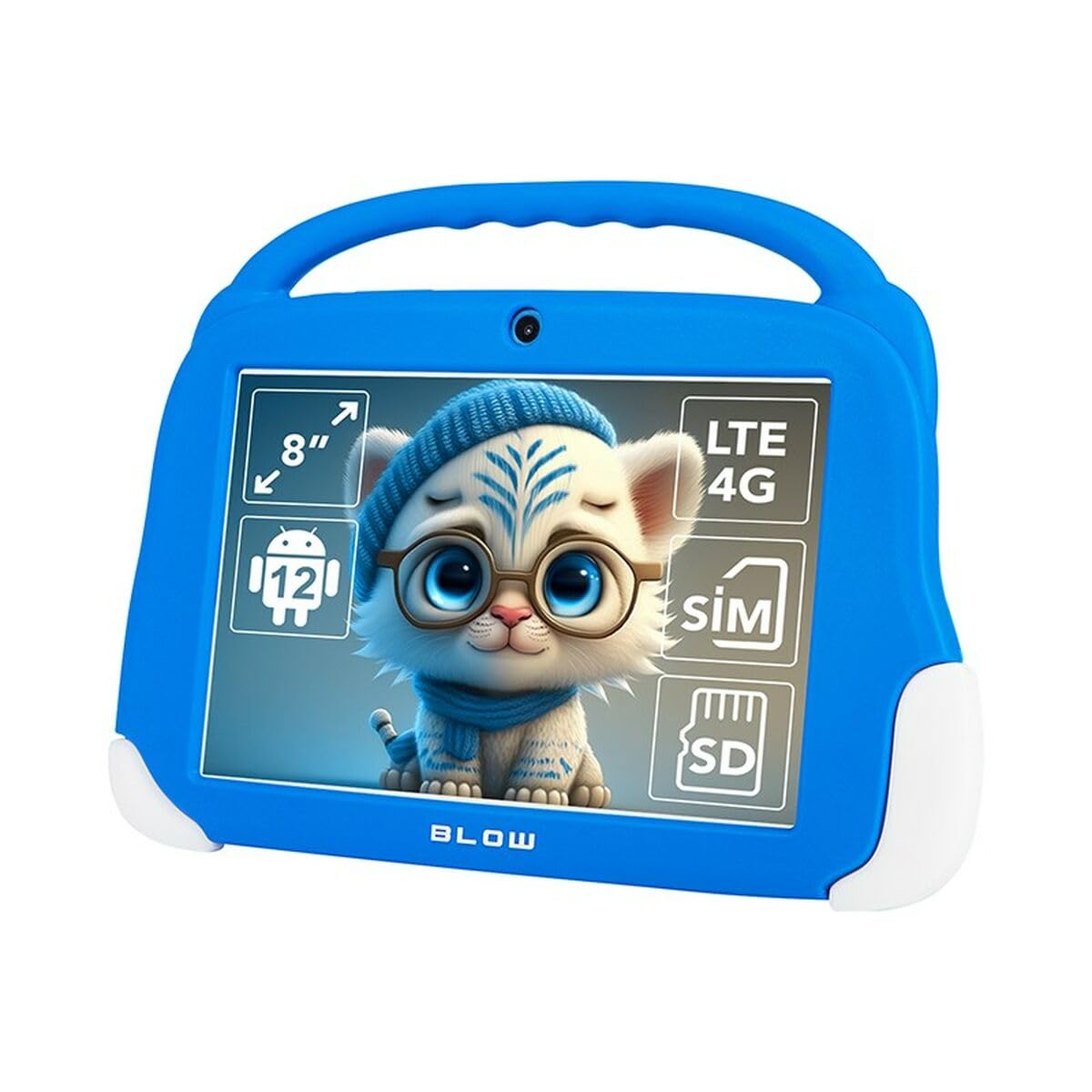
ചിത്രം 4.1: ഫ്രണ്ട് view of the Blow KidsTAB8 tablet, showing the 8-inch display and front camera.
4.1 ശാരീരിക സവിശേഷതകൾ
- 8-ഇഞ്ച് IPS ഡിസ്പ്ലേ: High-definition screen for clear visuals.
- മുൻ ക്യാമറ: Located above the screen for video calls and selfies.
- പിൻ ക്യാമറ: Located on the back for capturing photos and videos (2 MP resolution).
- പവർ ബട്ടൺ: Typically on the side, used to power on/off and wake/sleep the device.
- വോളിയം ബട്ടണുകൾ: ഓഡിയോ ലെവലുകൾ ക്രമീകരിക്കുക.
- യുഎസ്ബി-സി പോർട്ട്: ചാർജിംഗിനും ഡാറ്റ കൈമാറ്റത്തിനും.
- Micro SIM/SD Card Slot: For mobile connectivity and expandable storage.
5. സജ്ജീകരണം
5.1 പ്രാരംഭ ചാർജിംഗ്
Before first use, fully charge your tablet. Connect the USB-C cable to the tablet's USB-C port and the power adapter to a wall outlet. The battery indicator on the screen will show charging status. The tablet has a 4800 mAh battery.
5.2 പവർ ഓൺ/ഓഫ്
- പവർ ഓണാക്കാൻ: Press and hold the Power button until the Blow logo appears.
- പവർ ഓഫ് ചെയ്യാൻ: പവർ ബട്ടൺ അമർത്തിപ്പിടിക്കുക, തുടർന്ന് സ്ക്രീനിലെ ഓപ്ഷനുകളിൽ നിന്ന് "പവർ ഓഫ്" തിരഞ്ഞെടുക്കുക.
- ഉറങ്ങാൻ/ഉണരാൻ: ടാബ്ലെറ്റ് നിദ്രയിലാക്കാനോ ഉണർത്താനോ പവർ ബട്ടൺ അൽപ്പനേരം അമർത്തുക.
5.3 സിം കാർഡും മൈക്രോ എസ്ഡി കാർഡും ഇൻസ്റ്റാൾ ചെയ്യൽ
The tablet supports a Micro SIM card for 4G LTE connectivity and a MicroSD card for expandable storage up to 64GB (or more, depending on card compatibility).
- ടാബ്ലെറ്റിന്റെ വശത്ത് സിം/മൈക്രോ എസ്ഡി കാർഡ് ട്രേ കണ്ടെത്തുക.
- ട്രേ തുറക്കാൻ നൽകിയിരിക്കുന്ന സിം എജക്റ്റർ ടൂൾ (ഉൾപ്പെടുത്തിയിട്ടുണ്ടെങ്കിൽ) ഉപയോഗിക്കുക.
- Carefully place the Micro SIM card and/or MicroSD card into the designated slots on the tray, ensuring correct orientation.
- ട്രേ അതിന്റെ സ്ഥാനത്ത് ക്ലിക്കു ചെയ്യുന്നത് വരെ ടാബ്ലെറ്റിലേക്ക് പതുക്കെ തിരികെ തള്ളുക.
6. പ്രവർത്തന നിർദ്ദേശങ്ങൾ
6.1 അടിസ്ഥാന നാവിഗേഷൻ (ആൻഡ്രോയിഡ് 12)
- ഹോം സ്ക്രീൻ: ഹോം സ്ക്രീനുകൾക്കിടയിൽ നാവിഗേറ്റ് ചെയ്യാൻ ഇടത്തോട്ടോ വലത്തോട്ടോ സ്വൈപ്പ് ചെയ്യുക.
- ആപ്പ് ഡ്രോയർ: ഇൻസ്റ്റാൾ ചെയ്ത എല്ലാ ആപ്ലിക്കേഷനുകളും ആക്സസ് ചെയ്യാൻ സ്ക്രീനിന്റെ താഴെ നിന്ന് മുകളിലേക്ക് സ്വൈപ്പ് ചെയ്യുക.
- അറിയിപ്പുകളും ദ്രുത ക്രമീകരണങ്ങളും: സ്ക്രീനിന്റെ മുകളിൽ നിന്ന് താഴേക്ക് സ്വൈപ്പ് ചെയ്യുക view അറിയിപ്പുകളും ആക്സസ് ക്വിക്ക് സെറ്റിംഗ്സ് ടോഗിളുകളും.
- ബാക്ക്, ഹോം, സമീപകാല ആപ്പുകൾ: Use the navigation buttons at the bottom of the screen (or gestures, if enabled) to navigate.
6.2 കണക്റ്റിവിറ്റി
- വൈഫൈ: പോകുക ക്രമീകരണങ്ങൾ > നെറ്റ്വർക്കും ഇന്റർനെറ്റും > വൈ-ഫൈ to connect to available Wi-Fi networks (supports 802.11ac, b, g, n, and 5 GHz).
- ബ്ലൂടൂത്ത്: പോകുക ക്രമീകരണങ്ങൾ > കണക്റ്റുചെയ്ത ഉപകരണങ്ങൾ > ബ്ലൂടൂത്ത് to pair with Bluetooth 5.0 compatible devices.
- മൊബൈൽ ഡാറ്റ (4G LTE): If a Micro SIM card is installed, enable mobile data in ക്രമീകരണം > നെറ്റ്വർക്കും ഇന്റർനെറ്റും > മൊബൈൽ നെറ്റ്വർക്ക്.
- ജിപിഎസ്: The tablet supports GPS, Glonass, and BeiDou for location services. Ensure location services are enabled in ക്രമീകരണങ്ങൾ> സ്ഥാനം.
6.3 ക്യാമറ ഉപയോഗം
Open the Camera app to take photos or record videos. The tablet features a front camera and a 2 MP rear camera.
6.4 അപേക്ഷകൾ
Download and install applications from the Google Play Store. Ensure you have a Google account set up on your tablet.
7. പരിപാലനം
7.1 ടാബ്ലെറ്റ് വൃത്തിയാക്കൽ
Use a soft, lint-free cloth to clean the screen and body of the tablet. Do not use abrasive cleaners or solvents. If necessary, slightly dampവെള്ളം ഉപയോഗിച്ച് തുണി അല്ലെങ്കിൽ ഇലക്ട്രോണിക് ഉപകരണങ്ങൾക്കായി പ്രത്യേകം രൂപകൽപ്പന ചെയ്ത ഒരു സ്ക്രീൻ ക്ലീനർ.
7.2 സോഫ്റ്റ്വെയർ അപ്ഡേറ്റുകൾ
നിങ്ങളുടെ ടാബ്ലെറ്റിൽ ഏറ്റവും പുതിയ സവിശേഷതകളും സുരക്ഷാ മെച്ചപ്പെടുത്തലുകളും ഉണ്ടെന്ന് ഉറപ്പാക്കാൻ ഇടയ്ക്കിടെ സോഫ്റ്റ്വെയർ അപ്ഡേറ്റുകൾക്കായി പരിശോധിക്കുക. പോകുക ക്രമീകരണങ്ങൾ > സിസ്റ്റം > സിസ്റ്റം അപ്ഡേറ്റ്.
8. പ്രശ്നപരിഹാരം
| പ്രശ്നം | പരിഹാരം |
|---|---|
| ടാബ്ലെറ്റ് ഓണാക്കുന്നില്ല. | ബാറ്ററി ചാർജ്ജ് ചെയ്തിട്ടുണ്ടെന്ന് ഉറപ്പാക്കുക. ചാർജർ കണക്റ്റ് ചെയ്ത് വീണ്ടും പവർ ചെയ്യാൻ ശ്രമിക്കുന്നതിന് മുമ്പ് കുറച്ച് മിനിറ്റ് കാത്തിരിക്കുക. |
| വൈഫൈ കണക്ഷൻ പ്രശ്നങ്ങൾ. | Check if Wi-Fi is enabled in settings. Restart your Wi-Fi router. Forget the network and reconnect. |
| ആപ്പുകൾ ക്രാഷ് ചെയ്യുകയോ മരവിക്കുകയോ ചെയ്യുന്നു. | Close and restart the app. Clear the app's cache in ക്രമീകരണങ്ങൾ > ആപ്പുകൾ > [ആപ്പ് നാമം] > സംഭരണവും കാഷെയും. Restart the tablet. |
| മന്ദഗതിയിലുള്ള പ്രകടനം. | Close unused apps. Clear cache. Consider uninstalling unnecessary applications. Perform a factory reset as a last resort (backup data first). |
9 സ്പെസിഫിക്കേഷനുകൾ
| മോഡൽ നമ്പർ | എസ് 9148142 |
| പ്രദർശിപ്പിക്കുക | 8-inch IPS, 1280 x 800 px (HD) |
| പ്രോസസ്സർ | UNISOC T606 ഒക്ടാ കോർ |
| റാം | 4 ജിബി |
| ആന്തരിക സംഭരണം | 64 ജിബി |
| ഓപ്പറേറ്റിംഗ് സിസ്റ്റം | ആൻഡ്രോയിഡ് 12 |
| ബാറ്ററി ശേഷി | 4800 mAh |
| കണക്റ്റിവിറ്റി | Wi-Fi (802.11ac, b, g, n, 5 GHz), Bluetooth 5.0, 4G LTE, GPS, Glonass, BeiDou |
| തുറമുഖങ്ങൾ | USB-C 3.0 x 1, Micro SIM slot, MicroSD card reader |
| ക്യാമറകൾ | മുൻ ക്യാമറ, പിൻ ക്യാമറ (2 MP) |
| അളവുകൾ | 18.2 x 2.2 x 25 സെ.മീ |
| ഭാരം | 880 ഗ്രാം |
10. വാറൻ്റിയും പിന്തുണയും
For warranty information and technical support, please refer to the warranty card included with your product or visit the official Blow webസൈറ്റ്. വാറന്റി ക്ലെയിമുകൾക്കായി നിങ്ങളുടെ വാങ്ങലിന്റെ തെളിവ് സൂക്ഷിക്കുക.
നിർമ്മാതാവ്: ഊതുക
മോഡൽ: KidsTAB8 (S9148142)


