1. ആമുഖം
Thank you for choosing the LOFREE Touch PBT Wireless Mouse. This manual provides detailed instructions for setting up, operating, and maintaining your mouse to ensure optimal performance. Please read this manual thoroughly before use and retain it for future reference.
2. പാക്കേജ് ഉള്ളടക്കം
- LOFREE Touch PBT Wireless Mouse
- യുഎസ്ബി റിസീവർ (2.4G)
- യുഎസ്ബി-സി മുതൽ യുഎസ്ബി-എ ചാർജിംഗ് കേബിൾ വരെ
- ഉപയോക്തൃ മാനുവൽ
- ലിഥിയം പോളിമർ ബാറ്ററി (മുൻകൂട്ടി ഇൻസ്റ്റാൾ ചെയ്തത്)
3. ഉൽപ്പന്നം കഴിഞ്ഞുview
The LOFREE Touch PBT Wireless Mouse combines ergonomic design with advanced features for a superior user experience.

ചിത്രം 3.1: മുകളിൽ view of the LOFREE Touch PBT Wireless Mouse, showcasing its unique design and OLED screen.
3.1. PBT Material
The mouse features PBT material on the MB1, MB2 buttons, and the upper case. This material provides a non-glossy, non-sticky, and skin-friendly texture, ensuring a reliable grip and comfortable ergonomics during extended use.

ചിത്രം 3.2: ക്ലോസപ്പ് view highlighting the PBT material used on the mouse buttons.
3.2. OLED ഡിസ്പ്ലേ
An integrated OLED screen provides real-time information including DPI settings, battery level, and current connectivity mode. This allows for quick monitoring and adjustment of mouse parameters.

Figure 3.3: The OLED display indicating DPI, battery status, and connection type.
3.3. Replaceable Buttons
The mouse features replaceable buttons, allowing for customization of its appearance. This design also facilitates easier cleaning and maintenance.

Figure 3.4: Demonstrating the replaceable button feature of the mouse.
3.4. Multi-Surface Tracking
Equipped with a PAW3805 sensor, the mouse is traceable on various surfaces, including clear glass. It features high-speed dynamic tracking with adaptive binding rate adjustment, suitable for diverse work and gaming environments.

Figure 3.5: The mouse tracking accurately on a clear glass surface.
4. സജ്ജീകരണവും കണക്ഷനും
The LOFREE Touch PBT Wireless Mouse supports three connection modes: Bluetooth 5.0, 2.4G Wireless (via USB receiver), and Wired (via USB-C cable).
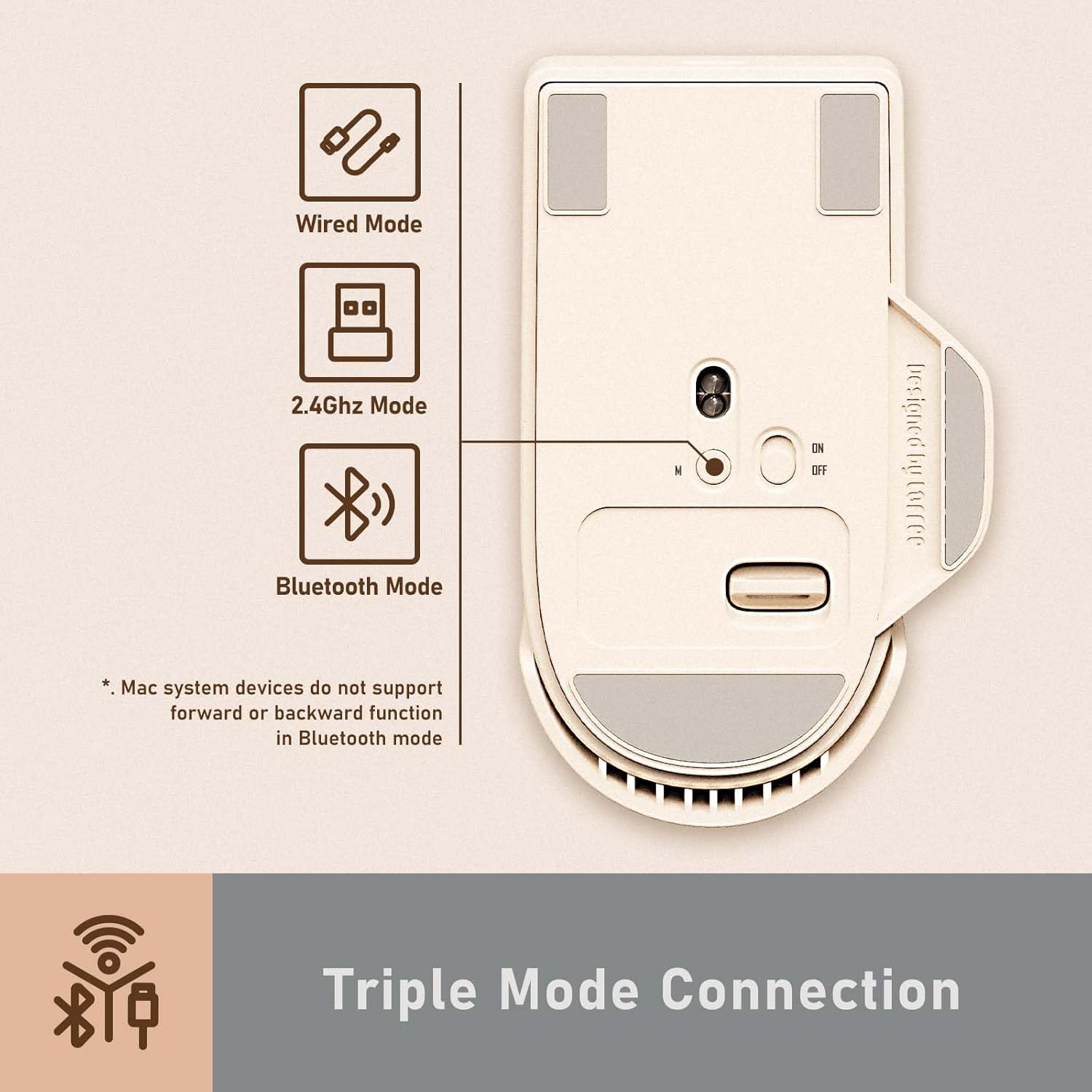
ചിത്രം 4.1: ഓവർview of the triple mode connection options.
4.1. പവർ ഓൺ/ഓഫ്, മോഡ് തിരഞ്ഞെടുക്കൽ
Locate the power switch and mode selector on the underside of the mouse. Use the switch to turn the mouse ON or OFF. The mode selector allows you to choose between 2.4G Wireless and Bluetooth modes.
4.2. 2.4G വയർലെസ് കണക്ഷൻ
- Turn on the mouse and select the 2.4G mode using the switch on the underside.
- Remove the USB receiver from its magnetic storage slot on the mouse.
- നിങ്ങളുടെ കമ്പ്യൂട്ടറിൽ ലഭ്യമായ USB പോർട്ടിലേക്ക് USB റിസീവർ പ്ലഗ് ചെയ്യുക.
- The mouse should automatically connect. The OLED screen will indicate the 2.4G connection status.
4.3. ബ്ലൂടൂത്ത് കണക്ഷൻ
- Turn on the mouse and select the Bluetooth mode using the switch on the underside.
- നിങ്ങളുടെ കമ്പ്യൂട്ടറിലോ ഉപകരണത്തിലോ, Bluetooth ക്രമീകരണങ്ങളിലേക്ക് നാവിഗേറ്റ് ചെയ്യുക.
- ഇതിനായി തിരയുക new devices and select "LOFREE Touch Mouse" (or similar) from the list.
- Follow any on-screen prompts to complete pairing. The OLED screen will show the Bluetooth connection status.
Note: Mac system devices do not support the forward or backward function of the mouse in Bluetooth mode.
4.4. വയർഡ് കണക്ഷൻ
- ചാർജിംഗ് കേബിളിന്റെ USB-C അറ്റം മൗസുമായും USB-A അറ്റം നിങ്ങളുടെ കമ്പ്യൂട്ടറുമായും ബന്ധിപ്പിക്കുക.
- മൗസ് യാന്ത്രികമായി വയേർഡ് മോഡിലേക്ക് മാറുകയും ചാർജ് ചെയ്യാൻ തുടങ്ങുകയും ചെയ്യും.
4.5 അനുയോജ്യത
The LOFREE Touch PBT Wireless Mouse is compatible with various operating systems, including Windows, macOS, and Android.

Figure 4.2: The mouse is compatible with Windows, Android, and macOS devices.
5. പ്രവർത്തന നിർദ്ദേശങ്ങൾ
5.1. ഡിപിഐ ക്രമീകരണം
The mouse offers adjustable DPI settings from 800 to 4000 DPI. You can customize the DPI in increments of 200 DPI. The current DPI setting is displayed on the OLED screen.
- To adjust DPI, press the dedicated DPI button located near the scroll wheel.
- Each press cycles through preset DPI values (800/1600/2400/3200/4000).
- For custom adjustments, refer to the advanced settings section (if applicable, typically via software, but not specified in product data).

Figure 5.1: The OLED screen displaying the current DPI setting.
5.2. ബാറ്ററി നില
The OLED screen continuously displays the current battery level, allowing you to monitor power and recharge as needed.
5.3. Basic Button Functions
- Left Click (MB1): പ്രാഥമിക പ്രവർത്തനം.
- Right Click (MB2): ദ്വിതീയ പ്രവർത്തന/സന്ദർഭ മെനു.
- സ്ക്രോൾ വീൽ: മുകളിലേക്കും/താഴേക്കും സ്ക്രോൾ ചെയ്യുക, മധ്യത്തിൽ ക്ലിക്ക് ചെയ്യുക.
- DPI ബട്ടൺ: DPI ക്രമീകരണങ്ങൾ ക്രമീകരിക്കുന്നു.
- സൈഡ് ബട്ടണുകൾ: Typically for forward/backward navigation in web browsers. (Functionality may vary by operating system and connection mode).
6. പരിപാലനം
6.1. വൃത്തിയാക്കൽ
To maintain the mouse's performance and appearance:
- മൗസിന്റെ ഉപരിതലം തുടയ്ക്കാൻ മൃദുവായതും ഉണങ്ങിയതുമായ ഒരു തുണി ഉപയോഗിക്കുക.
- കഠിനമായ അഴുക്കിന്, ചെറുതായി dampവെള്ളം അല്ലെങ്കിൽ മൃദുവായ, ഉരച്ചിലുകളില്ലാത്ത ക്ലീനർ ഉപയോഗിച്ച് തുണിയിൽ വയ്ക്കുക.
- The replaceable buttons can be removed for thorough cleaning underneath. Ensure they are dry before reattaching.
- Avoid using harsh chemicals or abrasive materials, as these can damage the PBT surface.
6.2. ചാർജിംഗ്
The mouse is equipped with a rechargeable Lithium Polymer battery. When the battery level is low, connect the mouse to a power source using the provided USB-C cable. The OLED screen will indicate charging status.
7. പ്രശ്നപരിഹാരം
| ഇഷ്യൂ | സാധ്യമായ കാരണം | പരിഹാരം |
|---|---|---|
| മൗസ് പ്രതികരിക്കുന്നില്ല | Low battery, incorrect connection mode, receiver not plugged in (2.4G), Bluetooth not paired. | Charge the mouse. Verify the mode switch is set correctly. Re-insert the USB receiver. Re-pair Bluetooth. |
| കാലതാമസം അല്ലെങ്കിൽ ഇടവിട്ടുള്ള കണക്ഷൻ | ഇടപെടൽ, റിസീവർ/ഉപകരണത്തിൽ നിന്നുള്ള ദൂരം, കുറഞ്ഞ ബാറ്ററി. | Move closer to the receiver/device. Ensure no large metal objects are between the mouse and receiver. Charge the mouse. Try a different USB port. |
| ട്രാക്കിംഗ് പ്രശ്നങ്ങൾ | വൃത്തികെട്ട സെൻസർ, അനുയോജ്യമല്ലാത്ത പ്രതലം. | Clean the optical sensor on the underside of the mouse. Use a clean, uniform surface. |
| Mouse enters sleep mode too quickly (2.4G) | പവർ ലാഭിക്കൽ സവിശേഷത. | The mouse is designed to wake up with button clicks or scroll wheel movement. Movement alone may not wake it in 2.4G mode. This is normal behavior. |
8 സ്പെസിഫിക്കേഷനുകൾ
| ഫീച്ചർ | വിശദാംശങ്ങൾ |
|---|---|
| മോഡൽ നമ്പർ | OE909 |
| കണക്റ്റിവിറ്റി | Bluetooth 5.0, 2.4G Wireless, Wired (USB-C) |
| ഡിപിഐ ശ്രേണി | 800 / 1600 / 2400 / 3200 / 4000 (adjustable in 200 DPI increments) |
| സെൻസർ | PAW3805 ഒപ്റ്റിക്കൽ സെൻസർ |
| മെറ്റീരിയൽ | PBT (buttons and upper case) |
| പ്രദർശിപ്പിക്കുക | OLED (DPI, Battery, Connectivity) |
| ബാറ്ററി തരം | ലിഥിയം പോളിമർ (ഉൾപ്പെടുത്തിയിരിക്കുന്നു) |
| ഇനത്തിൻ്റെ ഭാരം | 7.4 ഔൺസ് (ഏകദേശം 210 ഗ്രാം) |
| പാക്കേജ് അളവുകൾ | 5.12 x 3.78 x 2.13 ഇഞ്ച് |
9. വാറൻ്റിയും പിന്തുണയും
LOFREE products are designed and manufactured to the highest quality standards. This product is covered by a limited warranty from the date of purchase. For detailed warranty terms and conditions, please refer to the warranty card included in your package or visit the official LOFREE webസൈറ്റ്.
If you encounter any issues or have questions regarding your LOFREE Touch PBT Wireless Mouse, please contact LOFREE customer support through their official channels. Provide your product model number (OE909) and purchase details for efficient assistance.


