1. ആമുഖം
This manual provides essential information for the installation, operation, and maintenance of your GreenYi 56054058AH Rear View Backup Camera. This camera is designed as a direct replacement for original equipment (OE) part numbers 4672639AA, 56054058AD, 56054058AE, 56054058AF, 56054058AG, 56054157AG, and 56054058AH. It is compatible with 2011-2014 Dodge Charger and Chrysler 300 vehicle models.
2. ബോക്സിൽ എന്താണുള്ളത്?
പാക്കേജിൽ എല്ലാ ഘടകങ്ങളും ഉണ്ടെന്ന് ഉറപ്പാക്കുക:
- OE backup camera for Dodge Charger & Chrysler 300 (2011-2014 models)
- നന്ദി കാർഡ്

Image: The GreenYi 56054058AH backup camera with its integrated cable and connector.
3 പ്രധാന സവിശേഷതകൾ
- Direct OE Replacement: Designed to seamlessly replace original backup cameras in compatible Dodge Charger and Chrysler 300 models from 2011 to 2014.
- മെച്ചപ്പെടുത്തിയ രാത്രി കാഴ്ച: Features advanced imaging for clear, high-definition visuals in both daylight and low-light conditions, improving safety during nighttime reversing.
- IP68 വാട്ടർപ്രൂഫ് റേറ്റിംഗ്: Engineered to withstand various environmental conditions, including car washes and heavy rain, ensuring consistent performance.
- നീണ്ടുനിൽക്കുന്ന നിർമ്മാണം: Built with a robust housing for enhanced strength, toughness, high-temperature resistance, and wear resistance, preventing deformation.
- പ്ലഗ്-ആൻഡ്-പ്ലേ ഇൻസ്റ്റാളേഷൻ: Simplifies the replacement process by eliminating the need for complex wiring.

Image: A visual comparison demonstrating the clarity of Starlight Full Color Night Vision provided by the GreenYi camera versus standard night vision.

Image: The backup camera submerged in water, illustrating its IP68 waterproof rating, with insets showing its performance in rain and snow.
4. ഇൻസ്റ്റലേഷൻ
The GreenYi 56054058AH backup camera is designed for a direct, plug-and-play replacement of your vehicle's original camera. No complex wiring modifications are typically required.
ഇൻസ്റ്റലേഷൻ ഘട്ടങ്ങൾ:
- തയ്യാറാക്കൽ: Ensure your vehicle is turned off and the parking brake is engaged. Gather necessary tools, which may include a trim removal tool, screwdriver, and socket wrench.
- Access the Original Camera: Depending on your vehicle model (Dodge Charger or Chrysler 300), the original camera is typically located in the trunk lid or near the license plate area. You may need to remove interior trim panels to access the camera's mounting points and wiring harness.
- Disconnect Old Camera: Carefully disconnect the electrical connector from the existing backup camera. Remove any mounting screws or clips securing the old camera.
- Install New Camera: Position the GreenYi replacement camera in the original mounting location. Secure it with the factory screws or clips. Connect the camera's electrical connector to the vehicle's wiring harness.
- ടെസ്റ്റ് പ്രവർത്തനം: Before reassembling all trim panels, turn on your vehicle and shift into reverse to verify that the new camera is functioning correctly and displaying an image on your vehicle's screen.
- വീണ്ടും കൂട്ടിച്ചേർക്കുക: Once confirmed operational, reattach any removed trim panels and ensure all components are securely fastened.
For detailed, vehicle-specific installation guidance, it is recommended to search for instructional videos on platforms like YouTube using your exact vehicle model and the original equipment (OEM) part number found on your old camera.
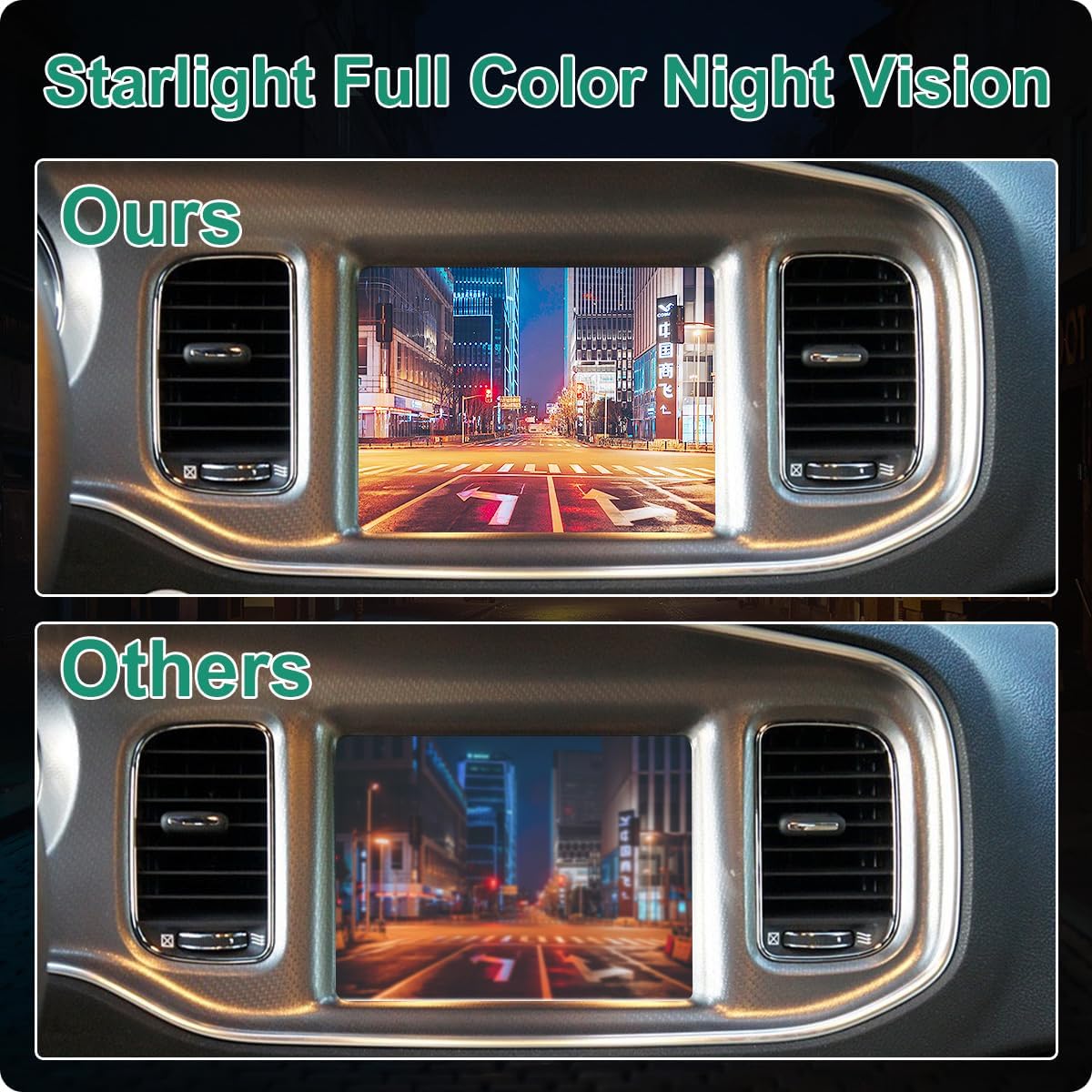
Image: Detailed dimensions of the camera unit and a close-up of the 6-pin electrical connector, showing its compact design.

ചിത്രം: ഒരു പിൻഭാഗം view of a Dodge Charger, demonstrating the wide 130-degree viewing angle of the backup camera as displayed on the vehicle's infotainment screen.
Video: A demonstration of the GreenYi 56054058AH OE backup camera, showcasing its appearance and potentially its functionality or installation process.
5. ഓപ്പറേഷൻ
Once installed, the GreenYi backup camera operates automatically when your vehicle is shifted into reverse gear. The camera feed will display on your vehicle's compatible infotainment screen, providing a clear view നിങ്ങളുടെ വാഹനത്തിന് പിന്നിലെ പ്രദേശം.
- മൾട്ടി-ആംഗിൾ Views: The camera provides a wide-angle view to assist with parking and maneuvering.
- രാത്രി കാഴ്ച: The advanced imaging system ensures visibility even in low-light conditions, enhancing safety during nighttime use.
- പാർക്കിംഗ് മാർഗ്ഗനിർദ്ദേശങ്ങൾ: Dynamic or static parking guidelines may be displayed on the screen to assist with judging distance and trajectory (functionality depends on vehicle's infotainment system).
6. പരിപാലനം
The GreenYi backup camera is designed for durability and minimal maintenance. Follow these guidelines to ensure optimal performance:
- വൃത്തിയാക്കൽ: ക്യാമറ ലെൻസ് ഇടയ്ക്കിടെ മൃദുവായ, ഡി-ടച്ച് ഉപയോഗിച്ച് വൃത്തിയാക്കുക.amp cloth to remove dirt, dust, or debris that may obstruct the view. Avoid using abrasive cleaners or harsh chemicals.
- ജല പ്രതിരോധം: The camera has an IP68 waterproof rating, meaning it is protected against dust and immersion in water. It can withstand car washes and heavy rain without damage.
- പരിശോധന: Occasionally inspect the camera and its wiring for any signs of physical damage or loose connections.
7. പ്രശ്നപരിഹാരം
If you encounter issues with your GreenYi backup camera, consider the following troubleshooting steps:
- ഇമേജ് ഡിസ്പ്ലേ ഇല്ല:
- വാഹനം റിവേഴ്സ് ഗിയറിൽ ആണെന്ന് ഉറപ്പാക്കുക.
- Check all electrical connections to the camera and the vehicle's wiring harness for secure fitment.
- Verify that your vehicle's infotainment system is functioning correctly.
- മോശം ചിത്രത്തിന്റെ ഗുണനിലവാരം:
- ക്യാമറ ലെൻസ് വൃത്തിയാക്കി അതിൽ നിന്ന് അഴുക്കോ പാടുകളോ നീക്കം ചെയ്യുക.
- ക്യാമറകൾക്ക് തടസ്സങ്ങളൊന്നുമില്ലെന്ന് ഉറപ്പാക്കുക. view.
- Check for any physical damage to the camera lens or housing.
- ഇടയ്ക്കിടെയുള്ള പ്രവർത്തനം:
- Inspect wiring for any signs of wear, pinching, or corrosion.
- ക്യാമറ സുരക്ഷിതമായി ഘടിപ്പിച്ചിട്ടുണ്ടെന്നും വൈബ്രേറ്റ് ചെയ്യുന്നില്ലെന്നും ഉറപ്പാക്കുക.
If these steps do not resolve the issue, consult a qualified automotive technician or contact GreenYi customer support.
8 സ്പെസിഫിക്കേഷനുകൾ
| ഫീച്ചർ | വിശദാംശങ്ങൾ |
|---|---|
| മോഡൽ നമ്പർ | GreenYi-229 |
| അനുയോജ്യമായ വാഹനങ്ങൾ | Dodge Charger & Chrysler 300 (2011, 2012, 2013, 2014) |
| Replaces OE Part Numbers | 4672639AA, 56054058AD, 56054058AE, 56054058AF, 56054058AG, 56054157AG, 56054058AH |
| ഉൽപ്പന്ന അളവുകൾ | 1.81"L x 1.02"W x 1.57"H (46mm x 26mm x 40mm) |
| ഇനത്തിൻ്റെ ഭാരം | 2.24 ഔൺസ് |
| ഇൻസ്റ്റലേഷൻ തരം | Original Mounting, Plug and Play |
| വാല്യംtage | 12 വോൾട്ട് (DC) |
| ഒപ്റ്റിക്കൽ സെൻസർ ടെക്നോളജി | CMOS |
| ലെൻസ് തരം | Wide Angle or Fisheye |
| യഥാർത്ഥ ആംഗിൾ View | 170 ഡിഗ്രി |
| കണക്റ്റർ തരം | Original Connector Compatible with Vehicle |
| വാട്ടർപ്രൂഫ് റേറ്റിംഗ് | IP68 |
9. വാറൻ്റിയും പിന്തുണയും
For information regarding product warranty, returns, or technical support, please refer to the documentation included with your purchase or visit the official GreenYi website. You may also contact GreenYi customer service directly for assistance with any product-related inquiries.


