ആമുഖം
This manual provides detailed instructions for the installation, operation, and maintenance of your AUSEK D8 Dash Camera. This device is a 10-inch IPS touch screen mirror dash cam designed for vehicles, offering 4K front and 1080P rear camera recording, Wi-Fi connectivity, GPS tracking, enhanced night vision, G-sensor for emergency locking, loop recording, and parking assistance features. Please read this manual thoroughly before using the product to ensure proper function and safety.
ബോക്സിൽ എന്താണുള്ളത്
പെട്ടി ശ്രദ്ധാപൂർവ്വം അൺപാക്ക് ചെയ്യുക, താഴെ പട്ടികപ്പെടുത്തിയിരിക്കുന്ന എല്ലാ ഇനങ്ങളും ഉണ്ടെന്നും നല്ല നിലയിലാണെന്നും ഉറപ്പാക്കുക:
- Dashboard Camera (Main Mirror Unit)
- പിൻ ക്യാമറ
- Mounting Rubbers (for mirror attachment)
- Car Charger Adaptor
- ഉപയോക്തൃ മാനുവൽ
- ജിപിഎസ് മൊഡ്യൂൾ
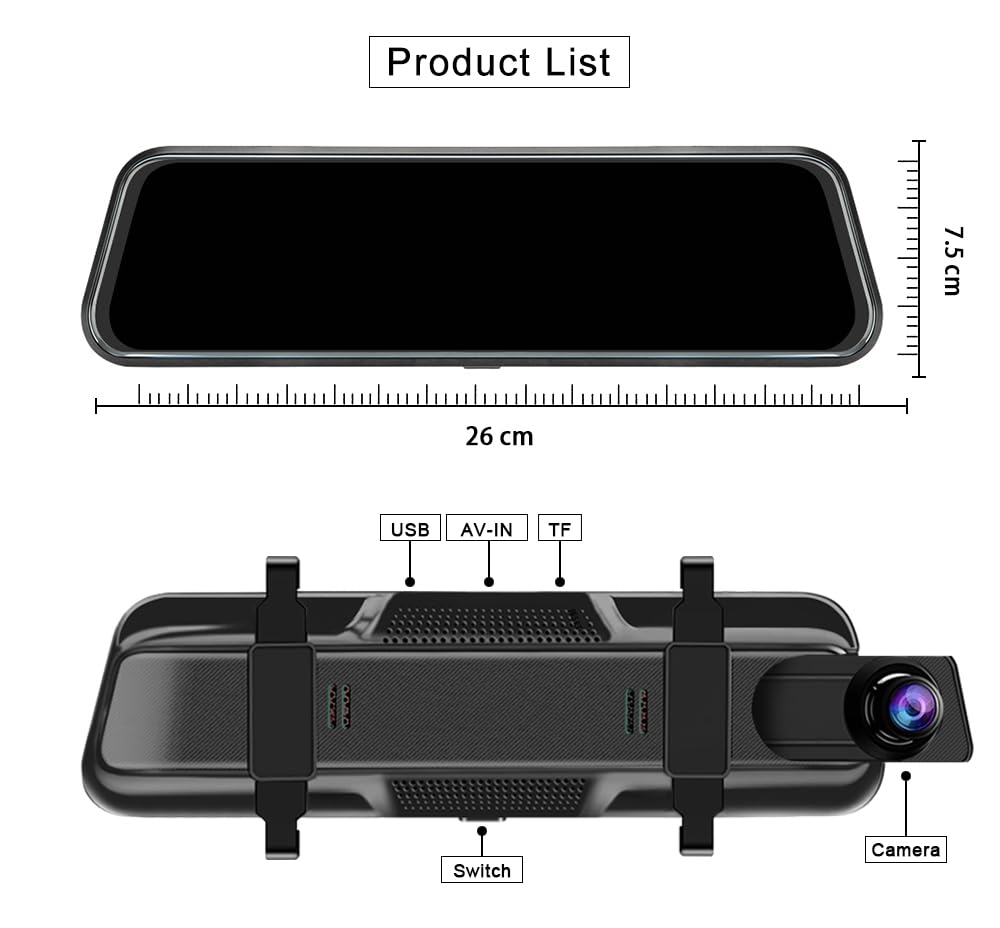
Image: Components included in the AUSEK D8 Dash Camera package, showing the main mirror dash cam, rear camera, GPS module, and accessories.
ഉൽപ്പന്നം കഴിഞ്ഞുview കൂടാതെ പ്രധാന സവിശേഷതകൾ
The AUSEK D8 Dash Camera is equipped with advanced features to enhance your driving safety and recording capabilities.
10" IPS Touch Screen & 4K WDR Recording
The device features a 10-inch IPS anti-glare touch screen with 2.5D glass, providing excellent color reproduction and real-time traffic display without lag. The user-friendly interface ensures fast responsiveness and ease of operation. It records in 4K resolution for the front camera and 1080P for the rear camera simultaneously.

Image: The 10-inch touch screen mirror dash cam highlighting its key features.
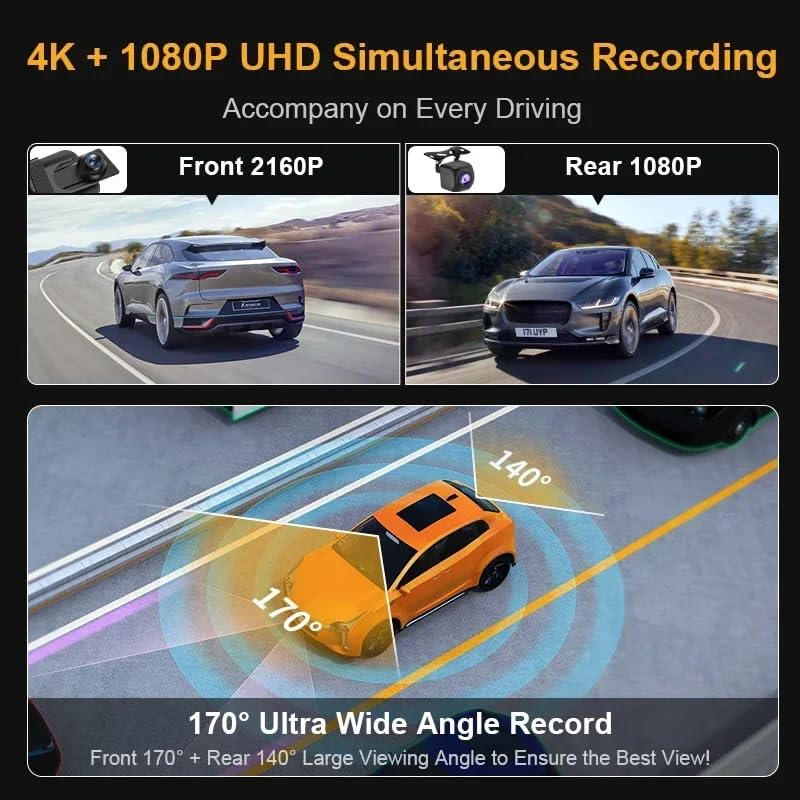
Image: Illustration of the dual camera recording capabilities and wide viewകോണുകൾ.
G-Sensor & Loop Recording
The built-in G-sensor automatically detects collisions and locks the current video segment to prevent it from being overwritten, serving as crucial evidence. Loop recording ensures continuous recording by overwriting the oldest unlocked files when the memory card is full, so you never miss a moment.
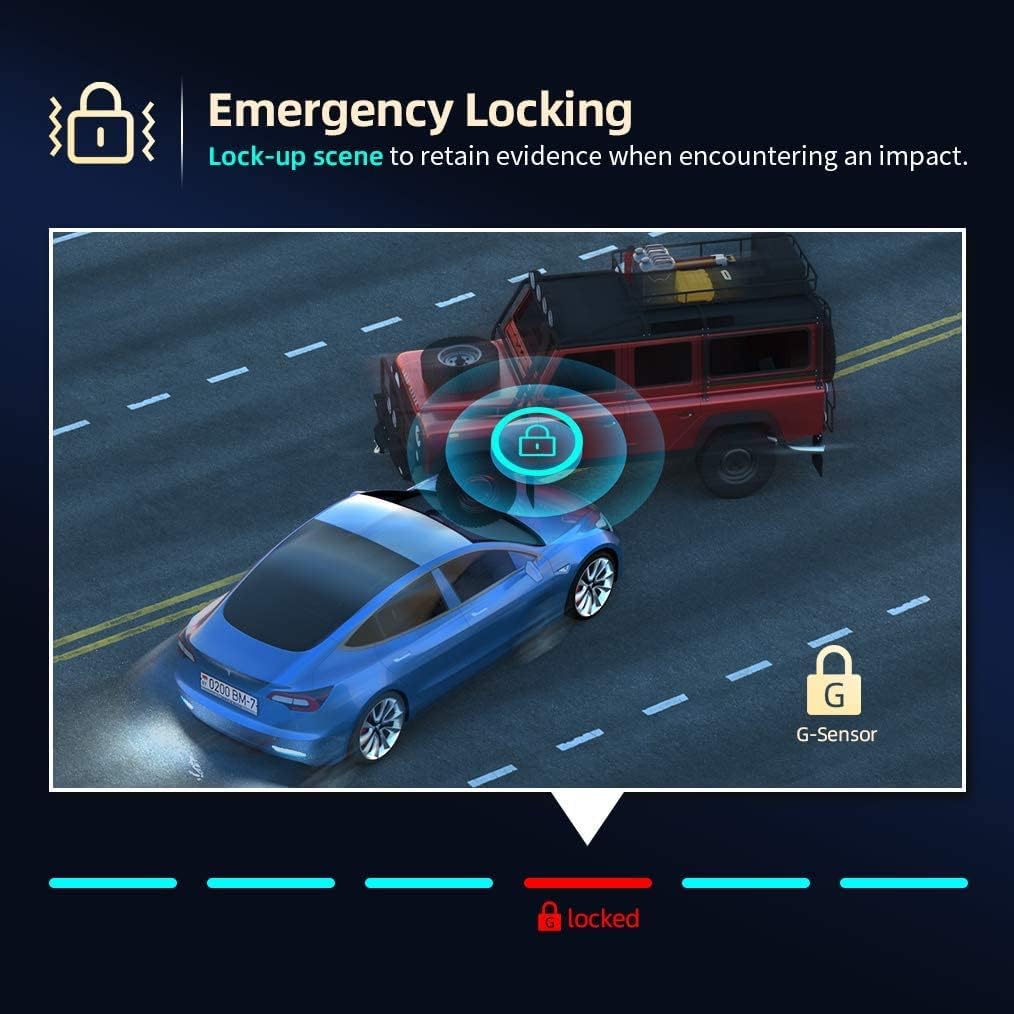
Image: Emergency locking feature triggered by the G-Sensor during an impact.

Image: Loop recording functionality, supporting up to 128GB SD card for extended storage.
GPS & Wi-Fi Connectivity
The integrated GPS module records your driving route, speed (in KMH or MPH), and location, which can be reviewed later using the SD card on a computer. Wi-Fi connectivity allows you to view, save, and share recordings wirelessly on your mobile device via a dedicated app.

Image: GPS module providing automatic tracing and saving of driving details for review on a PC/laptop.
മെച്ചപ്പെടുത്തിയ നൈറ്റ് വിഷൻ
Equipped with an advanced Sony "Starvis" sensor, the dash cam captures sharp videos with enhanced details even in extremely low light conditions, ensuring reliable recording day and night.
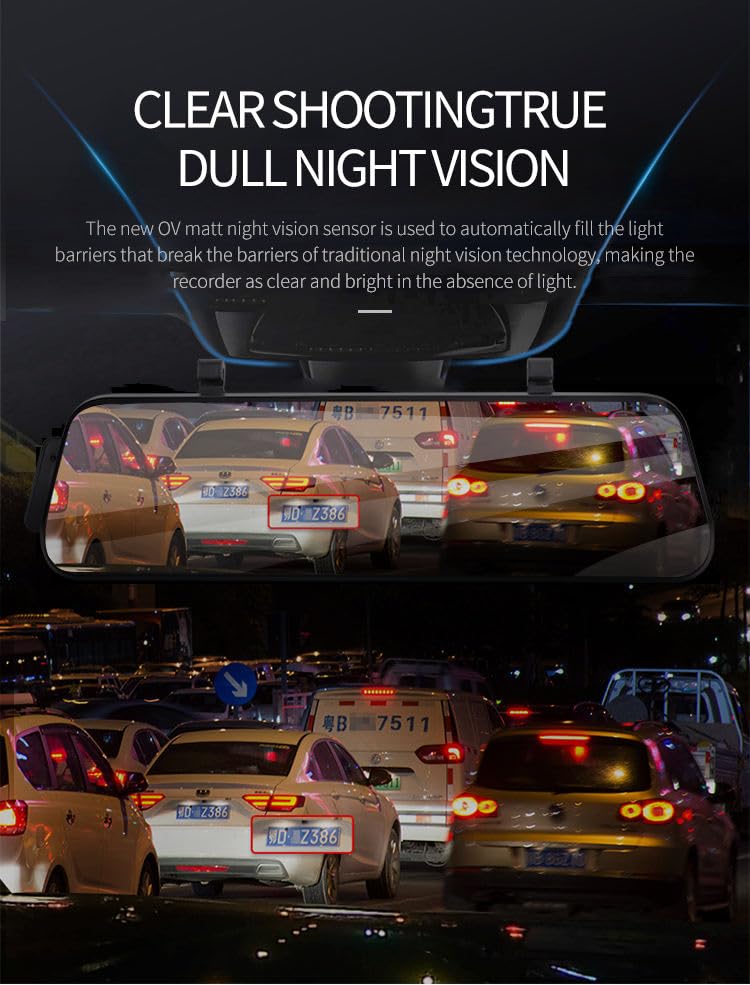
Image: Demonstration of the dash cam's clear shooting and true night vision capabilities.
Parking Assistance & Motion Detection
The rear backup camera displays a high-resolution video stream on the mirror screen. When reversing, parking assist lines appear to guide you for safe and easy parking. Motion detection ensures the dash camera records when any moving object is detected in front of the vehicle, providing surveillance when parked.

Image: Super clear reversing image with parking assist lines for easy parking.
സജ്ജീകരണവും ഇൻസ്റ്റാളേഷനും
Follow these steps to properly install your AUSEK D8 Dash Camera:
- മൈക്രോ എസ്ഡി കാർഡ് ചേർക്കുക: Before mounting, insert a Class 10, U3 Speed Micro-SD Card (recommended: SAMSUNG or SANDISK ULTRA) into the dash cam's TF card slot. Ensure it is inserted correctly until it clicks.
- പ്രധാന യൂണിറ്റ് മൌണ്ട് ചെയ്യുക: Attach the main mirror unit to your original rearview mirror using the provided rubber straps. Secure it firmly so it does not vibrate during driving.
- പിൻ ക്യാമറ ഇൻസ്റ്റാൾ ചെയ്യുക: Mount the rear camera at the back of your vehicle, typically above the license plate or inside the rear window. Ensure it has a clear view. Connect the rear camera cable to the AV-IN port on the main mirror unit.
- Connect GPS Module: Plug the GPS module into the dedicated GPS port on the main unit. Position the module on your dashboard or windshield with a clear view സിഗ്നൽ ലഭിക്കുന്നതിന് ആകാശത്തിന്റെ ഉയരം.
- പവർ കണക്ഷൻ: Connect the car charger adaptor to the main unit's power input (Type-C interface) and plug the other end into your vehicle's cigarette lighter socket. Route the cable neatly to avoid obstruction.
- പ്രാരംഭ പവർ ഓൺ: Start your vehicle. The dash cam should power on automatically. Follow the on-screen prompts for initial setup, such as setting date and time.
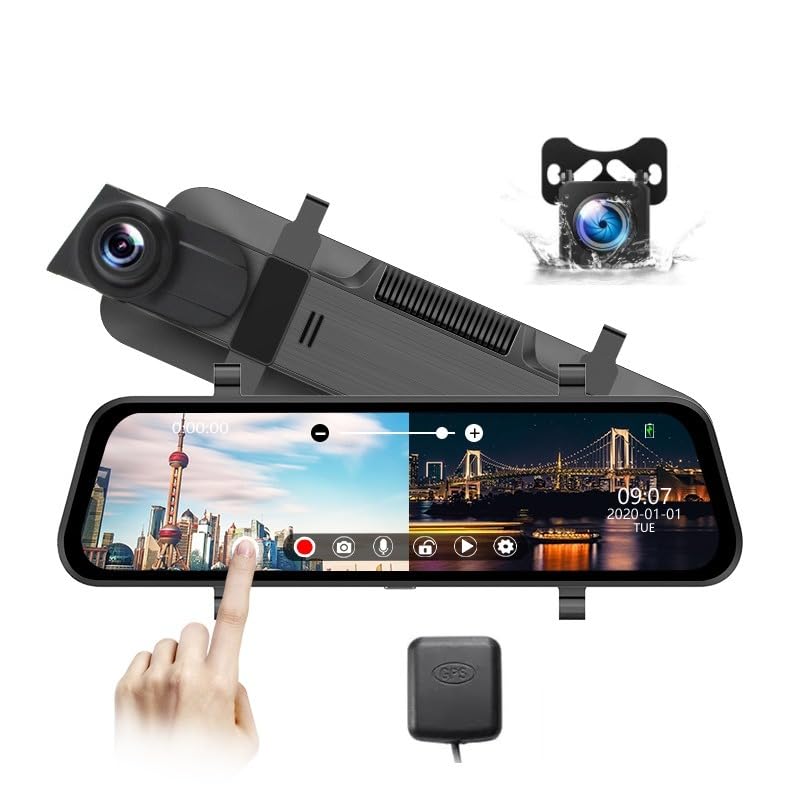
ചിത്രം: കഴിഞ്ഞുview of the AUSEK D8 Dash Camera components for installation.
പ്രവർത്തന നിർദ്ദേശങ്ങൾ
Learn how to use the various functions of your AUSEK D8 Dash Camera:
ടച്ച് സ്ക്രീൻ പ്രവർത്തനം
The 10-inch IPS touch screen allows intuitive control. Swipe left/right to switch between front and rear camera views, swipe up/down to adjust brightness, and tap icons for menu navigation and function activation.
റെക്കോർഡുചെയ്യൽ മോഡുകൾ
- ലൂപ്പ് റെക്കോർഡിംഗ്: The camera automatically records in continuous loops. When the SD card is full, the oldest unlocked fileകൾ തിരുത്തിയെഴുതിയിരിക്കുന്നു.
- ജി-സെൻസർ (അടിയന്തര റെക്കോർഡിംഗ്): In case of a sudden impact or collision, the G-sensor triggers emergency recording, locking the current video file അത് തിരുത്തിയെഴുതുന്നത് തടയാൻ.
- പാർക്കിംഗ് മോണിറ്റർ: When enabled, the dash cam will automatically start recording if it detects a collision or motion while your vehicle is parked. This feature requires a continuous power supply (e.g., hardwire kit, sold separately).
Wi-Fi കണക്റ്റിവിറ്റി
Download the dedicated mobile application (refer to the user manual for app name and QR code). Enable Wi-Fi on the dash cam and connect your smartphone to the dash cam's Wi-Fi network. You can then view തത്സമയംtage, download recorded videos, and adjust settings directly from your phone.
ജിപിഎസ് പ്രവർത്തനം
The GPS module automatically records your vehicle's speed and location data during recording. This data is embedded in the video fileകളും ആകാം viewed using a compatible GPS player software on your computer (software typically provided on the SD card or available for download).
മെയിൻ്റനൻസ്
ശരിയായ അറ്റകുറ്റപ്പണി നിങ്ങളുടെ ഡാഷ് ക്യാമറയുടെ ദീർഘായുസ്സും മികച്ച പ്രകടനവും ഉറപ്പാക്കുന്നു:
- SD കാർഡ് മാനേജുമെന്റ്: Regularly format your Micro SD card (at least once a month) to prevent data corruption and ensure smooth recording. Replace the SD card if you experience frequent errors or slow performance.
- വൃത്തിയാക്കൽ: Use a soft, dry cloth to clean the camera lenses and the touch screen. Avoid using abrasive cleaners or solvents that could damage the surfaces.
- താപനില: Avoid exposing the dash cam to extreme temperatures for prolonged periods. While designed for vehicle environments, excessive heat or cold can affect performance and lifespan.
- ഫേംവെയർ അപ്ഡേറ്റുകൾ: നിർമ്മാതാവ് പരിശോധിക്കുക website periodically for firmware updates. Keeping your device updated can improve performance and add new features.
ട്രബിൾഷൂട്ടിംഗ്
നിങ്ങൾ നേരിട്ടേക്കാവുന്ന പൊതുവായ പ്രശ്നങ്ങൾക്കുള്ള പരിഹാരങ്ങൾ ഇതാ:
ക്യാമറ ഓണാക്കുന്നില്ല
ഇഷ്യൂ: The camera stops turning on or does not power up.
പരിഹാരം: Ensure you are using the original car charger and cable provided with the dash cam. Generic chargers may not provide sufficient power, leading to operational issues. If you intend to hardwire the camera, purchase a dedicated hardwire kit designed for dash cams separately.
"SD Card Error" Message
ഇഷ്യൂ: The screen displays "SD card error".
പരിഹാരം: This typically indicates an issue with the Micro SD card. Ensure you are using a Class 10, U3 Speed Micro-SD Card specifically designed for 4K video recording. Recommended brands include SAMSUNG or SANDISK ULTRA. Avoid using generic Class 10 cards from third-party sellers, as they may not meet the performance requirements for high-end 4K dash cams. Try formatting the card in the dash cam's settings. If the issue persists, replace the SD card.
Screen Reflection
ഇഷ്യൂ: Reflection is visible when using the device as a combination mirror and screen view.
പരിഹാരം: To minimize reflection, increase the screen brightness to its maximum setting. Alternatively, you can turn off the screen completely when using it solely as a rearview കണ്ണാടി.
സ്പെസിഫിക്കേഷനുകൾ
| ഫീച്ചർ | സ്പെസിഫിക്കേഷൻ |
|---|---|
| ബ്രാൻഡ് | AUSEK |
| മോഡലിൻ്റെ പേര് | car dashcam (D8 Dash Camera) |
| ഉൽപ്പന്ന അളവുകൾ | 2 x 26 x 7.5 സെ.മീ |
| ഫ്ലാഷ് മെമ്മറി തരം | SD, TF (മൈക്രോ SD) |
| അനുയോജ്യമായ ഉപകരണങ്ങൾ | Car, Smartphone |
| സ്റ്റാൻഡിംഗ് സ്ക്രീൻ ഡിസ്പ്ലേ വലുപ്പം | 10 ഇഞ്ച് (26 സെ.മീ. ഡയഗണൽ) |
| ഡിസ്പ്ലേ തരം | LCD (IPS Touch Screen) |
| വീഡിയോ ക്യാപ്ചർ റെസല്യൂഷൻ | 4K (Front), 1080P (Rear) |
| ബാറ്ററികൾ ഉൾപ്പെടുത്തിയിട്ടുണ്ട് | അതെ |
| കണക്റ്റർ തരം | GPS, Wi-Fi, Type-C (Power) |
| ഉപകരണ തരം | Car Camera with Recording |
| മൗണ്ടിംഗ് തരം | Adhesive Mount (for rear cam), Rubber Straps (for mirror unit) |
| യഥാർത്ഥം Viewing ആംഗിൾ | 170 ഡിഗ്രി (മുൻവശം) |
| നിറം | കറുപ്പ് |
| നിയന്ത്രണ രീതി | App, Touch Screen |
വാറൻ്റിയും പിന്തുണയും
Your AUSEK D8 Dash Camera comes with standard manufacturer support. An optional 1-year extended warranty is available for purchase to provide additional coverage.
For technical assistance, troubleshooting, or warranty inquiries, please contact the manufacturer:
നിർമ്മാതാവ്: ആഷ എക്സ്പോർട്ട്സ് പ്രൈവറ്റ് ലിമിറ്റഡ്
വിലാസം: 140, സെക്ടർ 27, ഗുരുഗ്രാം -122009
ഉപഭോക്തൃ പിന്തുണ: 08048977694
വാറന്റി ക്ലെയിമുകൾക്കായി നിങ്ങളുടെ വാങ്ങൽ രസീത് സൂക്ഷിക്കുക.


