ആമുഖം
Welcome to the SENTRY Ultra-Light Bluetooth Earbuds user manual. These earbuds are designed to provide a seamless and immersive audio experience, perfect for active lifestyles. With an ultra-light design, LED power display, and intelligent touch controls, you can enjoy high-quality sound and convenient operation. Please read this manual carefully to ensure proper use and maintenance of your new earbuds.
പാക്കേജ് ഉള്ളടക്കം
- SENTRY Ultra-Light Bluetooth Earbuds (Left and Right)
- പോർട്ടബിൾ ചാർജിംഗ് കേസ്
- യുഎസ്ബി ചാർജിംഗ് കേബിൾ
- ഉപയോക്തൃ മാനുവൽ
ഉൽപ്പന്ന സവിശേഷതകൾ
- LED പവർ ഡിസ്പ്ലേ: Transparent design on the charging case allows real-time battery monitoring.
- കോംപാക്റ്റ് ഡിസൈൻ: Ultra-compact and space-saving, making them highly portable.
- Bass Acoustic Design: Advanced dynamic drivers deliver crystal-clear audio with enhanced bass and treble.
- ഇന്റലിജന്റ് ടച്ച് നിയന്ത്രണങ്ങൾ: Effortlessly manage volume, music tracks, calls, and voice assistants.
- Stable Connections: Advanced Bluetooth technology ensures lag-free and reliable performance.
ഉൽപ്പന്നം കഴിഞ്ഞുview
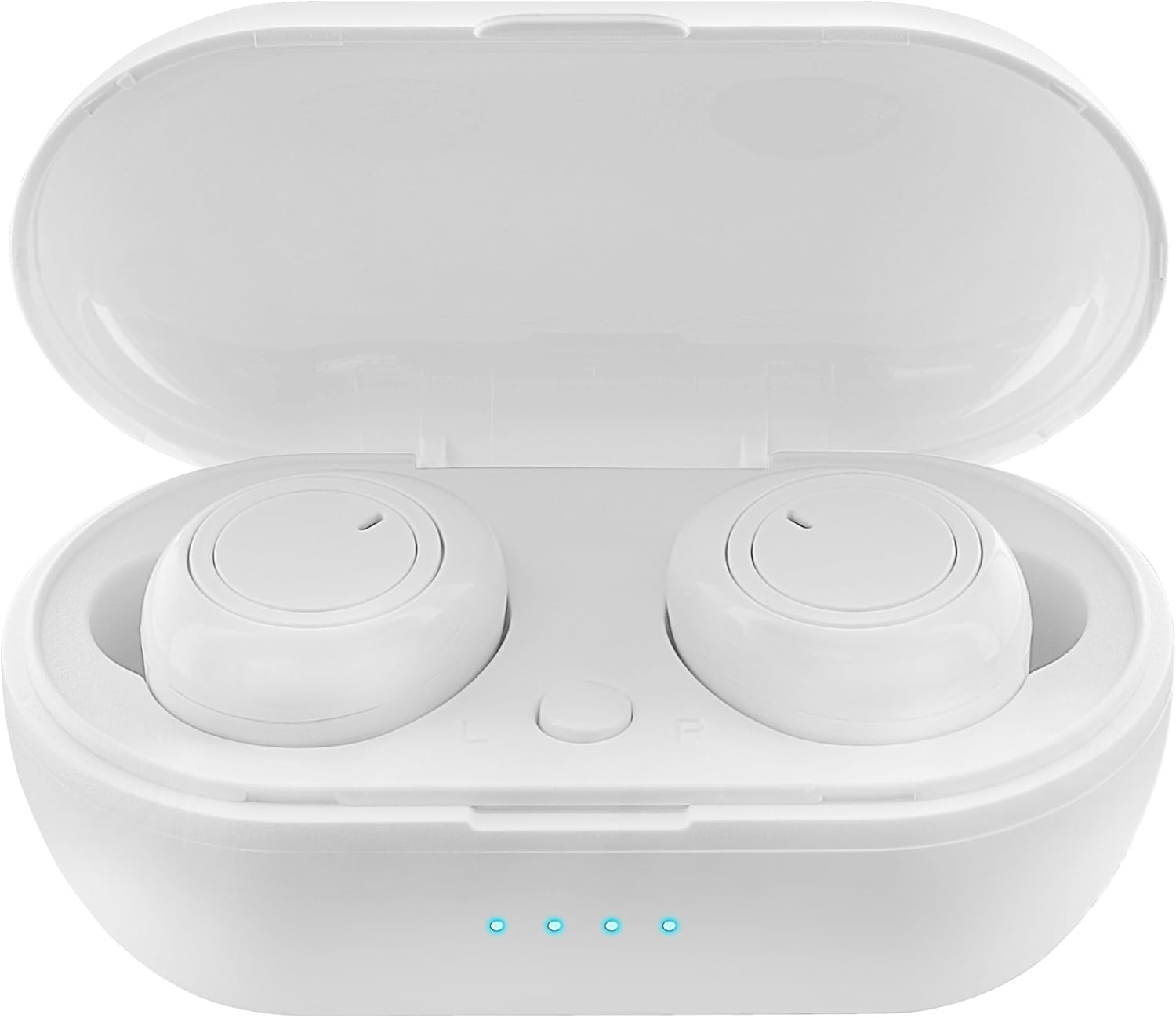
Figure 1: Earbuds in Charging Case with LED Indicators. The charging case features a transparent lid and three blue LED lights indicating battery status.

Figure 2: Individual Earbuds (Front View). Each earbud features a circular touch control area for easy operation.

Figure 3: Individual Earbuds (Side View). The ergonomic design ensures a comfortable and secure fit in the ear.
സജ്ജമാക്കുക
1. ഇയർബഡുകളും കേസും ചാർജ് ചെയ്യുന്നു
- ഇയർബഡുകൾ ചാർജിംഗ് കേസിൽ വയ്ക്കുക. അവ ശരിയായി സ്ഥാപിച്ചിട്ടുണ്ടെന്ന് ഉറപ്പാക്കുക.
- യുഎസ്ബി ചാർജിംഗ് കേബിൾ കേസിലെ ചാർജിംഗ് പോർട്ടിലേക്കും ഒരു പവർ സ്രോതസ്സിലേക്കും (ഉദാ: യുഎസ്ബി വാൾ അഡാപ്റ്റർ, കമ്പ്യൂട്ടർ യുഎസ്ബി പോർട്ട്) ബന്ധിപ്പിക്കുക.
- The LED display on the charging case will indicate the charging status. A full charge is indicated when all lights are solid.
- Allow approximately 1-2 hours for a full charge of both earbuds and the case.
2. നിങ്ങളുടെ ഉപകരണവുമായി ജോടിയാക്കുന്നു
- ചാർജിംഗ് കേസ് തുറക്കുക. ഇയർബഡുകൾ സ്വയമേവ ജോടിയാക്കൽ മോഡിലേക്ക് പ്രവേശിക്കും (ഇയർബഡുകളിൽ മിന്നുന്ന ലൈറ്റുകൾ സൂചിപ്പിക്കുന്നത്).
- നിങ്ങളുടെ സ്മാർട്ട്ഫോണിലോ ബ്ലൂടൂത്ത് പ്രവർത്തനക്ഷമമാക്കിയ ഉപകരണത്തിലോ, ബ്ലൂടൂത്ത് ക്രമീകരണങ്ങളിലേക്ക് പോകുക.
- ഇതിനായി തിരയുക new devices and select "SENTRY Earbuds" (or similar name) from the list.
- Once connected, the earbud lights will stop flashing, and you will hear a confirmation tone.
- ഉപകരണത്തിൽ ബ്ലൂടൂത്ത് പ്രവർത്തനക്ഷമമാക്കിയിട്ടുണ്ടെങ്കിൽ, കേസിൽ നിന്ന് പുറത്തെടുക്കുമ്പോൾ ഇയർബഡുകൾ അവസാനം ജോടിയാക്കിയ ഉപകരണവുമായി യാന്ത്രികമായി വീണ്ടും കണക്റ്റുചെയ്യും.
പ്രവർത്തന നിർദ്ദേശങ്ങൾ
Your SENTRY Ultra-Light Bluetooth Earbuds feature intelligent touch controls for easy management of your audio and calls.
| ഫംഗ്ഷൻ | ആക്ഷൻ |
|---|---|
| സംഗീതം പ്ലേ ചെയ്യുക/താൽക്കാലികമായി നിർത്തുക | ഏതെങ്കിലും ഇയർബഡിൽ ഒറ്റ ടാപ്പ് ചെയ്യുക |
| അടുത്ത ട്രാക്ക് | വലതുവശത്തെ ഇയർബഡിൽ രണ്ടുതവണ ടാപ്പ് ചെയ്യുക |
| മുമ്പത്തെ ട്രാക്ക് | ഇടതുവശത്തെ ഇയർബഡിൽ രണ്ടുതവണ ടാപ്പ് ചെയ്യുക |
| ഉത്തരം / കോൾ അവസാനിപ്പിക്കുക | ഏതെങ്കിലും ഇയർബഡിൽ ഒറ്റ ടാപ്പ് ചെയ്യുക |
| കോൾ നിരസിക്കുക | ഏതെങ്കിലും ഇയർബഡിൽ 2 സെക്കൻഡ് അമർത്തിപ്പിടിക്കുക |
| വോയ്സ് അസിസ്റ്റൻ്റ് സജീവമാക്കുക | ഇയർബഡുകളിലൊന്നിൽ മൂന്ന് തവണ ടാപ്പ് ചെയ്യുക |
| വോളിയം കൂട്ടുക | Press and hold Right earbud |
| വോളിയം ഡൗൺ | Press and hold Left earbud |
മെയിൻ്റനൻസ്
- വൃത്തിയാക്കൽ: ഇയർബഡുകളും ചാർജിംഗ് കെയ്സും വൃത്തിയാക്കാൻ മൃദുവായതും ഉണങ്ങിയതും ലിന്റ് രഹിതവുമായ തുണി ഉപയോഗിക്കുക. കഠിനമായ രാസവസ്തുക്കളോ ഉരച്ചിലുകളുള്ള വസ്തുക്കളോ ഉപയോഗിക്കരുത്.
- സംഭരണം: ഉപയോഗത്തിലില്ലാത്തപ്പോൾ, ഇയർബഡുകൾ ചാർജിംഗ് കേസിൽ സൂക്ഷിക്കുക, അതുവഴി അവയെ സംരക്ഷിക്കുകയും ചാർജ്ജ് ചെയ്ത് നിലനിർത്തുകയും ചെയ്യുക. നേരിട്ടുള്ള സൂര്യപ്രകാശത്തിൽ നിന്നും ഉയർന്ന താപനിലയിൽ നിന്നും അകന്ന് തണുത്തതും വരണ്ടതുമായ സ്ഥലത്ത് സൂക്ഷിക്കുക.
- ബാറ്ററി കെയർ: ബാറ്ററി ലൈഫ് വർദ്ധിപ്പിക്കാൻ, ഇയർബഡുകൾ പൂർണ്ണമായും ഡിസ്ചാർജ് ചെയ്യുന്നതും കേസ് ഇടയ്ക്കിടെ ചാർജ് ചെയ്യുന്നതും ഒഴിവാക്കുക. തുടർച്ചയായ ഉപയോഗത്തിലല്ലെങ്കിൽ പോലും അവ പതിവായി ചാർജ് ചെയ്യുക.
- ജല പ്രതിരോധം: ഈ ഇയർബഡുകൾ ജല പ്രതിരോധശേഷിയുള്ളവയല്ല. വെള്ളം, വിയർപ്പ്, ഉയർന്ന ഈർപ്പം എന്നിവയിൽ സമ്പർക്കം പുലർത്തുന്നത് ഒഴിവാക്കുക.
ട്രബിൾഷൂട്ടിംഗ്
- ഇയർബഡുകൾ ജോടിയാക്കുന്നില്ല: Ensure both earbuds are charged. Place them back in the case, close the lid, then open it again to re-enter pairing mode. Check your device's Bluetooth settings and try reconnecting.
- ഒരു ഇയർബഡ് മാത്രമേ പ്രവർത്തിക്കുന്നുള്ളൂ: Try placing both earbuds back in the charging case, closing the lid, and then taking them out again. This often re-syncs them.
- ശബ്ദമില്ല: നിങ്ങളുടെ ഉപകരണത്തിലെയും ഇയർബഡുകളിലെയും വോളിയം ലെവൽ പരിശോധിക്കുക. ഇയർബഡുകൾ നിങ്ങളുടെ ഉപകരണവുമായി ശരിയായി ബന്ധിപ്പിച്ചിട്ടുണ്ടെന്ന് ഉറപ്പാക്കുക.
- ചാർജിംഗ് പ്രശ്നങ്ങൾ: Ensure the charging cable is securely connected to both the case and the power source. Try a different USB port or charger. Clean the charging contacts on the earbuds and inside the case.
- മോശം ശബ്ദ നിലവാരം: Ensure the earbuds are properly seated in your ears. Try cleaning any debris from the earbud grilles.
സ്പെസിഫിക്കേഷനുകൾ
| ഫീച്ചർ | വിശദാംശങ്ങൾ |
|---|---|
| മോഡലിൻ്റെ പേര് | 5002-407 |
| കണക്റ്റിവിറ്റി ടെക്നോളജി | വയർലെസ് (ബ്ലൂടൂത്ത്) |
| വയർലെസ് കമ്മ്യൂണിക്കേഷൻ ടെക്നോളജി | ബ്ലൂടൂത്ത് |
| പ്രായപരിധി (വിവരണം) | മുതിർന്നവർ |
| ചാർജിംഗ് സമയം | Approximately 1-2 Hours (for earbuds and case) |
| അനുയോജ്യമായ ഉപകരണങ്ങൾ | Smartphones, Apple Devices |
| നിയന്ത്രണ തരം | മീഡിയ നിയന്ത്രണം |
| കേബിൾ സവിശേഷത | കേബിൾ ഇല്ലാതെ |
| ജല പ്രതിരോധ നില | വാട്ടർ റെസിസ്റ്റൻ്റ് അല്ല |
| ഫ്രീക്വൻസി റേഞ്ച് | 20Hz - 20kHz |
| നിയന്ത്രണ രീതി | സ്പർശിക്കുക |
| ബാറ്ററി ലൈഫ് | 12 മണിക്കൂർ വരെ (ചാർജിംഗ് കേസിനൊപ്പം) |
| ഓഡിയോ ഡ്രൈവർ തരം | ഡൈനാമിക് ഡ്രൈവർ |
| കെയ്സ് നിറം വഹിക്കുന്നു | വെള്ള |
| ഇയർപീസ് ആകൃതി | വൃത്താകൃതിയിലുള്ളത് |
| ബ്രാൻഡ് | സെൻട്രി |
| നിറം | വെള്ള |
| ചെവി പ്ലേസ്മെൻ്റ് | ചെവിയിൽ |
| ഫോം ഫാക്ടർ | ചെവിയിൽ |
| ശബ്ദ നിയന്ത്രണം | ഒന്നുമില്ല |
വാറൻ്റിയും പിന്തുണയും
SENTRY products are designed for reliability and performance. For information regarding warranty coverage and customer support, please refer to the warranty card included with your product or visit the official SENTRY webസൈറ്റ്. നിങ്ങൾക്ക് സന്ദർശിക്കാനും കഴിയും SENTRY Store on Amazon കൂടുതൽ ഉൽപ്പന്ന വിവരങ്ങൾക്കും പിന്തുണാ ഉറവിടങ്ങൾക്കും.


