ആമുഖം
Welcome to the magical world of music with your new eKids Disney Princess Karaoke Microphone! This Bluetooth-enabled microphone is designed for young performers, allowing them to sing along to their favorite tunes with built-in music or by streaming audio wirelessly. Featuring vibrant Disney Princess graphics, exciting light shows, and fun echo effects, this microphone provides hours of entertainment. Please read this manual carefully to ensure proper setup and operation.

Figure 1: eKids Disney Princess Karaoke Microphone
ഫീച്ചറുകൾ
- കരോക്കെ മൈക്രോഫോൺ: Connect any compatible Bluetooth device (including smartphones, tablets, and laptops) and wirelessly stream your favorite music, then ampനിങ്ങൾ പാടുമ്പോൾ നിങ്ങളുടെ ശബ്ദം സജീവമാക്കുക!
- Disney Princess Design: Featuring cool and colorful graphics inspired by your favorite Disney Princess characters. Designed for kids aged 5 and up.
- അന്തർനിർമ്മിത സംഗീതം: This toy microphone includes an extended clip of the song ‘Starting Now’. Press the Echo Button to add cool vocal effects, too!
- ലൈറ്റ് ഷോ: Lights flash along with the music, so you can put on an amazing karaoke performance for friends and family.

ചിത്രം 2: പ്രധാന സവിശേഷതകൾ കഴിഞ്ഞുview
സജ്ജമാക്കുക
1. ബാറ്ററി ഇൻസ്റ്റാളേഷൻ
The microphone requires 3 AA batteries (included).
- Locate the battery compartment on the back of the microphone.
- Using a Phillips screwdriver, open the battery compartment cover.
- Insert 3 "AA" (LR6) batteries with the correct polarity (+ and -) as indicated inside the compartment.
- കമ്പാർട്ട്മെന്റ് വാതിൽ മാറ്റി ഫിലിപ്സ് സ്ക്രൂഡ്രൈവർ ഉപയോഗിച്ച് സ്ക്രൂ മുറുക്കുക.
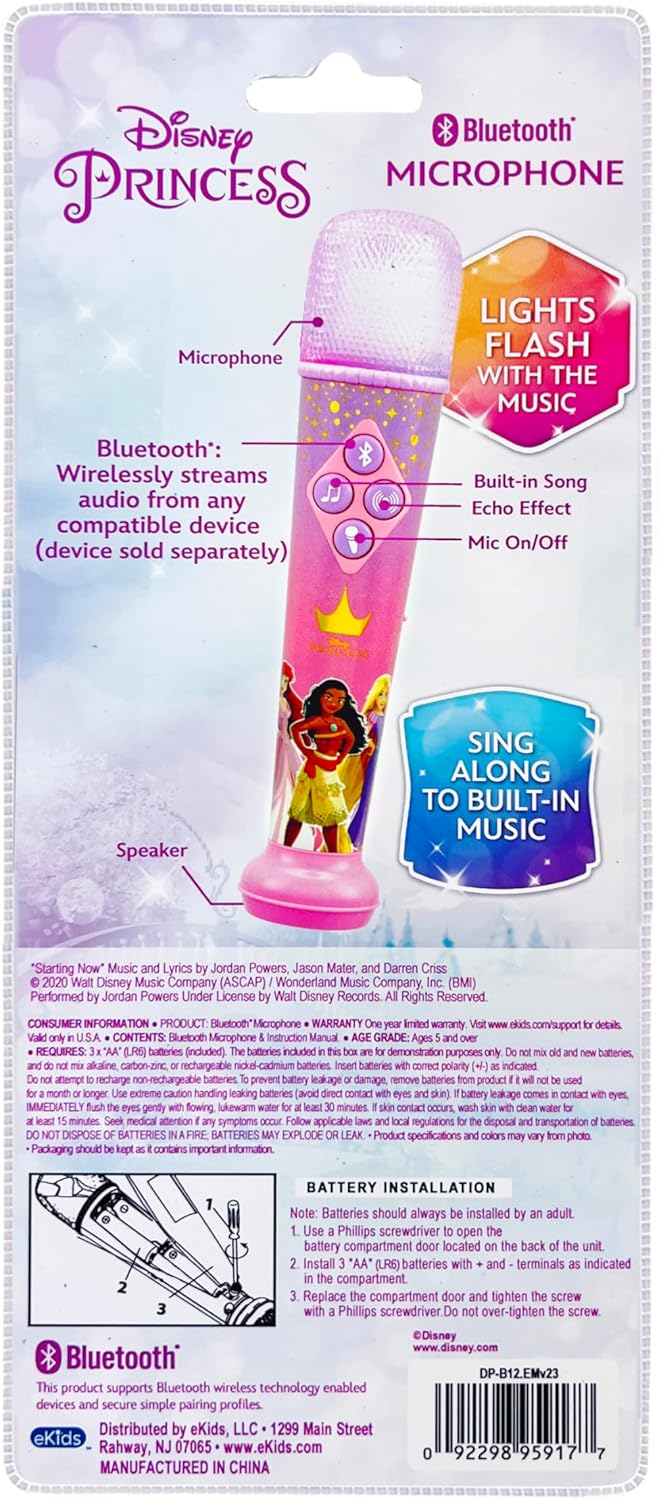
Figure 3: Battery Installation Diagram (from packaging)
2. പവർ ഓൺ/ഓഫ്
Locate the ON/OFF switch on the side of the microphone. Slide the switch to the "ON" position to power on the device. Slide it to "OFF" to power it down.
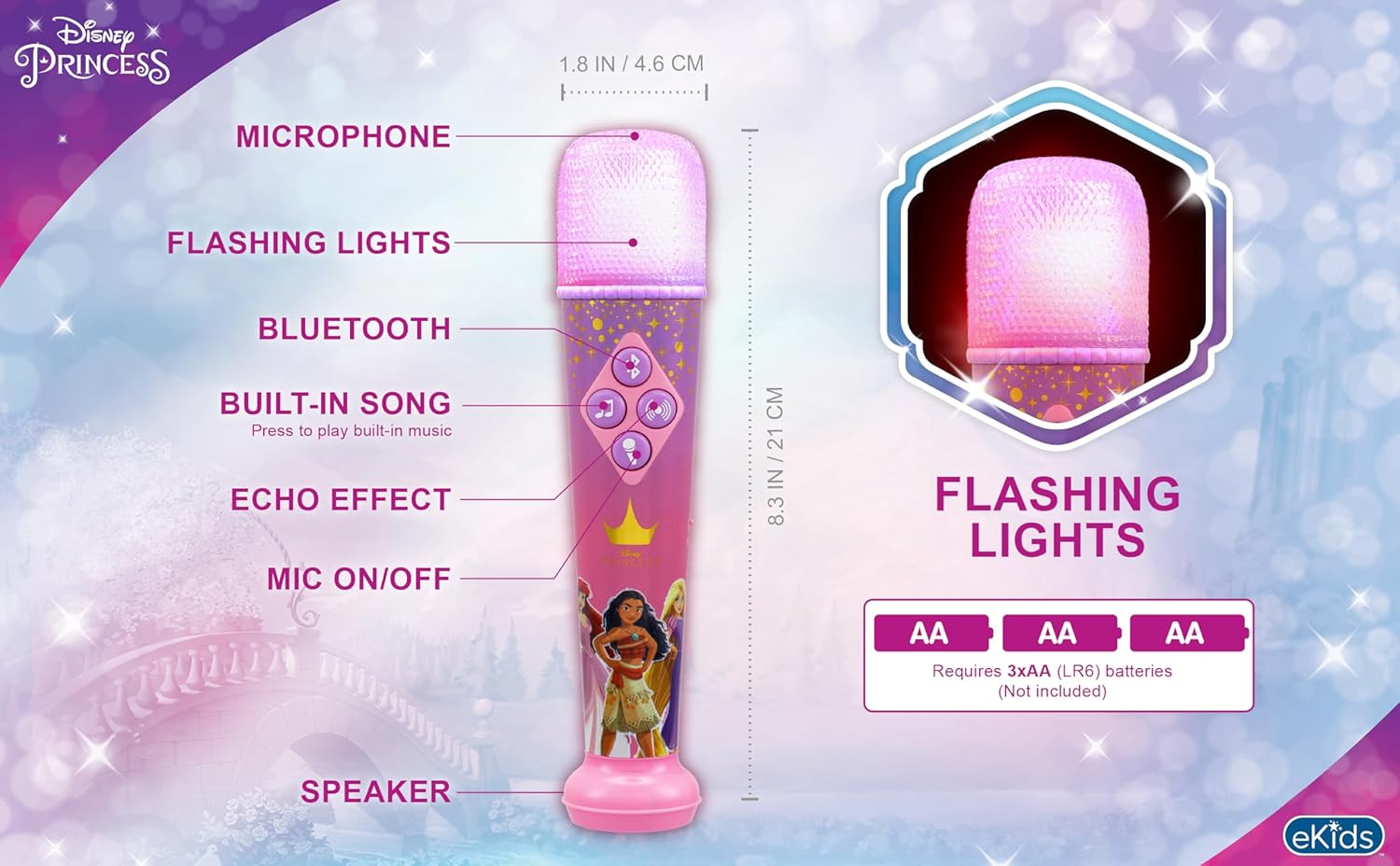
Figure 4: Microphone Controls and Features
പ്രവർത്തന നിർദ്ദേശങ്ങൾ
1. ബ്ലൂടൂത്ത് ജോടിയാക്കൽ
നിങ്ങളുടെ സ്മാർട്ട്ഫോണിൽ നിന്നോ ടാബ്ലെറ്റിൽ നിന്നോ ലാപ്ടോപ്പിൽ നിന്നോ വയർലെസ് ആയി ഓഡിയോ സ്ട്രീം ചെയ്യാൻ:
- മൈക്രോഫോൺ ഓണാക്കിയിട്ടുണ്ടെന്ന് ഉറപ്പാക്കുക.
- Activate Bluetooth on your external device.
- ഇതിനായി തിരയുക "eKids DP-B12" or a similar name in your device's Bluetooth settings.
- Select the microphone to pair. A confirmation sound will indicate successful pairing.
- Once paired, you can play music from your device, and it will stream through the microphone's speaker.
Video 1: Official eKids Disney Princess Bluetooth Karaoke Microphone overview, demonstrating Bluetooth streaming, built-in music, echo effects, and light show features.
2. Using Built-in Music
The microphone comes with a built-in song. To play it, press the music note button (♫) നിയന്ത്രണ പാനലിൽ.
3. Microphone Usage and Echo Effect
ലേക്ക് amplify your voice, press and hold the microphone button (🎤) while speaking or singing. To add an echo effect to your vocals, press the echo button (concentric circles icon) on the control panel.

Figure 5: Child enjoying the microphone
4. ലൈറ്റ് ഷോ
The microphone features a dynamic light show that flashes along with the music, enhancing your performance. The lights are integrated into the microphone head and activate automatically when music is playing.

Figure 6: Microphone light show in action
മെയിൻ്റനൻസ്
- മൃദുവായതും ഉണങ്ങിയതുമായ തുണി ഉപയോഗിച്ച് തുടച്ച് മൈക്രോഫോൺ വൃത്തിയായി സൂക്ഷിക്കുക.
- ഉരച്ചിലുകളുള്ള ക്ലീനറുകളോ ലായകങ്ങളോ ഉപയോഗിക്കരുത്.
- Avoid exposing the microphone to extreme temperatures, direct sunlight, or moisture.
- ഉപകരണം ദീർഘനേരം ഉപയോഗിക്കുന്നില്ലെങ്കിൽ, ചോർച്ച തടയാൻ ബാറ്ററികൾ നീക്കം ചെയ്യുക.
ട്രബിൾഷൂട്ടിംഗ്
| പ്രശ്നം | പരിഹാരം |
|---|---|
| പവർ ഇല്ല / ഉപകരണം ഓണാകുന്നില്ല |
|
| ബ്ലൂടൂത്ത് കണക്റ്റ് ചെയ്യുന്നില്ല |
|
| No sound from microphone (when speaking/singing) |
|
| Built-in music not playing |
|
സ്പെസിഫിക്കേഷനുകൾ
| ആട്രിബ്യൂട്ട് | വിശദാംശങ്ങൾ |
|---|---|
| മോഡൽ നമ്പർ | DP-B12 |
| ബ്രാൻഡ് | eKids |
| ഇനത്തിൻ്റെ ഭാരം | 8.5 ഔൺസ് |
| ഉൽപ്പന്ന അളവുകൾ | 1.8 x 1.79 x 8.28 ഇഞ്ച് |
| ബാറ്ററികൾ | 3 AA ബാറ്ററികൾ ആവശ്യമാണ് (ഉൾപ്പെടുന്നു) |
| മെറ്റീരിയൽ തരം | പ്ലാസ്റ്റിക് |
| സ്പീക്കർ എണ്ണം | 1 |
| പവർ ഉറവിടം | ബാറ്ററി പവർ |
| വാല്യംtage | 1.5 വോൾട്ട് (DC) |
| പ്രത്യേക ഫീച്ചർ | വോളിയം നിയന്ത്രണം |
| ഉൾപ്പെടുത്തിയ ഘടകങ്ങൾ | മൈക്രോഫോൺ |
| ശുപാർശ ചെയ്യുന്ന ഉപയോഗങ്ങൾ | ആലാപനം, കരോക്കെ |
വാറൻ്റിയും പിന്തുണയും
For product support, warranty information, or to explore more eKids products, please visit the official eKids brand store or contact their customer service.
eKids Brand Store: https://www.amazon.com/stores/eKids/page/314B1B40-5DF3-4830-97AC-E7BF609BCCA1
ഏതെങ്കിലും വാറന്റി ക്ലെയിമുകൾക്കായി നിങ്ങളുടെ വാങ്ങിയതിന്റെ തെളിവ് സൂക്ഷിക്കുക.


