ആമുഖം
വാങ്ങിയതിന് നന്ദി.asing the SHARP XL-B530 Micro Component System. This system is designed to provide high-quality audio playback from various sources, including Bluetooth wireless streaming, CD, USB, AM/FM radio, and auxiliary input. This manual provides detailed instructions for setting up, operating, and maintaining your new audio system to ensure optimal performance and longevity.
പ്രധാനപ്പെട്ട സുരക്ഷാ വിവരങ്ങൾ
- ഉപയോഗിക്കുന്നതിന് മുമ്പ് എല്ലാ നിർദ്ദേശങ്ങളും ശ്രദ്ധാപൂർവ്വം വായിക്കുക.
- ഭാവി റഫറൻസിനായി ഈ മാനുവൽ സൂക്ഷിക്കുക.
- മഴയോ ഈർപ്പമോ യൂണിറ്റ് തുറന്നുകാട്ടരുത്.
- യൂണിറ്റിന് ചുറ്റും ശരിയായ വായുസഞ്ചാരം ഉറപ്പാക്കുക. വെന്റിലേഷൻ ദ്വാരങ്ങൾ തടയരുത്.
- റേഡിയേറ്ററുകൾ, ഹീറ്റ് രജിസ്റ്ററുകൾ, സ്റ്റൗകൾ അല്ലെങ്കിൽ മറ്റ് ഉപകരണങ്ങൾ (ഉൾപ്പെടെ) പോലുള്ള താപ സ്രോതസ്സുകൾക്ക് സമീപം യൂണിറ്റ് സ്ഥാപിക്കരുത്. ampലൈഫയറുകൾ) ചൂട് ഉത്പാദിപ്പിക്കുന്നത്.
- പവർ കോർഡ് നടക്കുകയോ നുള്ളുകയോ ചെയ്യുന്നതിൽ നിന്ന് സംരക്ഷിക്കുക.
- നിർമ്മാതാവ് വ്യക്തമാക്കിയ അറ്റാച്ച്മെൻ്റുകൾ/ആക്സസറികൾ മാത്രം ഉപയോഗിക്കുക.
- മിന്നൽ കൊടുങ്കാറ്റുകളുടെ സമയത്തോ ദീർഘനേരം ഉപയോഗിക്കാത്ത സമയത്തോ ഈ ഉപകരണം അൺപ്ലഗ് ചെയ്യുക.
- എല്ലാ സേവനങ്ങളും യോഗ്യതയുള്ള സേവന ഉദ്യോഗസ്ഥർക്ക് റഫർ ചെയ്യുക.
പാക്കേജ് ഉള്ളടക്കം
താഴെ പറയുന്ന എല്ലാ ഇനങ്ങളും നിങ്ങളുടെ പാക്കേജിൽ ഉൾപ്പെടുത്തിയിട്ടുണ്ടോ എന്ന് ദയവായി പരിശോധിക്കുക:
- പ്രധാന യൂണിറ്റ് (മൈക്രോ കമ്പോണന്റ് സിസ്റ്റം)
- സ്പീക്കർ യൂണിറ്റുകൾ (x2)
- റിമോട്ട് കൺട്രോൾ
- പവർ കോർഡ്
- എഫ്എം ആൻ്റിന
- എഎം ലൂപ്പ് ആന്റിന
- ഉപയോക്തൃ മാനുവൽ (ഈ പ്രമാണം)
ഉൽപ്പന്നം കഴിഞ്ഞുview
Familiarize yourself with the components and controls of your SHARP XL-B530 system.
Main Unit and Speakers

മൊത്തത്തിൽ view of the SHARP XL-B530 Micro Component System, including the main unit, two speakers, and the remote control.
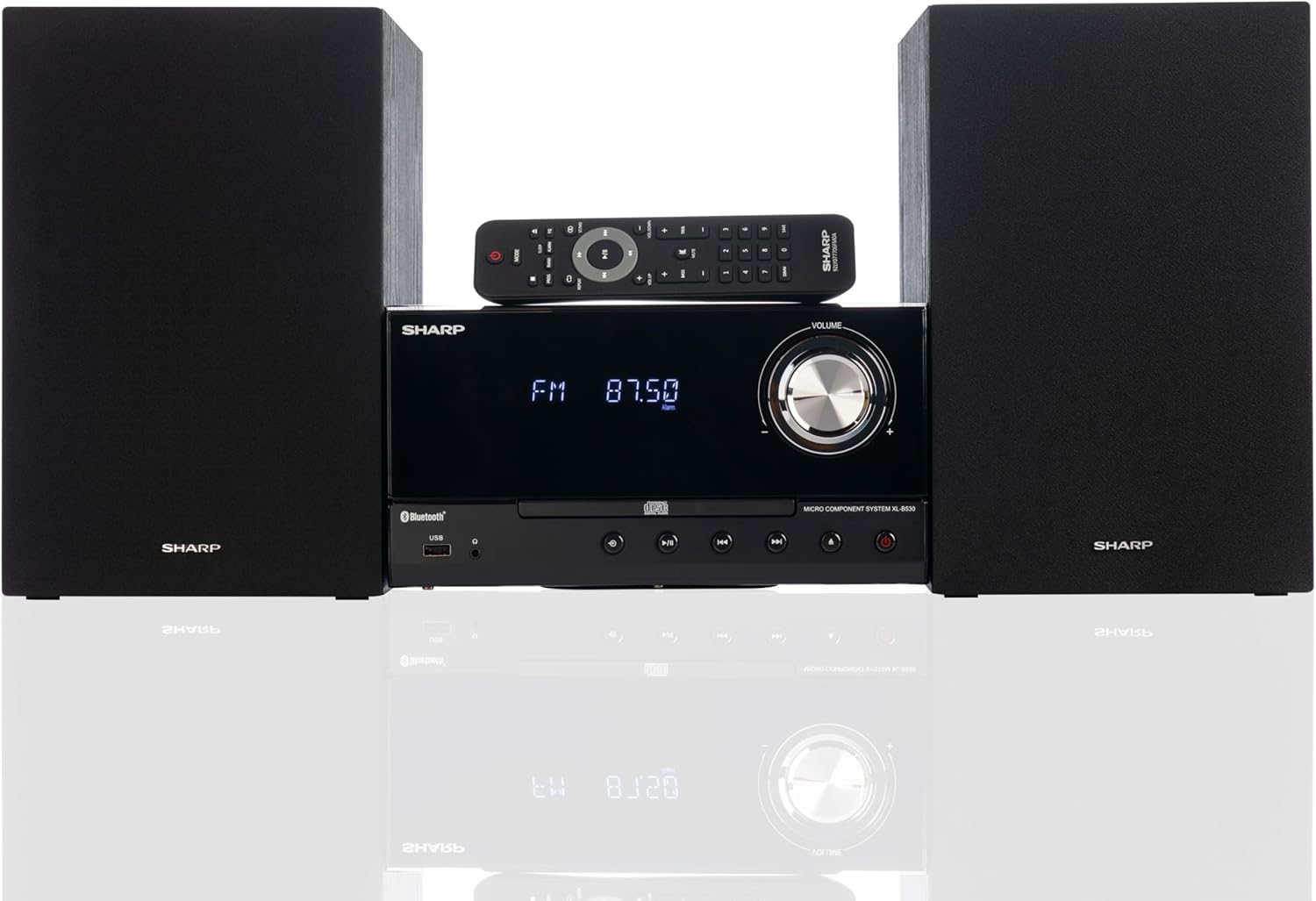
Front panel of the main unit, showing the LCD display, volume knob, CD tray, and control buttons.
പിൻ പാനൽ കണക്ഷനുകൾ

The rear panel of the main unit, featuring speaker terminals, FM antenna input, AM antenna input, and auxiliary input ports.
റിമോട്ട് കൺട്രോൾ
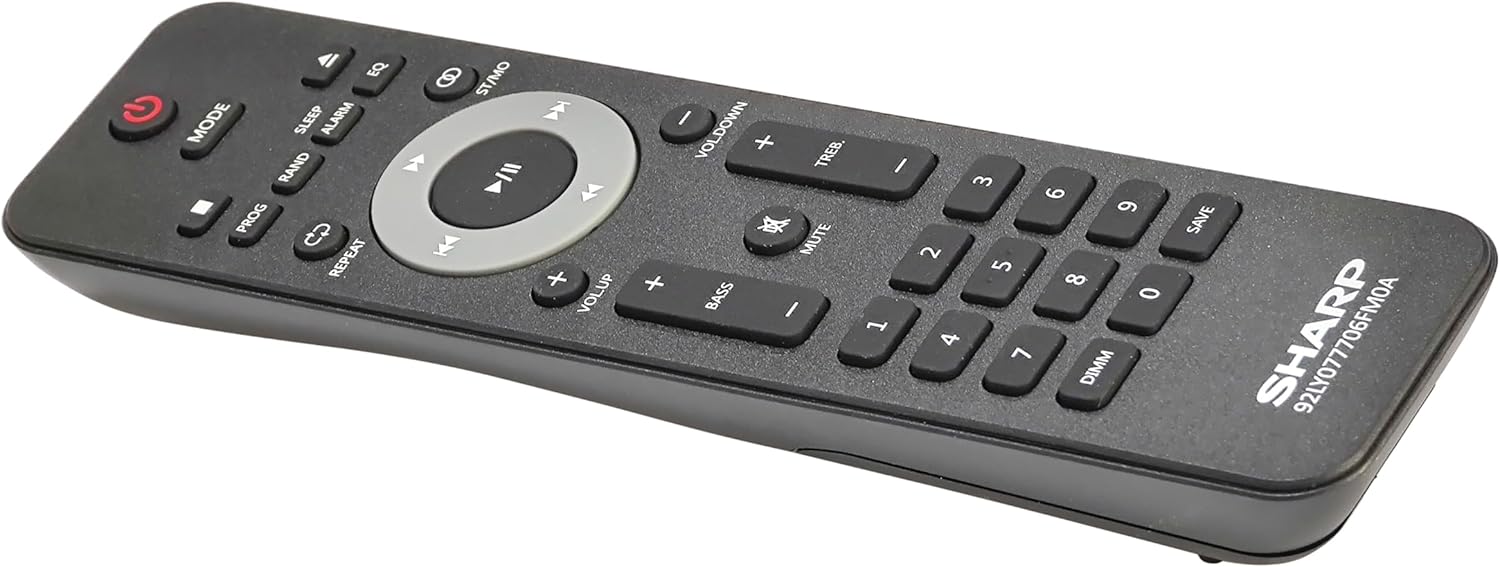
വിശദമായി view of the remote control, showing various function buttons for power, mode, playback, volume, and sound adjustments.
സജ്ജമാക്കുക
Follow these steps to set up your micro component system.
1 സ്പീക്കർ കണക്ഷൻ
- Identify the left and right speaker cables.
- Connect the red (+) wire from each speaker to the red (+) terminal on the main unit's rear panel.
- Connect the black (-) wire from each speaker to the black (-) terminal on the main unit's rear panel.
- Ensure a secure connection for both speakers.
2. ആന്റിന കണക്ഷൻ
- എഫ്എം ആന്റിന: Connect the supplied FM wire antenna to the FM antenna jack on the rear panel. Extend the wire fully for best reception.
- എഎം ആന്റിന: Assemble the AM loop antenna and connect its wires to the AM antenna terminals on the rear panel. Rotate the antenna for optimal AM reception.
3. പവർ കണക്ഷൻ
- Ensure all other connections are made.
- Plug the power cord into the AC IN jack on the rear of the main unit.
- Insert the other end of the power cord into a wall outlet.
പ്രവർത്തന നിർദ്ദേശങ്ങൾ
This section details how to use the various functions of your SHARP XL-B530 system.
പവർ ഓൺ/ഓഫ്
- അമർത്തുക പവർ button on the main unit or remote control to turn the system on or off.
ഉറവിട തിരഞ്ഞെടുപ്പ്
- അമർത്തുക മോഡ് button on the main unit or remote control repeatedly to cycle through available sources: CD, Bluetooth, USB, FM, AM, AUX.
സിഡി പ്ലേബാക്ക്
- അമർത്തുക മോഡ് button to select 'CD' mode.
- അമർത്തുക തുറക്കുക/അടയ്ക്കുക സിഡി ട്രേ തുറക്കാൻ ബട്ടൺ.
- Place a CD (CD/MP3/WMA/CD-R/CD-RW) with the label side up into the tray.
- അമർത്തുക തുറക്കുക/അടയ്ക്കുക button again to close the tray. Playback will start automatically.
- ഉപയോഗിക്കുക പ്ലേ/താൽക്കാലികമായി നിർത്തുക, നിർത്തുക, ഒഴിവാക്കുക (forward/backward), and തിരയുക നിയന്ത്രണത്തിനുള്ള ബട്ടണുകൾ.
ബ്ലൂടൂത്ത് ജോടിയാക്കൽ
- അമർത്തുക മോഡ് button to select 'Bluetooth' mode. The display will show 'BT' and flash, indicating it's ready for pairing.
- നിങ്ങളുടെ ബ്ലൂടൂത്ത് ഉപകരണത്തിൽ (സ്മാർട്ട്ഫോൺ, ടാബ്ലെറ്റ് മുതലായവ), ബ്ലൂടൂത്ത് പ്രവർത്തനക്ഷമമാക്കി ലഭ്യമായ ഉപകരണങ്ങൾക്കായി തിരയുക.
- Select 'SHARP XL-B530' from the list.
- Once paired, the display will stop flashing and show 'BT CONNECTED'. You can now stream audio from your device.
USB പ്ലേബാക്ക്
- മുൻ പാനലിലെ USB പോർട്ടിലേക്ക് ഒരു USB ഫ്ലാഷ് ഡ്രൈവ് തിരുകുക.
- അമർത്തുക മോഡ് button to select 'USB' mode.
- The system will automatically detect and begin playing compatible audio files (MP3/WMA).
- Use playback controls similar to CD mode.
AM/FM റേഡിയോ

The SHARP XL-B530 system displaying an FM radio frequency, highlighting its digital tuner capabilities.
- അമർത്തുക മോഡ് button to select 'FM' or 'AM' mode.
- ഓട്ടോ സ്കാൻ: അമർത്തിപ്പിടിക്കുക പ്ലേ/താൽക്കാലികമായി നിർത്തുക ലഭ്യമായ സ്റ്റേഷനുകൾ സ്വയമേവ സ്കാൻ ചെയ്യാനും സംരക്ഷിക്കാനും ബട്ടൺ.
- സ്വമേധയാലുള്ള ട്യൂണിംഗ്: ഉപയോഗിക്കുക ഒഴിവാക്കുക buttons to manually tune to desired frequencies.
- പ്രീസെറ്റ് സ്റ്റേഷനുകൾ: Use the number buttons on the remote to directly select saved preset stations.
Volume and Sound Adjustment

A close-up of one of the SHARP XL-B530 speakers, illustrating the adjustable bass and treble sound output.
- വോളിയം: തിരിക്കുക വോളിയം പ്രധാന യൂണിറ്റിലെ നോബ് അല്ലെങ്കിൽ ഉപയോഗിക്കുക VOL + / VOL- റിമോട്ട് കൺട്രോളിലെ ബട്ടണുകൾ.
- ബാസ്/ട്രെബിൾ: ഉപയോഗിക്കുക BASS+ / BASS- ഒപ്പം TREB+ / TREB- buttons on the remote control to adjust sound characteristics.
- ഉച്ചത്തിലുള്ളത്: അമർത്തുക പരിഹാസം button on the remote to enhance bass and treble at low volumes.
- EQ: അമർത്തുക EQ button on the remote to cycle through preset equalizer modes.
മെയിൻ്റനൻസ്
Proper care will ensure the longevity of your system.
- വൃത്തിയാക്കൽ: Use a soft, dry cloth to clean the exterior of the unit. For stubborn stains, dampen the cloth lightly with water. Do not use abrasive cleaners or solvents.
- സിഡി കെയർ: സിഡികൾ അവയുടെ അരികുകളിൽ പിടിക്കുക. മലിനമായ സിഡികൾ മൃദുവായ, ലിന്റ് രഹിത തുണി ഉപയോഗിച്ച് വൃത്തിയാക്കുക, മധ്യഭാഗത്ത് നിന്ന് പുറത്തേക്ക് തുടയ്ക്കുക.
- വെൻ്റിലേഷൻ: Ensure the ventilation openings are not blocked by dust or debris.
- സംഭരണം: യൂണിറ്റ് ദീർഘനേരം സൂക്ഷിക്കുകയാണെങ്കിൽ, പവർ ഔട്ട്ലെറ്റിൽ നിന്ന് അത് അൺപ്ലഗ് ചെയ്ത് തണുത്തതും വരണ്ടതുമായ സ്ഥലത്ത് സൂക്ഷിക്കുക.
ട്രബിൾഷൂട്ടിംഗ്
നിങ്ങളുടെ സിസ്റ്റത്തിൽ പ്രശ്നങ്ങൾ നേരിടുകയാണെങ്കിൽ, താഴെ പറയുന്ന പൊതുവായ പ്രശ്നങ്ങളും പരിഹാരങ്ങളും പരിശോധിക്കുക.
| പ്രശ്നം | സാധ്യമായ കാരണം | പരിഹാരം |
|---|---|---|
| ശക്തിയില്ല | പവർ കോർഡ് ബന്ധിപ്പിച്ചിട്ടില്ല; പവർ ഔട്ട്ലെറ്റ് സജീവമല്ല. | പവർ കോർഡ് സുരക്ഷിതമായി പ്ലഗ് ഇൻ ചെയ്തിട്ടുണ്ടെന്ന് ഉറപ്പാക്കുക; മറ്റൊരു ഔട്ട്ലെറ്റ് പരീക്ഷിക്കുക. |
| ശബ്ദമില്ല | Volume too low; Speakers not connected; Incorrect source selected | Increase volume; Check speaker connections; Select correct input source |
| സിഡി പ്ലേ ചെയ്യുന്നില്ല | CD inserted incorrectly; CD is dirty or scratched; Incorrect mode | Insert CD correctly (label side up); Clean or replace CD; Select CD mode |
| ബ്ലൂടൂത്ത് ജോടിയാക്കുന്നില്ല | Bluetooth mode not selected; Device too far; Device already paired to another unit | Select Bluetooth mode; Move device closer; Disconnect from other devices and try again |
| മോശം റേഡിയോ സ്വീകരണം | Antenna not connected or positioned poorly; Interference | Connect and adjust antenna position; Move unit away from other electronic devices |
| റിമോട്ട് കൺട്രോൾ പ്രവർത്തിക്കുന്നില്ല | Batteries are dead or inserted incorrectly; Obstruction between remote and unit | Replace batteries, check polarity; Remove any obstructions; Ensure remote is pointed at the unit's sensor |
സ്പെസിഫിക്കേഷനുകൾ
| ഫീച്ചർ | സ്പെസിഫിക്കേഷൻ |
|---|---|
| മോഡൽ നമ്പർ | XL-B530(BK) |
| ഔട്ട്പുട്ട് പവർ | 200W മാക്സ് (100W RMS) |
| കണക്റ്റിവിറ്റി | Bluetooth, USB, Aux Input |
| ഡിസ്ക് അനുയോജ്യത | സിഡി, സിഡി-ആർ/ആർഡബ്ല്യു, എംപി3, ഡബ്ല്യുഎംഎ |
| ട്യൂണർ | AM/FM Stereo Digital Tuner (50 station presets) |
| സ്പീക്കർ തരം | സ്റ്റീരിയോ |
| ഉൽപ്പന്ന അളവുകൾ (L x W x H) | 25 x 11 x 9.6 ഇഞ്ച് |
| ഇനത്തിൻ്റെ ഭാരം | 18 പൗണ്ട് |
| നിറം | കറുത്ത ബൈക്ക് |
വാറൻ്റിയും പിന്തുണയും
For warranty information and technical support, please refer to the warranty card included with your product or visit the official SHARP webസൈറ്റ്. ഏതെങ്കിലും വാറന്റി ക്ലെയിമുകൾക്ക് വാങ്ങിയതിന്റെ തെളിവായി നിങ്ങളുടെ വാങ്ങൽ രസീത് സൂക്ഷിക്കുക.
For further assistance, you may contact SHARP customer service through their official channels.


