ആമുഖം
ഈ മാനുവലിൽ Amazon Kindle 16 GB (ഏറ്റവും പുതിയ മോഡൽ) യ്ക്കുള്ള സമഗ്രമായ നിർദ്ദേശങ്ങൾ നൽകുന്നു. നിങ്ങളുടെ വായനാനുഭവം പരമാവധിയാക്കാൻ സഹായിക്കുന്ന സജ്ജീകരണം, പ്രവർത്തനം, പരിപാലനം, ട്രബിൾഷൂട്ടിംഗ്, സ്പെസിഫിക്കേഷനുകൾ എന്നിവ ഇതിൽ ഉൾപ്പെടുന്നു.
ആമസോൺ കിൻഡിൽ 16 ജിബി ഭാരം കുറഞ്ഞതും ഒതുക്കമുള്ളതുമായ രീതിയിൽ രൂപകൽപ്പന ചെയ്തിരിക്കുന്നതിനാൽ വേഗതയേറിയ പേജ് ടേണുകളും ഉയർന്ന കോൺട്രാസ്റ്റ് അനുപാതവും ഉപയോഗിച്ച് മെച്ചപ്പെട്ട വായനാനുഭവം നൽകുന്നു. ക്രമീകരിക്കാവുന്ന ഫ്രണ്ട് ലൈറ്റുള്ള 6 ഇഞ്ച് ഗ്ലെയർ-ഫ്രീ ഡിസ്പ്ലേയും, ഇപ്പോൾ പരമാവധി സജ്ജീകരണത്തിൽ 25% തെളിച്ചമുള്ളതും, ഏത് പരിതസ്ഥിതിയിലും സുഖകരമായ വായനയ്ക്കായി ഡാർക്ക് മോഡും ഇതിൽ ഉൾപ്പെടുന്നു. ഒറ്റ ചാർജിൽ 6 ആഴ്ച വരെ ബാറ്ററി ലൈഫും 16 ജിബി സ്റ്റോറേജും ഉള്ളതിനാൽ, ആയിരക്കണക്കിന് പുസ്തകങ്ങൾ, മാഗസിനുകൾ, കോമിക്സ് എന്നിവ സൂക്ഷിക്കാൻ ഇതിന് കഴിയും, ഇത് ശ്രദ്ധ തിരിക്കുന്നതൊഴിവാക്കുന്ന വായനാനുഭവം നൽകുന്നു.

ചിത്രം: ആമസോൺ കിൻഡിൽ 16 ജിബി ഇ-റീഡർ, ഒരു പുസ്തക പേജിലേക്ക് തുറക്കുന്നു, കാണിക്കുകasing അതിന്റെ വ്യക്തമായ ഡിസ്പ്ലേയും ഒതുക്കമുള്ള രൂപകൽപ്പനയും.
1. സജ്ജീകരണം
നിങ്ങളുടെ പുതിയ Amazon Kindle 16 GB സജ്ജീകരിക്കാൻ ഈ ഘട്ടങ്ങൾ പാലിക്കുക:
- നിങ്ങളുടെ കിൻഡിൽ ചാർജ് ചെയ്യുക: ആദ്യമായി ഉപയോഗിക്കുന്നതിന് മുമ്പ്, നൽകിയിരിക്കുന്ന USB-C കേബിൾ ഉപയോഗിച്ച് നിങ്ങളുടെ കിൻഡിൽ ഒരു പവർ സ്രോതസ്സുമായി ബന്ധിപ്പിക്കുക. ബാറ്ററി ഇൻഡിക്കേറ്റർ ചാർജിംഗ് നില കാണിക്കും.
- പവർ ഓൺ: സ്ക്രീൻ പ്രകാശിക്കുന്നത് വരെ ഉപകരണത്തിന്റെ താഴത്തെ അറ്റത്തുള്ള പവർ ബട്ടൺ അമർത്തിപ്പിടിക്കുക.
- ഭാഷ തിരഞ്ഞെടുക്കുക: ലിസ്റ്റിൽ നിന്ന് നിങ്ങൾക്ക് ഇഷ്ടപ്പെട്ട ഭാഷ തിരഞ്ഞെടുക്കുക.
- വൈഫൈയിലേക്ക് കണക്റ്റുചെയ്യുക: ലഭ്യമായ ലിസ്റ്റിൽ നിന്ന് നിങ്ങളുടെ വൈഫൈ നെറ്റ്വർക്ക് തിരഞ്ഞെടുത്ത് പാസ്വേഡ് നൽകുക. പ്രാരംഭ സജ്ജീകരണത്തിനും ഉള്ളടക്കം ഡൗൺലോഡ് ചെയ്യുന്നതിനും ഒരു സ്ഥിരമായ ഇന്റർനെറ്റ് കണക്ഷൻ ആവശ്യമാണ്.
- നിങ്ങളുടെ ഉപകരണം രജിസ്റ്റർ ചെയ്യുക: നിങ്ങളുടെ നിലവിലുള്ള ആമസോൺ അക്കൗണ്ട് ഉപയോഗിച്ച് സൈൻ ഇൻ ചെയ്യുകയോ പുതിയൊരെണ്ണം സൃഷ്ടിക്കുകയോ ചെയ്യുക. ഇത് നിങ്ങളുടെ കിൻഡിൽ നിങ്ങളുടെ ആമസോൺ ലൈബ്രറിയിലേക്കും സേവനങ്ങളിലേക്കും ലിങ്ക് ചെയ്യുന്നു.
- ഓപ്ഷണൽ: കിൻഡിൽ അൺലിമിറ്റഡ് സജ്ജീകരണം: നിങ്ങളുടെ വാങ്ങലിൽ ഒരു കിൻഡിൽ അൺലിമിറ്റഡ് സബ്സ്ക്രിപ്ഷൻ ഉൾപ്പെട്ടിട്ടുണ്ടെങ്കിൽ, നിങ്ങളുടെ 3 മാസത്തെ കിൻഡിൽ അൺലിമിറ്റഡ് സജീവമാക്കാൻ ഓൺ-സ്ക്രീൻ നിർദ്ദേശങ്ങൾ പാലിക്കുക. ഇത് 4 ദശലക്ഷത്തിലധികം ടൈറ്റിലുകളിലേക്കും ആയിരക്കണക്കിന് ഓഡിയോബുക്കുകളിലേക്കും ആക്സസ് നൽകുന്നു.
- ഡൗൺലോഡ് ഉള്ളടക്കം: രജിസ്റ്റർ ചെയ്തുകഴിഞ്ഞാൽ, നിങ്ങൾക്ക് കിൻഡിൽ സ്റ്റോർ ബ്രൗസ് ചെയ്യാം അല്ലെങ്കിൽ പുസ്തകങ്ങൾ ഡൗൺലോഡ് ചെയ്യാൻ നിങ്ങളുടെ നിലവിലുള്ള ലൈബ്രറിയിലേക്ക് പ്രവേശിക്കാം.
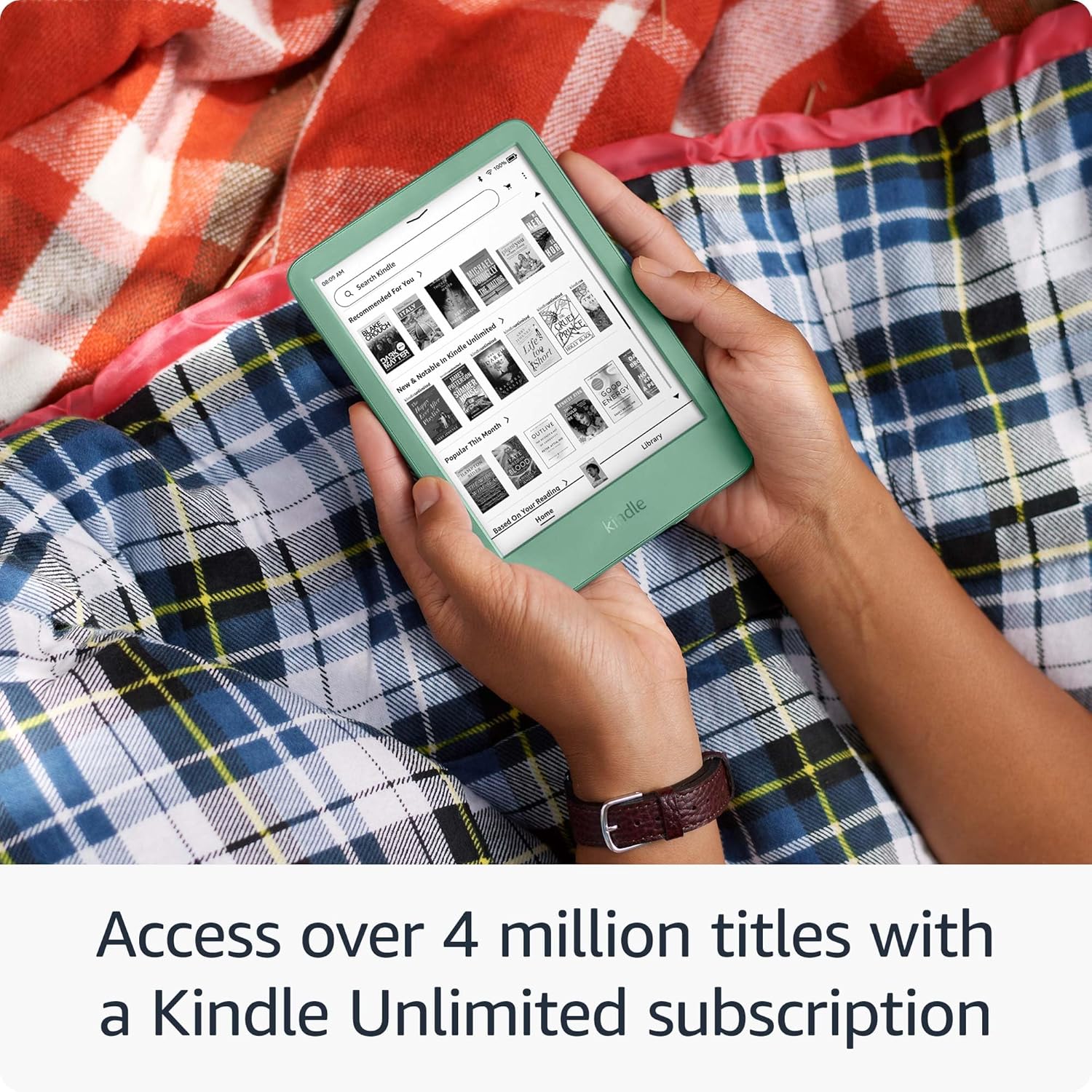
ചിത്രം: ആമസോൺ കിൻഡിൽ, കിൻഡിൽ അൺലിമിറ്റഡ് ലൈബ്രറി പ്രദർശിപ്പിക്കുന്നു, ഡൗൺലോഡ് ചെയ്യാൻ ലഭ്യമായ വിവിധ പുസ്തക കവറുകൾ കാണിക്കുന്നു.
2. നിങ്ങളുടെ കിൻഡിൽ പ്രവർത്തിപ്പിക്കൽ
2.1 അടിസ്ഥാന നാവിഗേഷൻ
- ഹോം സ്ക്രീൻ: നിങ്ങളുടെ പ്രധാന ലൈബ്രറിയിലേക്കും ശുപാർശകളിലേക്കും മടങ്ങാൻ "ഹോം" ഐക്കണിൽ ടാപ്പ് ചെയ്യുക.
- ലൈബ്രറി: "ലൈബ്രറി" ടാപ്പ് ചെയ്തുകൊണ്ട് നിങ്ങളുടെ ഡൗൺലോഡ് ചെയ്ത എല്ലാ പുസ്തകങ്ങളും ഉള്ളടക്കവും ആക്സസ് ചെയ്യുക.
- പേജ് തിരിവുകൾ: അടുത്ത പേജിലേക്ക് തിരിയാൻ സ്ക്രീനിന്റെ വലതുവശത്ത് ടാപ്പ് ചെയ്യുക, അല്ലെങ്കിൽ തിരികെ പോകാൻ ഇടതുവശത്ത് ടാപ്പ് ചെയ്യുക. സ്വൈപ്പ് ആംഗ്യങ്ങളും ഉപയോഗിക്കാം. സുഗമമായ വായനാ പ്രവാഹത്തിനായി വേഗത്തിലുള്ള പേജ് ടേണുകൾ കിൻഡിൽ അവതരിപ്പിക്കുന്നു.
- തിരയുക: നിങ്ങളുടെ ഉപകരണത്തിലോ കിൻഡിൽ സ്റ്റോറിലോ ഉള്ള പുസ്തകങ്ങൾ, രചയിതാക്കൾ അല്ലെങ്കിൽ ഉള്ളടക്കം കണ്ടെത്താൻ സ്ക്രീനിന്റെ മുകളിലുള്ള തിരയൽ ബാർ ഉപയോഗിക്കുക.
2.2 വായനാനുഭവം
ശ്രദ്ധ തിരിക്കുന്നതൊഴിവാക്കുന്ന വായനാനുഭവത്തിനായി കിൻഡിൽ രൂപകൽപ്പന ചെയ്തിരിക്കുന്നു. നിങ്ങളുടെ ഡിസ്പ്ലേ ക്രമീകരണങ്ങൾ നിങ്ങൾക്ക് ഇഷ്ടാനുസൃതമാക്കാം:
- ക്രമീകരിക്കാവുന്ന ഫ്രണ്ട് ലൈറ്റ്: ക്വിക്ക് സെറ്റിംഗ്സ് മെനു തുറക്കാൻ സ്ക്രീനിന്റെ മുകളിൽ ടാപ്പ് ചെയ്യുക. നിങ്ങളുടെ ഇഷ്ടത്തിനനുസരിച്ച് ബ്രൈറ്റ്നസ് സ്ലൈഡർ ക്രമീകരിക്കുക. പരമാവധി സെറ്റിംഗിൽ ഫ്രണ്ട് ലൈറ്റ് ഇപ്പോൾ 25% തെളിച്ചമുള്ളതാണ്.
- ഡാർക്ക് മോഡ്: കുറഞ്ഞ വെളിച്ചത്തിൽ സുഖകരമായ വായനയ്ക്കായി ക്വിക്ക് സെറ്റിംഗ്സ് മെനുവിൽ നിന്ന് ഡാർക്ക് മോഡ് ഓൺ/ഓഫ് ചെയ്യുക.
- ഫോണ്ടും വാചക വലുപ്പവും: ഒരു പുസ്തകം വായിക്കുമ്പോൾ, സ്ക്രീനിന്റെ മുകളിൽ ടാപ്പ് ചെയ്യുക, തുടർന്ന് ഫോണ്ട് ശൈലി, വലുപ്പം, വരികൾക്കിടയിലുള്ള അകലം, മാർജിനുകൾ എന്നിവ മാറ്റാൻ "Aa" ഐക്കൺ തിരഞ്ഞെടുക്കുക.
- തിളക്കമില്ലാത്ത ഡിസ്പ്ലേ: 6 ഇഞ്ച് ഗ്ലെയർ-ഫ്രീ ഡിസ്പ്ലേ നേരിട്ടുള്ള സൂര്യപ്രകാശത്തിൽ പോലും വായനാക്ഷമത ഉറപ്പാക്കുന്നു.

ചിത്രം: സ്ക്രീനിലെ വാചകവും മെച്ചപ്പെടുത്തിയ ഫ്രണ്ട് ലൈറ്റ് സവിശേഷതയും എടുത്തുകാണിക്കുന്ന ആമസോൺ കിൻഡിൽ കയ്യിൽ പിടിച്ചിരിക്കുന്നതിന്റെ ഒരു ക്ലോസ്-അപ്പ്.

ചിത്രം: വേഗത്തിലുള്ള പേജ് ടേണുകൾ ഉപയോഗിച്ച് ഉപകരണത്തിന്റെ പ്രതികരണശേഷി ചിത്രീകരിക്കുന്ന ഒരു വ്യക്തിയുടെ കൈവശമുള്ള ആമസോൺ കിൻഡിൽ.
3. പരിപാലനം
- ചാർജിംഗ്: ബാറ്ററി ഇൻഡിക്കേറ്റർ കുറവായിരിക്കുമ്പോൾ നിങ്ങളുടെ കിൻഡിൽ റീചാർജ് ചെയ്യുക. ഉപയോഗത്തെ ആശ്രയിച്ച്, പൂർണ്ണമായി ചാർജ് ചെയ്യുന്നത് 6 ആഴ്ച വരെ ബാറ്ററി ലൈഫ് നൽകുന്നു. നൽകിയിരിക്കുന്ന USB-C കേബിളും അനുയോജ്യമായ ഒരു പവർ അഡാപ്റ്ററും ഉപയോഗിക്കുക.
- വൃത്തിയാക്കൽ: മൃദുവായ, ലിന്റ് രഹിത തുണി ഉപയോഗിച്ച് നിങ്ങളുടെ കിൻഡിൽ സ്ക്രീനും ബോഡിയും സൌമ്യമായി തുടയ്ക്കുക. അബ്രാസീവ് ക്ലീനറുകളോ ലായകങ്ങളോ ഉപയോഗിക്കുന്നത് ഒഴിവാക്കുക.
- സോഫ്റ്റ്വെയർ അപ്ഡേറ്റുകൾ: വൈഫൈയിലേക്ക് കണക്റ്റ് ചെയ്യുമ്പോൾ നിങ്ങളുടെ കിൻഡിൽ സ്വയമേവ സോഫ്റ്റ്വെയർ അപ്ഡേറ്റുകൾ ഡൗൺലോഡ് ചെയ്ത് ഇൻസ്റ്റാൾ ചെയ്യും. അപ്ഡേറ്റ് ചെയ്യുമ്പോൾ നിങ്ങളുടെ ഉപകരണം ചാർജ്ജ് ചെയ്തിട്ടുണ്ടെന്ന് ഉറപ്പാക്കുക.
- സ്റ്റോറേജ് മാനേജ്മെന്റ്: 16 GB സ്റ്റോറേജുള്ള നിങ്ങളുടെ കിൻഡിൽ ആയിരക്കണക്കിന് പുസ്തകങ്ങൾ സൂക്ഷിക്കാൻ കഴിയും. സ്റ്റോറേജ് കൈകാര്യം ചെയ്യാൻ, "ക്രമീകരണങ്ങൾ" > "ഉപകരണ ഓപ്ഷനുകൾ" > "സ്റ്റോറേജ്" എന്നതിലേക്ക് പോകുക. നിങ്ങളുടെ ആമസോൺ അക്കൗണ്ടിൽ നിന്ന് ഇല്ലാതാക്കാതെ തന്നെ സ്ഥലം ശൂന്യമാക്കാൻ ഡൗൺലോഡ് ചെയ്ത പുസ്തകങ്ങൾ നീക്കം ചെയ്യാം.

ചിത്രം: ഒരു തൂക്കുകട്ടിലിൽ വിശ്രമിക്കുന്ന ഒരാൾ, ആമസോൺ കിൻഡിൽ വായിക്കുന്നു, അതിന്റെ പോർട്ടബിലിറ്റിയും നീണ്ട ബാറ്ററി ലൈഫും ഊന്നിപ്പറയുന്നു.
4. പ്രശ്നപരിഹാരം
നിങ്ങളുടെ കിൻഡിൽ പ്രശ്നങ്ങൾ നേരിടുകയാണെങ്കിൽ, ഇനിപ്പറയുന്ന പരിഹാരങ്ങൾ പരീക്ഷിക്കുക:
- ഉപകരണം പ്രതികരിക്കുന്നില്ല: നിങ്ങളുടെ കിൻഡിൽ മരവിച്ചിരിക്കുകയോ പ്രതികരിക്കാതിരിക്കുകയോ ചെയ്താൽ, ഉപകരണം പുനരാരംഭിക്കുന്നത് വരെ പവർ ബട്ടൺ 40 സെക്കൻഡ് അമർത്തിപ്പിടിക്കുക.
- Wi-Fi കണക്ഷൻ പ്രശ്നങ്ങൾ:
- നിങ്ങളുടെ വൈഫൈ റൂട്ടർ ഓണാണെന്നും പ്രവർത്തിക്കുന്നുണ്ടെന്നും ഉറപ്പാക്കുക.
- "ക്രമീകരണങ്ങൾ" > "വൈ-ഫൈ & ബ്ലൂടൂത്ത്" എന്നതിലേക്ക് പോയി നിങ്ങളുടെ നെറ്റ്വർക്കിലേക്ക് വീണ്ടും കണക്റ്റുചെയ്യാൻ ശ്രമിക്കുക.
- നിങ്ങളുടെ കിൻഡിലും വൈഫൈ റൂട്ടറും പുനരാരംഭിക്കുക.
- ബാറ്ററി ചാർജുചെയ്യുന്നില്ല:
- USB-C കേബിൾ കിൻഡിലിലേക്കും പവർ അഡാപ്റ്ററിലേക്കും സുരക്ഷിതമായി ബന്ധിപ്പിച്ചിട്ടുണ്ടോയെന്ന് പരിശോധിക്കുക.
- മറ്റൊരു USB-C കേബിളോ പവർ അഡാപ്റ്ററോ പരീക്ഷിച്ചുനോക്കൂ.
- പവർ ഔട്ട്ലെറ്റ് പ്രവർത്തനക്ഷമമാണെന്ന് ഉറപ്പാക്കുക.
- ഡൗൺലോഡ് ചെയ്യാത്ത പുസ്തകങ്ങൾ:
- നിങ്ങളുടെ Wi-Fi കണക്ഷൻ പരിശോധിക്കുക.
- നിങ്ങളുടെ കിൻഡിൽ ശരിയായ ആമസോൺ അക്കൗണ്ടിൽ രജിസ്റ്റർ ചെയ്തിട്ടുണ്ടെന്ന് ഉറപ്പാക്കുക.
- നിങ്ങളുടെ ഉപകരണത്തിൽ ലഭ്യമായ സംഭരണ സ്ഥലം പരിശോധിക്കുക.
കൂടുതൽ സഹായത്തിന്, "വാറന്റിയും പിന്തുണയും" വിഭാഗം കാണുക.
5 സ്പെസിഫിക്കേഷനുകൾ
| മോഡലിൻ്റെ പേര് | ആമസോൺ കിൻഡിൽ 16 ജിബി (ഏറ്റവും പുതിയ മോഡൽ) |
| പ്രദർശിപ്പിക്കുക | 6-ഇഞ്ച് ഗ്ലെയർ-ഫ്രീ ഡിസ്പ്ലേ, ക്രമീകരിക്കാവുന്ന ഫ്രണ്ട് ലൈറ്റ്, ഡാർക്ക് മോഡ് |
| സംഭരണം | 16 ജിബി (ആയിരക്കണക്കിന് പുസ്തകങ്ങൾ ഉൾക്കൊള്ളാൻ കഴിയും) |
| ബാറ്ററി ലൈഫ് | ഒറ്റ ചാർജിൽ 6 ആഴ്ച വരെ (വയർലെസ് ഓഫായിരിക്കുമ്പോഴും 13 മിനിറ്റിൽ ലൈറ്റ് സെറ്റിംഗ് ഉള്ളപ്പോഴും പ്രതിദിനം 30 മിനിറ്റ് വായനയെ അടിസ്ഥാനമാക്കി) |
| കണക്റ്റിവിറ്റി | വൈഫൈ |
| ചാർജിംഗ് പോർട്ട് | USB-C |
| മെറ്റീരിയലുകൾ | 75% പുനരുപയോഗിച്ച പ്ലാസ്റ്റിക്കുകൾ, 90% പുനരുപയോഗിച്ച മഗ്നീഷ്യം |

ചിത്രം: 16 ജിബി കിൻഡിൽ സൂക്ഷിക്കാൻ കഴിയുന്ന വിശാലമായ ലൈബ്രറിയെ ദൃശ്യപരമായി പ്രതിനിധീകരിക്കുന്ന പുസ്തക കവറുകളുടെ ഒരു ശേഖരം.
6. വാറൻ്റിയും പിന്തുണയും
വാറൻ്റി വിവരങ്ങൾ: നിങ്ങളുടെ Amazon Kindle 16 GB പരിമിതമായ വാറന്റിയിൽ ഉൾപ്പെടുന്നു. വാറന്റി കാലയളവിനെയും നിബന്ധനകളെയും കുറിച്ചുള്ള വിശദാംശങ്ങൾക്ക്, നിങ്ങളുടെ ഉപകരണ പാക്കേജിംഗിനൊപ്പം നൽകിയിരിക്കുന്ന വാറന്റി വിവരങ്ങൾ പരിശോധിക്കുക അല്ലെങ്കിൽ ഔദ്യോഗിക Amazon പിന്തുണ സന്ദർശിക്കുക. webസൈറ്റ്.
റിട്ടേണുകൾ: യോഗ്യമായ ഉൽപ്പന്നങ്ങൾക്ക് ആമസോൺ 30 ദിവസത്തെ റിട്ടേൺ പോളിസി വാഗ്ദാനം ചെയ്യുന്നു. നിർദ്ദിഷ്ട റിട്ടേൺ നിർദ്ദേശങ്ങൾക്കായി നിങ്ങളുടെ വാങ്ങൽ വിശദാംശങ്ങൾ പരിശോധിക്കുക.
ഉപഭോക്തൃ പിന്തുണ: സാങ്കേതിക സഹായം, ഈ മാനുവലിനപ്പുറമുള്ള ട്രബിൾഷൂട്ടിംഗ്, അല്ലെങ്കിൽ വാറന്റി ക്ലെയിമുകൾ എന്നിവയ്ക്കായി, ദയവായി ആമസോൺ ഉപഭോക്തൃ സേവനവുമായി ബന്ധപ്പെടുക. ഔദ്യോഗിക ആമസോണിൽ പിന്തുണാ കോൺടാക്റ്റ് വിവരങ്ങൾ നിങ്ങൾക്ക് കണ്ടെത്താനാകും. webസൈറ്റ് അല്ലെങ്കിൽ നിങ്ങളുടെ ആമസോൺ അക്കൗണ്ട് വഴി.
കൂടുതൽ വിവരങ്ങൾക്ക്, സന്ദർശിക്കുക: ആമസോൺ ഉപകരണ പിന്തുണ


