ആമുഖം
This manual provides comprehensive instructions for the setup, operation, and maintenance of your new HUAYU RM-L1678 remote control. This remote is designed for use with various AQUOS LCD LED Smart TV models, including GB234WJSA, GB346WJSA, GA455WJSA, GB139WJSA, and G8275WJSA. Please read this manual carefully to ensure proper use and to maximize the lifespan of your device.
1. സജ്ജീകരണം
1.1 ബാറ്ററി ഇൻസ്റ്റാളേഷൻ
റിമോട്ട് കൺട്രോളിന് രണ്ട് AAA ബാറ്ററികൾ ആവശ്യമാണ് (ഉൾപ്പെടുത്തിയിട്ടില്ല). അവ ഇൻസ്റ്റാൾ ചെയ്യാൻ ഈ ഘട്ടങ്ങൾ പാലിക്കുക:
- റിമോട്ട് കൺട്രോളിന്റെ പിൻഭാഗത്ത് ബാറ്ററി കമ്പാർട്ട്മെന്റ് കണ്ടെത്തുക.
- ബാറ്ററി കവർ താഴേക്ക് സ്ലൈഡ് ചെയ്യുക അല്ലെങ്കിൽ ലാച്ച് അമർത്തി ലിഫ്റ്റ് ഉപയോഗിച്ച് തുറക്കുക.
- രണ്ട് AAA ബാറ്ററികൾ ഇടുക, കമ്പാർട്ടുമെന്റിനുള്ളിലെ ഡയഗ്രമുകളുമായി പോസിറ്റീവ് (+) ഉം നെഗറ്റീവ് (-) ടെർമിനലുകളും പൊരുത്തപ്പെടുന്നുണ്ടെന്ന് ഉറപ്പാക്കുക.
- സുരക്ഷിതമായി ക്ലിക്ക് ചെയ്യുന്നതുവരെ ബാറ്ററി കവർ തിരികെ അതിന്റെ സ്ഥാനത്തേക്ക് സ്ലൈഡുചെയ്ത് മാറ്റിസ്ഥാപിക്കുക.

ചിത്രം: പിന്നിലേക്ക് view of the remote control with the battery compartment open, illustrating correct battery placement.
1.2 പ്രാരംഭ ഉപയോഗം
This remote control uses infrared technology and typically does not require programming for compatible AQUOS LCD LED Smart TVs. Simply point the remote towards your TV and press the Power button to test functionality. If the TV does not respond, ensure batteries are correctly installed and the remote has a clear line of sight to the TV's IR receiver.
2. പ്രവർത്തന നിർദ്ദേശങ്ങൾ
The HUAYU RM-L1678 remote control features standard buttons for TV operation. Below is a general guide to common button functions:
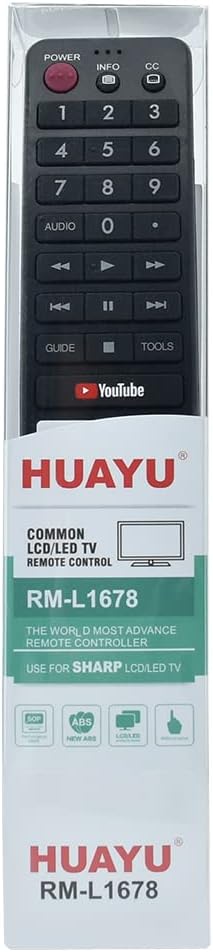
ചിത്രം: മുൻഭാഗം view റിമോട്ട് കൺട്രോളിന്റെ, ബട്ടൺ ലേഔട്ട് ഹൈലൈറ്റ് ചെയ്യുന്നു.
- പവർ ബട്ടൺ: ടിവി ഓണാക്കുകയോ ഓഫാക്കുകയോ ചെയ്യുന്നു.
- നമ്പർ ബട്ടണുകൾ (0-9): ടിവി ചാനലുകൾ നേരിട്ട് തിരഞ്ഞെടുക്കുക.
- വോളിയം കൂട്ടുക/താഴ്ത്തുക: Adjusts the TV's volume level.
- ചാനൽ മുകളിലേക്കും താഴേക്കും: ടിവി ചാനൽ തുടർച്ചയായി മാറ്റുന്നു.
- നിശബ്ദ ബട്ടൺ: ടിവി ശബ്ദം മ്യൂട്ട് ചെയ്യുകയോ അൺമ്യൂട്ട് ചെയ്യുകയോ ചെയ്യുന്നു.
- ഇൻപുട്ട്/ഉറവിട ബട്ടൺ: വ്യത്യസ്ത ഇൻപുട്ട് സ്രോതസ്സുകൾക്കിടയിൽ (HDMI, AV, മുതലായവ) മാറുന്നു.
- നാവിഗേഷൻ ബട്ടണുകൾ (മുകളിലേക്ക്, താഴേക്ക്, ഇടത്, വലത്, ശരി): മെനുകൾ നാവിഗേറ്റ് ചെയ്യുന്നതിനും തിരഞ്ഞെടുപ്പുകൾ സ്ഥിരീകരിക്കുന്നതിനും ഉപയോഗിക്കുന്നു.
- ബാക്ക്/എക്സിറ്റ് ബട്ടൺ: മുമ്പത്തെ മെനുവിലേക്ക് മടങ്ങുന്നു അല്ലെങ്കിൽ നിലവിലുള്ള മെനുവിൽ നിന്ന് പുറത്തുകടക്കുന്നു.
- Smart TV/App Buttons: Dedicated buttons for accessing smart TV features or specific applications like YouTube (if present and supported by your TV model).
Note: Specific button functionalities may vary slightly depending on your AQUOS TV model. Refer to your TV's user manual for detailed information on advanced features.
3. പരിപാലനം
3.1 വൃത്തിയാക്കൽ
To keep your remote control clean and functional:
- മൃദുവായതും ഉണങ്ങിയതുമായ തുണി ഉപയോഗിച്ച് ഉപരിതലം തുടയ്ക്കുക.
- ദുശ്ശാഠ്യമുള്ള അഴുക്കിന്, ലഘുവായി ഡിampതുണിയിൽ വെള്ളം അല്ലെങ്കിൽ നേരിയതും ഉരച്ചിലുകൾ ഇല്ലാത്തതുമായ ഒരു ക്ലീനർ ഉപയോഗിക്കുക. ക്ലീനർ നേരിട്ട് റിമോട്ടിലേക്ക് സ്പ്രേ ചെയ്യരുത്.
- കഠിനമായ രാസവസ്തുക്കൾ, ലായകങ്ങൾ, അല്ലെങ്കിൽ അബ്രസീവ് ക്ലീനിംഗ് പാഡുകൾ എന്നിവ ഉപയോഗിക്കുന്നത് ഒഴിവാക്കുക, കാരണം ഇവ റിമോട്ടിന്റെ ഫിനിഷിനോ ആന്തരിക ഘടകങ്ങളോ കേടുവരുത്തും.
3.2 ബാറ്ററി മാറ്റിസ്ഥാപിക്കൽ
Replace batteries when the remote's response becomes sluggish or stops working. Always replace both batteries at the same time with new AAA batteries. Do not mix old and new batteries or different types of batteries.
3.3 സംഭരണം
Store the remote control in a cool, dry place away from direct sunlight and extreme temperatures. If the remote will not be used for an extended period, remove the batteries to prevent leakage and potential damage.
4. പ്രശ്നപരിഹാരം
| പ്രശ്നം | സാധ്യമായ കാരണം | പരിഹാരം |
|---|---|---|
| റിമോട്ട് പ്രവർത്തിക്കുന്നില്ല | ഡെഡ് അല്ലെങ്കിൽ തെറ്റായി ഇൻസ്റ്റാൾ ചെയ്ത ബാറ്ററികൾ. | ബാറ്ററികൾ പുതിയവ ഉപയോഗിച്ച് മാറ്റിസ്ഥാപിക്കുക, ശരിയായ ധ്രുവത ഉറപ്പാക്കുക. |
| റിമോട്ട് പ്രതികരിക്കുന്നില്ല | Obstruction between remote and TV's IR sensor; remote too far from TV. | Ensure a clear line of sight to the TV. Move closer to the TV. |
| Certain buttons not functioning | Dirt or debris under buttons; remote damage. | Clean the remote surface. If damage is suspected, consider replacement. |
| TV not responding to specific smart features | TV model does not support the feature; TV software issue. | Verify your TV model's compatibility with the feature. Consult your TV's manual or manufacturer support. |
5 സ്പെസിഫിക്കേഷനുകൾ
- മോഡൽ നമ്പർ: ആർഎം-എൽ1678
- അനുയോജ്യത: AQUOS LCD LED Smart TVs (e.g., GB234WJSA, GB346WJSA, GA455WJSA, GB139WJSA, G8275WJSA)
- വയർലെസ് കണക്ഷൻ: ഇൻഫ്രാറെഡ് (IR)
- ഊർജ്ജ സ്രോതസ്സ്: 2 x AAA ബാറ്ററികൾ (ഉൾപ്പെടുത്തിയിട്ടില്ല)
- ചാനൽ: 1
- നിർമ്മാതാവിൻ്റെ റഫറൻസ്: FY-1005004724793564
- ASIN: B0CTMTG93T
6. വാറൻ്റിയും പിന്തുണയും
ഈ ഉൽപ്പന്നം എ 12 മാസ വാറൻ്റി വാങ്ങിയ തീയതി മുതൽ. ഈ വാറന്റി നിർമ്മാണ വൈകല്യങ്ങൾ ഉൾക്കൊള്ളുകയും സാധാരണ ഉപയോഗത്തിൽ ഉൽപ്പന്നം ഉദ്ദേശിച്ച രീതിയിൽ പ്രവർത്തിക്കുന്നുവെന്ന് ഉറപ്പാക്കുകയും ചെയ്യുന്നു.
If you encounter any issues with your product, such as receiving a damaged or incorrect item, please do not hesitate to contact us. We are committed to providing support and will respond to your inquiries within 24 hours.
For support, please refer to the seller's contact information on the purchase platform.


