ആമുഖം
Thank you for choosing the Nexus Bendz Prostate Edition Bendable Vibrating Prostate Massager. This manual provides essential information for the safe and effective use, maintenance, and troubleshooting of your device. Please read it thoroughly before first use and retain it for future reference.
The Nexus Bendz Prostate Edition is designed for customized pleasure, featuring a bendable, rippled design with dual-density silicone. It offers 6 vibrating functions for the shaft and 6 for the base, providing 48 combinations of pleasure. The device includes a slimline remote control for convenient operation, and both the massager and remote are rechargeable and fully waterproof/submersible.
സുരക്ഷാ വിവരങ്ങൾ
- Always clean the device thoroughly before and after each use.
- Use only water-based lubricants with this product. Oil-based lubricants can damage silicone.
- Do not use if the device appears damaged or if the silicone is torn.
- എന്തെങ്കിലും അസ്വസ്ഥതയോ വേദനയോ അനുഭവപ്പെട്ടാൽ ഉടൻ ഉപയോഗം നിർത്തുക.
- കുട്ടികൾക്ക് ലഭ്യമാകാതെ സൂക്ഷിക്കുക.
- നിങ്ങൾക്ക് മുൻകാല മെഡിക്കൽ അവസ്ഥകളോ ആശങ്കകളോ ഉണ്ടെങ്കിൽ ഒരു ആരോഗ്യ വിദഗ്ദ്ധനെ സമീപിക്കുക.
പാക്കേജ് ഉള്ളടക്കം
- 1 x Nexus Bendz Prostate Edition Massager
- 1 x Slimline Remote Control
- 1 x USB ചാർജിംഗ് കേബിൾ
- 1 x ഉപയോക്തൃ മാനുവൽ (ഈ പ്രമാണം)
സജ്ജമാക്കുക
Charging the Device and Remote
Before first use, fully charge both the Nexus Bendz Prostate Edition massager and its remote control.
- Locate the charging ports on both the massager and the remote. These are typically small, recessed magnetic contact points.
- Connect the provided USB charging cable to the charging points on the device and remote.
- USB കേബിളിന്റെ മറ്റേ അറ്റം ഒരു സാധാരണ USB പവർ അഡാപ്റ്ററിലേക്ക് (ഉൾപ്പെടുത്തിയിട്ടില്ല) അല്ലെങ്കിൽ ഒരു കമ്പ്യൂട്ടർ USB പോർട്ടിലേക്ക് പ്ലഗ് ചെയ്യുക.
- The indicator light on the device and remote will illuminate during charging and turn off or change color when fully charged. Charging typically takes 2-3 hours.
- പൂർണ്ണമായും ചാർജ് ചെയ്തുകഴിഞ്ഞാൽ ചാർജിംഗ് കേബിൾ വിച്ഛേദിക്കുക.
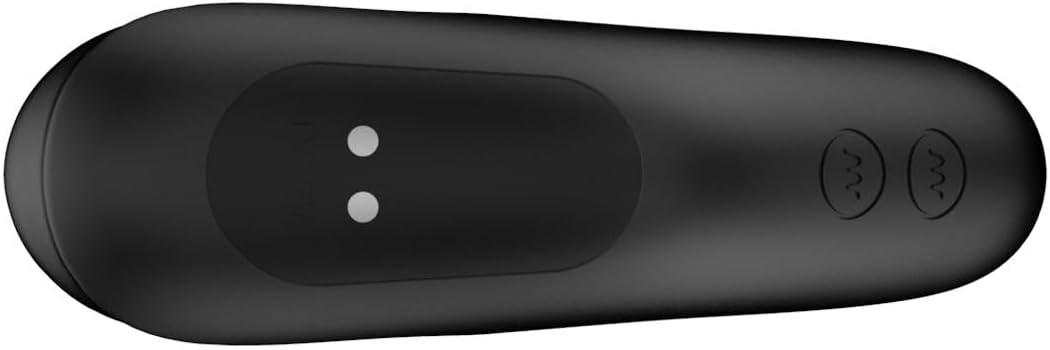
ചിത്രം 1: താഴെ view of the massager, highlighting the magnetic charging points. Ensure these points are clean and dry before charging.

ചിത്രം 2: The slimline remote control, showing the power button and vibration control buttons. The charging port is typically on the underside or end.
പ്രവർത്തന നിർദ്ദേശങ്ങൾ
പവർ ചെയ്യുന്നത് ഓൺ/ഓഫ്
- To power on the massager: Press and hold the power button on the massager for 2-3 seconds until it vibrates briefly.
- To power on the remote: Press and hold the power button on the remote for 2-3 seconds.
- To power off both: Press and hold the power button on either the massager or the remote for 2-3 seconds until the vibrations stop.
റിമോട്ട് കൺട്രോൾ ഉപയോഗിക്കുന്നു
The remote control allows for convenient operation of the massager from up to 8 meters away.
- Ensure both the massager and remote are powered on.
- The remote has separate buttons for controlling the shaft vibrations and the base vibrations.
- Press the respective vibration buttons to cycle through the 6 shaft vibration modes and 6 base vibration modes.
- Experiment with different combinations to find your preferred setting from the 48 available pleasure combinations.
അപേക്ഷ
Apply a generous amount of water-based lubricant to the massager before insertion. The bendable design allows the device to conform to your body for optimal comfort and targeted stimulation of the prostate and perineum.

ചിത്രം 3: The Nexus Bendz Prostate Edition massager. Note the bendable shaft and the rippled texture on the base designed for perineum stimulation.

ചിത്രം 4: വശം view demonstrating the ergonomic shape and bendable nature of the massager, designed for comfortable use.
പരിപാലനവും പരിചരണവും
വൃത്തിയാക്കൽ
Proper cleaning is essential for hygiene and to prolong the life of your device.
- Always clean the massager immediately after each use.
- Wash the device thoroughly with warm water and a mild, toy-safe soap.
- എല്ലാ സോപ്പ് അവശിഷ്ടങ്ങളും നീക്കം ചെയ്യാൻ നന്നായി കഴുകുക.
- Pat dry with a lint-free cloth or allow to air dry completely before storing.
- The device is waterproof/submersible, allowing for easy cleaning under running water.
സംഭരണം
Store the massager and remote in a clean, dry, and cool place, away from direct sunlight and extreme temperatures. Keep them separate from other toys made of different materials to prevent material degradation.
ട്രബിൾഷൂട്ടിംഗ്
| പ്രശ്നം | സാധ്യമായ കാരണം | പരിഹാരം |
|---|---|---|
| ഉപകരണം ഓണാക്കുന്നില്ല. | ബാറ്ററി തീർന്നു. | നൽകിയിരിക്കുന്ന USB കേബിൾ ഉപയോഗിച്ച് ഉപകരണം പൂർണ്ണമായി ചാർജ് ചെയ്യുക. |
| Remote not controlling device. | Remote battery is depleted; Device is off; Out of range. | Charge the remote; Ensure device is powered on; Move remote closer to the device (within 8 meters). |
| വൈബ്രേഷനുകൾ ദുർബലമോ പൊരുത്തമില്ലാത്തതോ ആണ്. | ബാറ്ററി കുറവാണ്; ഉപകരണത്തിന്റെ തകരാറ്. | Recharge the device. If problem persists after charging, contact customer support. |
| ഉപകരണം ചാർജ് ചെയ്യുന്നില്ല. | Charging cable not properly connected; Faulty cable/adapter; Dirty charging points. | Ensure cable is securely connected; Try a different USB port or adapter; Clean charging points with a dry cloth. |
സ്പെസിഫിക്കേഷനുകൾ
- മോഡൽ നമ്പർ: 87909
- ബ്രാൻഡ്: നെക്സസ്
- നിറം: കറുപ്പ്
- മെറ്റീരിയൽ: Luxury Silicone
- അളവുകൾ (L x W x H): 7.09 x 7.09 x 1.97 ഇഞ്ച്
- ഭാരം: 10.16 ഔൺസ്
- Vibration Functions: 6 shaft modes, 6 base modes (48 combinations)
- നിയന്ത്രണം: Device button and Slimline Remote Control
- വിദൂര ശ്രേണി: 8 മീറ്റർ വരെ
- ഊർജ്ജ സ്രോതസ്സ്: റീചാർജ് ചെയ്യാവുന്നത് (USB കേബിൾ ഉൾപ്പെടുത്തിയിരിക്കുന്നു)
- വാട്ടർപ്രൂഫ്: Yes, submersible
വാറൻ്റിയും പിന്തുണയും
For warranty information or technical support, please refer to the official Nexus webസൈറ്റിൽ ബന്ധപ്പെടുക അല്ലെങ്കിൽ നിങ്ങളുടെ റീട്ടെയിലറെ ബന്ധപ്പെടുക. ഏതെങ്കിലും വാറന്റി ക്ലെയിമുകൾക്കായി നിങ്ങളുടെ വാങ്ങിയതിന്റെ തെളിവ് സൂക്ഷിക്കുക.
നിർമ്മാതാവ്: നെക്സസ്
ആദ്യം ലഭ്യമായ തീയതി: ഫെബ്രുവരി 8, 2024


