1. ആമുഖം
This manual provides essential information for setting up, operating, and maintaining your ACEMAGIC F2A Mini PC. Please read this guide thoroughly before using the device to ensure optimal performance and safety.

ചിത്രം: കഴിഞ്ഞുview of the Intel Core Ultra 7 155H processor, highlighting its 16 cores, 22 threads, 4.8GHz Turbo Boost, 24MB Cache, and 65W TDP, indicating its advanced Intel 4 process technology.
2 സുരക്ഷാ വിവരങ്ങൾ
ഉപകരണത്തിന് കേടുപാടുകൾ സംഭവിക്കാതിരിക്കാനോ സ്വയം പരിക്കേൽക്കാതിരിക്കാനോ ഇനിപ്പറയുന്ന സുരക്ഷാ മുൻകരുതലുകൾ പാലിക്കുക:
- ഉപകരണം വെള്ളം, ഈർപ്പം അല്ലെങ്കിൽ തീവ്രമായ താപനില എന്നിവയിൽ തുറന്നുകാട്ടരുത്.
- താപ സ്രോതസ്സുകൾക്ക് സമീപം അല്ലെങ്കിൽ നേരിട്ട് സൂര്യപ്രകാശത്തിൽ ഉപകരണം സ്ഥാപിക്കുന്നത് ഒഴിവാക്കുക.
- ഉപകരണത്തിനൊപ്പം നൽകിയിരിക്കുന്ന പവർ അഡാപ്റ്റർ മാത്രം ഉപയോഗിക്കുക.
- ഉപകരണം സ്വയം തുറക്കാനോ നന്നാക്കാനോ ശ്രമിക്കരുത്. യോഗ്യതയുള്ള സേവന ഉദ്യോഗസ്ഥരെ ബന്ധപ്പെടുക.
- അമിതമായി ചൂടാക്കുന്നത് തടയാൻ ഉപകരണത്തിന് ചുറ്റും ശരിയായ വായുസഞ്ചാരം ഉറപ്പാക്കുക.
3. പാക്കേജ് ഉള്ളടക്കം
പാക്കേജിൽ എല്ലാ ഇനങ്ങളും ഉണ്ടെന്ന് ഉറപ്പാക്കുക:
- ACEMAGIC F2A Mini PC
- പവർ അഡാപ്റ്റർ
- HDMI കേബിൾ
- ഉപയോക്തൃ മാനുവൽ (ഈ പ്രമാണം)
- Mounting Bracket (optional, may vary by package)
4. സജ്ജീകരണം
4.1 പെരിഫറലുകൾ ബന്ധിപ്പിക്കുന്നു
Before powering on your Mini PC, connect your essential peripherals:
- നിരീക്ഷിക്കുക: Connect your monitor(s) to the HDMI 2.0 ports or the multifunctional USB-C port using appropriate cables. The device supports triple display output (2x HDMI 2.0 + 1x USB-C DP1.4).
- കീബോർഡും മൗസും: Connect your USB keyboard and mouse to the available USB 3.2 Gen2 ports.
- ഓഡിയോ: Connect speakers or headphones to the audio jack if needed.
- നെറ്റ്വർക്ക്: For a wired connection, connect an Ethernet cable to the 2.5Gbps LAN port. For wireless, ensure your Wi-Fi network is available.
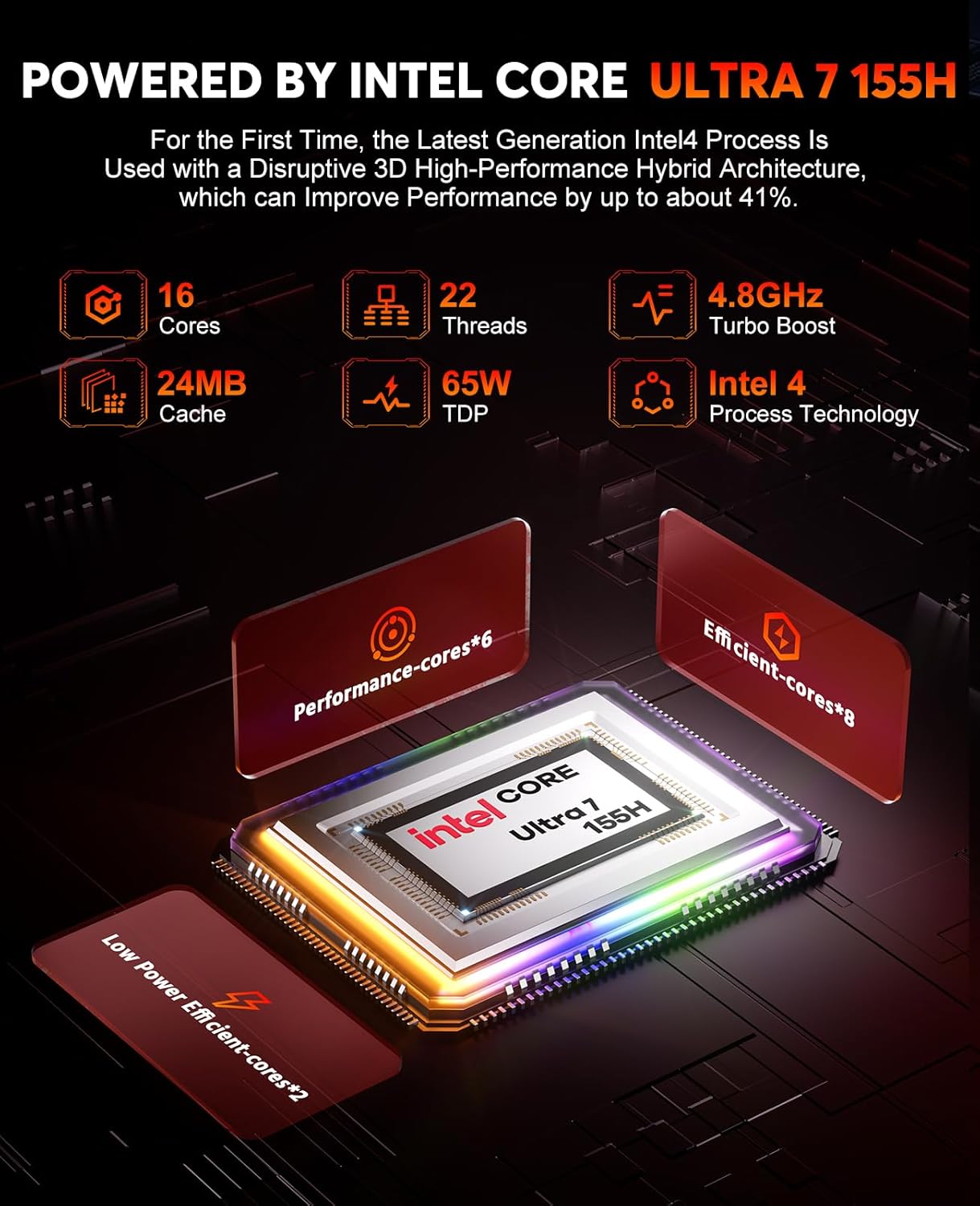
Image: The ACEMAGIC F2A Mini PC's front panel, displaying a Type-C port, two USB ports, and an audio jack, alongside the power button.
4.2 പവർ ചെയ്യുന്നു
Connect the power adapter to the DC-in port on the Mini PC and then plug it into a power outlet. Press the power button located on the front panel to turn on the device.
4.3 പ്രാരംഭ വിൻഡോസ് സജ്ജീകരണം
Upon first boot, you will be guided through the Windows operating system setup process. Follow the on-screen instructions to configure language, region, network, and user accounts.
4.4 നെറ്റ്വർക്ക് കണക്റ്റിവിറ്റി
Your F2A Mini PC supports advanced wireless and wired connectivity:
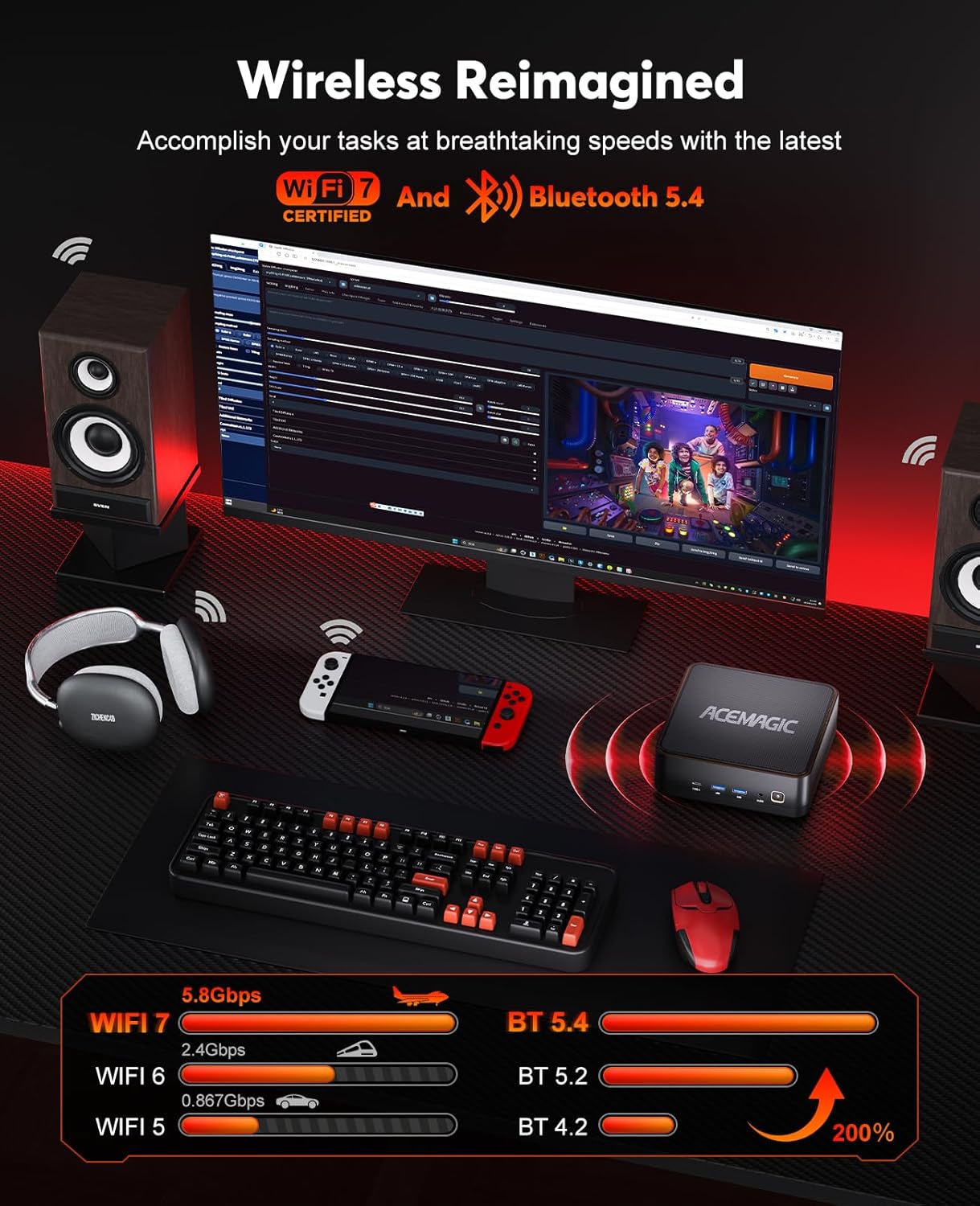
- Wi-Fi 7 (802.11be): Supports 2.4 GHz, 5 GHz, and 6 GHz frequency bands for speeds up to 5.8Gbps. To connect, select your Wi-Fi network from the Windows settings and enter the password.
- ബ്ലൂടൂത്ത് 5.4: For connecting wireless peripherals like keyboards, mice, and headphones. Pair devices through Windows Bluetooth settings.
- 2.5Gbps LAN: അതിവേഗ വയർഡ് നെറ്റ്വർക്ക് കണക്ഷനുകൾക്ക്.

Image: A visual representation of the ACEMAGIC F2A's wireless capabilities, highlighting Wi-Fi 7 and Bluetooth 5.4, with speed comparisons to older standards.
5. പ്രവർത്തന നിർദ്ദേശങ്ങൾ
5.1 പൊതുവായ ഉപയോഗം
The ACEMAGIC F2A Mini PC runs on Windows, providing a familiar desktop experience. Use it for office work, educational training, home theater, programming, and more.
5.2 AI Features with Intel AI Boost NPU
Leverage the integrated Intel AI Boost NPU for enhanced AI applications. This dedicated AI chip supports features such as background blur during video calls and other AI-driven tasks with optimized power consumption.

Image: Demonstrates the AI capabilities of the F2A Mini PC, featuring Intel AI Boost NPU for AI acceleration and intelligent blur in applications like video calls.
5.3 Graphics Performance with Intel Arc GPU
The integrated Intel Arc Graphics provides significant performance for gaming and content creation. It supports technologies like XeSS, Ray Tracing, and DirectX 12, offering a smooth visual experience.

Image: Highlights the Intel Arc GPU's performance, indicating it is up to 2.4 times faster than Intel Iris Xe graphics, suitable for immersive gaming and content creation.
5.4 Gaming and Content Creation
The F2A Mini PC is designed for modern gaming and demanding content creation tasks. Its Intel Ultra 7 155H processor and Intel Arc Graphics deliver strong performance for applications such as 3D games, 3D modeling, rendering, image editing, and video editing.

Image: The ACEMAGIC F2A Mini PC showcasing its gaming capabilities with estimated FPS for popular titles like CS2, Dota 2, Forza Horizon 5, and Dead by Daylight.
6. പരിപാലനം
6.1 കൂളിംഗ് സിസ്റ്റം
The F2A Mini PC features a robust cooling system with dual fans (one centrifugal, one axial) and D8 copper heat pipes to ensure stable performance even under heavy loads. Keep the ventilation openings clear of obstructions.
ചിത്രം: പൊട്ടിത്തെറിച്ച ഒരു view illustrating the efficient dual-fan cooling system of the ACEMAGIC F2A, including a large CPU fan, copper heat pipes, and a mini fan for DDR5 and SSD.
6.2 മെമ്മറി, സംഭരണ അപ്ഗ്രേഡുകൾ
The Mini PC supports memory and storage upgrades:
- മെമ്മറി: Features 2 SO-DDR5 DIMM slots, supporting up to 96GB DDR5 5600 MT/s in dual channel.
- സംഭരണം: Includes 2 M.2 slots (PCIe 4.0x4) for expanding SSD storage.
To access these components for upgrade, carefully remove the bottom panel by unscrewing the feet. Consult a professional if you are unsure about the upgrade process.

Image: Detailed information on the dual-channel 32GB DDR5 memory and 1TB M.2 NVMe PCIe 4.0x4 SSD, including a comparison table between DDR4 and DDR5 specifications.
7. പ്രശ്നപരിഹാരം
If you encounter issues with your ACEMAGIC F2A Mini PC, refer to the following common problems and solutions:
- ശക്തിയില്ല: Ensure the power adapter is securely connected to both the Mini PC and a working power outlet. Try a different outlet.
- ഡിസ്പ്ലേ ഇല്ല: Check all HDMI or USB-C display cable connections. Ensure your monitor is set to the correct input source.
- ഇൻ്റർനെറ്റ് കണക്ഷൻ ഇല്ല: For Wi-Fi, verify your network password and router status. For wired, check the Ethernet cable and router connection.
- ഉപകരണം അമിതമായി ചൂടാക്കൽ: Ensure the Mini PC's vents are not blocked. Operate the device in a well-ventilated area.
- മന്ദഗതിയിലുള്ള പ്രകടനം: ആവശ്യമില്ലാത്ത ആപ്ലിക്കേഷനുകൾ അടയ്ക്കുക. പശ്ചാത്തല അപ്ഡേറ്റുകൾക്കായി പരിശോധിക്കുക. മതിയായ സംഭരണ സ്ഥലം ഉറപ്പാക്കുക.
For persistent issues, contact ACEMAGIC customer support.
8 സ്പെസിഫിക്കേഷനുകൾ
| ഫീച്ചർ | സ്പെസിഫിക്കേഷൻ |
|---|---|
| ബ്രാൻഡ് | ACEMAGIC |
| ഇനം മോഡൽ നമ്പർ | F2A |
| ഉൽപ്പന്ന അളവുകൾ | 14.7 x 14.7 x 5.2 സെ.മീ; 2.08 കിലോഗ്രാം |
| നിർമ്മാതാവ് | ACEMAGIC |
| പരമ്പര | f2a-155h |
| സ്ക്രീൻ റെസല്യൂഷൻ | 2560 x 1440 |
| റെസലൂഷൻ | 3840x2160 |
| പ്രോസസ്സർ ബ്രാൻഡ് | ഇൻ്റൽ |
| പ്രോസസ്സർ തരം | Intel Mobile CPU (Intel Core Ultra 7 155H) |
| പ്രോസസ്സർ വേഗത | 4.8 GHz (Max Turbo Frequency) |
| പ്രോസസർ സോക്കറ്റ് | എഫ്സിബിജിഎ2049 |
| പ്രോസസ്സറുകളുടെ എണ്ണം | 16 (Cores) |
| റാം വലിപ്പം | 32 ജിബി |
| മെമ്മറി ടെക്നോളജി | DDR5 |
| കമ്പ്യൂട്ടർ മെമ്മറി തരം | DDR5 SDRAM |
| പിന്തുണയ്ക്കുന്ന പരമാവധി മെമ്മറി | 96 ജിബി |
| മെമ്മറി സ്പീഡ് | 5.6 GHz (5600 MT/s) |
| ഹാർഡ് ഡ്രൈവ് വലിപ്പം | 1 ടി.ബി |
| ഹാർഡ് ഡ്രൈവ് വിവരണം | SSD (NVMe PCIe 4.0x4) |
| ഹാർഡ് ഡ്രൈവ് ഇൻ്റർഫേസ് | സോളിഡ് സ്റ്റേറ്റ് |
| ഗ്രാഫിക്സ് കോപ്രൊസസർ | ഇൻ്റൽ ആർക്ക് ഗ്രാഫിക്സ് |
| ഗ്രാഫിക്സ് കാർഡ് വിവരണം | Dedicated (Integrated Intel Arc) |
| ഗ്രാഫിക്സ് റാം തരം | DDR5 SDRAM (Shared with system memory) |
| ഗ്രാഫിക്സ് റാം വലുപ്പം | 32 ജിബി (സിസ്റ്റം പങ്കിട്ടത്) |
| ഗ്രാഫിക്സ് കാർഡ് ഇൻ്റർഫേസ് | സംയോജിപ്പിച്ചത് |
| കണക്റ്റിവിറ്റി തരം | Wi-Fi 7, Bluetooth 5.4, 2.5Gbps LAN |
| വയർലെസ് തരം | ബ്ലൂടൂത്ത് |
| USB 3.0 പോർട്ടുകളുടെ എണ്ണം | 5 (USB 3.2 Gen2) |
| HDMI പോർട്ടുകളുടെ എണ്ണം | 2 |
| ഹാർഡ്വെയർ പ്ലാറ്റ്ഫോം | PC |
| ഓപ്പറേറ്റിംഗ് സിസ്റ്റം | വിൻഡോസ് |
| ബാറ്ററികൾ ഉൾപ്പെടുത്തിയിട്ടുണ്ട് | ഇല്ല |
| ഉൽപ്പന്നത്തിൻ്റെ പ്രത്യേക ഉപയോഗങ്ങൾ | Business, Gaming, Photo Editing |
| പേഴ്സണൽ കമ്പ്യൂട്ടർ ഡിസൈൻ തരം | മിനി പി.സി |
9. വാറൻ്റിയും പിന്തുണയും
Your ACEMAGIC F2A Mini PC comes with a standard manufacturer's warranty. Please refer to the warranty card included in your package for specific terms and conditions.
For technical support, troubleshooting assistance, or warranty claims, please contact ACEMAGIC customer service through their official webസൈറ്റ് അല്ലെങ്കിൽ നിങ്ങളുടെ ഉൽപ്പന്ന ഡോക്യുമെന്റേഷനിൽ നൽകിയിരിക്കുന്ന ബന്ധപ്പെടാനുള്ള വിവരങ്ങൾ.


