1. ആമുഖം
This manual provides comprehensive instructions for the setup, operation, and maintenance of your Lecoo WS208 Wireless Mouse. Please read this manual carefully before using the product to ensure proper function and longevity. Keep this manual for future reference.
2. ഉൽപ്പന്നം കഴിഞ്ഞുview
The Lecoo WS208 is a wireless optical mouse designed for comfort and efficiency. It features a 1200 DPI sensor for precise tracking and a silent click mechanism for a quiet user experience.
പ്രധാന സവിശേഷതകൾ:
- 1200 DPI ഒപ്റ്റിക്കൽ സെൻസർ: Provides accurate and responsive cursor control.
- 3-ബട്ടൺ ഡിസൈൻ: Standard left, right, and scroll wheel buttons for essential functions.
- നിശബ്ദ ക്ലിക്ക്: Reduces click noise for a quieter working environment.
- വയർലെസ് കണക്റ്റിവിറ്റി: Operates via a 2.4GHz USB receiver, offering a range of up to 10 meters.
- എർഗണോമിക്, ഒതുക്കമുള്ള ഡിസൈൻ: Lightweight (54g) and shaped for comfortable use over extended periods.
- നീണ്ട ബാറ്ററി ലൈഫ്: Powered by one AA battery, providing up to 6 months of usage depending on conditions.
- സാർവത്രിക അനുയോജ്യത: Supports Windows XP/7/8/10/11, Mac OS X 10.4+, Linux Kernel 2.6+, and Android devices.
പാക്കേജ് ഉള്ളടക്കം:
- Lecoo WS208 Wireless Mouse
- USB Mini Receiver
- ഉപയോക്തൃ മാനുവൽ
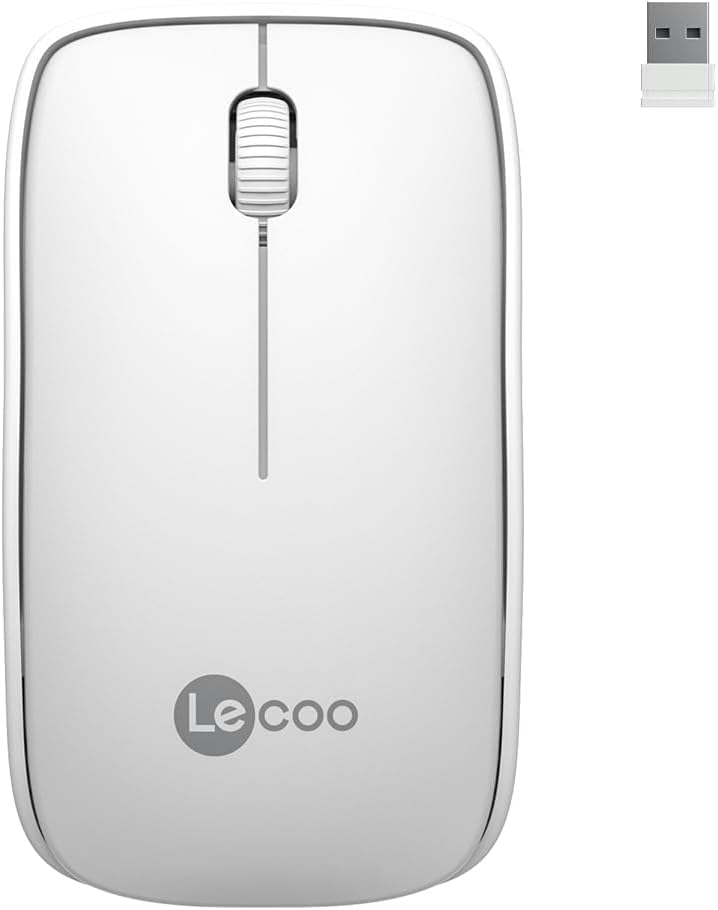
Image: Lecoo WS208 Wireless Mouse and its USB receiver.

Image: Diagram illustrating the components of the Lecoo WS208 mouse. Key features include the scroll wheel, left and right buttons, optical sensor, and USB dongle storage slot.
3. സജ്ജീകരണം
3.1 ബാറ്ററി ഇൻസ്റ്റാളേഷൻ
- മൗസിന്റെ അടിയിൽ ബാറ്ററി കമ്പാർട്ട്മെന്റ് കവർ കണ്ടെത്തുക.
- കമ്പാർട്ട്മെന്റ് തുറക്കാൻ കവർ പതുക്കെ സ്ലൈഡ് ചെയ്യുകയോ ഉയർത്തുകയോ ചെയ്യുക.
- Insert one AA battery (not included) into the compartment, ensuring the positive (+) and negative (-) terminals align correctly with the indicators.
- ബാറ്ററി കമ്പാർട്ട്മെന്റ് കവർ സുരക്ഷിതമായി സ്ഥലത്ത് ക്ലിക്ക് ചെയ്യുന്നതുവരെ മാറ്റിസ്ഥാപിക്കുക.
3.2 USB റിസീവർ ബന്ധിപ്പിക്കുന്നു
- Remove the USB mini receiver from its storage slot, usually located inside the battery compartment or on the bottom of the mouse.
- Plug the USB receiver into an available USB port on your computer (PC, Mac, Laptop) or compatible device.
- നിങ്ങളുടെ ഓപ്പറേറ്റിംഗ് സിസ്റ്റം ആവശ്യമായ ഡ്രൈവറുകൾ സ്വയമേവ കണ്ടെത്തി ഇൻസ്റ്റാൾ ചെയ്യണം. ഇതിന് കുറച്ച് നിമിഷങ്ങൾ എടുത്തേക്കാം.
3.3 Powering On the Mouse
After installing the battery and plugging in the receiver, the mouse should automatically power on. Some models may have a power switch on the bottom; ensure it is in the 'ON' position if present.
4. പ്രവർത്തന നിർദ്ദേശങ്ങൾ
4.1 അടിസ്ഥാന പ്രവർത്തനങ്ങൾ
- ഇടത് ബട്ടൺ: Primary click function (e.g., select items, open links).
- വലത് ബട്ടൺ: Secondary click function (e.g., open context menus).
- സ്ക്രോൾ വീൽ: ഡോക്യുമെന്റുകളിലൂടെ മുകളിലേക്കോ താഴേക്കോ സ്ക്രോൾ ചെയ്യുക, web pages. The scroll wheel also functions as a middle button when pressed.
4.2 ഡിപിഐ സെൻസിറ്റിവിറ്റി
The Lecoo WS208 operates at a fixed 1200 DPI (Dots Per Inch) sensitivity, providing a balanced speed and precision for most daily tasks. No manual DPI adjustment is available on this model.
4.3 പ്രവർത്തന ശ്രേണി
The mouse maintains a stable connection within a 10-meter range from the USB receiver. Performance may vary depending on environmental factors and obstacles.

Image: Icons representing universal compatibility with Android, Apple (macOS), Windows, Linux, and ChromeOS.
5. പരിപാലനം
5.1 വൃത്തിയാക്കൽ
- വൃത്തിയാക്കുന്നതിന് മുമ്പ് മൗസ് ഓഫ് ചെയ്തിട്ടുണ്ടെന്ന് ഉറപ്പാക്കുക.
- മൗസിന്റെ ഉപരിതലം തുടയ്ക്കാൻ മൃദുവായ, ഉണങ്ങിയ, ലിന്റ് രഹിത തുണി ഉപയോഗിക്കുക.
- കഠിനമായ അഴുക്കിന്, ചെറുതായി dampവെള്ളം അല്ലെങ്കിൽ നേരിയതും ഉരച്ചിലുകൾ ഇല്ലാത്തതുമായ ഒരു ക്ലീനർ ഉപയോഗിച്ച് തുണി തുടയ്ക്കുക. അമിതമായ ഈർപ്പം ഒഴിവാക്കുക.
- കഠിനമായ രാസവസ്തുക്കളോ, ലായകങ്ങളോ, ഉരച്ചിലുകളുള്ള വസ്തുക്കളോ ഉപയോഗിക്കരുത്, കാരണം ഇവ മൗസിന്റെ ഉപരിതലത്തിന് കേടുവരുത്തും.
5.2 ബാറ്ററി മാറ്റിസ്ഥാപിക്കൽ
When the mouse's performance degrades or it stops responding, it may be time to replace the AA battery. Follow the battery installation steps in Section 3.1.
6. പ്രശ്നപരിഹാരം
പൊതുവായ പ്രശ്നങ്ങളും പരിഹാരങ്ങളും:
- മൗസ് പ്രതികരിക്കുന്നില്ല:
- ബാറ്ററി ശരിയായി ഇൻസ്റ്റാൾ ചെയ്തിട്ടുണ്ടെന്നും ആവശ്യത്തിന് ചാർജ് ഉണ്ടെന്നും ഉറപ്പാക്കുക. ആവശ്യമെങ്കിൽ മാറ്റിസ്ഥാപിക്കുക.
- പ്രവർത്തിക്കുന്ന ഒരു USB പോർട്ടിലേക്ക് USB റിസീവർ സുരക്ഷിതമായി പ്ലഗ് ചെയ്തിട്ടുണ്ടോയെന്ന് പരിശോധിക്കുക. മറ്റൊരു USB പോർട്ട് പരീക്ഷിക്കുക.
- റിസീവറിന്റെ 10 മീറ്റർ പ്രവർത്തന പരിധിക്കുള്ളിൽ മൗസ് ഉണ്ടെന്ന് ഉറപ്പാക്കുക.
- നിങ്ങളുടെ കമ്പ്യൂട്ടർ പുനരാരംഭിക്കുക.
- Erratic or jumpy cursor movement:
- മൗസിന്റെ അടിയിലുള്ള ഒപ്റ്റിക്കൽ സെൻസർ മൃദുവായതും ഉണങ്ങിയതുമായ തുണി ഉപയോഗിച്ച് വൃത്തിയാക്കുക.
- അനുയോജ്യമായ ഒരു പ്രതലത്തിലാണ് മൗസ് ഉപയോഗിക്കുന്നതെന്ന് ഉറപ്പാക്കുക. ഉയർന്ന പ്രതിഫലനമുള്ളതോ സുതാര്യമായതോ ആയ പ്രതലങ്ങൾ ഒഴിവാക്കുക.
- മറ്റ് വയർലെസ് ഉപകരണങ്ങളിൽ നിന്നുള്ള ഇടപെടൽ പരിശോധിക്കുക.
- കണക്ഷൻ പ്രശ്നങ്ങൾ:
- Unplug and re-plug the USB receiver.
- യുഎസ്ബി റിസീവറിലേക്ക് മൗസ് നീക്കുക.
7 സ്പെസിഫിക്കേഷനുകൾ
| ബ്രാൻഡ് | ലെക്കൂ |
| മോഡൽ | WS208 |
| കണക്റ്റിവിറ്റി ടെക്നോളജി | Wireless (2.4GHz USB Receiver) |
| ചലനം കണ്ടെത്തൽ | ഒപ്റ്റിക്കൽ |
| ഡിപിഐ സംവേദനക്ഷമത | 1200 ഡിപിഐ |
| ബട്ടണുകളുടെ എണ്ണം | 3 (Left, Right, Scroll Wheel/Middle) |
| പ്രവർത്തന ശ്രേണി | 10 മീറ്റർ വരെ |
| ബാറ്ററി തരം | 1 x AA ബാറ്ററി (ഉൾപ്പെടുത്തിയിട്ടില്ല) |
| ബാറ്ററി ലൈഫ് | 6 മാസം വരെ (ഉപയോഗത്തെ ആശ്രയിച്ച്) |
| അളവുകൾ (L x W x H) | 95mm x 54mm x 31mm |
| ഭാരം | 54g (mouse only) |
| അനുയോജ്യത | Windows XP/7/8/10/11, Mac OS X 10.4+, Linux Kernel 2.6+, Android |

Image: Visual representation of the Lecoo WS208 mouse dimensions (95mm length, 54mm width, 31mm height) and weight (54g).
8. വാറൻ്റിയും പിന്തുണയും
Lecoo products are designed for reliability and performance. For warranty information or technical support, please refer to the warranty card included with your product or visit the official Lecoo webവാറന്റി ക്ലെയിമുകൾക്കുള്ള വാങ്ങലിന്റെ തെളിവായി നിങ്ങളുടെ വാങ്ങൽ രസീത് സൂക്ഷിക്കുക.


