ആമുഖം
Welcome to the user manual for your Lamax Street2 Bluetooth Speaker. This guide provides essential information for setting up, operating, maintaining, and troubleshooting your device. Please read this manual carefully before using the speaker and keep it for future reference.
സുരക്ഷാ വിവരങ്ങൾ
To ensure safe and proper operation, please observe the following safety guidelines:
- ഉപകരണത്തെ തീവ്രമായ താപനിലയിലോ, നേരിട്ടുള്ള സൂര്യപ്രകാശത്തിലോ, ഉയർന്ന ആർദ്രതയിലോ തുറന്നുകാട്ടരുത്.
- Do not immerse the device in water. It is designed to be splash-resistant, not waterproof.
- Keep the speaker out of reach of children and pets.
- Use only approved charging cables and adapters to prevent damage and ensure safety.
- സ്പീക്കർ സ്വയം ഡിസ്അസംബ്ലിംഗ് ചെയ്യാനോ നന്നാക്കാനോ പരിഷ്ക്കരിക്കാനോ ശ്രമിക്കരുത്. സഹായത്തിനായി യോഗ്യതയുള്ള സേവന ഉദ്യോഗസ്ഥരെ ബന്ധപ്പെടുക.
ഉൽപ്പന്നം കഴിഞ്ഞുview
The Lamax Street2 is a portable Bluetooth speaker designed to deliver powerful sound with convenience. Its compact size, splash resistance, and long battery life make it ideal for various environments.
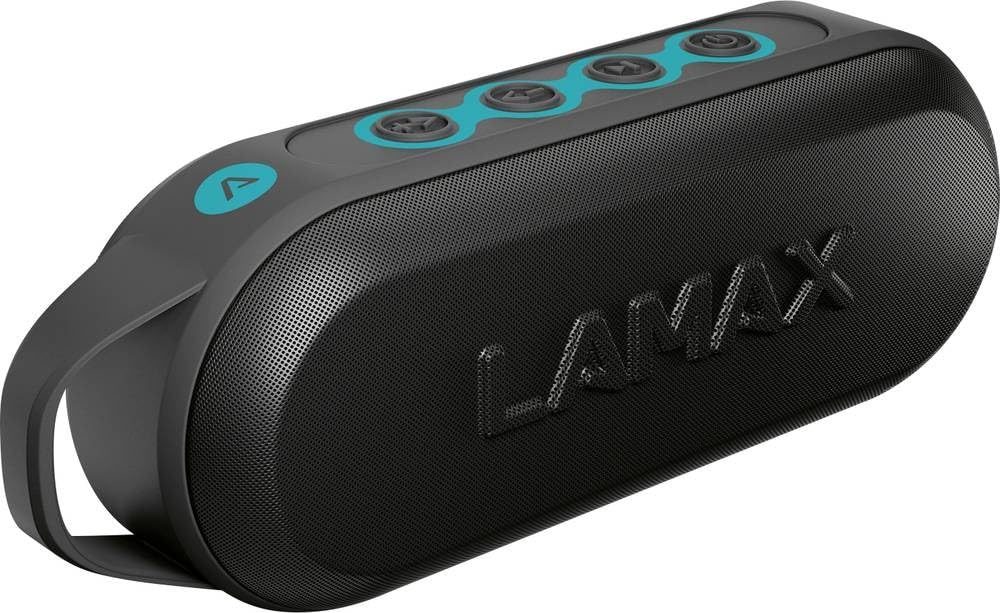
This image displays the front of the Lamax Street2 Bluetooth Speaker, showing its main body, control panel, and a sturdy carrying loop for portability.
Key features of your Lamax Street2 speaker include:
- സൂപ്പർ സൗണ്ട്: Enjoy clear and powerful audio output.
- 15W പവർ: Delivers robust sound performance.
- ബ്ലൂടൂത്ത് 5.0: സ്ഥിരതയുള്ളതും കാര്യക്ഷമവുമായ വയർലെസ് കണക്റ്റിവിറ്റിക്ക്.
- ട്രൂ വയർലെസ് സ്റ്റീരിയോ (TWS): Pair two Street2 speakers for an immersive stereo experience.
- സ്പ്ലാഷ് പ്രതിരോധം: തെറിച്ചു വീഴുന്നതിനെ ചെറുക്കാൻ രൂപകൽപ്പന ചെയ്തിരിക്കുന്നതിനാൽ, ഇത് പുറം ഉപയോഗത്തിന് അനുയോജ്യമാക്കുന്നു.
- നീണ്ട ബാറ്ററി ലൈഫ്: Extended playtime for uninterrupted music.
- പോർട്ടബിൾ ഡിസൈൻ: Features a fixed eyelet and carabiner for easy transport.
സജ്ജമാക്കുക
1. സ്പീക്കറിൽ നിന്ന് നിരക്ക് ഈടാക്കുന്നു
Before using your Lamax Street2 speaker for the first time, ensure it is fully charged.
- നൽകിയിരിക്കുന്ന ചാർജിംഗ് കേബിൾ സ്പീക്കറിന്റെ ചാർജിംഗ് പോർട്ടുമായി ബന്ധിപ്പിക്കുക.
- കേബിളിന്റെ മറ്റേ അറ്റം ഒരു USB പവർ അഡാപ്റ്ററുമായി (ഉൾപ്പെടുത്തിയിട്ടില്ല) അല്ലെങ്കിൽ ഒരു കമ്പ്യൂട്ടറിന്റെ USB പോർട്ടുമായി ബന്ധിപ്പിക്കുക.
- The charging indicator light will illuminate. It will typically turn off or change color once the speaker is fully charged.
2. പവർ ഓൺ/ഓഫ്
To turn the speaker on or off:
- പവർ ഓൺ: Press and hold the power button for approximately 3 seconds until you hear a power-on sound.
- പവർ ഓഫ്: Press and hold the power button for approximately 3 seconds until you hear a power-off sound.
3. ബ്ലൂടൂത്ത് ജോടിയാക്കൽ
To connect your Lamax Street2 to a Bluetooth-enabled device:
- Ensure the speaker is powered on and in pairing mode. The LED indicator will typically flash rapidly.
- നിങ്ങളുടെ സ്മാർട്ട്ഫോണിലോ, ടാബ്ലെറ്റിലോ, മറ്റ് ബ്ലൂടൂത്ത് ഉപകരണത്തിലോ, ബ്ലൂടൂത്ത് പ്രവർത്തനക്ഷമമാക്കി ലഭ്യമായ ഉപകരണങ്ങൾക്കായി തിരയുക.
- Select "LAMAX Street2" from the list of found devices.
- Once connected, the speaker will emit a confirmation sound, and the LED indicator will stop flashing and remain solid.
4. ട്രൂ വയർലെസ് സ്റ്റീരിയോ (TWS) ജോടിയാക്കൽ
To pair two Lamax Street2 speakers together for a stereo sound experience:
- Ensure both Lamax Street2 speakers are powered on and are not connected to any other Bluetooth device.
- On one of the speakers, press and hold the TWS button (often indicated by a chain-link icon) for 2-3 seconds.
- The speakers will automatically search for and pair with each other. A confirmation sound will indicate successful TWS pairing.
- Now, connect your primary device (smartphone, etc.) to the primary speaker via Bluetooth as described in the "Bluetooth Pairing" section.
സ്പീക്കർ പ്രവർത്തിപ്പിക്കുന്നു
അടിസ്ഥാന നിയന്ത്രണങ്ങൾ
- പവർ ബട്ടൺ: Press and hold for 3 seconds to turn the speaker on or off.
- പ്ലേ/താൽക്കാലികമായി നിർത്തുക ബട്ടൺ: ഓഡിയോ പ്ലേബാക്ക് പ്ലേ ചെയ്യാനോ താൽക്കാലികമായി നിർത്താനോ ഒരിക്കൽ അമർത്തുക.
- വോളിയം കൂട്ടുക (+): ശബ്ദം കൂട്ടാൻ ഒരിക്കൽ അമർത്തുക. അടുത്ത ട്രാക്കിലേക്ക് പോകാൻ അമർത്തിപ്പിടിക്കുക.
- വോളിയം ഡൗൺ (-): Press once to decrease the volume. Press and hold to skip to the previous track.
- Call Button (if available): Press once to answer an incoming call or end an ongoing call. Press and hold to reject an incoming call.
കണക്റ്റിവിറ്റി ഓപ്ഷനുകൾ
- ബ്ലൂടൂത്ത്: The primary method for wireless audio streaming from your devices.
മെയിൻ്റനൻസ്
Proper care and maintenance will extend the life of your Lamax Street2 speaker.
- വൃത്തിയാക്കൽ: Gently wipe the speaker's surface with a soft, dry, lint-free cloth. Do not use abrasive cleaners, solvents, or chemical sprays.
- സംഭരണം: ദീർഘനേരം ഉപയോഗിക്കാത്തപ്പോൾ, നേരിട്ടുള്ള സൂര്യപ്രകാശത്തിൽ നിന്നും കടുത്ത താപനിലയിൽ നിന്നും മാറി തണുത്തതും വരണ്ടതുമായ സ്ഥലത്ത് സ്പീക്കർ സൂക്ഷിക്കുക.
- ബാറ്ററി കെയർ: To maintain optimal battery performance, avoid fully discharging the battery frequently. Charge the speaker regularly, even if not in active use.
ട്രബിൾഷൂട്ടിംഗ്
If you encounter issues with your Lamax Street2 speaker, refer to the following table for common problems and solutions.
| പ്രശ്നം | പരിഹാരം |
|---|---|
| സ്പീക്കർ ഓണാക്കുന്നില്ല. | ബാറ്ററി ചാർജ്ജ് ചെയ്തിട്ടുണ്ടെന്ന് ഉറപ്പാക്കുക. സ്പീക്കർ ഒരു പവർ സ്രോതസ്സുമായി ബന്ധിപ്പിച്ച് വീണ്ടും ശ്രമിക്കുക. |
| ബ്ലൂടൂത്ത് വഴി ജോടിയാക്കാൻ കഴിയില്ല. | Ensure the speaker is in Bluetooth pairing mode (flashing LED). Turn off and on your device's Bluetooth. Move closer to the speaker and ensure no other devices are connected. |
| ശബ്ദമില്ല അല്ലെങ്കിൽ കുറഞ്ഞ ശബ്ദമില്ല. | Check volume levels on both the speaker and your connected device. Ensure the speaker is correctly paired and not muted. |
| മോശം ശബ്ദ നിലവാരം അല്ലെങ്കിൽ ഇടയ്ക്കിടെയുള്ള കണക്ഷൻ. | Move your device closer to the speaker to minimize interference. Ensure there are no major obstacles between the devices. Disconnect and re-pair the Bluetooth connection. |
സ്പെസിഫിക്കേഷനുകൾ
Technical specifications for the Lamax Street2 Bluetooth Speaker:
- മോഡലിൻ്റെ പേര്: തെരുവ്2
- നിർമ്മാതാവിൻ്റെ റഫറൻസ്: LMXST2
- ബ്രാൻഡ്: ലാമാക്സ്
- കണക്റ്റിവിറ്റി ടെക്നോളജി: ബ്ലൂടൂത്ത് 5.0
- ഔട്ട്പുട്ട് പവർ: 15 വാട്ട്സ്
- ഓഡിയോ putട്ട്പുട്ട് മോഡ്: സ്റ്റീരിയോ
- മൗണ്ടിംഗ് തരം: ടേബിൾ മൗണ്ട്
- ഊർജ്ജ സ്രോതസ്സ്: ബാറ്ററി പവർ
- പ്രത്യേക സവിശേഷതകൾ: Bluetooth, Splash Resistance
- ASIN: B0CV5TH488
വാറൻ്റിയും പിന്തുണയും
The Lamax Street2 Bluetooth Speaker is covered by a limited warranty. For detailed information regarding warranty terms, conditions, and duration, please refer to the warranty card included with your product or visit the official Lamax webസൈറ്റ്.
For technical assistance, troubleshooting, or to inquire about warranty claims, please contact Lamax customer support. You can typically find contact information on the official Lamax webസൈറ്റ് അല്ലെങ്കിൽ നിങ്ങൾ ഉൽപ്പന്നം വാങ്ങിയ റീട്ടെയിലർ വഴി.


