1. ഉൽപ്പന്നം കഴിഞ്ഞുview
The Imou Camera Bulb (Model: IPC-S6DP-3M0WEB-E27) is an innovative security solution combining a high-resolution camera with a standard light bulb form factor. Designed for outdoor use, this device offers advanced monitoring capabilities including full-color night vision, AI-powered human and vehicle detection, and two-way audio communication, all accessible wirelessly via Wi-Fi.

ചിത്രം 1.1: മുൻഭാഗം view of the Imou Camera Bulb, showcasing its integrated camera and bulb design.
പ്രധാന സവിശേഷതകളിൽ ഇവ ഉൾപ്പെടുന്നു:
- 3MP ഹൈ-റെസല്യൂഷൻ വീഡിയോ: വ്യക്തവും വിശദവുമായ foo പകർത്തുന്നുtage.
- 2.8mm ഫിക്സഡ് ലെൻസ്: വിശാലമായ ഒരു ഫീൽഡ് നൽകുന്നു view.
- പൂർണ്ണ വർണ്ണ രാത്രി ദർശനം: Ensures clear, colorful images even in low light conditions.
- AI Human & Vehicle Detection: Intelligently identifies human and vehicle shapes, reducing false alarms.
- ദ്വിമുഖ സംസാരം: തത്സമയ ആശയവിനിമയത്തിനായി ബിൽറ്റ്-ഇൻ മൈക്രോഫോണും സ്പീക്കറും.
- വയർലെസ് കണക്റ്റിവിറ്റി: Easy setup and connection via Wi-Fi.
- ഔട്ട്ഡോർ ഉപയോഗം: Durable design suitable for outdoor environments.

Figure 1.2: The Imou Camera Bulb installed in an outdoor fixture, illustrating its functionality and key features like 3MP/5MP video, AI detection, and two-way talk.
2. പാക്കേജ് ഉള്ളടക്കം
പാക്കേജിൽ ഇനിപ്പറയുന്ന ഇനങ്ങൾ ഉണ്ടോ എന്ന് പരിശോധിക്കുക:
- Imou Camera Bulb (IPC-S6DP-3M0WEB-E27)
- ദ്രുത ആരംഭ ഗൈഡ്
- Mounting Screws (if applicable for specific installations)
3. സജ്ജീകരണവും ഇൻസ്റ്റാളേഷനും
Follow these steps to set up your Imou Camera Bulb:
3.1 ഫിസിക്കൽ ഇൻസ്റ്റലേഷൻ
- പവർ ഓഫ്: Ensure the power to the light fixture is turned off at the circuit breaker before installation.
- സ്ക്രൂ ഇൻ ചെയ്യുക: Carefully screw the Imou Camera Bulb into a standard E27 light bulb socket. Ensure it is securely tightened.
- ആംഗിൾ ക്രമീകരിക്കുക: Once installed, you may adjust the camera's viewing angle by rotating the spherical camera body.
- പവർ ഓൺ: Restore power to the light fixture. The camera bulb will power on and initiate its startup sequence.
3.2 App Setup and Wi-Fi Connection
- അപ്ലിക്കേഷൻ ഡൗൺലോഡുചെയ്യുക: Download the official Imou Life app from your smartphone's app store (iOS App Store or Google Play Store).
- അക്കൗണ്ട് സൃഷ്ടിക്കുക: Open the Imou Life app and create a new account or log in to an existing one.
- ഉപകരണം ചേർക്കുക: Tap the "+" icon in the app to add a new device. Select "Camera" and follow the on-screen instructions.
- QR കോഡ് സ്കാൻ ചെയ്യുക: Scan the QR code located on the camera bulb or its packaging.
- വൈഫൈയിലേക്ക് കണക്റ്റുചെയ്യുക: Follow the app prompts to connect the camera bulb to your 2.4GHz Wi-Fi network. Ensure your Wi-Fi password is correct.
- ഉപകരണ സമാരംഭം: Wait for the camera to connect and initialize. Once connected, you will see the live view ആപ്പിൽ.
4. പ്രവർത്തന നിർദ്ദേശങ്ങൾ
Once your Imou Camera Bulb is set up, you can access its features via the Imou Life app:
- തത്സമയം View: Tap on the device in the app to view the live video feed from your camera.
- റെക്കോർഡിംഗ്: The camera supports continuous recording or event-triggered recording (e.g., motion detection). Recordings are stored on a microSD card (not included) or via cloud storage (subscription may be required).
- ദ്വിമുഖ സംസാരം: ലൈവിൽ മൈക്രോഫോൺ ഐക്കൺ ഉപയോഗിക്കുക view to speak through the camera's speaker and the speaker icon to hear audio from the camera's microphone.
- ചലനം കണ്ടെത്തലും അലേർട്ടുകളും: Configure motion detection zones and sensitivity settings. Receive instant notifications on your phone when motion is detected.
- AI Human & Vehicle Detection: Enable this feature in the app settings to receive more accurate alerts, distinguishing between humans/vehicles and other moving objects.
- പൂർണ്ണ വർണ്ണ രാത്രി ദർശനം: The camera automatically switches to full-color night vision in low-light conditions, providing clear, colorful images.
- പ്രകാശ നിയന്ത്രണം: Control the bulb's light function (on/off, schedule) directly from the app.
5. പരിപാലനം
Regular maintenance ensures optimal performance and longevity of your camera bulb:
- വൃത്തിയാക്കൽ: Gently wipe the camera lens and bulb surface with a soft, dry cloth. Do not use harsh chemicals or abrasive materials. Ensure power is off before cleaning.
- ഫേംവെയർ അപ്ഡേറ്റുകൾ: Periodically check for and install firmware updates via the Imou Life app. Updates often include performance improvements and security enhancements.
- സ്റ്റോറേജ് മാനേജ്മെന്റ്: If using a microSD card, regularly check its status in the app. Format the card periodically to maintain performance.
- നെറ്റ്വർക്ക് സ്ഥിരത: Ensure your Wi-Fi network is stable and strong in the camera's location for uninterrupted operation.
6. പ്രശ്നപരിഹാരം
If you encounter issues with your Imou Camera Bulb, refer to the following common problems and solutions:
| പ്രശ്നം | സാധ്യമായ കാരണം | പരിഹാരം |
|---|---|---|
| ക്യാമറ വൈഫൈയിലേക്ക് കണക്റ്റ് ചെയ്യുന്നില്ല | Incorrect Wi-Fi password, weak signal, 5GHz network used. | Double-check password. Move camera closer to router. Ensure you are connecting to a 2.4GHz network. Restart camera and router. |
| തത്സമയം ഇല്ല view | Camera offline, network issue, app issue. | Check camera's power and Wi-Fi connection. Restart the app. Ensure your phone has internet access. |
| മോശം ചിത്ര നിലവാരം | Dirty lens, insufficient lighting, network bandwidth. | Clean the lens. Ensure adequate lighting. Check network speed. |
| ചലനം കണ്ടെത്തൽ അലേർട്ടുകളൊന്നുമില്ല | Detection settings incorrect, app notifications disabled. | Verify motion detection settings in the app. Check phone notification settings for the Imou Life app. |
7 സ്പെസിഫിക്കേഷനുകൾ
Detailed technical specifications for the Imou Camera Bulb (IPC-S6DP-3M0WEB-E27):
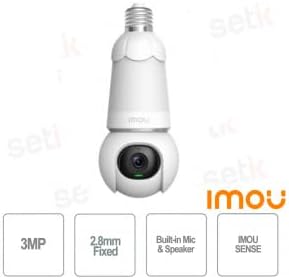
Figure 7.1: Imou Camera Bulb highlighting key specifications such as 3MP resolution, 2.8mm fixed lens, built-in mic & speaker, and IMOU SENSE technology.
| ഫീച്ചർ | വിശദാംശങ്ങൾ |
|---|---|
| മോഡൽ | IPC-S6DP-3M0WEB-E27 |
| നിർമ്മാതാവ് | Imou |
| റെസലൂഷൻ | 3 മെഗാപിക്സലുകൾ |
| ലെൻസ് | 2.8 മിമി ഫിക്സഡ് |
| ഓഡിയോ | Built-in Microphone & Speaker (Two-Way Talk) |
| നൈറ്റ് വിഷൻ | Full Color IR Sense |
| കണ്ടെത്തൽ സാങ്കേതികവിദ്യ | IMOU SENSE (AI Human & Vehicle Detection) |
| കണക്റ്റിവിറ്റി | Wireless (Wi-Fi, 2.4GHz) |
| ഉപയോഗ പരിസ്ഥിതി | ഔട്ട്ഡോർ |
| വൈദ്യുതി വിതരണം | E27 ബൾബ് സോക്കറ്റ് |
| ആദ്യം ലഭ്യമായ തീയതി | 12 ഫെബ്രുവരി 2024 |
8. വാറൻ്റിയും പിന്തുണയും
വാറന്റി വിവരങ്ങൾക്കും സാങ്കേതിക പിന്തുണയ്ക്കും, ദയവായി ഔദ്യോഗിക Imou കാണുക webസൈറ്റിൽ ബന്ധപ്പെടുക അല്ലെങ്കിൽ അവരുടെ ഉപഭോക്തൃ സേവനവുമായി ബന്ധപ്പെടുക. വാറന്റി ക്ലെയിമുകൾക്കുള്ള വാങ്ങലിന്റെ തെളിവായി നിങ്ങളുടെ വാങ്ങൽ രസീത് സൂക്ഷിക്കുക.
കൂടുതൽ സഹായത്തിന്, സന്ദർശിക്കുക: www.imoulife.com


