1. ആമുഖം
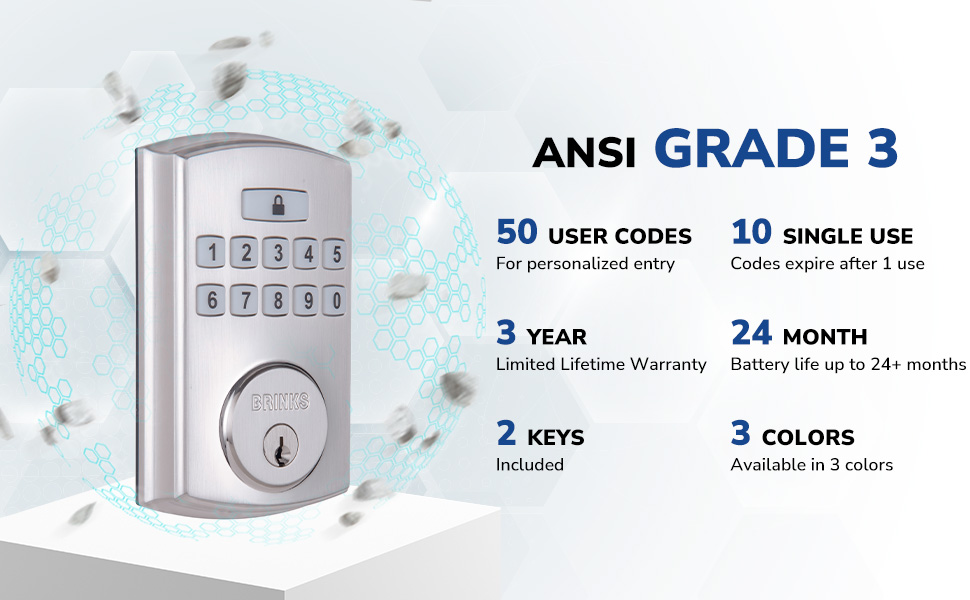
The BRINKS Keyless Entry Electronic Deadbolt Lock provides enhanced security and convenient keyless access for your home or office. This deadbolt features a programmable keypad, allowing for multiple user codes, and includes traditional key access as a backup. Designed for durability and ease of use, it integrates advanced security features to protect against common entry methods.

പ്രധാന സവിശേഷതകളിൽ ഇവ ഉൾപ്പെടുന്നു:
- Up to 50 customizable user codes.
- Optional auto-locking functionality.
- One-touch locking for quick security.
- PRO-GUARD security features: anti-tamper alarm, anti-pry shield, pick/bump/drill resistant keyway.
- Hardened steel anti-saw pin in the deadbolt latch.

2 സുരക്ഷാ വിവരങ്ങൾ
Please read and understand all instructions before installing and using this product. Failure to follow these instructions may result in product malfunction, property damage, or injury.
- Do not attempt to disassemble or modify the lock beyond the instructions provided.
- Use only the specified battery type (4 AA alkaline batteries). Do not mix old and new batteries or different battery types.
- താക്കോലുകൾ ലോക്കിൽ നിന്ന് മാറ്റി സുരക്ഷിതമായ ഒരു സ്ഥലത്ത് സൂക്ഷിക്കുക.
- ഇൻസ്റ്റാളേഷൻ സമയത്ത് എല്ലാ ഘടകങ്ങളും സുരക്ഷിതമായി ഉറപ്പിച്ചിട്ടുണ്ടെന്ന് ഉറപ്പാക്കുക.
- Avoid exposing the lock to excessive moisture or extreme temperatures.
3. പാക്കേജ് ഉള്ളടക്കം
Verify that all parts are present before beginning installation. If any parts are missing or damaged, contact BRINKS customer support.
- ബാഹ്യ കീപാഡ് അസംബ്ലി
- ഇൻ്റീരിയർ അസംബ്ലി
- ഡെഡ്ബോൾട്ട് ലാച്ച്
- മൗണ്ടിംഗ് പ്ലേറ്റ്
- സ്ട്രൈക്ക് പ്ലേറ്റ്
- ബലപ്പെടുത്തൽ പ്ലേറ്റ്
- മൗണ്ടിംഗ് സ്ക്രൂകൾ
- 2 Traditional Keys
- ഇൻസ്റ്റലേഷൻ ഹാർഡ്വെയർ

4. ഇൻസ്റ്റലേഷൻ
Installation of the BRINKS Electronic Deadbolt Lock is designed to be straightforward, requiring only a Phillips head screwdriver. No additional wiring is necessary.
4.1 പ്രീ-ഇൻസ്റ്റലേഷൻ പരിശോധനകൾ
- വാതിൽ കനം: Ensure your door thickness is between 1.375 inches (35mm) and 1.75 inches (44mm).
- ബാക്ക്സെറ്റ്: The deadbolt is compatible with both 2-3/8 inches (60mm) and 2-3/4 inches (70mm) backsets. Adjust the latch as needed.
- വാതിൽ കൈമാറ്റം: The lock is universally compatible with both right-handed and left-handed doors.

4.2 ഇൻസ്റ്റലേഷൻ ഘട്ടങ്ങൾ
- ഡെഡ്ബോൾട്ട് ലാച്ച് ഇൻസ്റ്റാൾ ചെയ്യുക: Insert the deadbolt latch into the door edge. Ensure the 'UP' arrow on the latch is pointing upwards. Secure with screws.
- എക്സ്റ്റീരിയർ കീപാഡ് ഇൻസ്റ്റാൾ ചെയ്യുക: Feed the cable from the exterior keypad through the hole in the door. Position the keypad flush against the door.
- മൗണ്ടിംഗ് പ്ലേറ്റ് ഇൻസ്റ്റാൾ ചെയ്യുക: Route the cable through the mounting plate. Secure the mounting plate to the door using the provided screws, ensuring it is aligned correctly.
- കേബിളുകൾ ബന്ധിപ്പിക്കുക: എക്സ്റ്റീരിയർ കീപാഡിൽ നിന്ന് ഇന്റീരിയർ അസംബ്ലിയിലേക്ക് കേബിൾ ബന്ധിപ്പിക്കുക.
- ഇന്റീരിയർ അസംബ്ലി ഇൻസ്റ്റാൾ ചെയ്യുക: Mount the interior assembly onto the mounting plate, ensuring the thumb turn operates smoothly. Secure with screws.
- സ്ട്രൈക്ക് പ്ലേറ്റ് ഇൻസ്റ്റാൾ ചെയ്യുക: Install the strike plate and reinforcement plate on the door frame, aligning them with the deadbolt latch.
- ബാറ്ററികൾ ചേർക്കുക: Open the battery cover on the interior assembly and insert 4 AA alkaline batteries. Close the cover.

5. സജ്ജീകരണവും പ്രോഗ്രാമിംഗും
After installation, you will need to program your lock with a Master Code and user codes.
5.1 മാസ്റ്റർ കോഡ് ക്രമീകരിക്കുന്നു
The Master Code is used to program the lock and should be kept confidential. It cannot be used to unlock the door.
- Press the 'Program' button on the interior assembly.
- Enter a new 4-8 digit Master Code.
- Press the 'Lock' button.
- Re-enter the new Master Code.
- Press the 'Lock' button to confirm.
5.2 Adding User Codes
You can program up to 50 unique user codes for regular entry.
- 'പ്രോഗ്രാം' ബട്ടൺ അമർത്തുക.
- നിങ്ങളുടെ മാസ്റ്റർ കോഡ് നൽകുക.
- Press the 'Lock' button.
- Enter a new 4-8 digit User Code.
- Press the 'Lock' button to confirm.
5.3 Adding Single-Use Codes
Up to 10 single-use codes can be created, which expire after one use.
- 'പ്രോഗ്രാം' ബട്ടൺ അമർത്തുക.
- നിങ്ങളുടെ മാസ്റ്റർ കോഡ് നൽകുക.
- Press the 'Lock' button twice.
- Enter a new 4-8 digit Single-Use Code.
- Press the 'Lock' button to confirm.
5.4 Setting Auto-Locking Feature
The auto-locking feature automatically locks the deadbolt after a set period (1-99 seconds) once unlocked.
- 'പ്രോഗ്രാം' ബട്ടൺ അമർത്തുക.
- നിങ്ങളുടെ മാസ്റ്റർ കോഡ് നൽകുക.
- Press the 'Lock' button three times.
- Enter the desired auto-lock delay in seconds (e.g., '10' for 10 seconds).
- Press the 'Lock' button to confirm.

6. പ്രവർത്തന നിർദ്ദേശങ്ങൾ
6.1 വാതിൽ അൺലോക്കുചെയ്യുന്നു
- ഒരു ഉപയോക്തൃ കോഡ് ഉപയോഗിക്കുന്നു: Enter your 4-8 digit user code on the keypad. The deadbolt will retract, and the door can be opened.
- Using a Key: Insert the traditional key into the keyway and turn to unlock.
6.2 വാതിൽ പൂട്ടുന്നു
- വൺ-ടച്ച് ലോക്കിംഗ്: Press the 'Lock' button on the keypad. The deadbolt will extend.
- യാന്ത്രിക ലോക്കിംഗ്: If enabled, the deadbolt will automatically extend after the set delay once the door is closed and unlocked.
- Using a Key: Insert the traditional key into the keyway and turn to lock.
The keypad is illuminated for visibility in low-light conditions.
7. പരിപാലനം
7.1 ബാറ്ററി മാറ്റിസ്ഥാപിക്കൽ
The lock is powered by 4 AA alkaline batteries. A low battery indicator will alert you when batteries need replacement. Battery life is approximately 24 months or longer.
- ഇന്റീരിയർ അസംബ്ലിയിലെ ബാറ്ററി കവർ നീക്കം ചെയ്യുക.
- പഴയ ബാറ്ററികൾ നീക്കം ചെയ്യുക.
- ശരിയായ പോളാരിറ്റി ഉറപ്പാക്കിക്കൊണ്ട് 4 പുതിയ AA ആൽക്കലൈൻ ബാറ്ററികൾ ഇടുക.
- ബാറ്ററി കവർ മാറ്റിസ്ഥാപിക്കുക.
7.2 വൃത്തിയാക്കൽ
ലോക്കിന്റെ പുറംഭാഗം മൃദുവായ, ഡി ക്ലീനർ ഉപയോഗിച്ച് വൃത്തിയാക്കുക.amp തുണി. അബ്രാസീവ് ക്ലീനറുകളോ ലായകങ്ങളോ ഒഴിവാക്കുക, കാരണം ഇവ ഫിനിഷിനോ ഇലക്ട്രോണിക് ഘടകങ്ങൾക്കോ കേടുവരുത്തും.
8. പ്രശ്നപരിഹാരം
- ലോക്ക് പ്രതികരിക്കുന്നില്ല: Check battery levels. Replace batteries if necessary. Ensure the cable connection between the exterior and interior assemblies is secure.
- കോഡുകൾ പ്രവർത്തിക്കുന്നില്ല: Verify that the correct Master Code is being used for programming. Re-enter user codes carefully. Ensure the lock is not in programming mode when attempting to unlock.
- ഡെഡ്ബോൾട്ട് പൂർണ്ണമായും നീട്ടുന്നില്ല/പിൻവലിക്കുന്നില്ല: Check for obstructions in the door frame or latch area. Ensure the deadbolt latch is installed correctly and aligned with the strike plate.
- Keypad not illuminating: ബാറ്ററി ലെവലുകൾ പരിശോധിക്കുക.
9 സ്പെസിഫിക്കേഷനുകൾ
| ഫീച്ചർ | സ്പെസിഫിക്കേഷൻ |
|---|---|
| മോഡലിൻ്റെ പേര് | 4390-122 |
| ലോക്ക് തരം | ഡെഡ്ബോൾട്ട് |
| മെറ്റീരിയൽ | നിക്കൽ |
| നിറം | Satin Nickel (other finishes available) |
| അളവുകൾ (L x W x H) | 7.87 x 3.54 x 5.51 ഇഞ്ച് |
| ഇനത്തിൻ്റെ ഭാരം | 2.94 പൗണ്ട് |
| ഉപയോക്തൃ കോഡുകൾ | 50 വരെ |
| Single-Use Codes | 10 വരെ |
| Auto-Locking Delay | 1-99 seconds (customizable) |
| പവർ ഉറവിടം | 4 AA ആൽക്കലൈൻ ബാറ്ററികൾ (ഉൾപ്പെടുത്തിയിട്ടില്ല) |
| ബാറ്ററി ലൈഫ് | 24+ മാസം |
| സുരക്ഷാ റേറ്റിംഗ് | ANSI ഗ്രേഡ് 3 |
| പ്രത്യേക സവിശേഷതകൾ | Anti-Bump, Anti-Tamper Alarm, Anti-Pry Shield, Illuminated Keypad |
10. വാറൻ്റിയും പിന്തുണയും
10.1 വാറൻ്റി വിവരങ്ങൾ
This BRINKS Electronic Deadbolt Lock comes with a 3 വർഷത്തെ ലിമിറ്റഡ് ലൈഫ് ടൈം വാറന്റി. Please refer to the warranty card included with your product for full terms and conditions. The warranty covers defects in material and workmanship under normal use.
10.2 ഉപഭോക്തൃ പിന്തുണ
For technical assistance, troubleshooting, or warranty claims, please contact BRINKS customer support. Contact information can typically be found on the BRINKS official webസൈറ്റ് അല്ലെങ്കിൽ ഉൽപ്പന്ന പാക്കേജിംഗിൽ.


