1. ആമുഖം
This user manual provides detailed instructions for the Maxcom MM248 4G mobile phone. Please read this manual carefully before using your device to ensure proper operation and to maximize its lifespan. Keep this manual for future reference.
2. ഡിവൈസ് ഓവർview
Familiarize yourself with the physical components of your Maxcom MM248 phone.
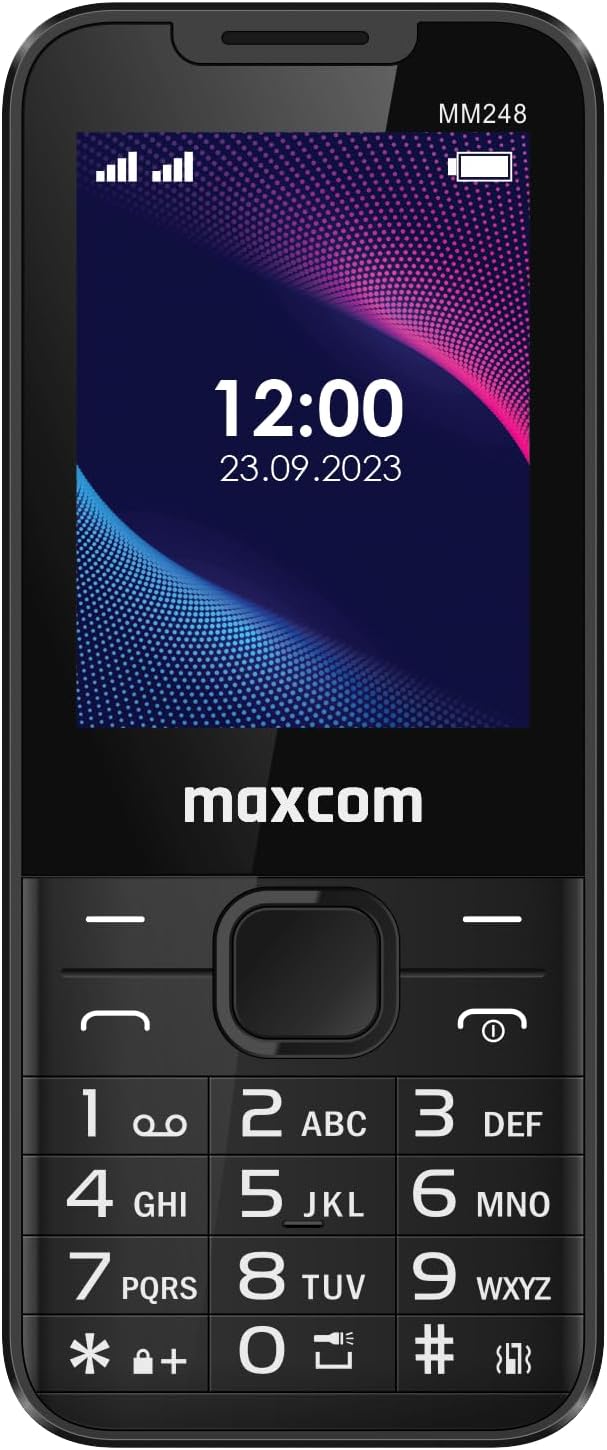
ചിത്രം 2.1: മുൻഭാഗം View of Maxcom MM248
This image displays the front of the Maxcom MM248 phone, highlighting its 2.4-inch screen and traditional alphanumeric keypad. The screen shows the current time and date, along with signal and battery indicators. The Maxcom logo is visible below the screen.

ചിത്രം 2.2: വശം View of Maxcom MM248
ഈ ചിത്രം സൈഡ് പ്രോയെ കാണിക്കുന്നുfile of the Maxcom MM248, illustrating its compact and ergonomic design.

ചിത്രം 2.3: താഴെ View of Maxcom MM248
This image highlights the bottom of the device, featuring the USB Type-C charging port and a 3.5mm headphone jack for audio accessories.

ചിത്രം 2.4: മുകളിൽ View of Maxcom MM248
This image shows the top of the phone, where the integrated flashlight is located.
3. സജ്ജീകരണം
3.1. ബാറ്ററി ഇൻസ്റ്റാൾ ചെയ്യുന്നു
- Carefully remove the back cover of the phone. This may require firm but gentle pressure, as noted by some users.
- Insert the battery into its compartment, ensuring the gold contacts align with the phone's terminals.
- പിൻ കവർ മാറ്റി, അത് സ്ഥലത്ത് ക്ലിക്ക് ചെയ്യുന്നതുവരെ ദൃഢമായി അമർത്തുക.
3.2. സിമ്മും മെമ്മറി കാർഡുകളും ചേർക്കൽ
The Maxcom MM248 supports SIM cards for network connectivity and a memory card (e.g., microSD) for expanded storage.
- With the back cover and battery removed, locate the SIM card slot(s) and the memory card slot.
- Insert your SIM card(s) into the designated slot(s) with the gold contacts facing down, following the orientation indicated on the phone.
- If using a memory card, insert it into the memory card slot until it is securely seated.
- ബാറ്ററിയും ബാക്ക് കവറും വീണ്ടും ഇൻസ്റ്റാൾ ചെയ്യുക.
3.3 ബാറ്ററി ചാർജ് ചെയ്യുന്നു
ആദ്യ ഉപയോഗത്തിന് മുമ്പ്, ഫോണിന്റെ ബാറ്ററി പൂർണ്ണമായും ചാർജ് ചെയ്യുക.
- ഫോണിന്റെ അടിയിലുള്ള ചാർജിംഗ് പോർട്ടിലേക്ക് യുഎസ്ബി ടൈപ്പ്-സി കേബിൾ ബന്ധിപ്പിക്കുക.
- Connect the other end of the cable to a compatible USB power adapter and plug it into a wall outlet.
- സ്ക്രീനിലെ ചാർജിംഗ് ഇൻഡിക്കേറ്റർ ചാർജിംഗ് സ്റ്റാറ്റസ് കാണിക്കും.
- പൂർണ്ണമായി ചാർജ് ചെയ്തുകഴിഞ്ഞാൽ, ചാർജർ വിച്ഛേദിക്കുക.
കുറിപ്പ്: If the provided charger does not function, please use a compatible USB Type-C charger. Ensure the charger is working correctly before use.
3.4. പവർ ഓൺ/ഓഫ്
- പവർ ഓണാക്കാൻ: സ്ക്രീൻ പ്രകാശിക്കുന്നത് വരെ പവർ/എൻഡ് കോൾ ബട്ടൺ അമർത്തിപ്പിടിക്കുക.
- പവർ ഓഫ് ചെയ്യാൻ: Press and hold the Power/End Call button, then select "Power Off" from the options on the screen.
4. പ്രവർത്തന നിർദ്ദേശങ്ങൾ
4.1. അടിസ്ഥാന നാവിഗേഷൻ
- Use the directional navigation keys (up, down, left, right) to move through menus and options.
- Press the central "OK" or "Select" button to confirm a selection.
- Use the "Back" or "Clear" button to return to the previous screen or delete characters.
4.2. കോളുകൾ ചെയ്യലും സ്വീകരിക്കലും
- ഒരു കോൾ ചെയ്യാൻ: കീപാഡ് ഉപയോഗിച്ച് ഫോൺ നമ്പർ നൽകി ഗ്രീൻ കോൾ ബട്ടൺ അമർത്തുക.
- ഒരു കോൾ സ്വീകരിക്കുന്നതിന്: ഫോൺ റിംഗ് ചെയ്യുമ്പോൾ ഗ്രീൻ കോൾ ബട്ടൺ അമർത്തുക.
- ഒരു കോൾ അവസാനിപ്പിക്കാൻ: റെഡ് എൻഡ് കോൾ ബട്ടൺ അമർത്തുക.
4.3. സന്ദേശങ്ങൾ അയയ്ക്കലും സ്വീകരിക്കലും
- Navigate to the "Messages" application from the main menu.
- Select "New Message" to compose an SMS. Enter the recipient's number and your message.
- "അയയ്ക്കുക" ഓപ്ഷൻ അമർത്തുക.
- Received messages will appear in your inbox.
4.4. Internet Connectivity (4G)
The Maxcom MM248 supports 4G connectivity for internet access via KaiOS.
- നിങ്ങളുടെ സിം കാർഡിൽ ഒരു സജീവ ഡാറ്റ പ്ലാൻ ഉണ്ടെന്ന് ഉറപ്പാക്കുക.
- Navigate to the "Browser" application from the main menu.
- Use the keypad to type in website addresses or search queries.
4.5. ക്യാമറ ഉപയോഗിക്കുന്നത്
The phone includes a basic camera function.
- Access the "Camera" application from the main menu.
- സ്ക്രീൻ ഉപയോഗിച്ച് നിങ്ങളുടെ ഷോട്ട് ഫ്രെയിം ചെയ്യുക a ആയി viewഫൈൻഡർ.
- Press the central "OK" or "Select" button to capture a photo.
4.6. എഫ്എം റേഡിയോ
The Maxcom MM248 features an FM radio that does not require headphones to function as an antenna.
- Open the "FM Radio" application.
- Use the navigation keys to scan for stations or tune to a specific frequency.
- Adjust the volume using the dedicated volume keys (if present) or menu options.
4.7 ഫ്ലാഷ്ലൈറ്റ്
പ്രകാശത്തിനായി ബിൽറ്റ്-ഇൻ ഫ്ലാഷ്ലൈറ്റ് സജീവമാക്കുക.
- Typically, the flashlight can be activated via a shortcut key or through the main menu's "Tools" or "Utilities" section. Refer to your phone's on-screen prompts for the exact method.
5. പരിപാലനം
5.1. നിങ്ങളുടെ ഉപകരണം വൃത്തിയാക്കൽ
- Use a soft, dry cloth to clean the phone's screen and body.
- Avoid using harsh chemicals or abrasive materials, which can damage the device.
5.2. ബാറ്ററി പരിചരണം
- ബാറ്ററി ലൈഫ് വർദ്ധിപ്പിക്കാൻ, ഫോൺ ഉയർന്ന താപനിലയിൽ തുറന്നുകാട്ടുന്നത് ഒഴിവാക്കുക.
- Do not leave the phone charging for extended periods after it is fully charged.
- ബാറ്ററി നീക്കം ചെയ്യാവുന്നതാണെങ്കിൽ, അത് ശരിയായി സ്ഥാപിച്ചിട്ടുണ്ടെന്ന് ഉറപ്പാക്കുക.
5.3. സോഫ്റ്റ്വെയർ അപ്ഡേറ്റുകൾ
While specific software update information is not available, it is generally recommended to keep your device's software updated to ensure optimal performance and security. Check the phone's settings for any available updates.
6. പ്രശ്നപരിഹാരം
6.1. പൊതുവായ പ്രശ്നങ്ങളും പരിഹാരങ്ങളും
- ഫോൺ ഓണാക്കുന്നില്ല: Ensure the battery is charged and correctly installed. Try connecting the charger.
- നെറ്റ്വർക്ക് സിഗ്നൽ ഇല്ല: Check if the SIM card is properly inserted and active. Ensure you are in an area with network coverage.
- ചാർജർ പ്രവർത്തിക്കുന്നില്ല: Verify the charger cable and adapter are functional. Try a different compatible USB Type-C charger.
- Difficulty removing back cover: Apply firm, even pressure to the designated opening points. If persistent, consult a service center.
For issues not listed here, please refer to the support section or contact customer service.
7 സ്പെസിഫിക്കേഷനുകൾ
| ഫീച്ചർ | വിശദാംശങ്ങൾ |
|---|---|
| ബ്രാൻഡ് | മാക്സ്കോം |
| മോഡലിൻ്റെ പേര് | MM248 |
| ഓപ്പറേറ്റിംഗ് സിസ്റ്റം | KaiOS |
| സ്ക്രീൻ വലിപ്പം | 2.4 ഇഞ്ച് |
| സെല്ലുലാർ ടെക്നോളജി | 4G |
| വയർലെസ് കാരിയർ | അൺലോക്ക് ചെയ്തു |
| കണക്റ്റിവിറ്റി | GSM, 4G, USB Type-C, 3.5mm Connector |
| പ്രത്യേക സവിശേഷതകൾ | Internet access, FM Radio, Flashlight |
| റാം വലിപ്പം | 128 MB |
| സംഭരണ ശേഷി | 16 GB (likely internal, expandable via microSD) |
| സിപിയു മോഡൽ | കോർട്ടക്സ് |
| റെസലൂഷൻ | 480 x 800 അല്ലെങ്കിൽ 480 x 854 |
| ബാറ്ററി | 1 Non-standard battery required |
| ഉൽപ്പന്ന തരം | ബാർ ഫോൺ |
| നിറം | Black/Red (as per product details, though images show black) |
8. വാറൻ്റിയും പിന്തുണയും
Specific warranty information for the Maxcom MM248 is not detailed in the product listing. For warranty claims or technical support, please contact your retailer or the manufacturer directly.
- സ്പെയർ പാർട്സ് ലഭ്യത: സ്പെയർ പാർട്സുകളുടെ ലഭ്യത സംബന്ധിച്ച വിവരങ്ങൾ നൽകിയിട്ടില്ല.
- Software Updates Guarantee: Information regarding guaranteed software updates is not provided.
വാറന്റി ആവശ്യങ്ങൾക്കായി നിങ്ങളുടെ വാങ്ങിയതിന്റെ തെളിവ് എപ്പോഴും സൂക്ഷിക്കുക.


