1. ആമുഖം
The Frigga M2D is a multi-use USB temperature data logger designed for reliable and accurate temperature monitoring across various applications. This device is capable of recording up to 14,400 readings and generating PDF and CSV reports directly upon connection to a computer, eliminating the need for specialized software for basic data retrieval. It is ideal for cold chain logistics, pharmaceutical storage, food refrigeration, and environmental testing.
This manual provides detailed instructions on the setup, operation, maintenance, and specifications of your Frigga M2D data logger.

Image 1.1: Frigga M2D Multi-Use Temperature Data Logger. This image shows the compact design of the data logger with its USB connector and LCD screen.
2. ഉൽപ്പന്ന ഘടകങ്ങൾ
Familiarize yourself with the key components of your Frigga M2D data logger:

Image 2.1: Frigga M2D Data Logger Components. This image labels the USB Cover, USB Connector, LED Indicator, LCD Screen, Stop Button, Start Button, and Bar Code Label on the device.
- USB കവർ: Protects the USB connector when not in use.
- USB കണക്റ്റർ: Used to connect the device to a computer for data download and configuration.
- LED സൂചകം: Provides visual feedback on device status, alarms, and recording activity.
- LCD സ്ക്രീൻ: Displays real-time temperature readings, alarm status, statistical data, and recording status.
- ബട്ടൺ നിർത്തുക: Press to stop the current recording session.
- ആരംഭ ബട്ടൺ: Press to initiate a new recording session.
- Bar Code Label: Contains product identification information.
3. സജ്ജീകരണം
The Frigga M2D data logger is designed for ease of use with minimal setup required for basic operation.
3.1 പ്രാരംഭ ഉപയോഗം
The device is pre-configured for immediate use. To begin recording, simply press the ആരംഭ ബട്ടൺ. No software installation is required for initial recording or report generation.
3.2 Advanced Configuration (Optional)
For advanced settings such as delayed start, logging intervals, temperature units, time zones, and custom alarm ranges, the complimentary Frigga Data Software is required. This software is compatible with Windows and Mac OS and can be downloaded from the official Frigga webസൈറ്റ്.
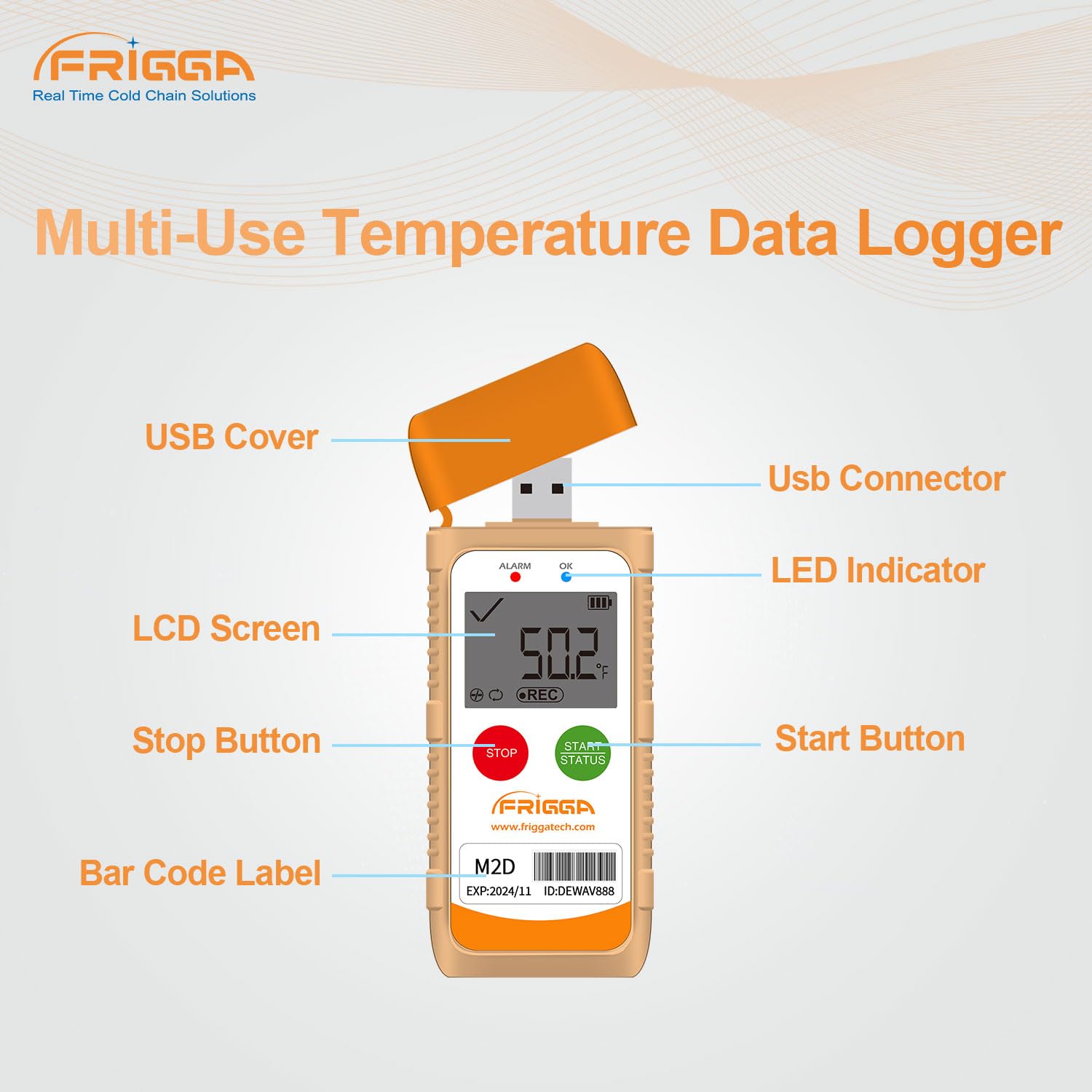
Image 3.1: Parameter Settable via Frigga Data Center. This image illustrates the user interface of the Frigga Data Software, showing various configurable parameters for the data logger.
4. പ്രവർത്തന നിർദ്ദേശങ്ങൾ
4.1 ഒരു റെക്കോർഡിംഗ് ആരംഭിക്കുന്നു
- Ensure the device is powered on (if applicable, or has sufficient battery).
- അമർത്തിപ്പിടിക്കുക ആരംഭ ബട്ടൺ for approximately 3 seconds until the 'REC' icon appears on the LCD screen and the LED indicator flashes, confirming that recording has begun.
4.2 Stopping a Recording
- During an active recording, press and hold the സ്റ്റോപ്പ് ബട്ടൺ for approximately 3 seconds until the 'REC' icon disappears from the LCD screen. The LED indicator will stop flashing, confirming that recording has ended.
4.3 എൽസിഡി ഡിസ്പ്ലേയും സൂചകങ്ങളും
എൽസിഡി സ്ക്രീൻ തത്സമയ വിവരങ്ങൾ നൽകുന്നു:
- നിലവിലെ താപനില: Displays the real-time temperature reading.
- റെക്കോർഡിംഗ് നില: 'REC' icon indicates active recording.
- അലാറം നില: An alarm icon or flashing LED indicates if temperature thresholds have been exceeded.
- ബാറ്ററി നില: ശേഷിക്കുന്ന ബാറ്ററി ലൈഫ് സൂചിപ്പിക്കുന്നു.
Fahrenheit/Celsius units can be switched directly on the device or via the Frigga Data Software.
4.4 LED Alarm Function
The LED indicator will flash to alert users if the recorded temperature goes beyond the pre-set upper or lower thresholds. This feature is crucial for applications requiring strict temperature stability.
5. ഡാറ്റ റിപ്പോർട്ടിംഗ്
The Frigga M2D data logger automatically generates PDF and CSV reports, making data retrieval straightforward.
- Ensure the recording has been stopped (refer to Section 4.2).
- Remove the USB cover and plug the data logger into a standard USB port on any computer (Windows or Mac OS).
- The device will appear as a removable storage drive. Navigate to the drive.
- Locate and open the generated PDF or CSV report files. No special software or drivers are required for this process.

Image 5.1: Auto-generated PDF & CSV. This image demonstrates how the Frigga M2D data logger automatically generates PDF and CSV reports when connected to a computer, compatible with both Windows and Apple operating systems.
6. Frigga Data Software
For comprehensive data analysis and device configuration, utilize the Frigga Data Software.
6.1 സോഫ്റ്റ്വെയർ സവിശേഷതകൾ
- Logging Conditions: Set delayed start, logging intervals, and recording duration.
- താപനില യൂണിറ്റുകൾ: ഫാരൻഹീറ്റിനും സെൽഷ്യസിനും ഇടയിൽ മാറുക.
- സമയ മേഖലകൾ: Adjust time settings for accurate data stamping.
- Alarm Ranges: Customize upper and lower temperature thresholds for alerts.
- ഡാറ്റ വിശകലനം: Provides charting, statistical analysis, and event marking capabilities.
- കയറ്റുമതി ഓപ്ഷനുകൾ: Allows data to be exported to other applications such as Excel and PDF.
6.2 സോഫ്റ്റ്വെയർ ഡൗൺലോഡും ഇൻസ്റ്റാളേഷനും
The Frigga Data Software is available for download from the official Frigga website. Follow the on-screen instructions for installation on your Windows or Mac OS computer.
7. പരിപാലനം
Proper maintenance ensures the longevity and accuracy of your Frigga M2D data logger.
7.1 ബാറ്ററി മാറ്റിസ്ഥാപിക്കൽ
The Frigga M2D is equipped with a CR2450 battery. When the battery level is low, replace it as follows:
- ഉപകരണത്തിന്റെ പിൻഭാഗത്ത് ബാറ്ററി കമ്പാർട്ട്മെന്റ് കണ്ടെത്തുക.
- Use a suitable tool (e.g., a coin) to twist the battery cover counter-clockwise to open.
- പഴയ CR2450 ബാറ്ററി ശ്രദ്ധാപൂർവ്വം നീക്കം ചെയ്യുക.
- പോസിറ്റീവ് (+) വശം മുകളിലേക്ക് അഭിമുഖീകരിക്കുന്ന ഒരു പുതിയ CR2450 ബാറ്ററി ഇടുക.
- ബാറ്ററി കവർ മാറ്റി ഘടികാരദിശയിൽ തിരിക്കുക, അത് സുരക്ഷിതമാക്കുക.

Image 7.1: How to replace the battery. This image provides a four-step visual guide on replacing the CR2450 battery in the Frigga M2D data logger.
7.2 വൃത്തിയാക്കൽ
Wipe the device clean with a soft, dry cloth. Avoid using abrasive cleaners or submerging the device in water.
8. പ്രശ്നപരിഹാരം
If you encounter issues with your Frigga M2D data logger, refer to the following common problems and solutions:
- Device not starting recording: Ensure the battery has sufficient charge. Press and hold the Start button firmly for 3 seconds. If issues persist, connect to Frigga Data Software to check device status.
- No PDF/CSV report generated: Ensure the recording has been stopped before plugging into the USB port. Try connecting to a different USB port or computer.
- കൃത്യമല്ലാത്ത വായനകൾ: Verify the device is placed in an appropriate environment for measurement. Check the calibration certificate for accuracy specifications. If suspected, perform a recalibration using the Frigga Data Software or contact support.
- LED alarm not functioning: Check the alarm settings via the Frigga Data Software to ensure thresholds are correctly configured and enabled.
For further assistance, please contact Frigga customer support.
9 സ്പെസിഫിക്കേഷനുകൾ
Detailed technical specifications for the Frigga M2D Multi-Use Temperature Data Logger:

Image 9.1: Product parameter. This image displays the key specifications of the Frigga M2D, including measurement range, accuracy range, and memory capacity.
| ഫീച്ചർ | സ്പെസിഫിക്കേഷൻ |
|---|---|
| അളക്കൽ ശ്രേണി | -30°C ~ +70°C (-22°F ~ +158°F) |
| കൃത്യത പരിധി | ±0.5°C (-20°C ~ +40°C); ±1°C for other ranges |
| Data Memory Capacity | 14,400 വായനകൾ |
| ബാറ്ററി തരം | CR2450 (Long-lasting battery life) |
| കണക്റ്റിവിറ്റി | USB |
| ഡിസ്പ്ലേ തരം | ഡിജിറ്റൽ എൽസിഡി |
| ബാഹ്യ മെറ്റീരിയൽ | പ്ലാസ്റ്റിക് |
| പ്രത്യേക സവിശേഷതകൾ | Alarm, Fast Reading System, High Accuracy, Low Battery Indicator, IP65 Waterproof Grade, Temperature Calibration Report, Event Mark, Zero Data Loss |
| റിപ്പോർട്ട് ജനറേഷൻ | Auto-generated PDF & CSV |
| സോഫ്റ്റ്വെയർ അനുയോജ്യത | Windows & Mac OS (Frigga Data Software) |
10. വാറൻ്റിയും പിന്തുണയും
Your Frigga M2D data logger comes with a warranty. Please refer to the warranty card included in your package for specific terms and conditions. You can scan the QR code on the warranty card to access the user manual online and export the calibration certificate by connecting the device to your computer.
For any technical issues, questions, or support, Frigga offers 24/7 Technician Support via Email. Please refer to the contact information provided on your warranty card or the official Frigga webസൈറ്റ്.


