ആമുഖം
The Valeton GP-100 Violet is a compact and powerful multi-effects processor designed for guitar and bass players. It integrates a comprehensive suite of effects, amp models, and cabinet simulations, along with essential tools like a looper, drum machine, and USB audio interface. This manual provides detailed instructions for setting up, operating, and maintaining your GP-100 Violet to help you unlock its full potential.

Figure 1: The Valeton GP-100 Violet Multi-Effects Processor, showcasing its compact design and included footswitch toppers.
സജ്ജമാക്കുക
അൺബോക്സിംഗും പ്രാരംഭ പരിശോധനയും
Upon opening the package, ensure all components are present and in good condition. The standard package includes:
- Valeton GP-100 Violet Multi-Effects Processor
- USB കേബിൾ
- Power Adapter (DC 9V, 500mA - Note: May be sold separately or included depending on region/bundle. Verify packaging.)
നിങ്ങളുടെ ഉപകരണം ബന്ധിപ്പിക്കുന്നു
The GP-100 Violet offers various input and output options for versatile connectivity. Refer to the diagram below for common connection setups.

Figure 2: Rear panel connections of the GP-100 Violet. From left to right: Guitar Input, Left/Mono and Right Outputs, Aux Input, Headphone Output, USB Port, and DC 9V Power Input.
- പവർ കണക്ഷൻ: Connect the DC 9V power adapter (500mA minimum, center negative) to the "DC IN" jack on the rear panel.
- ഉപകരണ ഇൻപുട്ട്: Plug your guitar or bass into the "INPUT" jack (1/4" TS) on the rear panel.
- ഓഡിയോ ഔട്ട്പുട്ട്:
- For stereo output to an amplifier or mixer, use the "L/MONO" and "R" 1/4" TS output jacks.
- For silent practice, connect headphones to the "PHONES" 1/8" TRS jack.
- സഹായ ഇൻപുട്ട്: Connect external audio sources (e.g., MP3 player, phone) to the "AUX IN" 1/8" TRS jack for practice along with backing tracks.
- USB കണക്ഷൻ: Connect the GP-100 to your computer using the provided USB cable for audio recording, firmware updates, and software editing.
Once all connections are secure, you can power on the unit. Ensure your amplifier or monitoring system is set to a low volume before powering on the GP-100 to avoid sudden loud noises.
Operating the GP-100 Violet
അടിസ്ഥാന നിയന്ത്രണങ്ങളും ഇന്റർഫേസും
The GP-100 features an intuitive interface with a clear LCD display, navigation knobs, and footswitches for hands-on control.

Figure 3: The compact size of the GP-100 Violet, designed for portability and ease of use.
- LCD ഡിസ്പ്ലേ: Shows current patch name, effect block status, parameters, and menu navigation.
- എൻകോഡർ നോബ്: Used for navigating menus, selecting options, and adjusting parameter values. Press to confirm selections.
- കാൽ സ്വിച്ചുകൾ: Two footswitches control patch changes, effect on/off, looper functions, and tuner activation.
- എക്സ്പ്രഷൻ പെഡൽ: Controls volume, wah, or other assignable parameters in real-time.
ഇഫക്റ്റുകൾ ഒപ്പം Amp മോഡലിംഗ്
The GP-100 boasts a powerful HD Digital Modeling System, offering a wide array of tones:
- 140 Built-in Effects: Includes a variety of guitar, bass, and acoustic effects.
- 45 Legendary Amp മോഡലുകൾ: Recreations of classic and modern ampജീവപര്യന്തം.
- 40 IR Cabinet Simulations: High-quality impulse responses for realistic cabinet tones.
- 3rd Party IR Support: Import up to 20 user IRs to expand your tonal palette.
You can adjust the signal chain with up to 9 simultaneous effect blocks, allowing for complex and customized sound design.

Figure 4: Customize your signal chain by arranging various effects and models to create unique sounds.
ലൂപ്പർ ഫംഗ്ഷൻ
The built-in looper allows for up to 90 seconds of recording time, perfect for practice, songwriting, or live performance.
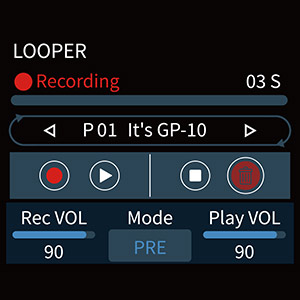
Figure 5: The looper interface on the GP-100 display, showing recording, playback, and volume controls.
Access the looper via the footswitches or menu. Controls typically include Record, Play/Stop, Undo, and Clear.
ഡ്രം റിഥംസ്
Practice with 100 built-in drum rhythms covering various genres. Adjust tempo (BPM) and volume to suit your needs.
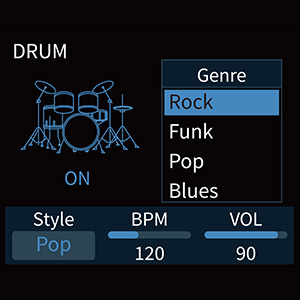
Figure 6: The drum machine interface, allowing selection of different genres and adjustment of BPM and volume.
ട്യൂണർ
The integrated tuner provides accurate chromatic tuning. Activate it via a dedicated footswitch function or menu option.
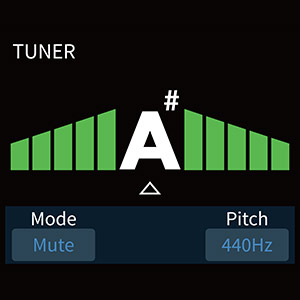
Figure 7: The tuner display, indicating pitch and tuning accuracy.
USB Audio Interface and Software
The GP-100 functions as a USB 2.0 audio interface, allowing direct recording to your computer (Mac/Windows) with stereo audio streaming. It also supports OTG (On-The-Go) for direct connection to iOS/Android mobile devices.
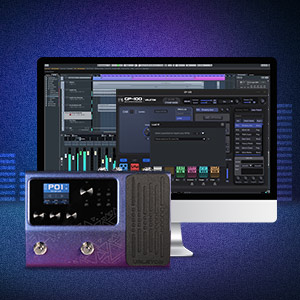
Figure 8: The GP-100 Violet connected to a computer, demonstrating its compatibility with dedicated software for sound editing and preset management.
Free Mac/Windows software is available for comprehensive sound editing and preset management, providing a visual interface for deeper customization.
മെയിൻ്റനൻസ്
വൃത്തിയാക്കൽ
To maintain the appearance and functionality of your GP-100, regularly wipe the unit with a soft, dry cloth. Avoid using abrasive cleaners, solvents, or waxes, as these can damage the finish and internal components.
സംഭരണം
When not in use for extended periods, store the GP-100 in a cool, dry place away from direct sunlight, extreme temperatures, and high humidity. Disconnect the power adapter and all cables before storage.
ഫേംവെയർ അപ്ഡേറ്റുകൾ
Valeton may release firmware updates to improve performance, add features, or fix bugs. Check the official Valeton website periodically for the latest firmware and instructions on how to update your GP-100 via the USB connection.
ട്രബിൾഷൂട്ടിംഗ്
If you encounter issues with your GP-100 Violet, refer to the following common troubleshooting steps:
| പ്രശ്നം | സാധ്യമായ കാരണം | പരിഹാരം |
|---|---|---|
| സൗണ്ട് ഔട്ട്പുട്ട് ഇല്ല | Incorrect cable connections, low volume settings, incorrect input/output selection. |
|
| വികലമായ ശബ്ദം | Input level too high, incorrect gain staging, faulty cables. |
|
| യൂണിറ്റ് പവർ ചെയ്യുന്നില്ല | Incorrect power adapter, loose power connection. |
|
| USB കണക്ഷൻ പ്രശ്നങ്ങൾ | Driver issues, faulty USB cable, incorrect USB port. |
|
If the problem persists after trying these steps, please contact Valeton customer support for further assistance.
സ്പെസിഫിക്കേഷനുകൾ
| ഫീച്ചർ | വിശദാംശങ്ങൾ |
|---|---|
| A/D/A Converter | 24-ബിറ്റ് ഉയർന്ന പ്രകടനമുള്ള ഓഡിയോ |
| Sampലിംഗ് ആവൃത്തി | 44.1 kHz |
| എസ്.എൻ.ആർ | 110dB |
| Maximum Simultaneous Effects | 9 |
| ഇൻപുട്ട് ഇംപെഡൻസ് | 1M ഓംസ് |
| ഓക്സ് ഇൻപുട്ട് ഇംപെഡൻസ് | 10k ഓംസ് |
| ഇടത്/വലത് ഔട്ട്പുട്ടുകൾ | 1/4" Unbalanced (TS) |
| Left/Right Output Impedance | 1k ഓംസ് |
| ഹെഡ്ഫോൺ ഔട്ട്പുട്ട് | 1/8" Stereo (TRS) |
| ഹെഡ്ഫോൺ ഔട്ട്പുട്ട് ഇംപെഡൻസ് | 47 ഓം |
| USB പോർട്ട് | യുഎസ്ബി 2.0 ടൈപ്പ്-ബി |
| USB റെക്കോർഡിംഗ് സ്പെസിഫിക്കേഷൻ | Sample Rate: 44.1 kHz, Bit Depth: Supports 16-bit or 24-bit |
| അളവുകൾ (W x D x H) | 198mm x 134mm x 28mm (7.8 x 5.3 x 1.1 ഇഞ്ച്) |
| യൂണിറ്റ് ഭാരം | 800 ഗ്രാം (1.76 പൗണ്ട്) |
| പവർ ആവശ്യകതകൾ | DC 9V, 500mA (center negative) |
| മെറ്റീരിയൽ തരം | ലോഹം |
വാറൻ്റിയും പിന്തുണയും
For information regarding warranty coverage, please refer to the warranty card included with your product or visit the official Valeton website. For technical support, product inquiries, or service, please contact Valeton customer support through their official channels.
Valeton Official Webസൈറ്റ്: www.valeton.net


