1. ആമുഖം
The EcoNet Controls Bulldog Smart Water Valve Controller is designed to provide automated water shut-off capabilities for your home. This device integrates with Z-Wave Plus systems, allowing for remote control and enhanced leak prevention when paired with compatible sensors. Its design facilitates a straightforward DIY installation without the need for complex plumbing modifications.
2 സുരക്ഷാ വിവരങ്ങൾ
Please read all instructions carefully before installation and operation. Ensure the power adapter is disconnected before performing any maintenance or adjustments. Do not attempt to disassemble or repair the device yourself. This device is intended for indoor use in dry environments. Avoid exposure to water or extreme temperatures, except for the valve itself. Always consult a qualified professional if you are unsure about any part of the installation or operation.
3. പാക്കേജ് ഉള്ളടക്കം
- Water Shutoff Controller
- എസി അഡാപ്റ്റർ
- മൗണ്ടിംഗ് കിറ്റ്
- ഉപയോക്തൃ ഗൈഡ്
4. ഉൽപ്പന്നം കഴിഞ്ഞുview
The EcoNet Bulldog Smart Water Valve Controller is a robust device designed to automate the opening and closing of 1/4-turn ball valves. It features a high-torque motor for reliable operation and Z-Wave Plus certification for secure wireless communication.

Figure 4.1: EcoNet Bulldog Smart Water Valve Controller mounted on a pipe.
The controller is powered by an included AC adapter, ensuring continuous operation. It is designed for easy integration into existing Z-Wave smart home ecosystems.

Figure 4.2: The Bulldog controller connected to its power adapter.
പ്രധാന സവിശേഷതകളിൽ ഇവ ഉൾപ്പെടുന്നു:
- Z- വേവ് പ്ലസ് സർട്ടിഫൈഡ്: Reliable, secure wireless communication with up to 30m (100 ft) range (line of sight).
- സ്മാർട്ട് ഹോം റെഡി: Integrates with Z-Wave-based systems including SmartThings, Wink, Hubitat, Nexia, Honeywell, and more.
- Leak Prevention Automation: Pair with compatible Z-Wave leak sensors (sold separately) to automatically shut off your water when a leak is detected.
- ശക്തമായ പ്രവർത്തനം: High-torque motor toggles open/close in approximately 18 seconds.

Figure 4.3: The Bulldog controller's compatibility with popular Z-Wave hubs.
5. സജ്ജീകരണം
5.1 Valve Compatibility
The Bulldog controller supports most 1/4-turn ball valves from 3/4" to 1.5" in size. It works with 3/4", 1", 1.25", and 1.5" ball valves. Refer to the compatibility chart below to ensure your valve type is supported.
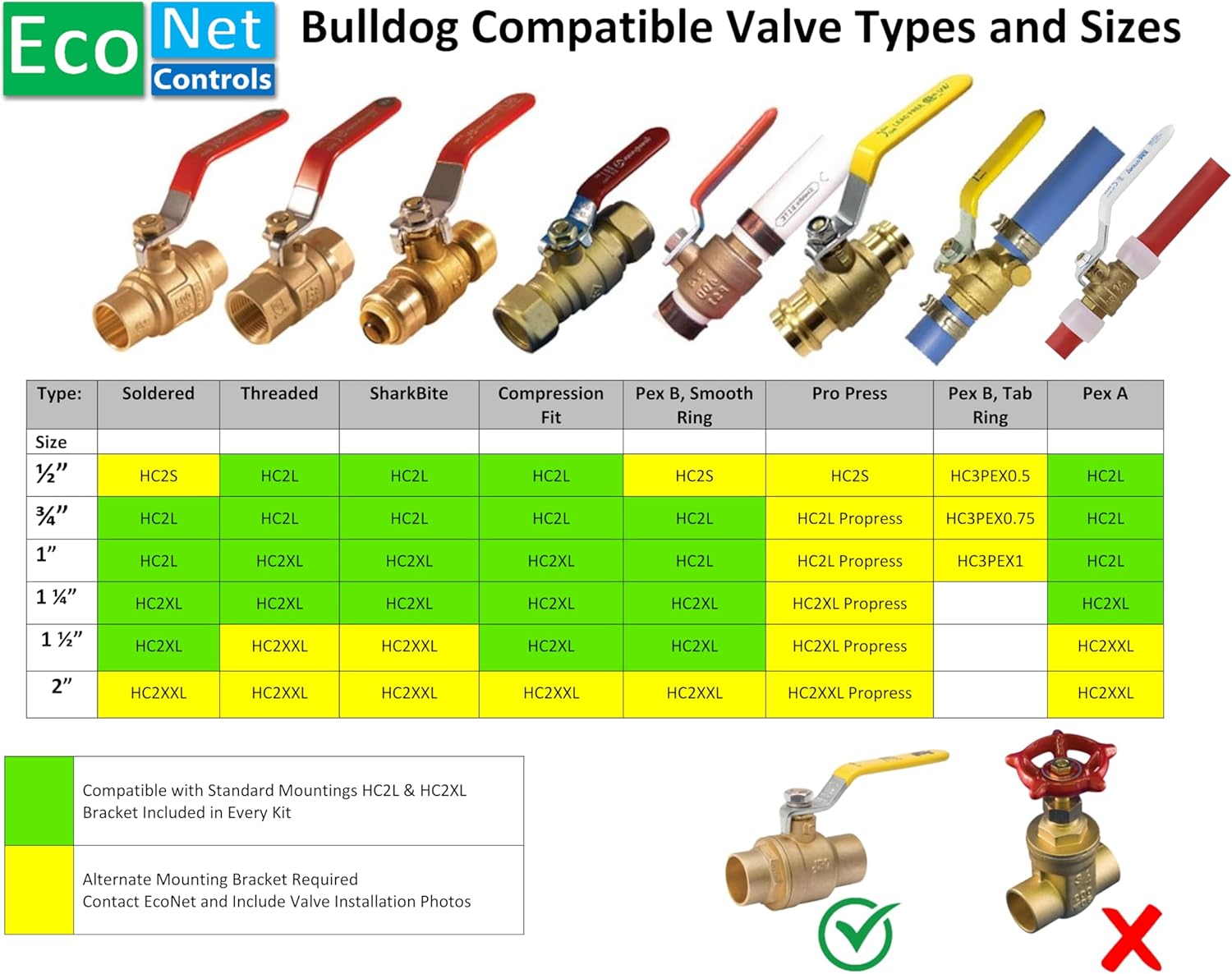
Figure 5.1: EcoNet Bulldog Valve Compatibility Chart.
5.2 ഇൻസ്റ്റലേഷൻ ഘട്ടങ്ങൾ
- Prepare the Valve: Ensure the 1/4-turn ball valve is in the fully open or fully closed position. The area around the valve should be clean and dry.
- Position the Controller: The Bulldog Valve Robot mounts directly to the valve body, not the pipe. This prevents undue stress on plumbing joints.
- Secure the Mounting Kit: Use a #2 Phillips screwdriver to attach the mounting kit securely to your existing valve. No plumbing or pipe cutting is required.
- കൺട്രോളർ ഘടിപ്പിക്കുക: Place the Bulldog controller onto the mounted kit, ensuring it is firmly in place.
- പവർ ബന്ധിപ്പിക്കുക: Plug the universal AC adapter into the controller and then into a standard electrical outlet.
- Pair with Z-Wave Hub: Follow the instructions provided with your Z-Wave compatible hub (e.g., SmartThings, Hubitat, Vera) to add the EcoNet Bulldog controller to your smart home network. A Z-Wave hub is required and sold separately.

Figure 5.2: Proper mounting directly to the valve body.
5.3 അളവുകൾ
For installation planning, refer to the detailed dimensions of the unit:

Figure 5.3: Product dimensions for installation reference.
6. പ്രവർത്തിക്കുന്നു
6.1 മാനുവൽ പ്രവർത്തനം
The controller has a manual override button. Pressing this button will toggle the valve between its open and closed positions. This is useful for testing or in situations where smart home control is unavailable.
6.2 സ്മാർട്ട് ഹോം കൺട്രോൾ
Once paired with your Z-Wave hub, you can control the valve remotely through your hub's application or interface. This allows you to open or close your main water supply from anywhere with an internet connection.
6.3 Automated Leak Prevention
For advanced leak prevention, integrate the Bulldog controller with Z-Wave leak sensors (sold separately). When a leak is detected by a paired sensor, your Z-Wave hub can be configured to automatically send a command to the Bulldog controller to shut off the water supply, minimizing potential water damage.
7. പരിപാലനം
The EcoNet Bulldog Smart Water Valve Controller requires minimal maintenance. Periodically inspect the device and its mounting for any signs of wear or damage. Ensure the power adapter connection is secure. Keep the unit clean and free from dust and debris. Do not use harsh chemicals or abrasive cleaners.
8. പ്രശ്നപരിഹാരം
- ഉപകരണം പ്രതികരിക്കുന്നില്ല: Check the power connection and ensure the AC adapter is properly plugged in. Verify that the Z-Wave hub is online and communicating with the controller. Try re-pairing the device with your Z-Wave hub.
- Valve not fully opening/closing: Ensure the controller is securely mounted to the valve body and not the pipe. Check for any obstructions around the valve handle. The valve itself should be a 1/4-turn ball valve within the specified size range.
- No water shut-off on leak detection: Confirm that your Z-Wave leak sensors are properly paired and functioning. Verify the automation rules within your Z-Wave hub are correctly configured to trigger the valve shut-off upon leak detection.
- പ്രവർത്തന സമയത്ത് അസാധാരണമായ ശബ്ദങ്ങൾ: This may indicate an issue with the valve itself or the mounting. Ensure the valve operates smoothly manually. If the issue persists, contact EcoNet Controls support.
9 സ്പെസിഫിക്കേഷനുകൾ
| സ്പെസിഫിക്കേഷൻ | വിശദാംശങ്ങൾ |
|---|---|
| ബ്രാൻഡ് | ഇക്കോനെറ്റ് നിയന്ത്രണങ്ങൾ |
| മോഡൽ നമ്പർ | EVC200-C |
| മെറ്റീരിയൽ | പ്ലാസ്റ്റിക് |
| വാൽവ് തരം അനുയോജ്യത | 1/4-turn Ball Valve |
| Valve Size Compatibility | 3/4", 1", 1.25", 1.5" |
| വയർലെസ് പ്രോട്ടോക്കോൾ | ഇസഡ്-വേവ് പ്ലസ് |
| വയർലെസ് ശ്രേണി | 30 മീറ്റർ (100 അടി) വരെ നീളമുള്ള കാഴ്ച |
| പവർ ഇൻപുട്ട് | 12 Volts AC Adapter |
| പ്രവർത്തന സമയം | Approx. 18 seconds (open/close) |
| ഇനത്തിൻ്റെ ഭാരം | 2.92 പൗണ്ട് |
| പാക്കേജ് അളവുകൾ | 9.65 x 7.95 x 3.23 ഇഞ്ച് |
| യു.പി.സി | 628451752370 |
10. വാറൻ്റിയും പിന്തുണയും
For warranty information and technical support, please refer to the documentation included with your product or visit the official EcoNet Controls website. You can also contact EcoNet Controls directly for assistance with product inquiries, troubleshooting, or replacement parts.
EcoNet Controls Store: https://www.amazon.com/stores/EcoNetControls/page/A63811D9-574B-4EC6-879B-AC8B9C069456


