1. ആമുഖം
The EPOMAKER x LEOBOG Hi75 is a high-performance wired mechanical keyboard designed for both gaming and professional use. Featuring a durable aluminum alloy construction, a gasket-mounted structure for enhanced typing feel, and a versatile mode-switching knob, this keyboard offers extensive customization and reliable performance. This manual provides detailed instructions for setup, operation, and maintenance to ensure optimal use of your device.

ചിത്രം 1: ഓവർview of the EPOMAKER x LEOBOG Hi75 Mechanical Keyboard.
2. പാക്കേജ് ഉള്ളടക്കം
- EPOMAKER x LEOBOG Hi75 Mechanical Keyboard
- യുഎസ്ബി-സി കേബിൾ
- കീക്യാപ് പുള്ളർ
3. സജ്ജീകരണം
3.1 കീബോർഡ് ബന്ധിപ്പിക്കുന്നു
The Hi75 keyboard uses a USB-C interface for a stable wired connection. To connect:
- Locate the USB-C port on the keyboard, typically on the rear edge.
- നൽകിയിരിക്കുന്ന USB-C കേബിളിന്റെ ഒരറ്റം കീബോർഡുമായി ബന്ധിപ്പിക്കുക.
- USB-C കേബിളിന്റെ മറ്റേ അറ്റം നിങ്ങളുടെ കമ്പ്യൂട്ടറിൽ ലഭ്യമായ ഒരു USB പോർട്ടിലേക്ക് ബന്ധിപ്പിക്കുക.
- നിങ്ങളുടെ ഓപ്പറേറ്റിംഗ് സിസ്റ്റം കീബോർഡ് യാന്ത്രികമായി തിരിച്ചറിയും.

Figure 2: Connecting the USB-C cable to the keyboard for wired operation.
3.2 ഓപ്പറേറ്റിംഗ് സിസ്റ്റം അനുയോജ്യത
The Hi75 keyboard is compatible with both Windows and Mac operating systems. If the WIN key or Alt key stops working properly, use the following shortcuts to switch to the correct OS mode:
- FN + Q: Android മോഡ്
- FN + W: വിൻഡോസ് മോഡ്
- FN + E: മാക് മോഡ്
- FN + R: iOS മോഡ്
4. പ്രവർത്തന നിർദ്ദേശങ്ങൾ
4.1 Mode-Switching Knob
The innovative knob on the Hi75 keyboard allows for seamless transitions between different modes and provides refined control over various functions.
- Pressing the Knob: Switches between Work Mode (constant RGB glow) and Gaming Mode (dynamic RGB flashing).
- Rotating the Knob: Adjusts volume and lighting settings.
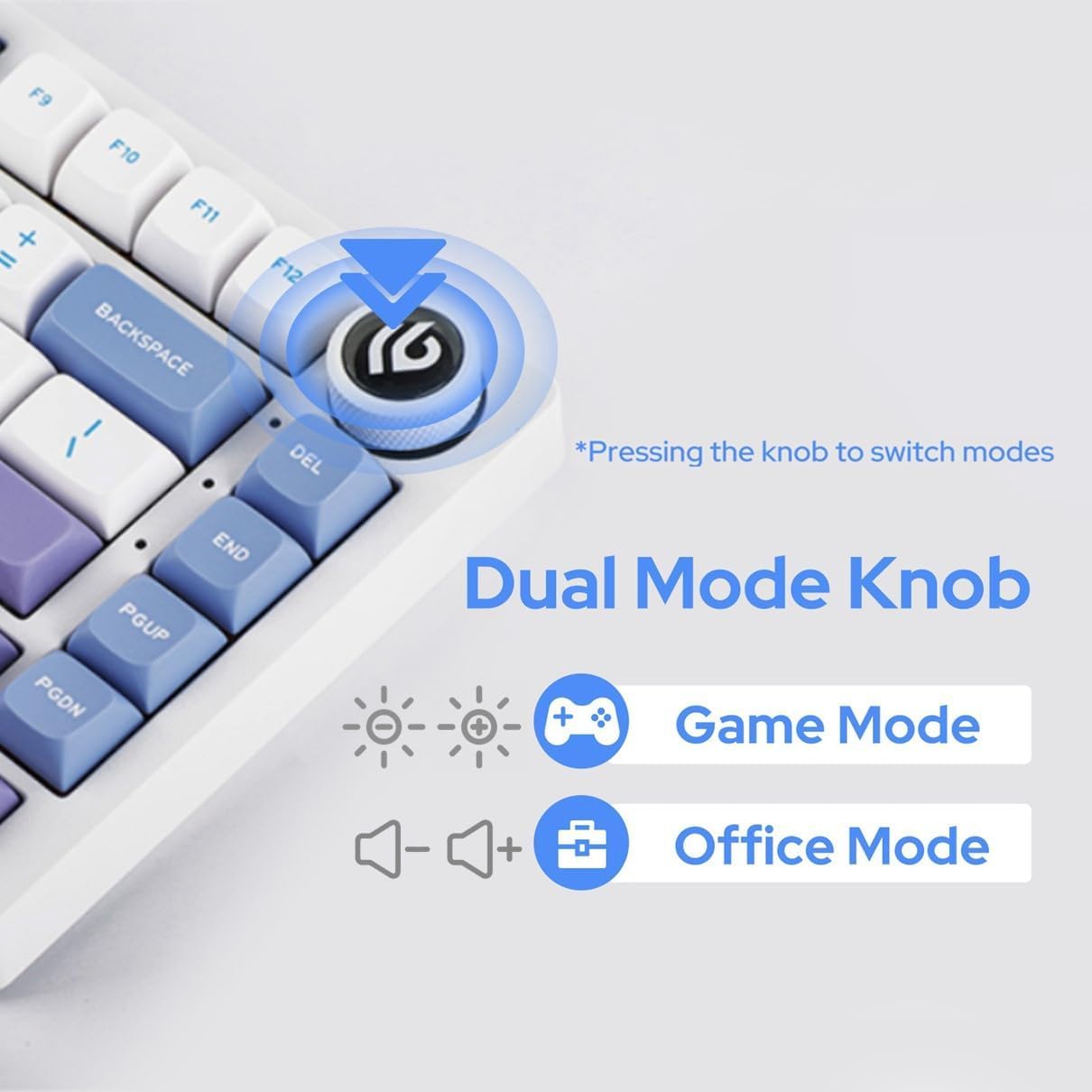
Figure 3: The multi-functional mode-switching knob for quick adjustments.
4.2 NKRO (N-Key Rollover)
The Hi75 supports N-Key Rollover, ensuring that every keypress is registered accurately, even when multiple keys are pressed simultaneously. This feature is crucial for fast typing and gaming scenarios.

Figure 4: Diagram illustrating the N-Key Rollover capability.
4.3 Advanced Gaming-Grade Chip
Equipped with a top-tier gaming chip, the Hi75 ensures rapid and responsive keystroke registration. Customize delay settings for a swift and seamless experience.

Figure 5: Illustration of the advanced gaming-grade chip.
4.4 Programming Software (VIA)
The Hi75 keyboard is programmable via VIA software, allowing for extensive customization of key assignments, macros, and lighting effects. To use VIA:
- ഔദ്യോഗിക EPOMAKER-ൽ നിന്ന് VIA സോഫ്റ്റ്വെയർ ഡൗൺലോഡ് ചെയ്യുക. webസൈറ്റ് അല്ലെങ്കിൽ usevia.app.
- Connect your Hi75 keyboard to your computer via USB-C.
- Open the VIA software. The software should automatically detect your keyboard.
- Load the appropriate JSON definition file for your Hi75 model (usually available on the EPOMAKER webസൈറ്റ്).
- Customize keymaps, create macros, and adjust lighting to your preference. Changes are applied in real-time.
Video 1: Demonstration on how to use VIA software for keyboard customization.
5. പരിപാലനം
5.1 വൃത്തിയാക്കൽ
നിങ്ങളുടെ കീബോർഡിന്റെ ദീർഘായുസ്സും രൂപവും നിലനിർത്താൻ:
- വൃത്തിയാക്കുന്നതിനുമുമ്പ് നിങ്ങളുടെ കമ്പ്യൂട്ടറിൽ നിന്ന് കീബോർഡ് വിച്ഛേദിക്കുക.
- Use a soft, lint-free cloth to wipe down the keycaps and case.
- കൂടുതൽ ആഴത്തിലുള്ള വൃത്തിയാക്കലിനായി, കീക്യാപ്പുകൾക്കിടയിൽ നിന്ന് പൊടിയും അവശിഷ്ടങ്ങളും നീക്കം ചെയ്യാൻ ഒരു കംപ്രസ് ചെയ്ത വായു ഉപയോഗിക്കുക.
- കഠിനമായ രാസവസ്തുക്കളോ ഉരച്ചിലുകളോ ഉപയോഗിക്കുന്നത് ഒഴിവാക്കുക.
5.2 ഹോട്ട്-സ്വാപ്പബിൾ സ്വിച്ചുകൾ
The Hi75 features full key hot-swap capability, allowing you to change switches without soldering. It is compatible with most 3/5-pin mechanical switches.
- നൽകിയിരിക്കുന്ന കീക്യാപ്പ് പുള്ളർ ഉപയോഗിച്ച്, ആവശ്യമുള്ള കീക്യാപ്പ് ശ്രദ്ധാപൂർവ്വം നീക്കം ചെയ്യുക.
- Using a switch puller (not included, but often bundled with switches), gently grip the switch and pull it straight up to remove it.
- പിസിബിയിലെ ദ്വാരങ്ങളുമായി പുതിയ സ്വിച്ചിന്റെ പിന്നുകൾ വിന്യസിക്കുക.
- Press the new switch firmly into place until it clicks. Ensure it is seated correctly and not bent.
- കീക്യാപ്പ് മാറ്റിസ്ഥാപിക്കുക.

Figure 6: Demonstration of replacing hot-swappable switches.
Video 2: Comparison of different switch types, relevant for understanding hot-swappable options.
6. പ്രശ്നപരിഹാരം
6.1 കീബോർഡ് പ്രതികരിക്കുന്നില്ല
- USB-C കേബിൾ കീബോർഡിലേക്കും കമ്പ്യൂട്ടറിലേക്കും സുരക്ഷിതമായി ബന്ധിപ്പിച്ചിട്ടുണ്ടെന്ന് ഉറപ്പാക്കുക.
- നിങ്ങളുടെ കമ്പ്യൂട്ടറിലെ മറ്റൊരു USB പോർട്ടിലേക്ക് കീബോർഡ് ബന്ധിപ്പിക്കാൻ ശ്രമിക്കുക.
- ഒരു കമ്പ്യൂട്ടർ-നിർദ്ദിഷ്ട പ്രശ്നം ഒഴിവാക്കാൻ മറ്റൊരു കമ്പ്യൂട്ടറിൽ കീബോർഡ് പരിശോധിക്കുക.
- ഒരു യുഎസ്ബി ഹബ് ഉപയോഗിക്കുകയാണെങ്കിൽ, കമ്പ്യൂട്ടറിലേക്ക് നേരിട്ട് കണക്റ്റുചെയ്യാൻ ശ്രമിക്കുക.
6.2 Incorrect Key Output or Layout
- Verify the operating system mode is correctly set (FN + W for Windows, FN + E for Mac).
- Check VIA software for any custom key assignments that might be causing unexpected behavior.
- Perform a factory reset if necessary (refer to VIA software documentation for specific instructions).
6.3 RGB ലൈറ്റിംഗ് പ്രശ്നങ്ങൾ
- Ensure the keyboard is in the correct mode (Work Mode for constant glow, Gaming Mode for dynamic flashing) using the mode-switching knob.
- Adjust brightness and effects using the knob or VIA software.
- If specific keys are not lighting up, check for any physical damage or improperly seated switches.
7 സ്പെസിഫിക്കേഷനുകൾ
- ഉൽപ്പന്ന അളവുകൾ: 12.99 x 5.31 x 1.77 ഇഞ്ച്
- ഇനത്തിൻ്റെ ഭാരം: 4.44 പൗണ്ട്
- നിർമ്മാതാവ്: എപോമേക്കർ
- മോഡൽ നമ്പർ: ഹായ്75
- കണക്റ്റിവിറ്റി ടെക്നോളജി: USB-C
- കീബോർഡ് വിവരണം: ഗെയിമിംഗ്
- പ്രത്യേക സവിശേഷതകൾ: Backlit, Customizable Display Keys, Ergonomic, Hot-Swappable, Wired
- കീബോർഡ് ബാക്ക്ലൈറ്റിംഗ് വർണ്ണ പിന്തുണ: RGB
- ആദ്യം ലഭ്യമായ തീയതി: ഫെബ്രുവരി 25, 2024
8. Additional Product Videos
വീഡിയോ 3: കഴിഞ്ഞുview of the EPOMAKER x LEOBOG Hi75 Aluminum Alloy Wired Mechanical Keyboard.
Video 4: Detailed look at the EPOMAKER x LEOBOG Hi75 Aluminum Alloy Wired Gaming Keyboard.
Video 5: Comparison between the Hi75 and P75 keyboards, highlighting key differences.
Video 6: Showcase of the EPOMAKER x LEOBOG Hi75 White Wired Mechanical Keyboard.
9. വാറൻ്റിയും പിന്തുണയും
For warranty information and customer support, please visit the official EPOMAKER webസൈറ്റിൽ ബന്ധപ്പെടുക അല്ലെങ്കിൽ അവരുടെ ഉപഭോക്തൃ സേവനവുമായി നേരിട്ട് ബന്ധപ്പെടുക. വാറന്റി ക്ലെയിമുകൾക്കായി നിങ്ങളുടെ വാങ്ങൽ രസീത് സൂക്ഷിക്കുക.


