1. ആമുഖം
Thank you for choosing the FLEXISPOT E6 MAX Standing Desk. This electric height-adjustable desk is designed to enhance your workspace ergonomics and productivity, allowing seamless transitions between sitting and standing positions. This manual provides essential information for the proper setup, operation, and maintenance of your new desk.
Please read this manual thoroughly before assembly and use to ensure safe and efficient operation.
2 പ്രധാന സവിശേഷതകൾ
- Durable Bamboo Desktop: Crafted from bamboo, known for its remarkable strength and flexibility, capable of withstanding daily use with a tensile strength of 28,000 pounds per square inch. The surface features a natural grain and elegant finish.
- Quiet Dual Motors: Equipped with dual motors for whisper-quiet height adjustments (less than 50dB). These powerful motors effortlessly lift up to 330 lbs (150KG), ensuring smooth transitions without disturbing your environment.
- മൂന്ന്-എസ്tage Leg System: Provides continuous height adjustment, accommodating users of various heights, from children to extra tall adults.
- Programmable Control Panel: Features intuitive up/down buttons, blue backlighting, and four height memory settings for quick and precise ergonomic adjustments.
- കൂട്ടിയിടി വിരുദ്ധ സവിശേഷത: Includes a built-in system that automatically retracts the desk upon encountering an obstacle, preventing accidents and protecting furniture, children, and pets.
- Complimentary Accessories: Comes with Velcro straps for cable management, a set of wheels for easy mobility, and a cable manager to keep your workspace tidy.
3. ഉൽപ്പന്ന സവിശേഷതകൾ
| ആട്രിബ്യൂട്ട് | വിശദാംശങ്ങൾ |
|---|---|
| ബ്രാൻഡ് | ഫ്ലെക്സിസ്പോട്ട് |
| മോഡൽ നമ്പർ | E6 |
| ഡെസ്ക്ടോപ്പ് മെറ്റീരിയൽ | Bamboo (Whole-Piece Board) |
| ഫ്രെയിം മെറ്റീരിയൽ | Metal (Black Frame) |
| Dimensions (Desktop) | 55"D x 28"W |
| ഉയരം പരിധി | 23.6" - 50" (Continuous Adjustment) |
| ലോഡ് കപ്പാസിറ്റി | Up to 330 lbs (150KG) |
| മോട്ടോർ തരം | ഡ്യുവൽ മോട്ടോർ |
| ശബ്ദ നില | 50dB-യിൽ കുറവ് |
| നിയന്ത്രണ പാനൽ | Programmable with 4 Memory Presets |
| അസംബ്ലി ആവശ്യമാണ് | അതെ (ഉപകരണങ്ങൾ ഉൾപ്പെടുത്തിയിരിക്കുന്നു) |
| യു.പി.സി | 810072854988 |
4. പ്രധാനപ്പെട്ട സുരക്ഷാ മുന്നറിയിപ്പുകൾ
- ഭാര പരിധി: Do not exceed the maximum weight limit of 330 lbs (150KG). Exceeding this limit can cause damage to the desk and potentially lead to injury.
- മോട്ടോർ ശബ്ദം: The desk's quiet dual motors generate less than 50dB of sound. Users should be aware of this minimal motor noise during operation.
- ആന്റി-കൊളിഷൻ സിസ്റ്റം: While the desk has an anti-collision feature, always ensure the area around the desk is clear during height adjustments to prevent accidents.
- ഊർജ്ജ സ്രോതസ്സ്: Use only the provided power adapter and ensure it is connected to a grounded outlet.
- കുട്ടികളും വളർത്തുമൃഗങ്ങളും: പരിക്കുകൾ ഒഴിവാക്കാൻ ഓപ്പറേഷൻ സമയത്ത് കുട്ടികളെയും വളർത്തുമൃഗങ്ങളെയും മേശയിൽ നിന്ന് അകറ്റി നിർത്തുക.
5. സജ്ജീകരണവും അസംബ്ലിയും
Your FLEXISPOT E6 MAX Standing Desk arrives in two separate packages: one for the desktop and one for the frame components. All necessary assembly tools are included.
അസംബ്ലി ഘട്ടങ്ങൾ:
- എല്ലാ ഘടകങ്ങളും അൺപാക്ക് ചെയ്ത് ഉൾപ്പെടുത്തിയിരിക്കുന്ന മാനുവലിലെ ഭാഗങ്ങളുടെ പട്ടികയുമായി താരതമ്യം ചെയ്യുക.
- Assemble the frame according to the detailed instructions provided in the assembly guide. This typically involves attaching the crossbar, side brackets, and feet to the lifting columns.
- Attach the desktop to the assembled frame using the provided screws. The bamboo desktop comes with pre-drilled holes for easy alignment.
- Connect the motor cables to the control box and then connect the control box to the power supply.
- നിയുക്ത സ്ഥലത്ത് ഡെസ്ക്ടോപ്പിന്റെ അടിവശത്ത് നിയന്ത്രണ പാനൽ ഇൻസ്റ്റാൾ ചെയ്യുക.
- Optionally, attach the included casters to the feet for easy mobility, or use the standard leveling feet for a stationary setup.
- Organize cables using the provided Velcro straps and cable manager for a clean and safe workspace.

Image: The FLEXISPOT E6 MAX Standing Desk fully assembled in a home office environment.

Image: Detail of the three-stage leg, illustrating continuous height adjustment from 24.4" to 50".
6. പ്രവർത്തന നിർദ്ദേശങ്ങൾ
നിയന്ത്രണ പാനൽ പ്രവർത്തനങ്ങൾ:
- മുകളിലേക്കും താഴേക്കുമുള്ള അമ്പടയാളങ്ങൾ: Press and hold the up or down arrow buttons to manually adjust the desk height. Release the button to stop.
- മെമ്മറി പ്രീസെറ്റുകൾ (1, 2, 3, 4): The control panel features four programmable memory buttons.
- മെമ്മറി പ്രീസെറ്റുകൾ സജ്ജമാക്കുന്നു:
- മുകളിലേക്കും താഴേക്കുമുള്ള അമ്പടയാളങ്ങൾ ഉപയോഗിച്ച് നിങ്ങൾക്ക് ആവശ്യമുള്ള ഉയരത്തിലേക്ക് ഡെസ്ക് ക്രമീകരിക്കുക.
- Press the 'M' button (Memory button). The display will show 'S-' or similar.
- Within 3 seconds, press the desired memory button (1, 2, 3, or 4) to save the current height. The display will confirm the setting.
- മെമ്മറി പ്രീസെറ്റുകൾ തിരിച്ചുവിളിക്കുന്നു: Simply press the corresponding memory button (1, 2, 3, or 4), and the desk will automatically move to the saved height.
- ആന്റി-കൊളിഷൻ സിസ്റ്റം: The desk is equipped with an anti-collision sensor. If the desktop encounters an obstacle during movement, it will automatically stop and retract slightly to prevent damage.
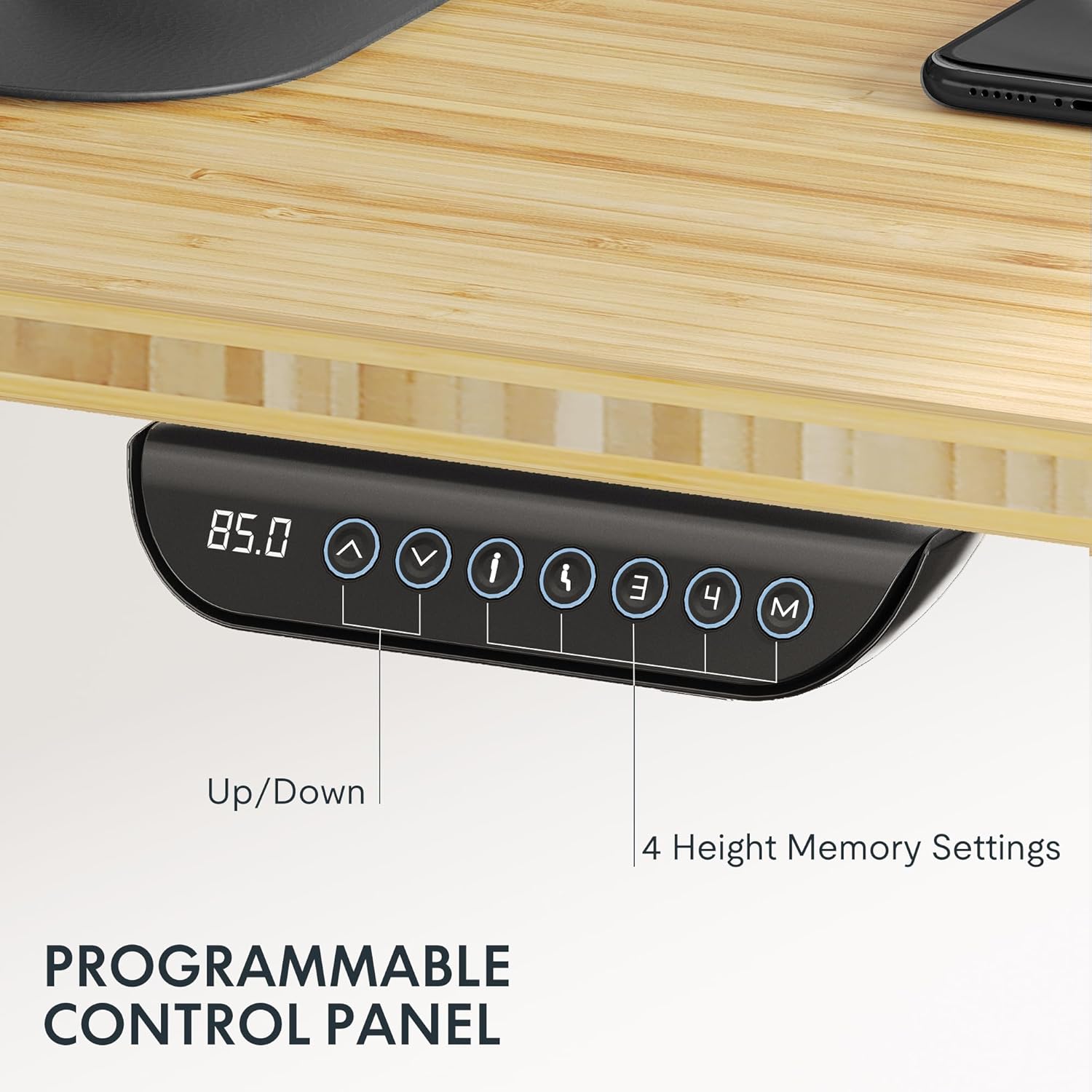
Image: The intuitive control panel allows for easy height adjustments and saving preferred positions.
Video: Official FLEXISPOT brand video showcasing general product features and operation. (Creator: FlexiSpot)
7. പരിപാലനം
- വൃത്തിയാക്കൽ: ഡെസ്ക്ടോപ്പും ഫ്രെയിമും ഒരു സോഫ്റ്റ്, ഡി ക്ലീനർ ഉപയോഗിച്ച് തുടയ്ക്കുക.amp തുണി. ഫിനിഷിന് കേടുവരുത്തുന്ന കഠിനമായ രാസവസ്തുക്കളോ അബ്രാസീവ് ക്ലീനറുകളോ ഒഴിവാക്കുക.
- പതിവ് പരിശോധനകൾ: സുരക്ഷിതമാണെന്ന് ഉറപ്പാക്കാൻ എല്ലാ സ്ക്രൂകളും കണക്ഷനുകളും ഇടയ്ക്കിടെ പരിശോധിക്കുക. ആവശ്യമെങ്കിൽ മുറുക്കുക.
- കേബിൾ മാനേജുമെന്റ്: Ensure cables remain tidy and are not pinched or tangled, especially during height adjustments.
8. പ്രശ്നപരിഹാരം
പൊതുവായ പ്രശ്നങ്ങളും പരിഹാരങ്ങളും:
- ഡെസ്ക് നീങ്ങുന്നില്ല:
- പവർ കോർഡ് മേശയിലും ചുമരിലെ ഔട്ട്ലെറ്റിലും സുരക്ഷിതമായി പ്ലഗ് ചെയ്തിട്ടുണ്ടോയെന്ന് പരിശോധിക്കുക.
- Ensure the control box connections are firm.
- Uneven Height:
- Perform a reset procedure (refer to the detailed assembly manual for specific steps).
- മേശ ഒരു നിരപ്പായ പ്രതലത്തിലാണെന്ന് ഉറപ്പാക്കുക.
- Motor Noise is Excessive:
- While the motors are quiet, unusual loud noises may indicate an issue. Check for any obstructions or loose components.
- Ensure the desk is not overloaded beyond its maximum capacity.
- Anti-Collision Triggering Frequently:
- Ensure there are no objects in the desk's path during movement.
- Check if any cables are hanging loosely and interfering with the desk's movement.
9. വാറൻ്റിയും പിന്തുണയും
FLEXISPOT stands behind the quality of its products. The E6 MAX Standing Desk comes with a comprehensive warranty:
- 10 വർഷത്തെ ഗ്യാരണ്ടി: Covers the desk frame and motor.
- 2 വർഷത്തെ സംരക്ഷണം: Covers the control panel and electronics.
For any assistance, questions, or warranty claims, please contact FLEXISPOT Customer Support. Refer to your product packaging or the official FLEXISPOT webഏറ്റവും കാലികമായ ബന്ധപ്പെടാനുള്ള വിവരങ്ങൾക്കായി സൈറ്റ്.


