1. ആമുഖം
The ProtoArc XKM03 is an ergonomic, foldable Bluetooth keyboard and mouse combo designed for portability and comfortable use across various devices. This manual provides instructions for setup, operation, maintenance, and troubleshooting to ensure optimal performance.

Image: The ProtoArc XKM03 foldable keyboard, ergonomic mouse, and protective carrying case.
പ്രധാന സവിശേഷതകൾ:
- Ergonomic Split Design: The keyboard features a V-shape with a 166-degree angle and split keyset to promote a natural typing posture and reduce wrist strain.
- Ultra-Slim and Foldable: The keyboard folds for compact storage and portability, with automatic power on/off upon unfolding/folding.
- Ergonomic Mouse: The wireless mouse is designed with a contoured shape for palm and thumb support, reducing wrist discomfort. It offers adjustable DPI settings up to 2400.
- മൾട്ടി-ഡിവൈസ് കണക്റ്റിവിറ്റി: Connects to up to three Bluetooth devices simultaneously, allowing for easy switching between them.
- വിശാലമായ അനുയോജ്യത: Compatible with Mac OS, iOS, Android, and Windows operating systems on iPads, iPhones, tablets, cellphones, and laptops.
2. പാക്കേജ് ഉള്ളടക്കം
- ProtoArc XKM03 Foldable Bluetooth Keyboard
- ProtoArc Ergonomic Bluetooth Mouse
- USB-C ചാർജിംഗ് കേബിൾ
- ഉപയോക്തൃ മാനുവൽ
- ചുമക്കുന്ന കേസ്
3. സജ്ജീകരണവും കണക്ഷനും
3.1 ഉപകരണങ്ങൾ ചാർജ് ചെയ്യുന്നു
Before initial use, fully charge both the keyboard and the mouse using the provided USB-C charging cable. The charging port for the keyboard is typically located on the side or back edge. The mouse charging port is usually on the front edge.
- ഒരു ഫുൾ ചാർജിന് ഏകദേശം 2 മണിക്കൂർ എടുക്കും.
- The keyboard has a standby time of up to 250 hours on a full charge.
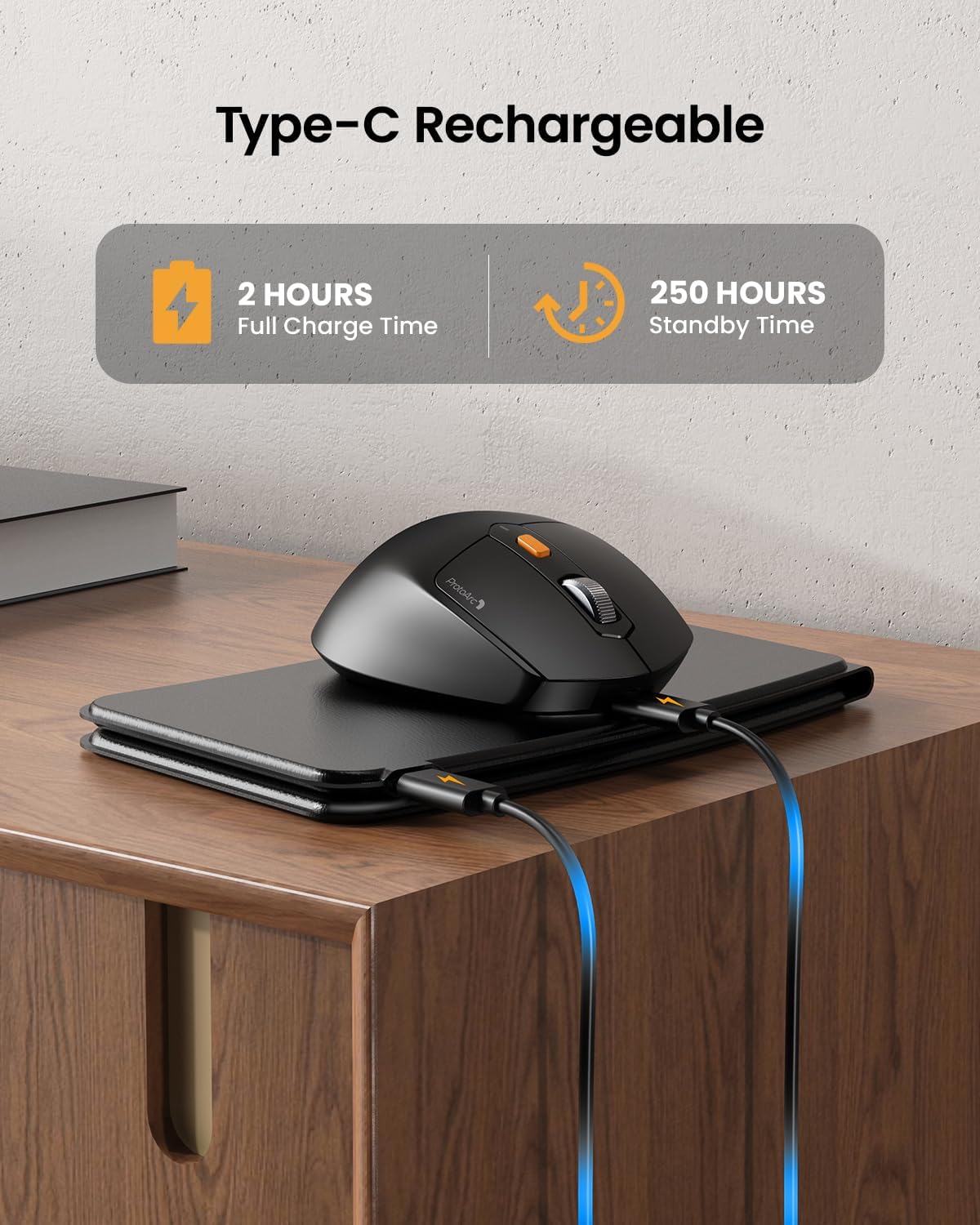
Image: The keyboard and mouse connected to power via USB-C cables for charging.
3.2 Keyboard Bluetooth Pairing
- Unfold the keyboard. This action automatically powers on the keyboard.
- അമർത്തിപ്പിടിക്കുക Fn കീയും ബ്ലൂടൂത്ത് ചാനൽ കീകളിൽ ഒന്ന് (BT1, BT2, അല്ലെങ്കിൽ BT3) അനുബന്ധ ഇൻഡിക്കേറ്റർ ലൈറ്റ് വേഗത്തിൽ മിന്നുന്നത് വരെ 3-5 സെക്കൻഡ് നേരത്തേക്ക്. കീബോർഡ് ജോടിയാക്കൽ മോഡിലാണെന്ന് ഇത് സൂചിപ്പിക്കുന്നു.
- On your device (iPad, tablet, iPhone, laptop), go to Bluetooth settings and search for available devices.
- "തിരഞ്ഞെടുക്കുക"ProtoArc XKM03 Keyboard"ലിസ്റ്റിൽ നിന്ന്.
- കണക്ട് ചെയ്തുകഴിഞ്ഞാൽ, ഇൻഡിക്കേറ്റർ ലൈറ്റ് മിന്നുന്നത് നിർത്തുകയും ഓഫാക്കുന്നതിന് മുമ്പ് കുറച്ച് സെക്കൻഡ് നേരത്തേക്ക് ഉറച്ചുനിൽക്കുകയും ചെയ്യും.
3.3 Mouse Bluetooth Pairing
- മൗസിന്റെ അടിഭാഗത്തുള്ള പവർ സ്വിച്ച് ഉപയോഗിച്ച് അത് ഓണാക്കുക.
- Press the Bluetooth pairing button (usually on the underside or top near the scroll wheel) for 3-5 seconds until the indicator light flashes rapidly.
- നിങ്ങളുടെ ഉപകരണത്തിൽ, ബ്ലൂടൂത്ത് ക്രമീകരണത്തിലേക്ക് പോയി ലഭ്യമായ ഉപകരണങ്ങൾക്കായി തിരയുക.
- "തിരഞ്ഞെടുക്കുക"ProtoArc XKM03 Mouse"ലിസ്റ്റിൽ നിന്ന്.
- കണക്ട് ചെയ്തുകഴിഞ്ഞാൽ, ഇൻഡിക്കേറ്റർ ലൈറ്റ് മിന്നുന്നത് നിർത്തും.

Image: The keyboard and mouse wirelessly connected to a laptop, tablet, and smartphone, illustrating multi-device capability.
4. പ്രവർത്തന നിർദ്ദേശങ്ങൾ
4.1 കീബോർഡ് ഉപയോഗം
The XKM03 keyboard features an ergonomic split design for comfortable typing. An initial adaptation period may be required to become accustomed to the layout.

Image: A user's hands positioned on the V-shaped split keyboard, demonstrating the ergonomic design.
ഓട്ടോമാറ്റിക് പവർ ഓൺ/ഓഫ്:
- കീബോർഡ് ഓൺ ചെയ്യാൻ അത് തുറക്കുക.
- Fold the keyboard to power it off.
- The keyboard also features magnetic closure to prevent accidental unfolding.
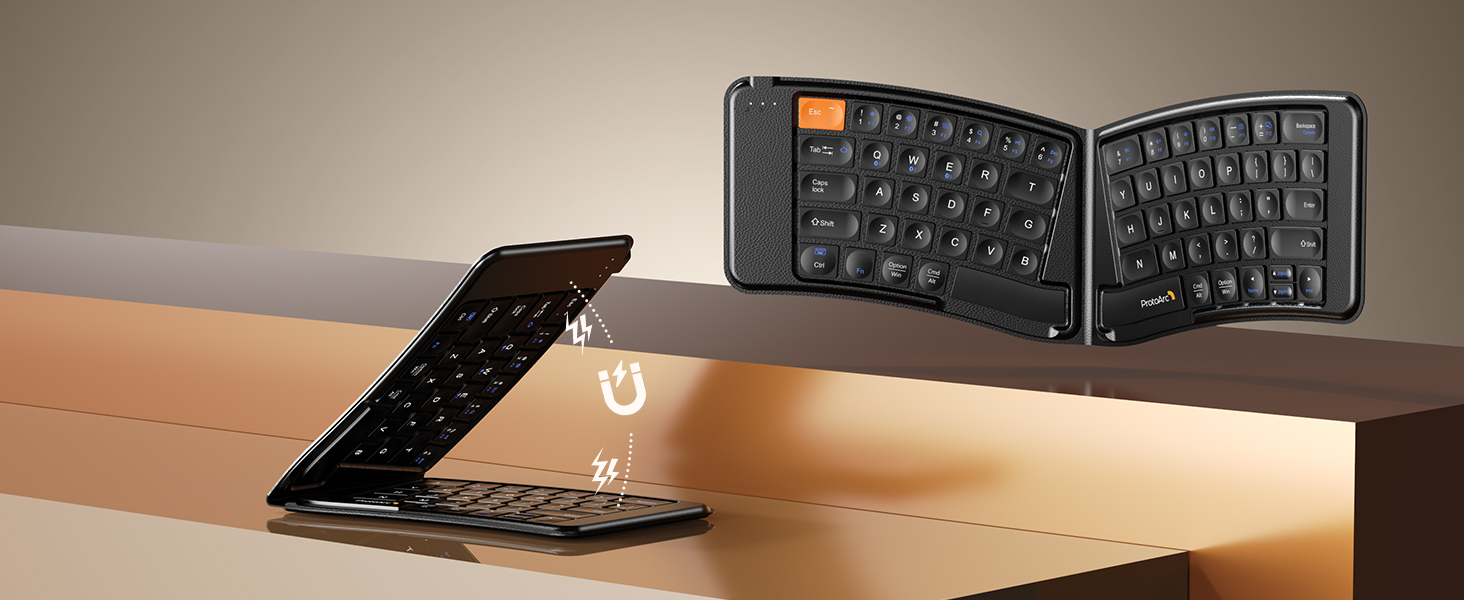
Image: The keyboard shown in both folded and unfolded states, highlighting its magnetic closure mechanism.
4.2 ഉപകരണങ്ങൾക്കിടയിൽ മാറൽ
To switch between paired Bluetooth devices, simply press the Fn അനുബന്ധ ബ്ലൂടൂത്ത് ചാനൽ കീയ്ക്കൊപ്പം കീയും (BT1, BT2, അല്ലെങ്കിൽ BT3) നിങ്ങളുടെ ആവശ്യമുള്ള ഉപകരണം ജോടിയാക്കിയിരിക്കുന്നു.
4.3 മൾട്ടിമീഡിയ ഫംഗ്ഷൻ കീകൾ
The keyboard includes multimedia function keys. Refer to the keycap legends for specific functions (e.g., volume control, media playback).
- അമർത്തുക F1-F10 directly to access number 1-0.
- അമർത്തുക Fn+F1-F12 to activate multimedia functions.
- അമർത്തുക Shift + F1-F12 to input symbols like !, @, #.
- അമർത്തുക Fn + Shift + F1-F12 to access F1-F12 functions.
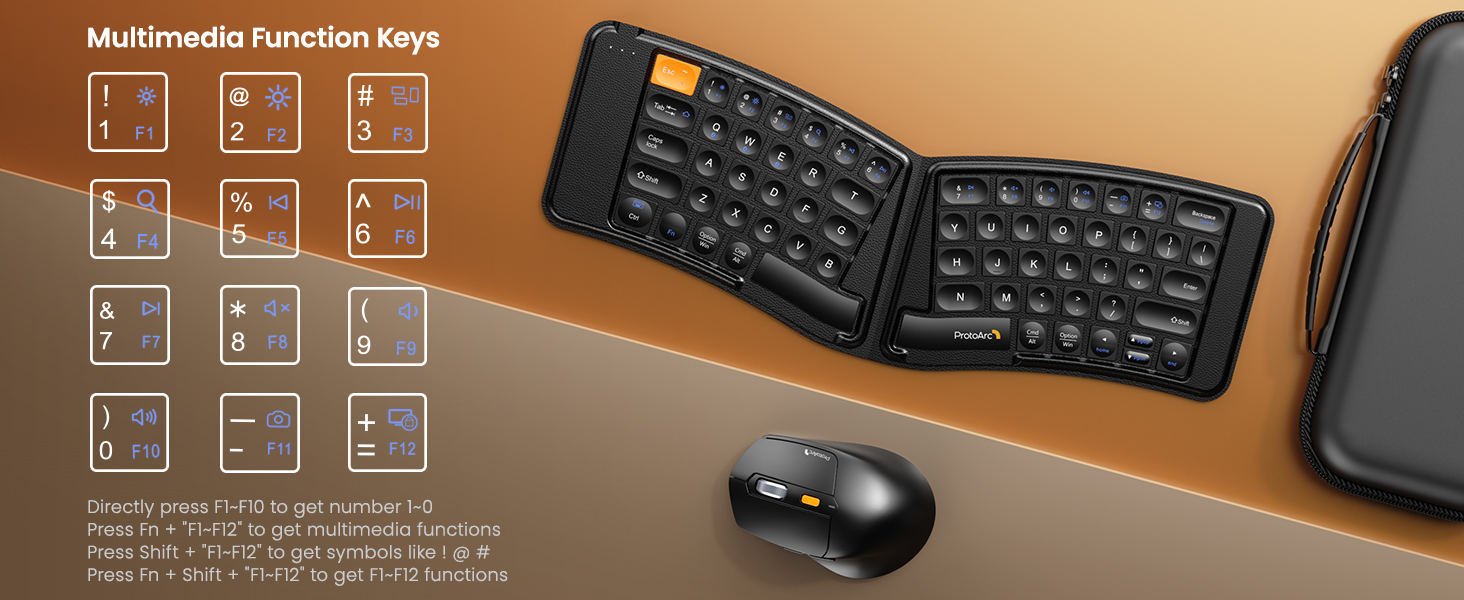
Image: A visual guide to the multimedia function keys and their combinations on the keyboard.
4.4 മൗസ് ഉപയോഗം
The ergonomic mouse provides comfortable navigation. It features adjustable DPI settings and additional navigation buttons.
- DPI ക്രമീകരണം: Press the DPI button (usually located behind the scroll wheel) to cycle through different sensitivity levels (e.g., 800, 1200, 1600, 2400 DPI).
- ഫോർവേഡ്/ബാക്ക്വേർഡ് ബട്ടണുകൾ: വേഗത്തിൽ നാവിഗേറ്റ് ചെയ്യാൻ സൈഡ് ബട്ടണുകൾ ഉപയോഗിക്കുക. web ബ്രൗസറുകൾ അല്ലെങ്കിൽ file പര്യവേക്ഷകർ.

Image: Diagram illustrating the adjustable DPI settings of the mouse.

Image: Diagram showing the location of the forward and backward buttons on the mouse.
5. പരിപാലനവും പരിചരണവും
- വൃത്തിയാക്കൽ: കീബോർഡും മൗസും വൃത്തിയാക്കാൻ മൃദുവായതും ഉണങ്ങിയതുമായ തുണി ഉപയോഗിക്കുക. കഠിനമായ അഴുക്കിന്, അല്പം ഡി.amp ഉപകരണങ്ങളിൽ ദ്രാവകം പ്രവേശിക്കുന്നില്ലെന്ന് ഉറപ്പാക്കാൻ വീര്യം കുറഞ്ഞ സോപ്പുള്ള തുണി ഉപയോഗിക്കാം.
- സംഭരണം: When not in use, fold the keyboard and store both devices in the provided carrying case to protect them from dust and damage.
- ചാർജിംഗ്: Recharge the devices when the battery indicator light shows low power. Avoid prolonged exposure to extreme temperatures.
- മെറ്റീരിയൽ: The keyboard features a wear-resistant PU leather exterior.

ചിത്രം: ഒരു ക്ലോസ്-അപ്പ് view of the keyboard's surface, highlighting the PU leather material.
6. പ്രശ്നപരിഹാരം
| പ്രശ്നം | സാധ്യമായ കാരണം | പരിഹാരം |
|---|---|---|
| Keyboard/Mouse not connecting via Bluetooth. | Low battery; not in pairing mode; device's Bluetooth is off; interference. |
|
| Keyboard/Mouse frequently disconnects. | Low battery; too far from host device; interference. |
|
| മൗസ് കഴ്സർ ക്രമരഹിതമോ പ്രതികരിക്കാത്തതോ ആണ്. | Low battery; dirty sensor; unsuitable surface; incorrect DPI setting. |
|
| Keyboard keys are not responding. | Low battery; keyboard not powered on; connection issue. |
|
7 സ്പെസിഫിക്കേഷനുകൾ
| ഫീച്ചർ | വിശദാംശങ്ങൾ |
|---|---|
| മോഡൽ നമ്പർ | XKM03 |
| ബ്രാൻഡ് | പ്രോട്ടോആർക്ക് |
| കണക്റ്റിവിറ്റി | Bluetooth (up to 3 devices) |
| കീബോർഡ് ഡിസൈൻ | Ergonomic Split, Foldable |
| മൗസ് DPI ക്രമീകരണങ്ങൾ | 800, 1200, 1600, 2400 |
| ചാർജിംഗ് പോർട്ട് | USB-C |
| മുഴുവൻ ചാർജ്ജ് സമയം | ഏകദേശം 2 മണിക്കൂർ |
| സ്റ്റാൻഡ്ബൈ സമയം | ഏകദേശം 250 മണിക്കൂർ |
| അനുയോജ്യമായ OS | Mac OS, iOS, Android, Windows |
| Dimensions (Folded Keyboard) | ഏകദേശം. 7.68 x 5.62 x 0.5 ഇഞ്ച് |
| ഇനത്തിൻ്റെ ഭാരം | 1.96 പൗണ്ട് (കോംബോ) |

Image: Diagram showing the folded dimensions of the keyboard.
8. വാറൻ്റിയും പിന്തുണയും
For warranty information and technical support, please refer to the official ProtoArc website or contact their customer service directly. Contact details are typically found on the product packaging or the manufacturer's webസൈറ്റ്.
നിർമ്മാതാവ്: പ്രോട്ടോആർക്ക്


