1. ആമുഖം
This user manual provides detailed instructions for the assembly, operation, and maintenance of your FLEXISPOT Lite Electric Standing Desk. Please read this manual thoroughly before installation and use to ensure proper function and safety. Keep this manual for future reference.
2 പ്രധാനപ്പെട്ട സുരക്ഷാ വിവരങ്ങൾ
ഈ സുരക്ഷാ നിർദ്ദേശങ്ങൾ പാലിക്കുന്നതിൽ പരാജയപ്പെടുന്നത് ഉൽപ്പന്നത്തിന് പരിക്കോ കേടുപാടുകളോ ഉണ്ടാക്കാം.
- The desk has a maximum load capacity of 70 കി.ഗ്രാം (154 പൗണ്ട്)ഈ ഭാര പരിധി കവിയരുത്.
- അസംബ്ലി ഒരു മുതിർന്നയാൾ നടത്തണം.
- ഉപയോഗിക്കുന്നതിന് മുമ്പ് എല്ലാ സ്ക്രൂകളും ബോൾട്ടുകളും സുരക്ഷിതമായി ശക്തമാക്കിയിട്ടുണ്ടെന്ന് ഉറപ്പാക്കുക.
- Keep children and pets away from the desk during operation to prevent injury from moving parts.
- Do not place hands or other objects near the lifting mechanism while the desk is in motion.
- വൃത്തിയാക്കുന്നതിനോ അറ്റകുറ്റപ്പണികൾ നടത്തുന്നതിനോ മുമ്പ് വൈദ്യുതി വിച്ഛേദിക്കുക.
- Use only the power adapter supplied with the desk.
- നിയന്ത്രണ പാനലിലോ മോട്ടോർ ഘടകങ്ങളിലോ ദ്രാവകങ്ങൾ ഒഴിക്കുന്നത് ഒഴിവാക്കുക.
3. ഉൽപ്പന്നം കഴിഞ്ഞുview ഫീച്ചറുകളും
The FLEXISPOT Lite Electric Standing Desk is designed to promote a healthy work environment by allowing seamless transitions between sitting and standing positions. It features a robust motor, memory presets, and an anti-collision system.

Figure 3.1: FLEXISPOT Lite Electric Standing Desk setup with accessories.
പ്രധാന സവിശേഷതകൾ:
- എർഗണോമിക് ഡിസൈൻ: Facilitates alternating between sitting and standing to reduce physical strain.
- Quiet and Durable Motor: Operates at less than 50 dB, ensuring a quiet workspace.
- Electric Height Adjustment with Memory: Easily adjust height with a control panel and save up to four preferred height settings.
- കരുത്തുറ്റ നിർമ്മാണം: Steel frame with a T-foot design provides stability and supports up to 70 kg.
- വിശാലമായ ഡെസ്ക്ടോപ്പ്: 140x60 cm maple tabletop with rounded corners and integrated wire holes.
- Anti-Collision Rebound Function: Automatically stops and reverses if an obstruction is detected during movement.
- സംയോജിത ആക്സസറികൾ: Includes two hooks and a cup holder for convenience.
4. സജ്ജീകരണവും അസംബ്ലിയും
This section outlines the general steps for assembling your FLEXISPOT Lite Electric Standing Desk. Refer to the separate assembly guide included in your package for detailed, step-by-step instructions and diagrams.
4.1 അൺപാക്കിംഗ്
- പാക്കേജിംഗ് ശ്രദ്ധാപൂർവ്വം തുറന്ന് എല്ലാ ഘടകങ്ങളും നീക്കം ചെയ്യുക.
- Place all parts on a clean, flat, and soft surface (e.g., a carpet) to prevent scratches.
- അസംബ്ലി ഗൈഡിൽ പട്ടികപ്പെടുത്തിയിരിക്കുന്ന എല്ലാ ഭാഗങ്ങളും ഉണ്ടെന്ന് ഉറപ്പാക്കുക.
4.2 ഘടകം തിരിച്ചറിയൽ
പ്രധാന ഘടകങ്ങളുമായി പരിചയപ്പെടുക:
- Desktop sections
- Leg columns (lifting columns)
- കാൽ പിന്തുണയ്ക്കുന്നു
- നിയന്ത്രണ ബോക്സ്
- നിയന്ത്രണ പാനൽ
- പവർ അഡാപ്റ്ററും കേബിളും
- Hardware (screws, bolts, tools)
- Accessories (hooks, cup holder)
4.3 അസംബ്ലി ഘട്ടങ്ങൾ (പൊതുവായത്)
- ഡെസ്ക്ടോപ്പ് ഫ്രെയിമിലേക്ക് ലിഫ്റ്റിംഗ് നിരകൾ ഘടിപ്പിക്കുക.
- Secure the foot supports to the bottom of the lifting columns.
- Mount the control box and control panel to the underside of the desktop.
- Connect all cables from the motors to the control box, and then connect the power adapter.
- Attach the desktop sections together (if applicable) and secure them to the frame.
- Install the cup holder and hooks as desired.
Note: Refer to the detailed assembly manual for specific screw types, torque requirements, and visual aids for each step.
5. നിങ്ങളുടെ മേശ പ്രവർത്തിപ്പിക്കൽ
This section explains how to use the control panel to adjust your desk height and utilize its features.

Figure 5.1: Smart Control Panel.
5.1 നിയന്ത്രണ പാനൽ പ്രവർത്തനങ്ങൾ
- LED ഡിസ്പ്ലേ: Shows the current desk height in centimeters.
- മുകളിലേക്കും താഴേക്കും ബട്ടണുകൾ (▲ / ▼): Press and hold to continuously adjust the desk height upwards or downwards. Release the button to stop at the desired height.
- Sit/Stand Button (i): This button may function as a quick switch between a default sitting and standing height, or as a general indicator. Refer to your specific control panel model for exact functionality.
- Memory Preset Buttons (1, 2, 3, 4): These buttons allow you to save and recall up to four preferred height settings.
5.2 മെമ്മറി പ്രീസെറ്റുകൾ സജ്ജീകരിക്കൽ
- മുകളിലേക്കും താഴേക്കും ബട്ടണുകൾ ഉപയോഗിച്ച് നിങ്ങൾക്ക് ആവശ്യമുള്ള ഉയരത്തിലേക്ക് ഡെസ്ക് ക്രമീകരിക്കുക.
- Press the 'M' or 'Set' button (if available, otherwise proceed to step 3). The display may flash.
- Immediately press one of the number buttons (1, 2, 3, or 4) to save the current height to that preset. The display will show 'S-' followed by the number, confirming the setting.
5.3 Recalling Memory Presets
ആവശ്യമുള്ള നമ്പർ ബട്ടൺ (1, 2, 3, അല്ലെങ്കിൽ 4) അമർത്തുക. ഡെസ്ക് സ്വയമേവ സംരക്ഷിച്ച ഉയരത്തിലേക്ക് നീങ്ങും.
5.4 Anti-Collision Rebound Function
ഡെസ്കിൽ ഒരു ആന്റി-കൊളിഷൻ സിസ്റ്റം സജ്ജീകരിച്ചിരിക്കുന്നു. മുകളിലേക്കോ താഴേക്കോ നീങ്ങുമ്പോൾ ഡെസ്ക് ഒരു തടസ്സം നേരിട്ടാൽ, കേടുപാടുകൾ അല്ലെങ്കിൽ പരിക്ക് തടയാൻ അത് യാന്ത്രികമായി നിർത്തി ചെറുതായി പിന്നോട്ട് പോകും.
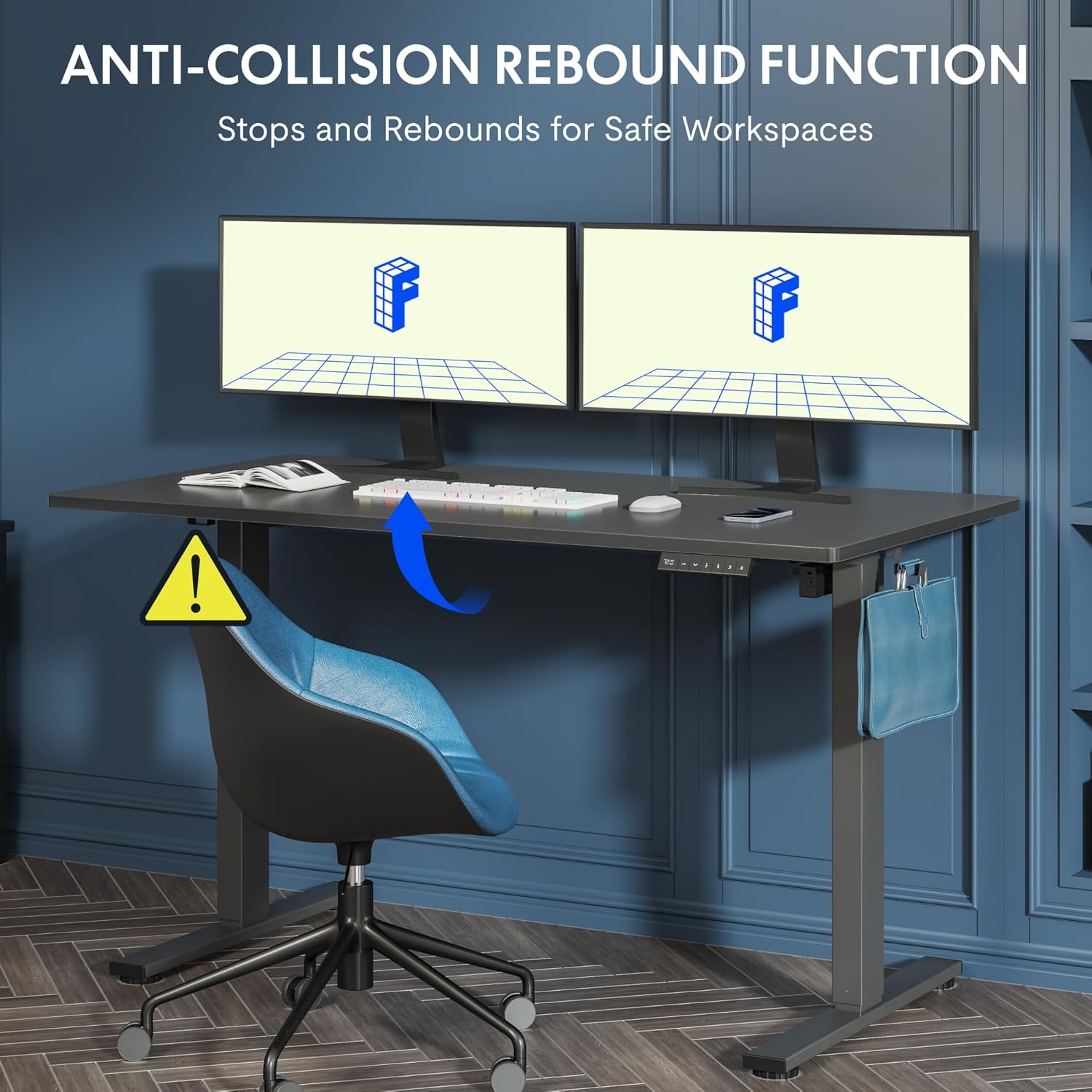
Figure 5.2: Anti-Collision Rebound Function in action.
6. പരിപാലനവും പരിചരണവും
പതിവ് അറ്റകുറ്റപ്പണികൾ നിങ്ങളുടെ സ്റ്റാൻഡിംഗ് ഡെസ്കിന്റെ ദീർഘായുസ്സും മികച്ച പ്രകടനവും ഉറപ്പാക്കുന്നു.
- വൃത്തിയാക്കൽ: ഡെസ്ക്ടോപ്പും ഫ്രെയിമും ഒരു സോഫ്റ്റ്, ഡി ക്ലീനർ ഉപയോഗിച്ച് തുടയ്ക്കുക.amp തുണി. ഉരച്ചിലുകൾ ഉണ്ടാക്കുന്ന ക്ലീനറുകളോ കഠിനമായ രാസവസ്തുക്കളോ ഒഴിവാക്കുക.
- പരിശോധന: എല്ലാ സ്ക്രൂകളും ബോൾട്ടുകളും ഇറുകിയതാണെന്ന് ഉറപ്പാക്കാൻ ഇടയ്ക്കിടെ പരിശോധിക്കുക. ആവശ്യമെങ്കിൽ വീണ്ടും മുറുക്കുക.
- കേബിൾ മാനേജുമെന്റ്: Ensure all cables are neatly routed and not pinched or tangled, which could affect operation.
- ലോഡ് കപ്പാസിറ്റി: Do not overload the desk beyond its 70 kg capacity.
7. ട്രബിൾഷൂട്ടിംഗ് ഗൈഡ്
നിങ്ങളുടെ മേശയിൽ പ്രശ്നങ്ങൾ നേരിടുകയാണെങ്കിൽ, താഴെപ്പറയുന്ന പൊതുവായ പ്രശ്നങ്ങളും പരിഹാരങ്ങളും പരിശോധിക്കുക:
| പ്രശ്നം | സാധ്യമായ കാരണം | പരിഹാരം |
|---|---|---|
| ഡെസ്ക് ചലിക്കുന്നില്ല അല്ലെങ്കിൽ നിയന്ത്രണങ്ങളോട് പ്രതികരിക്കുന്നില്ല. | Power cable disconnected; control box cable loose; motor cable loose. | Check all cable connections. Ensure the power cable is securely plugged into the wall outlet and the control box. |
| മേശ അസമമായി നീങ്ങുന്നു അല്ലെങ്കിൽ അസാധാരണമായ ശബ്ദങ്ങൾ ഉണ്ടാക്കുന്നു. | Overload; loose screws; obstruction. | Reduce weight on the desk. Check and tighten all assembly screws. Ensure no obstructions are in the path of the lifting columns. |
| Desk stops moving unexpectedly. | Anti-collision system activated; motor overheating. | Check for obstructions and remove them. If no obstruction, allow the motor to cool down for 20 minutes before attempting operation again. |
| നിയന്ത്രണ പാനലിൽ പിശക് കോഡ് പ്രദർശിപ്പിച്ചിരിക്കുന്നു. | നിർദ്ദിഷ്ട സിസ്റ്റം തകരാറ്. | Refer to the detailed assembly manual for specific error code meanings and troubleshooting steps. If the issue persists, contact customer support. |
8 സാങ്കേതിക സവിശേഷതകൾ

Figure 8.1: Desk Dimensions and Performance Metrics.
| സ്പെസിഫിക്കേഷൻ | വിശദാംശങ്ങൾ |
|---|---|
| ബ്രാൻഡ് | ഫ്ലെക്സിസ്പോട്ട് |
| മോഡൽ നമ്പർ | QS1M-1460-IE |
| നിറം | White Frame + Maple Top |
| ഡെസ്ക്ടോപ്പ് അളവുകൾ (L x W) | 140 സെ.മീ x 60 സെ.മീ |
| ഉയരം ക്രമീകരിക്കൽ ശ്രേണി | 73.5 സെ.മീ - 118 സെ.മീ |
| മെറ്റീരിയൽ | Wood (Maple Top), Metal (Alloy Steel Frame) |
| പരമാവധി ലോഡ് കപ്പാസിറ്റി | 70 കി.ഗ്രാം |
| ഇനത്തിൻ്റെ ഭാരം | 26.9 കി.ഗ്രാം |
| ശബ്ദ നില | < 50 dB |
| അഡ്ജസ്റ്റ്മെന്റ് സ്പീഡ് | 20 മിമി/സെ |
| പ്രത്യേക സവിശേഷതകൾ | Ergonomic, Adjustable, Anti-Collision, Memory Presets |
9. വാറണ്ടിയും ഉപഭോക്തൃ പിന്തുണയും
For warranty information, specific troubleshooting not covered in this manual, or to purchase replacement parts, please contact FLEXISPOT customer support directly. Refer to the product packaging or the official FLEXISPOT webബന്ധപ്പെടാനുള്ള വിശദാംശങ്ങൾക്കുള്ള സൈറ്റ്.


