ആമുഖം
This manual provides essential information for the safe operation, maintenance, and troubleshooting of your Roborock Qrevo Master Robot Vacuum and Mop Combo. Please read this manual thoroughly before using the product and retain it for future reference.
The Roborock Qrevo Master is an advanced cleaning device featuring 10,000Pa suction, FlexiArm Design for edge and corner cleaning, automatic mop washing and drying, self-emptying, and intelligent obstacle avoidance. It is designed to provide a comprehensive and hands-free cleaning experience.
സുരക്ഷാ വിവരങ്ങൾ
ഉൽപ്പന്നത്തിന് പരിക്കോ കേടുപാടുകളോ ഉണ്ടാകാതിരിക്കാൻ ഇനിപ്പറയുന്ന സുരക്ഷാ മാർഗ്ഗനിർദ്ദേശങ്ങൾ എപ്പോഴും പാലിക്കുക:
- Ensure the product is used with the correct voltagഇ (100V-120V).
- Do not allow children or pets to operate the device.
- മുടി, അയഞ്ഞ വസ്ത്രങ്ങൾ, വിരലുകൾ, ശരീരത്തിൻ്റെ എല്ലാ ഭാഗങ്ങളും തുറസ്സുകളിൽ നിന്നും ചലിക്കുന്ന ഭാഗങ്ങളിൽ നിന്നും അകറ്റി നിർത്തുക.
- Do not use the product to pick up large objects, sharp objects, or flammable/combustible liquids.
- Regularly check for and remove any tangled hair or debris from the brushes.
ഉൽപ്പന്ന ഘടകങ്ങൾ
The Roborock Qrevo Master package includes the following items:
- Robot Vacuum (1)
- Multifunctional Dock 3.0 (1)
- Dock Base (1)
- ഡിസ്പോസിബിൾ ഡസ്റ്റ് ബാഗ് (1)
- പവർ കേബിൾ (1)
- Rotating Mop Module (2)
- ഉപയോക്തൃ മാനുവൽ (1)

Image: The Roborock Qrevo Master robot vacuum, its multifunctional dock, and a smartphone displaying the companion app.
സജ്ജീകരണ ഗൈഡ്
1. പായ്ക്ക് ചെയ്യലും പ്ലേസ്മെന്റും
Carefully remove all components from the packaging. Place the Multifunctional Dock 3.0 on a hard, flat surface against a wall, ensuring there is adequate space around it for the robot to maneuver. Avoid placing the dock near stairs or in areas with direct sunlight.

ചിത്രം: പൊട്ടിത്തെറിച്ച ഒരു view diagram illustrating the various components and functions of the Multifunctional Dock 3.0, including hot water mop washing, intelligent dirt detection, warm air drying, auto dust emptying, auto tank refilling, and dock self-cleaning.
2. പവർ കണക്ഷൻ
Connect the power cable to the dock and plug it into a wall outlet. Ensure the dock is powered on.
3. പ്രാരംഭ ചാർജിംഗ്
Place the robot vacuum onto the charging contacts of the dock. The robot will begin charging automatically. For first-time use, ensure the robot is fully charged before operation.
4. ആപ്പ് ഇൻസ്റ്റാളേഷനും കണക്ഷനും
Download the Roborock App from your device's app store. Follow the in-app instructions to connect your robot vacuum to your home Wi-Fi network (2.4G WiFi only). This will enable smart control features.

Image: A smartphone displaying the Roborock app interface, showing the robot vacuum's status and controls, emphasizing privacy features.
പ്രവർത്തന നിർദ്ദേശങ്ങൾ
1. Starting a Clean
You can start a cleaning cycle using one of the following methods:
- ആപ്പ് നിയന്ത്രണം: Open the Roborock App and select "Start Cleaning" or choose specific rooms/zones to clean.
- വോയ്സ് കമാൻഡ്: Use the built-in "Hello Rocky" voice assistant. Say "Hello Rocky" followed by commands like "Clean here," "Clean the kitchen," or "Start cleaning."
- മാനുവൽ ബട്ടൺ: Press the power button on the robot vacuum to start a general cleaning cycle.

Image: A child interacting with the robot vacuum, illustrating the use of the "Hello Rocky" voice assistant with various commands like "Clean here" and "Dry the mop."
2. ക്ലീനിംഗ് മോഡുകളും സവിശേഷതകളും
The Roborock Qrevo Master offers various cleaning modes and intelligent features:
- വാക്വമിംഗ്: Utilizes 10,000Pa HyperForce suction and dual rubber brushes for effective debris collection.
- മോപ്പിംഗ്: Dual spinning mops (200 RPM) with 30 levels of water flow for thorough floor cleaning. The mop automatically lifts by 10mm on carpets.
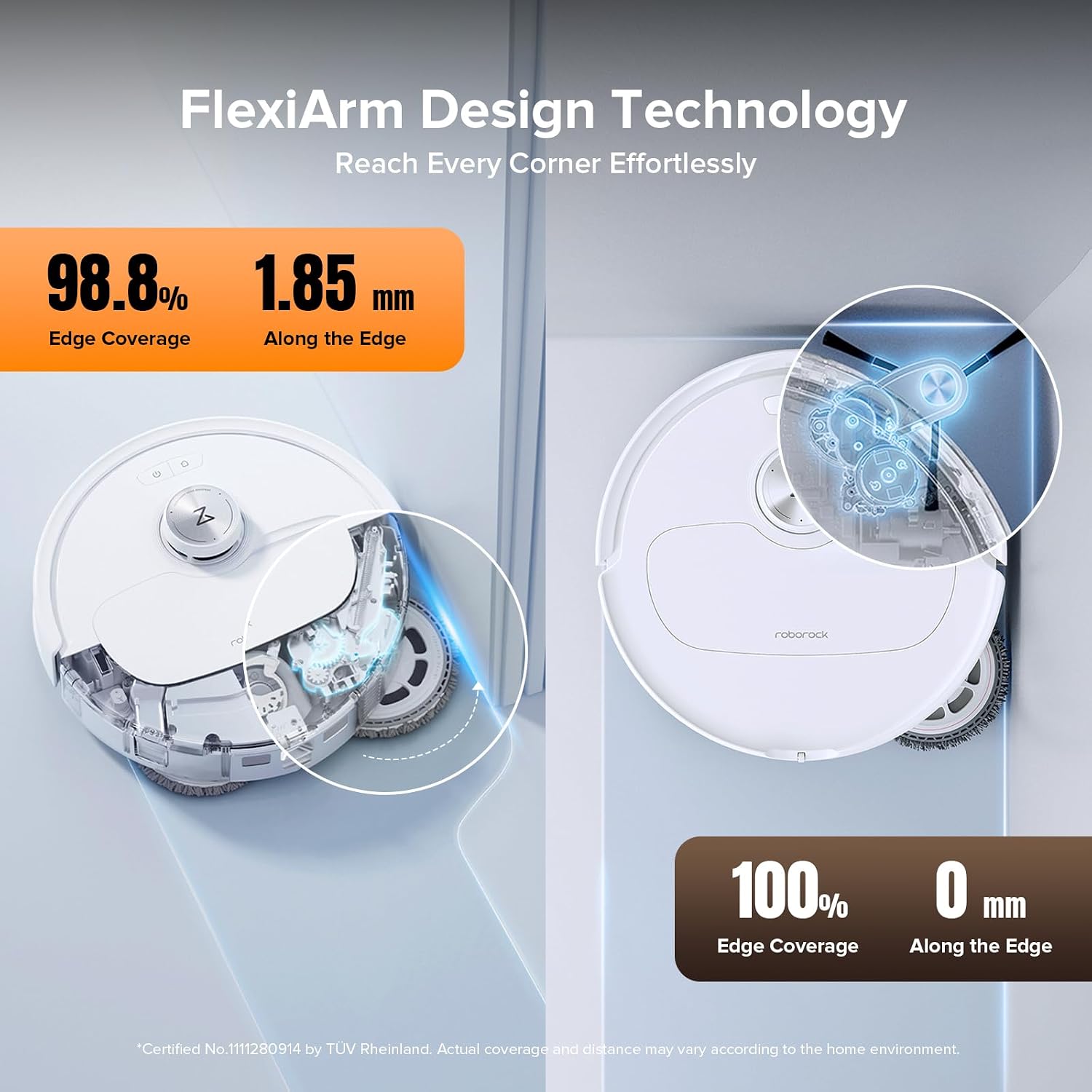
- FlexiArm Design: Side brush extends for 100% corner coverage, and the mop extends for 98.8% edge coverage.
- Reactive AI Obstacle Recognition: Identifies and avoids 62 types of objects using structured light, RGB camera, and LED light.
- PreciSense LiDAR Navigation: Creates real-time, precise maps for optimal cleaning routes. Supports up to 4 floors.
- Interactive Video Calls & Cruise: Use the app for real-time video calls, two-way voice interaction, pet recognition, and remote observation.

ചിത്രം: മുകളിൽ നിന്ന് താഴേക്ക് view of the Roborock Qrevo Master, highlighting its FlexiArm Design side brush achieving 100% edge coverage and the FlexiArm Design mop achieving 98.8% edge coverage.
ചിത്രം: ഒരു ആന്തരികം view of the Roborock Qrevo Master, illustrating its 10,000Pa HyperForce suction and dual all-rubber main brushes for effective debris capture.

Image: The robot vacuum navigating a room, demonstrating its Reactive AI Obstacle Recognition by identifying and avoiding common household items like slippers and crumpled paper.
3. Dock Functions
The Multifunctional Dock 3.0 provides automated maintenance:
- Hot Water Mop Wash: Cleans mop pads with 113°F hot water.
- ചൂടുള്ള വായുവിൽ ഉണക്കൽ: Dries mop pads at 113°F to prevent odors.
- Auto Dust Emptying: Automatically empties the robot's dustbin into a disposable bag in the dock (up to 7 weeks capacity).
- Auto Tank Refilling: Fills the robot's water tank automatically.
- Intelligent Dirt Detection: Detects mop dirtiness and re-washes/re-mops as needed.
- Dock Self-Cleaning: The dock base is cleaned by rotating scrapers.

ചിത്രം: ഒരു അടിവശം view of the Roborock Qrevo Master, showing its dual spinning mops and the main brush, illustrating the 200 RPM spinning speed and 30 water flow options.
മെയിൻ്റനൻസ്
Regular maintenance ensures optimal performance and extends the lifespan of your Roborock Qrevo Master.
1. Dust Bag Replacement (Dock)
The disposable dust bag in the Multifunctional Dock 3.0 can hold up to 7 weeks of debris. Replace the bag when the app indicates it is full or when suction performance decreases.
2. Mop Module Cleaning and Replacement
While the dock performs automatic mop washing, it is recommended to periodically remove and rinse the rotating mop modules manually. Replace mop modules when they show signs of wear or reduced cleaning effectiveness.
3. ബ്രഷ് ക്ലീനിംഗ്
The dual rubber brushes are designed to prevent tangles, but occasional inspection and cleaning are necessary. Remove any hair or debris wrapped around the brushes. The dock base also has scrapers to assist in cleaning the brushes.
4. ഫിൽട്ടർ ക്ലീനിംഗ്
The robot vacuum uses a washable filter. Remove the filter and rinse it under running water. Allow it to air dry completely before reinserting. Do not use a brush or other tools to clean the filter, as this may damage it.
5. സെൻസർ ക്ലീനിംഗ്
Wipe the sensors (including cliff sensors, wall sensors, and the Reactive AI obstacle recognition sensors) on the robot with a soft, dry cloth to ensure accurate navigation and obstacle avoidance.
ട്രബിൾഷൂട്ടിംഗ്
| പ്രശ്നം | സാധ്യമായ കാരണം | പരിഹാരം |
|---|---|---|
| റോബോട്ട് ആരംഭിക്കുകയോ പ്രതികരിക്കുകയോ ചെയ്യുന്നില്ല. | ബാറ്ററി തീരെയില്ല; പവർ സ്വിച്ച് ഓഫ്; റോബോട്ട് കുടുങ്ങി. | റോബോട്ട് ചാർജ് ചെയ്യുക; പവർ സ്വിച്ച് ഓണാക്കുക; തടസ്സങ്ങൾ നീക്കുക. |
| മോശം ക്ലീനിംഗ് പ്രകടനം. | Full dustbin; Clogged filter; Tangled brushes; Dirty mop pads. | Empty dustbin/replace bag; Clean/replace filter; Clean brushes; Clean/replace mop pads. |
| റോബോട്ട് ഇടയ്ക്കിടെ കുടുങ്ങിപ്പോകാറുണ്ട്. | Too many obstacles; Dirty sensors; Dark surfaces. | Clear floor of small objects; Clean all sensors; Robot may struggle on very dark carpets/floors. |
| Dock not performing self-cleaning functions. | Water tanks empty; Dock base dirty; Software glitch. | Refill clean water tank; Clean dock base; Restart the robot and dock. |
| ആപ്പ് കണക്റ്റിവിറ്റി പ്രശ്നങ്ങൾ. | തെറ്റായ വൈ-ഫൈ പാസ്വേഡ്; റൂട്ടർ പ്രശ്നങ്ങൾ; റോബോട്ട് റൂട്ടറിൽ നിന്ന് വളരെ അകലെയാണ്. | Verify Wi-Fi password; Restart router; Move robot closer to router; Ensure 2.4G WiFi is used. |
സ്പെസിഫിക്കേഷനുകൾ
- ബ്രാൻഡ്: റോബോറോക്ക്
- മോഡലിൻ്റെ പേര്: റോബോറോക്ക് ക്രെവോ മാസ്റ്റർ
- സക്ഷൻ പവർ: 10,000Pa HyperForce
- Mop Spinning Speed: 200 ആർപിഎം
- Mop Lifting Height: 10 മി.മീ
- ബാറ്ററി ലൈഫ്: 180 മിനിറ്റ്
- വാല്യംtage: 100V-120V
- നിയന്ത്രണ രീതി: App, Voice ("Hello Rocky"), Manual Buttons
- അനുയോജ്യമായ ഉപകരണങ്ങൾ: Smartphones, Amazon Echo, Siri, Google Home, Smartwatches
- ഉൽപ്പന്ന അളവുകൾ: 16.6"L x 19.4"W x 16.5"H
- ഇനത്തിൻ്റെ ഭാരം: 39 പൗണ്ട്
- ഫിൽട്ടർ തരം: കഴുകാവുന്ന ഫിൽട്ടർ
- കണക്റ്റിവിറ്റി: 2.4G WiFi only
വാറൻ്റിയും പിന്തുണയും
For warranty information and technical support, please refer to the official roborock website or contact their customer service. Details can typically be found on the product packaging or the official roborock support page.
ഓൺലൈൻ പിന്തുണ: Visit roborock Support


