BlitzWolf BW-VT2 മിനി പ്രൊജക്ടർ ഉപയോക്തൃ മാനുവൽ
Your comprehensive guide to setting up, operating, and maintaining your BlitzWolf BW-VT2 Mini Projector.
1. ഉൽപ്പന്നം കഴിഞ്ഞുview
1.1 പാക്കേജ് ഉള്ളടക്കം
നിങ്ങളുടെ പാക്കേജിൽ എല്ലാ ഇനങ്ങളും ഉണ്ടെന്ന് ദയവായി പരിശോധിക്കുക:
- BlitzWolf BW-VT2 Mini Projector
- റിമോട്ട് കൺട്രോൾ
- പവർ അഡാപ്റ്റർ
- HDMI കേബിൾ
- ഉപയോക്തൃ മാനുവൽ (ഈ പ്രമാണം)
1.2 ഉപകരണ ലേayട്ട്
Familiarize yourself with the various parts and ports of your projector.
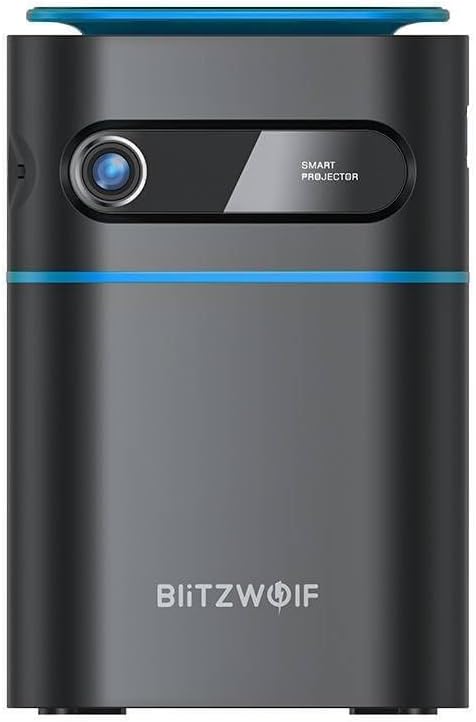
ചിത്രം 1.1: മുൻഭാഗം View. This image displays the front of the BlitzWolf BW-VT2 Mini Projector, highlighting the projection lens and the 'SMART PROJECTOR' branding.

Figure 1.2: Projector with Remote Control. This image shows the BlitzWolf BW-VT2 Mini Projector alongside its dedicated remote control, illustrating the compact size of both devices.
ചിത്രം 1.3: പിൻഭാഗം View. The rear of the projector is shown, featuring ventilation grilles and various input/output ports.

ചിത്രം 1.4: വശം View. This image highlights the side of the projector where additional connectivity options such as USB and HDMI ports are located.

ചിത്രം 1.5: മുകളിൽ View. The top surface of the projector is visible, featuring the integrated touch control panel for direct interaction.
1.3 പോർട്ടുകളും നിയന്ത്രണങ്ങളും
- എച്ച്ഡിഎംഐ പോർട്ട്: Connect to laptops, game consoles, Blu-ray players, etc.
- USB പോർട്ട്: മീഡിയ പ്ലേബാക്കിനായി USB ഫ്ലാഷ് ഡ്രൈവുകൾ ബന്ധിപ്പിക്കുക.
- Audio Out (3.5mm) Port: ബാഹ്യ സ്പീക്കറുകളോ ഹെഡ്ഫോണുകളോ ബന്ധിപ്പിക്കുക.
- തുറമുഖത്ത് ഡിസി: പവർ അഡാപ്റ്റർ ബന്ധിപ്പിക്കുക.
- പവർ ബട്ടൺ: പ്രൊജക്ടർ ഓൺ/ഓഫ് ചെയ്യുന്നു.
- ഫോക്കസ് വീൽ: ചിത്രത്തിന്റെ വ്യക്തത ക്രമീകരിക്കുന്നു.
- ടച്ച് കൺട്രോൾ പാനൽ: Navigate menus and control playback directly on the device.
2. സജ്ജീകരണ ഗൈഡ്
2.1 പവർ ചെയ്യുന്നു
- പ്രൊജക്ടറിലെ DC IN പോർട്ടിലേക്ക് പവർ അഡാപ്റ്റർ ബന്ധിപ്പിക്കുക.
- ഒരു മതിൽ ഔട്ട്ലെറ്റിലേക്ക് പവർ അഡാപ്റ്റർ പ്ലഗ് ചെയ്യുക.
- Press and hold the Power Button on the projector or the remote control until the device powers on.
2.2 പ്രാരംഭ പ്ലേസ്മെന്റ്
ഒപ്റ്റിമലിന് viewing experience, consider the following:
- Place the projector on a stable, flat surface.
- Ensure there is adequate ventilation around the projector to prevent overheating.
- Position the projector perpendicular to the projection surface (wall or screen) for a rectangular image.
- Adjust the distance to achieve your desired screen size.
2.3 ഫോക്കസ് അഡ്ജസ്റ്റ്മെന്റ്
After powering on, adjust the focus to ensure a clear image:
- പ്രൊജക്റ്റ് ചെയ്ത ചിത്രം വ്യക്തവും വ്യക്തവുമായി കാണപ്പെടുന്നതുവരെ ലെൻസിന് സമീപമുള്ള ഫോക്കസ് വീൽ തിരിക്കുക.
2.4 വിദൂര നിയന്ത്രണ സജ്ജീകരണം
Insert batteries into the remote control before first use:
- വിദൂര നിയന്ത്രണത്തിന്റെ പിൻഭാഗത്ത് ബാറ്ററി കമ്പാർട്ട്മെന്റ് കവർ തുറക്കുക.
- Insert two AAA batteries (not included), ensuring correct polarity (+/-).
- ബാറ്ററി കമ്പാർട്ട്മെൻ്റ് കവർ അടയ്ക്കുക.
3. പ്രവർത്തന നിർദ്ദേശങ്ങൾ
3.1 നാവിഗേഷൻ
You can navigate the projector's interface using either the remote control or the touch control panel on top of the device.
- റിമോട്ട് കൺട്രോൾ: Use the directional buttons (up, down, left, right) to move through menus and the 'OK' button to select.
- ടച്ച് കൺട്രോൾ പാനൽ: Swipe and tap on the touch-sensitive surface to navigate.
3.2 ഉപകരണങ്ങൾ ബന്ധിപ്പിക്കുന്നു
The BW-VT2 supports various input sources:
- എച്ച്ഡിഎംഐ ഇൻപുട്ട്: Connect your laptop, game console, or other HDMI-enabled devices using an HDMI cable. Select the HDMI input source from the projector's menu.
- യുഎസ്ബി ഇൻപുട്ട്: Insert a USB flash drive into the USB port. The projector's media player will typically detect the drive automatically, allowing you to browse and play supported media files (videos, photos, music).
- വൈഫൈ കണക്റ്റിവിറ്റി: Navigate to the 'Settings' menu, then 'Network' or 'Wi-Fi'. Select your Wi-Fi network and enter the password to connect the projector to the internet. This enables access to online streaming apps and updates.
3.3 Android OS Features
As an Android-powered projector, the BW-VT2 offers smart functionalities:
- ആപ്പ് ആക്സസ്: Download and install various streaming apps (e.g., Netflix, YouTube) directly from the pre-installed app store or by sideloading APKs.
- ക്രമീകരണങ്ങൾ: Customize display settings, audio output, network configurations, and system preferences through the Android settings menu.
- സ്ക്രീൻ മിററിംഗ്: Utilize built-in screen mirroring features (e.g., Miracast, AirPlay compatible apps) to project content from your smartphone or tablet wirelessly.
3.4 ഓഡിയോ putട്ട്പുട്ട്
The projector has built-in speakers, but you can also connect external audio devices:
- 3.5mm ഓഡിയോ ഔട്ട്: Connect headphones or external speakers via the 3.5mm audio jack for enhanced sound.
4. പരിപാലനം
ശരിയായ അറ്റകുറ്റപ്പണികൾ നിങ്ങളുടെ പ്രൊജക്ടറിന്റെ ദീർഘായുസ്സും മികച്ച പ്രകടനവും ഉറപ്പാക്കുന്നു.
4.1 ലെൻസ് ക്ലീനിംഗ്
To maintain clear image quality, clean the projector lens regularly:
- ഒപ്റ്റിക്കൽ ലെൻസുകൾക്കായി പ്രത്യേകം രൂപകൽപ്പന ചെയ്ത മൃദുവായ, ലിന്റ് രഹിത തുണി ഉപയോഗിക്കുക.
- വൃത്താകൃതിയിൽ ലെൻസ് സൌമ്യമായി തുടയ്ക്കുക.
- Avoid using abrasive cleaners or excessive force, which can scratch the lens.
4.2 വെന്റിലേഷൻ
Ensure proper airflow to prevent overheating:
- Do not block the ventilation vents on the projector.
- നന്നായി വായുസഞ്ചാരമുള്ള സ്ഥലത്ത് പ്രൊജക്ടർ പ്രവർത്തിപ്പിക്കുക.
- Periodically clean dust from the vents using a soft brush or compressed air.
4.3 സംഭരണം
When not in use, store your projector properly:
- പ്രൊജക്ടർ തണുത്തതും വരണ്ടതുമായ സ്ഥലത്ത് സൂക്ഷിക്കുക, നേരിട്ടുള്ള സൂര്യപ്രകാശവും കടുത്ത താപനിലയും ഏൽക്കാത്ത സ്ഥലത്ത് സൂക്ഷിക്കുക.
- Use the original packaging or a protective case to prevent dust accumulation and physical damage.
5. പ്രശ്നപരിഹാരം
പൊതുവായ പ്രശ്നങ്ങളും അവയുടെ പരിഹാരങ്ങളും അറിയാൻ ഈ വിഭാഗം കാണുക.
| പ്രശ്നം | സാധ്യമായ കാരണം | പരിഹാരം |
|---|---|---|
| Projector does not power on. | No power connection; faulty power adapter. | Ensure power adapter is securely connected to both projector and outlet. Try a different outlet. |
| ഒരു ചിത്രവും പ്രൊജക്റ്റ് ചെയ്തിട്ടില്ല. | Incorrect input source selected; loose HDMI/USB cable. | Verify the correct input source is selected in the menu. Check cable connections. |
| ചിത്രം മങ്ങിയതാണ്. | Focus not adjusted; projector too close/far. | Rotate the focus wheel until the image is clear. Adjust projection distance if necessary. |
| ശബ്ദമില്ല. | Volume too low; external audio device not connected properly. | Increase volume. Check connections to external speakers/headphones. Ensure audio output is set correctly in settings. |
| വൈഫൈ കണക്ഷൻ പ്രശ്നങ്ങൾ. | തെറ്റായ പാസ്വേഡ്; റൂട്ടർ പ്രശ്നങ്ങൾ; സിഗ്നൽ ഇടപെടൽ. | Re-enter Wi-Fi password. Restart router. Move projector closer to router. |
| റിമോട്ട് കൺട്രോൾ പ്രവർത്തിക്കുന്നില്ല. | ഡെഡ് ബാറ്ററികൾ; തടസ്സം; റിമോട്ട് ജോടിയാക്കിയിട്ടില്ല. | Replace batteries. Ensure no obstruction between remote and projector. |
6 സാങ്കേതിക സവിശേഷതകൾ
Key specifications of the BlitzWolf BW-VT2 Mini Projector:
| ഫീച്ചർ | സ്പെസിഫിക്കേഷൻ |
|---|---|
| ബ്രാൻഡ് | ബ്ലിറ്റ്സ് വൂൾഫ് |
| മോഡൽ നമ്പർ | BW-VT2EU |
| നിറം | കറുപ്പ് |
| കണക്റ്റിവിറ്റി ടെക്നോളജി | HDMI, USB, VGA, Wi-Fi |
| ഡിസ്പ്ലേ റെസല്യൂഷൻ | 1920 x 1080 (പൂർണ്ണ HD) |
| ഡിസ്പ്ലേ തരം | എൽസിഡി, എൽഇഡി |
| ഫോം ഫാക്ടർ | പോർട്ടബിൾ |
| പ്രത്യേക സവിശേഷതകൾ | Portable, Android OS, Wi-Fi, HDMI, USB, VGA |
| അനുയോജ്യമായ ഉപകരണങ്ങൾ | Laptops, Smartphones, Game Consoles, Blu-ray Players, Media Players, Wi-Fi enabled devices |
| ശുപാർശ ചെയ്യുന്ന ഉപയോഗങ്ങൾ | ഹോം സിനിമ |
7. വാറൻ്റിയും പിന്തുണയും
7.1 നിർമ്മാതാവിന്റെ വാറന്റി
The BlitzWolf BW-VT2 Mini Projector comes with a 2 വർഷത്തെ നിർമ്മാതാവിന്റെ വാറന്റി. സാധാരണ ഉപയോഗത്തിലുള്ള മെറ്റീരിയലുകളിലെയും നിർമ്മാണത്തിലെയും വൈകല്യങ്ങൾ ഈ വാറന്റി ഉൾക്കൊള്ളുന്നു. വാറന്റി ക്ലെയിമുകൾക്കായി നിങ്ങളുടെ വാങ്ങലിന്റെ തെളിവ് സൂക്ഷിക്കുക.
7.2 ഉപഭോക്തൃ പിന്തുണ
If you encounter issues not covered in the troubleshooting section or require further assistance, please contact BlitzWolf customer support. Refer to the product packaging or the official BlitzWolf webഏറ്റവും പുതിയ ബന്ധപ്പെടാനുള്ള വിവരങ്ങൾക്കായി സൈറ്റ്.


