ഉൽപ്പന്നം കഴിഞ്ഞുview
The Conambo K10 Wireless Bluetooth Headset V5.2 is designed for clear communication and extended use, featuring advanced noise-canceling technology and a portable charging case. This manual provides detailed instructions for setup, operation, and maintenance to ensure optimal performance.
ബോക്സിൽ എന്താണുള്ളത്
- Conambo K10C Headset (1 unit)
- 750mAh Charging Case (1 unit)
- USB-C ചാർജിംഗ് കേബിൾ (1 യൂണിറ്റ്)
- ഇയർടിപ്പുകൾ (ഒന്നിലധികം വലുപ്പങ്ങൾ)
- ഉപയോക്തൃ മാനുവൽ (ഈ പ്രമാണം)
ഉൽപ്പന്ന സവിശേഷതകൾ
- ദീർഘിപ്പിച്ച സംസാര സമയം: Up to 16 hours on a single charge, with an additional 48 hours provided by the 750mAh charging case, totaling 60 hours.
- Advanced Noise Canceling: Features CVC8.0 Dual Mic and ENC noise-canceling technology, reducing 96% of ambient noise for clear calls.
- Bluetooth 5.2 & Qualcomm aptX HD: Ensures stable connectivity and high-definition voice quality.
- Multipoint Technology: Connects to two phones simultaneously, allowing calls from either device.
- സുഖപ്രദമായ ഡിസൈൻ: Rigorously tested for stability and comfort, includes 9 different sizes of ear tips for a personalized fit.
- അവബോധജന്യമായ നിയന്ത്രണങ്ങൾ: Easy access to media, volume, and call controls, including a mute button and activation for Siri/Google Assistant.
- ജല പ്രതിരോധം: IPX4 rated for splash resistance.

Image: Conambo K10 Headset with charging case, highlighting 16 hours of talk time on a single charge and 60 hours total with the charging case.

Image: Conambo K10 Headset with visual representation of CVC8.0 & ENC Dual Mic Noise Cancelling for clear calls in various environments.
സജ്ജമാക്കുക
- ഹെഡ്സെറ്റ് ചാർജ് ചെയ്യുക: Before first use, fully charge the headset and its charging case. Connect the provided USB-C cable to the charging case and a power source. The headset can be charged by placing it inside the case or by connecting the cable directly to the headset.
- പവർ ഓൺ: Slide the Power On/Off switch on the headset to the 'ON' position. The indicator light will flash, indicating it's ready for pairing.
- ജോടിയാക്കൽ:
- നിങ്ങളുടെ മൊബൈൽ ഉപകരണത്തിൽ ബ്ലൂടൂത്ത് സജീവമാക്കുക.
- ഇതിനായി തിരയുക 'Conambo K10C' in the list of available Bluetooth devices.
- Select 'Conambo K10C' to connect. Once connected, the indicator light will stop flashing and remain solid.
- For multipoint connection, repeat the pairing process with a second device.
- ഫിറ്റ് ക്രമീകരിക്കുക: Select the most comfortable ear tip size from the provided options. Gently adjust the headset on your ear for a secure and comfortable fit.
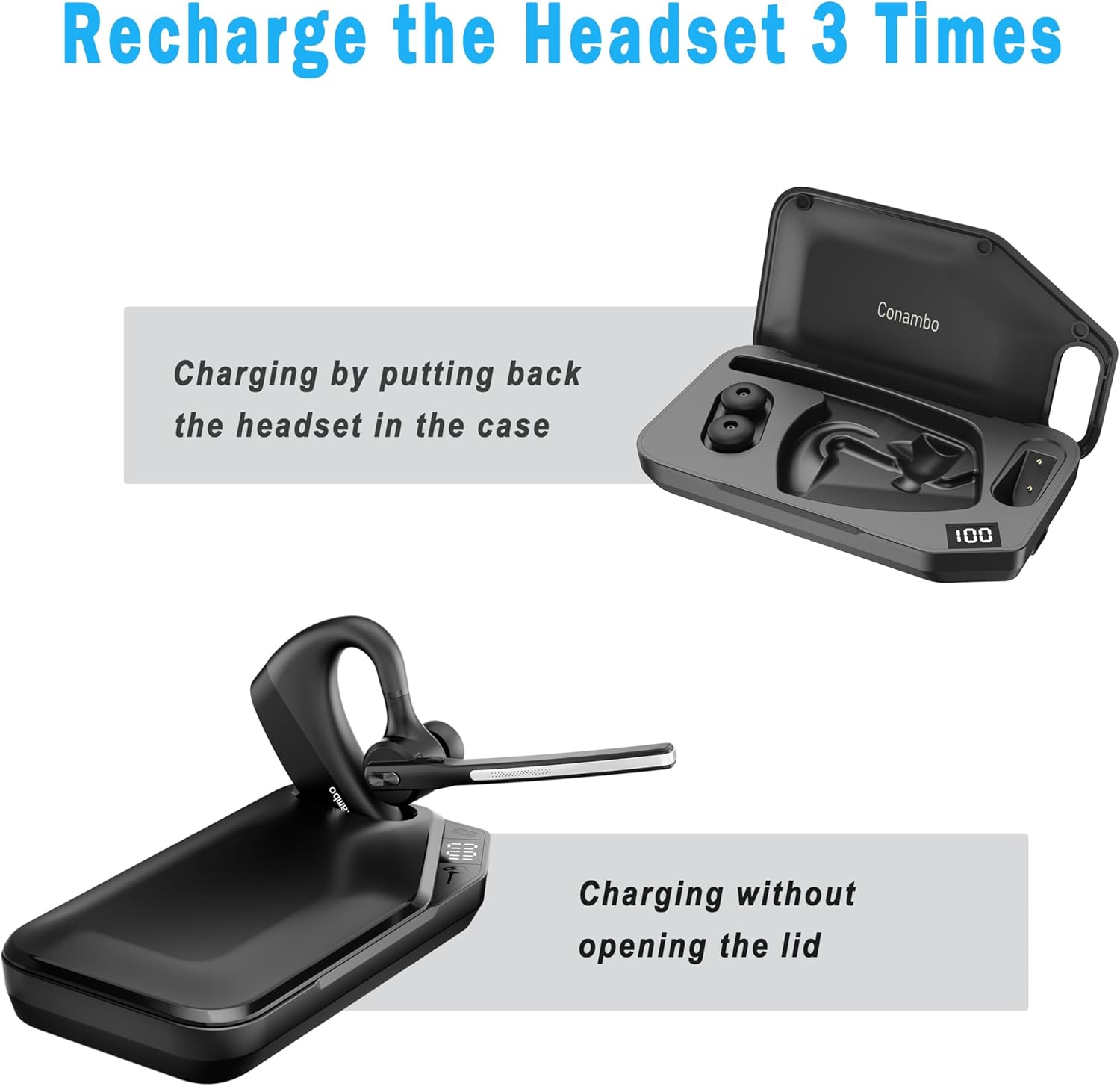
Image: The Conambo K10 Headset being charged by placing it inside its dedicated charging case.
പ്രവർത്തന നിർദ്ദേശങ്ങൾ
കോൾ മാനേജുമെന്റ്
- ഉത്തരം/അവസാന കോൾ: മൾട്ടി-ഫംഗ്ഷൻ ബട്ടൺ ഒരിക്കൽ അമർത്തുക.
- കോൾ നിരസിക്കുക: മൾട്ടി-ഫംഗ്ഷൻ ബട്ടൺ 2 സെക്കൻഡ് അമർത്തിപ്പിടിക്കുക.
- നിശബ്ദമാക്കുക/അൺമ്യൂട്ടുചെയ്യുക: Press the mute button on the boom arm.
- വോയ്സ് അസിസ്റ്റന്റ്: Press and hold the mute button for 3 seconds to activate Siri or Google Assistant.
വോളിയം നിയന്ത്രണം
- വോളിയം വർദ്ധിപ്പിക്കുക: '+' ബട്ടൺ അമർത്തുക.
- വോളിയം കുറയ്ക്കുക: '-' ബട്ടൺ അമർത്തുക.
മീഡിയ പ്ലേബാക്ക്
- പ്ലേ/താൽക്കാലികമായി നിർത്തുക: മൾട്ടി-ഫംഗ്ഷൻ ബട്ടൺ ഒരിക്കൽ അമർത്തുക.
- അടുത്ത ട്രാക്ക്: മൾട്ടി-ഫംഗ്ഷൻ ബട്ടൺ രണ്ടുതവണ അമർത്തുക.
- മുമ്പത്തെ ട്രാക്ക്: മൾട്ടി-ഫംഗ്ഷൻ ബട്ടൺ മൂന്ന് തവണ അമർത്തുക.

ചിത്രം: വിശദമായത് view of the Conambo K10 Headset, illustrating the location of the Power On/Off switch, Volume +/- buttons, and Mute button.
മെയിൻ്റനൻസ്
- വൃത്തിയാക്കൽ: Regularly wipe the headset and charging case with a soft, dry cloth. For ear tips, remove them and clean with mild soap and water, then dry thoroughly before reattaching.
- സംഭരണം: Store the headset in its charging case when not in use to protect it from dust and damage. Keep in a cool, dry place away from extreme temperatures.
- ബാറ്ററി കെയർ: ബാറ്ററി ലൈഫ് വർദ്ധിപ്പിക്കാൻ, ബാറ്ററി ഇടയ്ക്കിടെ പൂർണ്ണമായും ഡിസ്ചാർജ് ചെയ്യുന്നത് ഒഴിവാക്കുക. തുടർച്ചയായ ഉപയോഗത്തിലല്ലെങ്കിൽ പോലും ഹെഡ്സെറ്റ് പതിവായി ചാർജ് ചെയ്യുക.
ട്രബിൾഷൂട്ടിംഗ്
| പ്രശ്നം | പരിഹാരം |
|---|---|
| Headset won't power on | Ensure the battery is charged. Connect to the charging cable or place in the charging case. |
| ഉപകരണവുമായി ജോടിയാക്കാൻ കഴിയില്ല | Ensure Bluetooth is enabled on your device and the headset is in pairing mode (flashing indicator light). Try restarting both devices. |
| മോശം ഓഡിയോ നിലവാരം | Check the headset's position on your ear. Ensure no obstructions are blocking the microphone. Move closer to your paired device to avoid interference. |
| Charging case not charging headset | Ensure the charging case itself is charged. Verify the headset is correctly seated in the case. |
സ്പെസിഫിക്കേഷനുകൾ
- മോഡലിൻ്റെ പേര്: K10C
- കണക്റ്റിവിറ്റി ടെക്നോളജി: വയർലെസ്സ് (ബ്ലൂടൂത്ത് 5.2)
- ബ്ലൂടൂത്ത് ശ്രേണി: 10 മീറ്റർ
- Battery Life (Headset): 16 Hours talk time
- ബാറ്ററി ലൈഫ് (ചാർജിംഗ് കേസിനൊപ്പം): Up to 60 Hours talk time
- Noise Control Features: CVC8.0 Dual Mic Noise Cancellation, ENC
- നിയന്ത്രണ തരം: Media Control, Volume, Call Control (Touch)
- മെറ്റീരിയൽ: പ്ലാസ്റ്റിക്, സിലിക്കൺ
- ജല പ്രതിരോധം: IPX4
- അനുയോജ്യമായ ഉപകരണങ്ങൾ: Bluetooth-enabled devices (iPhone, Android, etc.)
വാറൻ്റി വിവരങ്ങൾ
The Conambo K10 Wireless Bluetooth Headset V5.2 comes with a standard manufacturer's warranty. Please refer to the warranty card included in your product packaging for specific terms and conditions, including warranty duration and coverage details. Keep your proof of purchase for any warranty claims.
പിന്തുണ
For further assistance, technical support, or to inquire about replacement parts, please visit the official Conambo website or contact their customer service. Contact details can typically be found in the warranty information or on the product packaging.


