1. ആമുഖം
Thank you for choosing the CAMMHD-YX1 Body Camera. This device is designed to record high-quality video and audio, offering features such as 2K/1440P resolution, night vision, and data encryption. This manual provides essential information for the proper setup, operation, and maintenance of your body camera.
2. പാക്കേജ് ഉള്ളടക്കം
താഴെ ലിസ്റ്റ് ചെയ്തിരിക്കുന്ന എല്ലാ ഇനങ്ങളും നിങ്ങളുടെ പാക്കേജിൽ ഉൾപ്പെടുത്തിയിട്ടുണ്ടെന്ന് ദയവായി പരിശോധിക്കുക:
- CAMMHD-YX1 Body Camera
- യുഎസ് ചാർജർ
- ടൈപ്പ്-സി ഡാറ്റ കേബിൾ
- Camera Long Clip
- Camera Short Clip
- ഉപയോക്തൃ മാനുവൽ (ഈ പ്രമാണം)

Image 2.1: Contents of the CAMMHD-YX1 Body Camera package, including the camera, charger, Type-C cable, long clip, and short clip.
3. സജ്ജീകരണം
3.1 ബാറ്ററി ചാർജ് ചെയ്യുന്നു
Before first use, fully charge the camera's built-in 3500mAh battery. Use the provided Type-C data cable and charger.
- Connect the Type-C cable to the camera's charging port.
- Connect the other end of the cable to the provided US charger.
- ഒരു പവർ ഔട്ട്ലെറ്റിൽ ചാർജർ പ്ലഗ് ചെയ്യുക.
- The charging indicator light will illuminate. Once fully charged (approximately 3 hours), the indicator may change color or turn off. A full charge provides over 12 hours of continuous video recording (1080P, night vision off) or 24 hours of audio recording.

Image 3.1: The CAMMHD-YX1 Body Camera connected to a Type-C charging cable, illustrating the charging process.
3.2 Attaching the Clips
Select either the long or short clip based on your preference and attachment point. Securely attach the chosen clip to the back of the body camera until it clicks into place. Ensure the clip is firmly attached before wearing the camera.
4. പ്രവർത്തന നിർദ്ദേശങ്ങൾ
4.1 പവർ ഓൺ/ഓഫ്
- പവർ ഓണാക്കാൻ: Press and hold the Power button for approximately 3 seconds until the screen illuminates.
- പവർ ഓഫ് ചെയ്യാൻ: ഉപകരണം ഓഫാകുന്നതുവരെ ഏകദേശം 3 സെക്കൻഡ് നേരത്തേക്ക് പവർ ബട്ടൺ അമർത്തിപ്പിടിക്കുക.
4.2 വീഡിയോ റെക്കോർഡിംഗ്
The YX1 supports 2K/1440P and 1080P video recording. The camera is equipped with a 64GB internal storage card.
- ക്യാമറ ഓണാണെന്ന് ഉറപ്പാക്കുക.
- അമർത്തുക രേഖപ്പെടുത്തുക button once to start video recording. A red indicator light or on-screen icon will confirm recording is active.
- അമർത്തുക രേഖപ്പെടുത്തുക button again to stop recording. The video file ഓട്ടോമാറ്റിക്കായി സേവ് ചെയ്യപ്പെടും.
4.3 ഓഡിയോ റെക്കോർഡിംഗ്
The camera can record audio independently.
- ക്യാമറ ഓണാണെന്ന് ഉറപ്പാക്കുക.
- Locate and press the dedicated ഓഡിയോ റെക്കോർഡ് button (refer to device diagram in section 2.1). An indicator will show audio recording is active.
- അമർത്തുക ഓഡിയോ റെക്കോർഡ് റെക്കോർഡിംഗ് നിർത്താൻ വീണ്ടും ബട്ടൺ.
4.4 നൈറ്റ് വിഷൻ മോഡ്
The YX1 features both automatic and manual night vision switching, utilizing two infrared lamp beads for enhanced clarity in low-light conditions.
- ഓട്ടോമാറ്റിക് നൈറ്റ് വിഷൻ: The camera can detect low light conditions and activate infrared night vision automatically.
- Manual Night Vision: സമർപ്പിച്ചിരിക്കുന്നത് അമർത്തുക നൈറ്റ് വിഷൻ button to manually toggle night vision on or off.
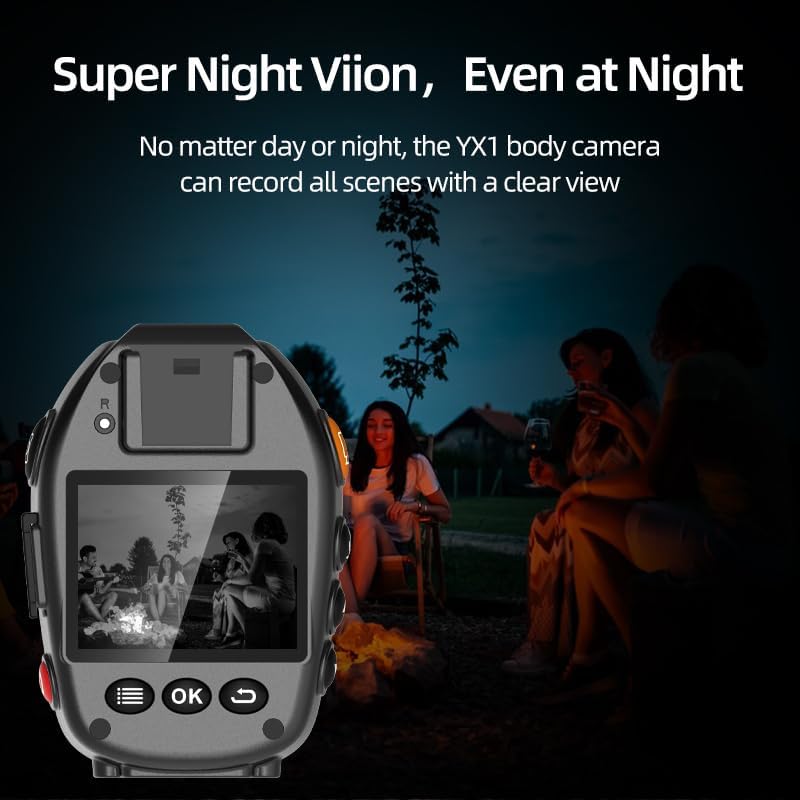
Image 4.1: The CAMMHD-YX1 Body Camera demonstrating its night vision capabilities, capturing clear scenes even in dark environments.
4.5 Using the LCD Screen and Menu
The 2.0-inch LCD screen allows you to view തത്സമയംtage, play back recorded videos, and adjust camera settings.
- Use the navigation buttons (Up/Down/OK) to browse the menu.
- അമർത്തുക OK ഒരു ഓപ്ഷൻ തിരഞ്ഞെടുക്കുന്നതിനോ ഒരു ക്രമീകരണം സ്ഥിരീകരിക്കുന്നതിനോ.
- From the menu, you can set recording rules, video resolution, loop recording duration, and other parameters.
4.6 Data Management and Encryption
The camera automatically generates usage records with timestamps. To protect your data, you can set an access password.
- ഒരു പാസ്വേഡ് ക്രമീകരിക്കുന്നു: Navigate to the Security or Password setting in the camera's menu and follow the on-screen prompts to set a password. Once set, others cannot access the camera's data without it.
- ഡാറ്റ കൈമാറുന്നു: Connect the camera to a computer using the provided Type-C data cable. The camera will appear as a removable drive, allowing you to view, download, and share video files.
5 പ്രധാന സവിശേഷതകൾ
The CAMMHD-YX1 Body Camera offers several advanced features:
- 2K/1440P HD Video Recording: വ്യക്തവും വിശദവുമായ foo പകർത്തുകtage.
- 64 ജിബി ഇന്റേണൽ സ്റ്റോറേജ്: Ample space for extended recording.
- 3500mAh ബാറ്ററി: Provides over 12 hours of continuous video recording.
- ഇൻഫ്രാറെഡ് നൈറ്റ് വിഷൻ: Automatic and manual modes for clear recording in darkness.
- ഡാറ്റ എൻക്രിപ്ഷൻ: Password protection for recorded data.
- 2.0-ഇഞ്ച് LCD സ്ക്രീൻ: തത്സമയം view, playback, and settings adjustment.
- ചലനം കണ്ടെത്തൽ: Automatically starts recording when motion is detected.
- ലൂപ്പ് റെക്കോർഡിംഗ്: ഏറ്റവും പഴയത് തിരുത്തിയെഴുതുന്നു files when storage is full, ensuring continuous recording.
- കാർ മോഡ്: Functions as a dash cam when connected to vehicle power.
- LED ലൈറ്റ്: Can be used as a portable night light.

Image 5.1: Visual representation of the CAMMHD-YX1's 2K HD video quality compared to 1080P, alongside icons indicating key features such as IR Night Vision, Mstar Chip, 170° Wide Angle, Loop Recording, Car Dash Cam, Motion Detection, and Time Watermark.
6. പരിപാലനം
- വൃത്തിയാക്കൽ: Use a soft, dry cloth to clean the camera body and lens. Avoid using harsh chemicals or abrasive materials.
- സംഭരണം: നേരിട്ടുള്ള സൂര്യപ്രകാശവും ഉയർന്ന താപനിലയും ഏൽക്കാത്ത തണുത്തതും വരണ്ടതുമായ സ്ഥലത്ത് ക്യാമറ സൂക്ഷിക്കുക.
- ബാറ്ററി കെയർ: ബാറ്ററി ലൈഫ് വർദ്ധിപ്പിക്കാൻ, ബാറ്ററി ഇടയ്ക്കിടെ പൂർണ്ണമായും ഡിസ്ചാർജ് ചെയ്യുന്നത് ഒഴിവാക്കുക. ദീർഘനേരം ഉപയോഗത്തിലില്ലെങ്കിൽ പോലും ക്യാമറ പതിവായി ചാർജ് ചെയ്യുക.
- ഫേംവെയർ അപ്ഡേറ്റുകൾ: Check the official CAMMHD webഒപ്റ്റിമൽ പ്രകടനം ഉറപ്പാക്കാൻ ലഭ്യമായ ഏതെങ്കിലും ഫേംവെയർ അപ്ഡേറ്റുകൾക്കായി ഇടയ്ക്കിടെ സൈറ്റ് സന്ദർശിക്കുക.
7. പ്രശ്നപരിഹാരം
| പ്രശ്നം | സാധ്യമായ കാരണം | പരിഹാരം |
|---|---|---|
| ക്യാമറ പവർ ഓൺ ചെയ്യുന്നില്ല. | കുറഞ്ഞ ബാറ്ററി. | Charge the camera fully using the provided charger and cable. |
| വീഡിയോ റെക്കോർഡ് ചെയ്യാൻ കഴിയില്ല. | Storage full; incorrect settings. | കൈമാറ്റം files to a computer to free up space. Check recording settings in the menu. |
| മോശം വീഡിയോ നിലവാരം. | Dirty lens; low light without night vision. | Clean the camera lens. Ensure night vision is active in low light. Check video resolution settings. |
| കമ്പ്യൂട്ടർ ക്യാമറ തിരിച്ചറിയുന്നില്ല. | Faulty cable; driver issue; camera not in data transfer mode. | Try a different USB port or cable. Ensure the camera is powered on and in data transfer mode (if applicable). |
8 സ്പെസിഫിക്കേഷനുകൾ
| മോഡൽ | YX1 |
| വീഡിയോ ക്യാപ്ചർ റെസല്യൂഷൻ | 2K/1440P, 1080p |
| സ്ക്രീൻ വലിപ്പം | 2 ഇഞ്ച് |
| ബാറ്ററി ശേഷി | 3500mAh |
| Recording Time (Video) | ≥12 hours (1080P, night vision off) |
| Recording Time (Audio) | 24 മണിക്കൂർ |
| കണക്റ്റിവിറ്റി ടെക്നോളജി | USB (ടൈപ്പ്-സി) |
| പ്രത്യേക സവിശേഷതകൾ | Motion Detection, Night Vision, Data Encryption, Loop Recording, Car Mode, LED Light |
| ലെൻസ് തരം | സൂം ചെയ്യുക |
| ഫോക്കസ് തരം | മാനുവൽ ഫോക്കസ് |
9. വാറൻ്റിയും പിന്തുണയും
CAMMHD guarantees the quality of the YX1 Body Camera. For any questions, technical assistance, or support needs, please contact CAMMHD's customer service. They provide 24/7 online after-sales service to assist you with usage and any issues you may encounter.
Please refer to the official CAMMHD webനിർദ്ദിഷ്ട വാറന്റി നിബന്ധനകൾക്കും ബന്ധപ്പെടാനുള്ള വിവരങ്ങൾക്കും സൈറ്റ് അല്ലെങ്കിൽ നിങ്ങളുടെ വാങ്ങൽ ഡോക്യുമെന്റേഷൻ.


