1. ഉൽപ്പന്നം കഴിഞ്ഞുview
The Phomemo M832 is a compact and portable thermal printer designed for convenient, inkless printing. It supports both Bluetooth and USB connectivity, making it compatible with smartphones, tablets, and laptops. This printer is ideal for various applications including documents, receipts, study materials, and photos, offering a resolution of 300 dpi for clear output.
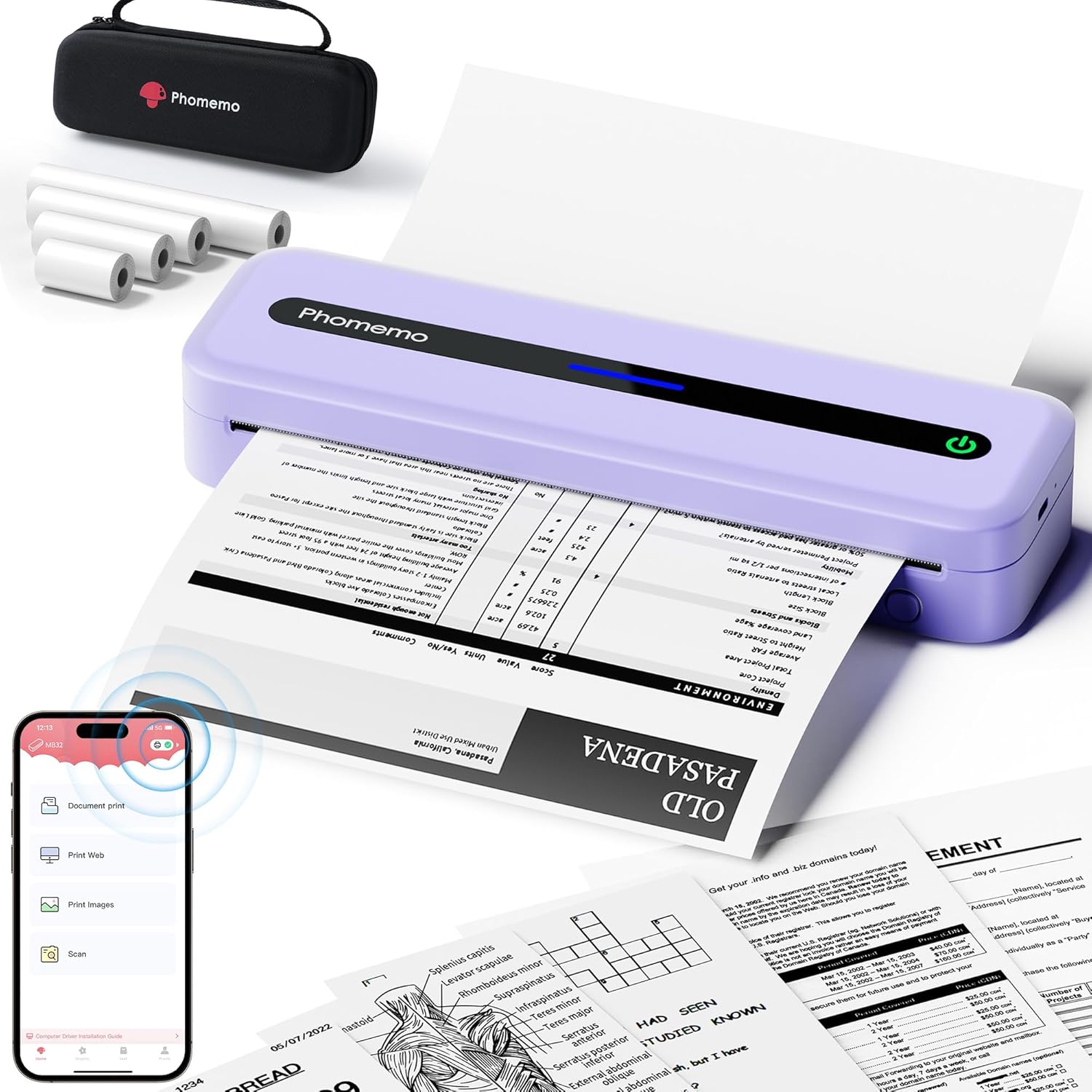
Image 1.1: The Phomemo M832 portable thermal printer in purple, shown actively printing a document. A black carrying case and several rolls of thermal paper are also displayed, highlighting the product's portability and inkless operation.
2. ബോക്സിൽ എന്താണുള്ളത്?
Upon unboxing your Phomemo M832 printer, please verify that all the following components are included:
- 1 x Phomemo M832 Portable Printer (Purple)
- 1 x 8.5'' x 11'' US Letter Size Thermal Roll Paper
- 1 x 4.33'' Width Thermal Roll Paper
- 1 x 3.14'' Width Thermal Roll Paper
- 1 x 2.08'' Width Thermal Roll Paper
- 1 x Phomemo M832 Printer Case
- 1 x USB Data Cable (80cm)
- 1 x പവർ അഡാപ്റ്റർ
- 1 x M832 User Manual

Image 2.1: All items included in the Phomemo M832 printer package. This includes the purple M832 printer, a black carrying case, four different sizes of thermal paper rolls, a USB data cable, a power adapter, and the user manual.
3. സജ്ജീകരണ ഗൈഡ്
3.1 പ്രിന്റർ ചാർജ് ചെയ്യുന്നു
The Phomemo M832 printer is equipped with a 2600mAh rechargeable Lithium Polymer battery. Before initial use, ensure the printer is fully charged using the provided USB data cable and power adapter. Connect the USB Type-C end of the cable to the printer and the USB-A end to the adapter, then plug into a power outlet. The charging indicator light will provide status.

Image 3.1: An illustrative diagram highlighting the internal 2600mAh high-capacity battery of the Phomemo M832 printer, emphasizing its power source for portable use.
3.2 തെർമൽ പേപ്പർ ലോഡുചെയ്യുന്നു
The M832 printer supports various thermal paper types, including single sheets, roll paper, and fanfold paper. It features a built-in paper bin for convenience.
- പ്രിന്ററിലെ പേപ്പർ കമ്പാർട്ട്മെന്റ് കവർ തുറക്കുക.
- Insert the thermal paper, ensuring the printable side (usually smoother) is facing the print head.
- For roll paper, place the roll into the designated slot. For fanfold or single sheets, align them properly in the paper path.
- Close the paper compartment cover securely.

Image 3.2: The Phomemo M832 printer showcasing its versatility in handling different thermal paper formats. One printer is shown with a roll of thermal paper, while another demonstrates the use of fan-fold paper, illustrating the flexible paper loading options.

Image 3.3: The Phomemo M832 printer is shown with various sizes of thermal paper it supports, including 8.5" x 11" (US Letter), A4, 4.33", 3.14", and 2.08" wide, highlighting its adaptability for different printing needs.
4. പ്രവർത്തന നിർദ്ദേശങ്ങൾ
4.1 Printing from Phone or Tablet (Bluetooth)
To print wirelessly from your smartphone or tablet, follow these steps:
- ആപ്പ് ഡൗൺലോഡ് ചെയ്യുക: Install the official 'Phomemo' application from your device's app store (compatible with iOS 10+ and Android 8+).
- Power On & Bluetooth: Turn on your M832 printer. Ensure Bluetooth is enabled on your phone or tablet.
- ആപ്പ് വഴി കണക്റ്റുചെയ്യുക: Open the 'Phomemo' app. Tap the 'Printer' icon within the app to search for the M832 portable printer. Select it to establish a Bluetooth connection. കുറിപ്പ്: Bluetooth connection is managed exclusively through the Phomemo app, not directly through your device's Bluetooth settings.
- Select & Print: Within the app, select the desired paper size and file type, then initiate the printing process.

Image 4.1: The Phomemo M832 printer demonstrating Bluetooth wireless connectivity. A smartphone displaying the Phomemo app interface is shown next to the printer, indicating the method for connecting and printing from mobile devices.
4.2 Printing from Laptop or PC (USB)
For printing from a laptop or PC, a wired USB connection is required:
- ഡ്രൈവർ ഇൻസ്റ്റാളേഷൻ: ഔദ്യോഗിക ഫോമെമോ സന്ദർശിക്കുക website to download and install the correct M832 driver for your operating system (Windows 7/8/10/11+ or macOS 10.14+ or Linux).
- USB വഴി ബന്ധിപ്പിക്കുക: Use the provided USB data cable to connect your M832 printer directly to your computer.
- പ്രമാണം അച്ചടിക്കുക: Open your document, select 'Print', and choose 'M832' from the list of available printers. കുറിപ്പ്: The printer does not support Wi-Fi printing for laptops/PCs.

Image 4.2: The Phomemo M832 printer connected to a laptop using a USB data cable, demonstrating the wired connectivity option for printing from computers. The image also highlights compatibility with Mac OS, Windows, and Linux operating systems.
5. പരിപാലനം
The Phomemo M832 is an inkless thermal printer, which simplifies maintenance significantly. There is no need to replace ink cartridges, toner, or ribbons.
- വൃത്തിയാക്കൽ: Periodically wipe the exterior of the printer with a soft, dry cloth. Avoid using harsh chemicals or abrasive materials.
- പ്രിന്റ് ഹെഡ് കെയർ: The print head is a delicate component. Avoid touching it directly. If print quality degrades, a specialized thermal printer cleaning pen or card can be used according to its instructions.
- പേപ്പർ സംഭരണം: Store thermal paper in a cool, dry place away from direct sunlight and heat to preserve its printability and longevity.
- ബാറ്ററി കെയർ: For optimal battery life, avoid completely discharging the battery frequently. Charge the printer regularly, especially if it will be stored for an extended period.
6. പ്രശ്നപരിഹാരം
If you encounter issues with your Phomemo M832 printer, refer to the following common troubleshooting steps:
- പ്രിന്റർ പ്രതികരിക്കുന്നില്ല/ഓഫ്ലൈൻ:
- പ്രിന്റർ ഓണാക്കിയിട്ടുണ്ടെന്നും പൂർണ്ണമായും ചാർജ് ചെയ്തിട്ടുണ്ടെന്നും ഉറപ്പാക്കുക.
- For Bluetooth connections, verify that Bluetooth is enabled on your mobile device and that the connection is established within the Phomemo app.
- For USB connections, check that the USB cable is securely connected to both the printer and the computer. Try a different USB port or cable if necessary.
- Restart both the printer and your connected device.
- Print Jobs Stuck/Not Printing:
- Check for sufficient thermal paper and ensure it is loaded correctly.
- Verify that the paper compartment cover is closed properly.
- Clear any pending print jobs from your device's print queue.
- Ensure the correct printer (M832) is selected in your device's print settings.
- Poor Print Quality (Faded/Streaky):
- Ensure the printer battery is adequately charged, as low battery can affect print darkness.
- Check that you are using genuine Phomemo thermal paper.
- Clean the print head if there are persistent streaks or faded areas.
- Adjust print density settings within the Phomemo app or printer driver if available.
- Driver Issues (PC/Laptop):
- Ensure you have downloaded and installed the latest drivers from the official Phomemo webനിങ്ങളുടെ നിർദ്ദിഷ്ട ഓപ്പറേറ്റിംഗ് സിസ്റ്റത്തിനായുള്ള സൈറ്റ്.
- Uninstall and reinstall the printer drivers if problems persist.
7 സ്പെസിഫിക്കേഷനുകൾ
| ഫീച്ചർ | വിശദാംശങ്ങൾ |
|---|---|
| മോഡലിൻ്റെ പേര് | M832 |
| ബ്രാൻഡ് | ഫേമോമോ |
| പ്രിൻ്റിംഗ് ടെക്നോളജി | തെർമൽ |
| പ്രിൻ്റർ ഔട്ട്പുട്ട് | മോണോക്രോം (കറുപ്പും വെളുപ്പും) |
| പരമാവധി പ്രിന്റ് റെസലൂഷൻ | 304 ഡിപിഐ |
| പരമാവധി പ്രിന്റ് വേഗത (മോണോക്രോം) | 5 പി.പി.എം |
| കണക്റ്റിവിറ്റി ടെക്നോളജി | ബ്ലൂടൂത്ത്, യുഎസ്ബി ടൈപ്പ്-സി |
| അനുയോജ്യമായ ഉപകരണങ്ങൾ | Android & iOS Phone/Tablet (via App), Linux, Windows 7/8/10/11+, macOS 10.14+ (via USB) |
| പരമാവധി മീഡിയ വലുപ്പം | 8.5''x11'' (Letter), A4, 4.33'', 3.14'', 2.08'' |
| പരമാവധി ഇൻപുട്ട് ഷീറ്റ് ശേഷി | 20 ഷീറ്റുകൾ |
| ബാറ്ററി | 2600mAh ലിഥിയം പോളിമർ (ഉൾപ്പെടുത്തിയിരിക്കുന്നു) |
| ഇനത്തിൻ്റെ ഭാരം | 1.54 പൗണ്ട് (700 ഗ്രാം) |
| ഉൽപ്പന്ന അളവുകൾ | 13.7 x 4.17 x 3.11 ഇഞ്ച് |

Image 7.1: A visual comparison demonstrating the high-definition printing technology of the Phomemo M832. It highlights the superior clarity of 300dpi resolution compared to a 203dpi output from another printer, showcasing enhanced detail for text and graphics.
8. വാറൻ്റിയും പിന്തുണയും
The Phomemo M832 Portable Thermal Printer comes with a പരിമിത വാറൻ്റി. For specific terms and conditions of the warranty, please refer to the warranty card included in your product packaging or visit the official Phomemo webസൈറ്റ്.
For technical support, driver downloads, or further assistance, please visit the official Phomemo support website or contact their customer service. Keep your product model number (M832) and purchase information readily available when seeking support.


