ആമുഖം
വാങ്ങിയതിന് നന്ദി.asing the WIITHINK WCD-9949 Portable CD Player Boombox. This device offers versatile audio playback options including CD, FM radio, Bluetooth, USB, and AUX input. Designed for ease of use and portability, it provides a rich audio experience for various settings. Please read this manual carefully to ensure proper operation and maintenance of your new boombox.
സുരക്ഷാ വിവരങ്ങൾ
- തീ അല്ലെങ്കിൽ ഷോക്ക് അപകടങ്ങൾ തടയാൻ യൂണിറ്റ് മഴയോ ഈർപ്പമോ കാണിക്കരുത്.
- വെന്റിലേഷൻ തുറസ്സുകൾ തടയരുത്. ശരിയായ വായുസഞ്ചാരത്തിനായി യൂണിറ്റിന് ചുറ്റും മതിയായ ഇടം ഉറപ്പാക്കുക.
- നിർമ്മാതാവ് വ്യക്തമാക്കിയ അറ്റാച്ച്മെൻ്റുകൾ/ആക്സസറികൾ മാത്രം ഉപയോഗിക്കുക.
- മിന്നൽ കൊടുങ്കാറ്റുകളുടെ സമയത്തോ ദീർഘകാലത്തേക്ക് ഉപയോഗിക്കാത്ത സമയത്തോ യൂണിറ്റ് അൺപ്ലഗ് ചെയ്യുക.
- യൂണിറ്റ് തുറക്കരുത് casing. എല്ലാ സേവനങ്ങളും യോഗ്യതയുള്ള സേവന ഉദ്യോഗസ്ഥരെ ഏൽപ്പിക്കുക.
- ബാറ്ററികൾ ശരിയായി നശിപ്പിക്കുക. ബാറ്ററികൾ അമിത ചൂടിന് വിധേയമാക്കരുത്.
പാക്കേജ് ഉള്ളടക്കം
പാക്കേജിൽ എല്ലാ ഇനങ്ങളും ഉണ്ടെന്ന് ഉറപ്പാക്കുക:
- 1 x WIITHINK WTB791 Portable CD Radio Boombox (Batteries Not Included)
- 1 x Remote Control (Batteries Not Included)
- 1 x പവർ കേബിൾ
- 1 x AUX ലൈൻ
- 1 x ഉപയോക്തൃ മാനുവൽ
- 1 x പാക്കിംഗ് ബോക്സ്
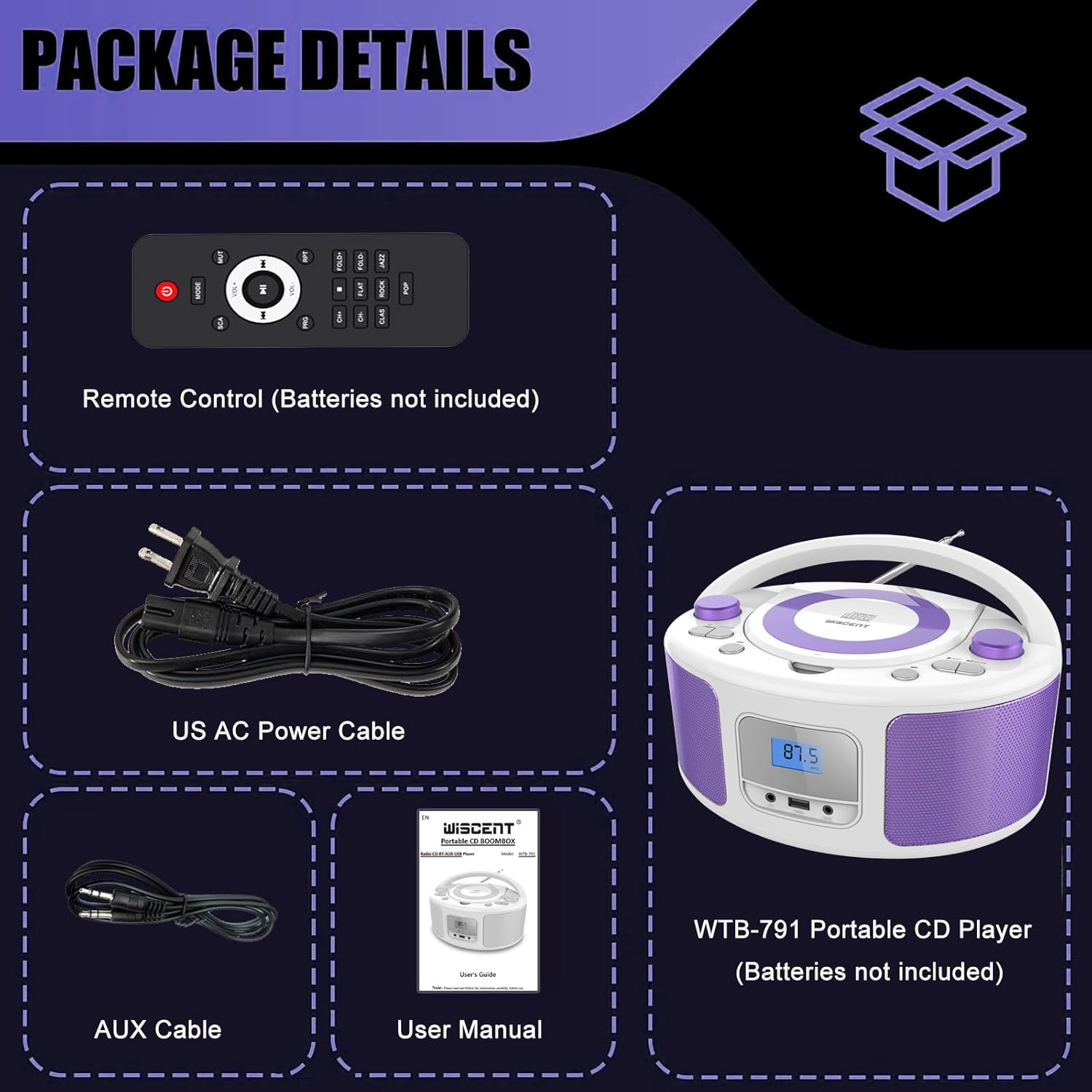
Image: Contents of the WIITHINK WCD-9949 Boombox package, showing the boombox, remote control, power cable, AUX cable, and user manual.
ഉൽപ്പന്നം കഴിഞ്ഞുview
Familiarize yourself with the main components of your boombox.

ചിത്രം: മുൻഭാഗം view of the WIITHINK WCD-9949 Boombox, highlighting key features such as CD player, Bluetooth, USB port, AUX input, headphone jack, LCD display, FM radio, and power options.
- Top-Loading CD Player: For playing CDs, CD-R/RW, MP3 CDs, and audiobook CDs.
- എഫ്എം റേഡിയോ ട്യൂണർ: എഫ്എം റേഡിയോ സ്റ്റേഷനുകൾ കേൾക്കാൻ.
- ബ്ലൂടൂത്ത്: അനുയോജ്യമായ ഉപകരണങ്ങളിൽ നിന്നുള്ള വയർലെസ് ഓഡിയോ സ്ട്രീമിംഗിനായി.
- യുഎസ്ബി ഇൻപുട്ട്: For playing MP3/WMA music files from USB flash drives (FAT32 format, up to 128GB).
- AUX ഇൻപുട്ട് (3.5mm): ബാഹ്യ ഓഡിയോ ഉപകരണങ്ങൾ ബന്ധിപ്പിക്കുന്നതിന്.
- ഹെഡ്ഫോൺ ജാക്ക് (3.5 മിമി): സ്വകാര്യ ശ്രവണത്തിനായി.
- LCD ഡിസ്പ്ലേ: Shows current mode, track number, and radio frequency.
- നിയന്ത്രണ ബട്ടണുകൾ: Power, Mode, Play/Pause, Skip/Search, Repeat, Scan, EQ/Function.
- വോളിയം നോബുകൾ: ഓഡിയോ ഔട്ട്പുട്ട് ലെവൽ ക്രമീകരിക്കുക.
- ട്യൂണിംഗ് നോബ്: എഫ്എം റേഡിയോ ഫ്രീക്വൻസി ക്രമീകരിക്കുന്നു.
- ടെലിസ്കോപ്പിക് ആന്റിന: മെച്ചപ്പെട്ട എഫ്എം റേഡിയോ സ്വീകരണത്തിനായി.
- ചുമക്കുന്ന ഹാൻഡിൽ: എളുപ്പമുള്ള പോർട്ടബിലിറ്റിക്ക്.
സജ്ജമാക്കുക
ബൂംബോക്സിന് പവർ നൽകുന്നു
നിങ്ങളുടെ ബൂംബോക്സിന് എസി പവർ അല്ലെങ്കിൽ ബാറ്ററികൾ ഉപയോഗിക്കാം.
AC Power (Wall Outlet)
- ബൂംബോക്സ് ഓഫാക്കിയിട്ടുണ്ടെന്ന് ഉറപ്പാക്കുക.
- Insert one end of the provided AC power cable into the AC IN jack on the back of the boombox.
- എസി പവർ കേബിളിന്റെ മറ്റേ അറ്റം ഒരു സാധാരണ മതിൽ ഔട്ട്ലെറ്റിലേക്ക് പ്ലഗ് ചെയ്യുക.

ചിത്രം: പിൻഭാഗം view of the boombox, indicating the AC IN jack for power connection and the battery compartment.
Battery Power (Portable Use)
- Ensure the boombox is turned off and disconnected from AC power.
- യൂണിറ്റിന്റെ അടിയിൽ ബാറ്ററി കമ്പാർട്ട്മെന്റ് കണ്ടെത്തുക.
- ബാറ്ററി കമ്പാർട്ട്മെൻ്റ് കവർ തുറക്കുക.
- Insert 4 x UM2-C 1.5V batteries (not included), ensuring correct polarity (+/-).
- ബാറ്ററി കമ്പാർട്ട്മെൻ്റ് കവർ സുരക്ഷിതമായി അടയ്ക്കുക.
കുറിപ്പ്: ചോർച്ചയും കേടുപാടുകളും തടയാൻ യൂണിറ്റ് ദീർഘനേരം ഉപയോഗിക്കുന്നില്ലെങ്കിൽ ബാറ്ററികൾ നീക്കം ചെയ്യുക.
പ്രവർത്തന നിർദ്ദേശങ്ങൾ
പൊതു പ്രവർത്തനം
- പവർ ഓൺ/ഓഫ്: അമർത്തുക പവർ യൂണിറ്റ് ഓണാക്കാനോ ഓഫാക്കാനോ ഉള്ള ബട്ടൺ.
- മോഡ് തിരഞ്ഞെടുക്കുക: അമർത്തുക മോഡ് button repeatedly to cycle through available modes: CD, FM, Bluetooth (BT), USB, AUX. The selected mode will be displayed on the LCD screen.
- വോളിയം ക്രമീകരിക്കുക: തിരിക്കുക വോളിയം ശബ്ദം കൂട്ടാൻ ഘടികാരദിശയിലും കുറയ്ക്കാൻ എതിർ ഘടികാരദിശയിലും നോബ് അമർത്തുക.
- EQ മോഡുകൾ: അമർത്തുക EQ/FUN button to select different equalizer presets: ROCK / POP / FLAT / CLASS / JAZZ.

ചിത്രം: കഴിഞ്ഞുview of the boombox's multiple playback modes and features.
സിഡി പ്ലേബാക്ക്
- അമർത്തുക മോഡ് button to select CD mode. "CD" will appear on the display.
- സിഡി കമ്പാർട്ട്മെന്റ് കവർ പതുക്കെ ഉയർത്തി തുറക്കുക.
- Place a CD (CD, CD-R/RW, MP3 CD, audiobook CD) onto the spindle with the label side facing up.
- സിഡി കമ്പാർട്ട്മെന്റ് കവർ അടയ്ക്കുക. സിഡി യാന്ത്രികമായി പ്ലേ ചെയ്യാൻ തുടങ്ങും.
- പ്ലേ/താൽക്കാലികമായി നിർത്തുക: അമർത്തുക പ്ലേ/താൽക്കാലികമായി നിർത്തുക പ്ലേബാക്ക് താൽക്കാലികമായി നിർത്തുന്നതിനോ പുനരാരംഭിക്കുന്നതിനോ ഉള്ള ബട്ടൺ.
- ട്രാക്കുകൾ ഒഴിവാക്കുക: അമർത്തുക ഫോർവേഡ് ഒഴിവാക്കുക or പിന്നോട്ട് പോകുക അടുത്ത അല്ലെങ്കിൽ മുമ്പത്തെ ട്രാക്കിലേക്ക് പോകാനുള്ള ബട്ടണുകൾ.
- ആവർത്തിക്കുക: അമർത്തുക RPT button to repeat the current track (Repeat 1) or all tracks (Repeat All).
- പ്രോഗ്രാം പ്ലേ: Refer to the detailed user manual for programming specific track orders.

Image: Close-up of the top-loading CD player with a disc inside, ready for playback.
എഫ്എം റേഡിയോ ഓപ്പറേഷൻ
- അമർത്തുക മോഡ് button to select FM radio mode. The FM frequency will appear on the display.
- ഒപ്റ്റിമൽ റിസപ്ഷനായി ടെലിസ്കോപ്പിക് ആന്റിന നീട്ടുക.
- ഓട്ടോ സ്കാൻ: അമർത്തിപ്പിടിക്കുക സ്കാൻ ചെയ്യുക button to automatically scan and save available FM stations (up to 30 presets).
- സ്വമേധയാലുള്ള ട്യൂണിംഗ്: തിരിക്കുക ട്യൂണിംഗ് ഫ്രീക്വൻസി സ്വമേധയാ ക്രമീകരിക്കുന്നതിനുള്ള നോബ്.
- പ്രീസെറ്റ് തിരഞ്ഞെടുക്കുക: ഉപയോഗിക്കുക പ്രീസെറ്റ് +/- buttons on the remote control to navigate through saved stations.

Image: Visual representation of the FM radio feature, showing the frequency range and preset capabilities.
ബ്ലൂടൂത്ത് ജോടിയാക്കൽ
- അമർത്തുക മോഡ് button to select Bluetooth mode. "BT" will flash on the display, indicating it's ready for pairing.
- നിങ്ങളുടെ ബ്ലൂടൂത്ത് പ്രവർത്തനക്ഷമമാക്കിയ ഉപകരണത്തിൽ (സ്മാർട്ട്ഫോൺ, ടാബ്ലെറ്റ് മുതലായവ), ബ്ലൂടൂത്ത് പ്രവർത്തനക്ഷമമാക്കി ലഭ്യമായ ഉപകരണങ്ങൾക്കായി തിരയുക.
- Select "WTB-791" from the list of devices.
- Once paired, "BT" will stop flashing and remain solid. You can now stream audio wirelessly.
- Control playback (Play/Pause, Skip) using the boombox buttons or your connected device.

Image: The boombox displaying "BT" for Bluetooth mode, connected to a smartphone for wireless music streaming.
USB പ്ലേബാക്ക്
- Insert a USB flash drive (FAT32 format, up to 128GB) containing MP3/WMA audio files into the USB port on the front of the boombox.
- അമർത്തുക മോഡ് button to select USB mode. "USB" will appear on the display.
- Playback will start automatically. Use the Play/Pause and Skip buttons to control playback.
AUX ഇൻപുട്ട്
- Connect an external audio device (e.g., MP3 player, laptop) to the AUX IN jack on the front of the boombox using the provided 3.5mm AUX cable.
- അമർത്തുക മോഡ് button to select AUX mode. "AUX" will appear on the display.
- Control playback from your external device. Adjust volume using the boombox's volume knob.

Image: The boombox connected to multiple external devices via AUX input, demonstrating its versatility.
ഹെഡ്ഫോൺ ഉപയോഗം
For private listening, plug 3.5mm headphones (not included) into the HEADPHONE jack on the front of the boombox. The speakers will automatically mute.
റിമോട്ട് കൺട്രോൾ
The included remote control allows you to operate the boombox from a distance. Ensure batteries are inserted correctly (2 x AAA, not included). Functions include Power, Mode selection, Volume, Mute, Play/Pause, Skip/Search, Repeat, Scan, and EQ modes.

Image: The boombox and its remote control, highlighting the convenience of remote operation.
മെയിൻ്റനൻസ്
- മൃദുവായതും ഉണങ്ങിയതുമായ തുണി ഉപയോഗിച്ച് യൂണിറ്റ് വൃത്തിയാക്കുക. അബ്രാസീവ് ക്ലീനറുകളോ ലായകങ്ങളോ ഉപയോഗിക്കരുത്.
- Keep the CD compartment clean and free of dust. Use a CD lens cleaner if necessary.
- നേരിട്ടുള്ള സൂര്യപ്രകാശത്തിൽ നിന്നും തീവ്രമായ താപനിലയിൽ നിന്നും മാറി തണുത്തതും വരണ്ടതുമായ സ്ഥലത്ത് യൂണിറ്റ് സൂക്ഷിക്കുക.
ട്രബിൾഷൂട്ടിംഗ്
| പ്രശ്നം | പരിഹാരം |
|---|---|
| ശക്തിയില്ല | Check if the AC power cable is securely connected. If using batteries, ensure they are inserted correctly and not depleted. |
| സിഡി പ്ലേ ചെയ്യുന്നില്ല | Ensure the CD is clean and free of scratches. Verify the CD is inserted correctly with the label side up. Close the CD compartment completely. Ensure CD mode is selected. |
| മോശം എഫ്എം റേഡിയോ സ്വീകരണം | Extend and adjust the telescopic antenna. Try repositioning the unit. |
| ബ്ലൂടൂത്ത് ജോടിയാക്കുന്നില്ല | Ensure the boombox is in Bluetooth mode and "BT" is flashing. Make sure your device's Bluetooth is enabled and within range. Forget previous pairings on your device and try again. |
| USB പ്ലേബാക്ക് പ്രശ്നങ്ങൾ | Ensure the USB drive is formatted to FAT32 and contains compatible MP3/WMA files. The maximum capacity supported is 128GB. |
സ്പെസിഫിക്കേഷനുകൾ
| ഫീച്ചർ | വിശദാംശങ്ങൾ |
|---|---|
| മോഡൽ നമ്പർ | WCD-9949 |
| ഉൽപ്പന്ന അളവുകൾ (L x W x H) | 7 x 10 x 5 ഇഞ്ച് |
| ഇനത്തിൻ്റെ ഭാരം | 3.91 പൗണ്ട് |
| കണക്റ്റിവിറ്റി ടെക്നോളജി | ഓക്സിലറി, ബ്ലൂടൂത്ത്, യുഎസ്ബി |
| സ്പീക്കർ തരം | ബിൽറ്റ്-ഇൻ |
| പവർ ഔട്ട്പുട്ട് | 2x2W RMS |
| എഫ്എം റേഡിയോ ഫ്രീക്വൻസി | 87.5-108Mhz |
| പവർ ഉറവിടം | AC 100-240V~ / 4 x C batteries (not included) |
| USB ശേഷി | Up to 128GB (FAT32 format only) |
വാറൻ്റി & പിന്തുണ
WIITHINK is committed to customer satisfaction. Your product comes with:
- 18 മാസത്തെ മാറ്റിസ്ഥാപിക്കൽ: For missing parts or defective products.
- ആജീവനാന്ത സാങ്കേതിക പിന്തുണ: Assistance with any product inquiries.
- Amazon Buyer-Seller Messaging: Available 7/24 for support.
For any inquiries, please go to Your Orders, find your order in the list, and click on "WIITHINK" to contact us.

Image: Details on WIITHINK's customer support, including replacement policy and technical assistance.
ഔദ്യോഗിക ഉൽപ്പന്ന വീഡിയോകൾ
WIITHINK Direct - CD Radio Portable CD Player Boombox with Bluetooth
Video: An official product video from WIITHINK Direct showcasing the features and functionality of the CD Radio Portable CD Player Boombox with Bluetooth.


