ആമുഖം
Thank you for choosing the BYTECH True Wireless In-Ear Headphones. This manual provides essential information for setting up, operating, and maintaining your new audio device. Please read it carefully before use to ensure optimal performance and longevity of your headphones.
പാക്കേജ് ഉള്ളടക്കം
- BYTECH True Wireless In-Ear Headphones (Left and Right)
- ചാർജിംഗ് കേസ്
- ചാർജിംഗ് കേബിൾ
- നിർദ്ദേശ മാനുവൽ (ഈ പ്രമാണം)
ഉൽപ്പന്നം കഴിഞ്ഞുview
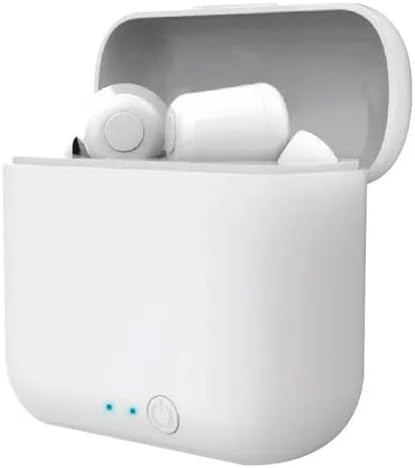
This image shows the white BYTECH True Wireless In-Ear Headphones nestled inside their matching white charging case. The case is open, revealing the two earbuds. The front of the charging case displays two small blue indicator lights and a power button.
The BYTECH True Wireless In-Ear Headphones feature a compact design with a portable charging case. The earbuds are designed for comfortable in-ear placement and offer true wireless freedom. The charging case not only protects your earbuds but also provides additional battery life on the go.
സജ്ജമാക്കുക
1. ഹെഡ്ഫോണുകളും കേസും ചാർജ് ചെയ്യുന്നു
Before first use, fully charge both the earbuds and the charging case. Place the earbuds into the charging case. Connect the charging cable (included) to the charging port on the case and the other end to a USB power source. The indicator lights on the case will show charging status. Once fully charged, the lights may turn solid or turn off, depending on the model.
2. നിങ്ങളുടെ ഉപകരണവുമായി ജോടിയാക്കുന്നു
- ഇയർബഡുകൾ ചാർജ് ചെയ്തിട്ടുണ്ടെന്നും ചാർജിംഗ് കെയ്സിനുള്ളിലാണെന്നും ഉറപ്പാക്കുക.
- Open the charging case. The earbuds will automatically enter pairing mode (or you may need to press and hold the power button on the case/earbuds for a few seconds).
- On your device (e.g., smartphone, tablet, laptop), go to the Bluetooth settings.
- ബ്ലൂടൂത്ത് ഓണാക്കുക.
- ഇതിനായി തിരയുക new devices. You should see "BY-AU-BE-303-WT" or a similar name appear in the list of available devices.
- Select the headphones to connect. Once connected, a voice prompt or indicator light change will confirm successful pairing.
- The headphones are pre-paired with each other, so you only need to pair them once with your device.
പ്രവർത്തന നിർദ്ദേശങ്ങൾ
The BYTECH True Wireless In-Ear Headphones feature intuitive controls for managing audio playback and calls.
പവർ ഓൺ/ഓഫ്
- പവർ ഓൺ: Open the charging case, and the earbuds will automatically power on. Alternatively, press and hold the touch control area on each earbud for approximately 3 seconds.
- പവർ ഓഫ്: Place the earbuds back into the charging case and close the lid. They will automatically power off and begin charging. Alternatively, press and hold the touch control area on each earbud for approximately 5 seconds.
സംഗീത പ്ലേബാക്ക്
- പ്ലേ/താൽക്കാലികമായി നിർത്തുക: ഇയർബഡുകളിൽ ഏതിലെങ്കിലും ഒന്നിലെ ടച്ച് കൺട്രോൾ ഏരിയയിൽ ഒരിക്കൽ ടാപ്പ് ചെയ്യുക.
- അടുത്ത ട്രാക്ക്: Double-tap the touch control area on the ശരിയാണ് ഇയർബഡ്.
- മുമ്പത്തെ ട്രാക്ക്: Double-tap the touch control area on the വിട്ടുപോയി ഇയർബഡ്.
കോൾ മാനേജുമെന്റ്
- ഉത്തരം/അവസാന കോൾ: Tap the touch control area on either earbud once during an incoming call.
- കോൾ നിരസിക്കുക: ഇൻകമിംഗ് കോൾ വരുമ്പോൾ, ഇയർബഡുകളിൽ ഏതെങ്കിലുമൊന്നിലെ ടച്ച് കൺട്രോൾ ഏരിയ 2 സെക്കൻഡ് അമർത്തിപ്പിടിക്കുക.
വോയ്സ് അസിസ്റ്റൻ്റ്
- വോയ്സ് അസിസ്റ്റന്റിനെ സജീവമാക്കുക: രണ്ട് ഇയർബഡുകളിലെയും ടച്ച് കൺട്രോൾ ഏരിയയിൽ മൂന്ന് തവണ ടാപ്പ് ചെയ്യുക.
മെയിൻ്റനൻസ്
- വൃത്തിയാക്കൽ: ഇയർബഡുകളും ചാർജിംഗ് കെയ്സും വൃത്തിയാക്കാൻ മൃദുവായതും ഉണങ്ങിയതും ലിന്റ് രഹിതവുമായ തുണി ഉപയോഗിക്കുക. കഠിനമായ രാസവസ്തുക്കളോ ഉരച്ചിലുകളുള്ള വസ്തുക്കളോ ഉപയോഗിക്കരുത്.
- സംഭരണം: ഉപയോഗത്തിലില്ലാത്തപ്പോൾ, പൊടിയിൽ നിന്നും കേടുപാടുകളിൽ നിന്നും സംരക്ഷിക്കാൻ ഹെഡ്ഫോണുകൾ ചാർജിംഗ് കേസിൽ സൂക്ഷിക്കുക. നേരിട്ടുള്ള സൂര്യപ്രകാശവും കടുത്ത താപനിലയും ഏൽക്കാത്ത തണുത്തതും വരണ്ടതുമായ സ്ഥലത്ത് സൂക്ഷിക്കുക.
- ബാറ്ററി കെയർ: ബാറ്ററി ലൈഫ് വർദ്ധിപ്പിക്കാൻ, ബാറ്ററി ഇടയ്ക്കിടെ പൂർണ്ണമായും ഡിസ്ചാർജ് ചെയ്യുന്നത് ഒഴിവാക്കുക. ദീർഘനേരം ഉപയോഗിച്ചിട്ടില്ലെങ്കിൽ പോലും ഹെഡ്ഫോണുകൾ പതിവായി ചാർജ് ചെയ്യുക.
ട്രബിൾഷൂട്ടിംഗ്
| പ്രശ്നം | സാധ്യമായ പരിഹാരം |
|---|---|
| ഹെഡ്ഫോണുകൾ പവർ ഓൺ ചെയ്യുന്നില്ല. | ഇയർബഡുകളും ചാർജിംഗ് കെയ്സും പൂർണ്ണമായും ചാർജ് ചെയ്തിട്ടുണ്ടെന്ന് ഉറപ്പാക്കുക. |
| ഉപകരണവുമായി ജോടിയാക്കാൻ കഴിയില്ല. |
|
| ഒന്നോ രണ്ടോ ഇയർബഡുകളിൽ നിന്ന് ശബ്ദമില്ല. |
|
| ചാർജിംഗ് കേസ് ചാർജ് ചെയ്യുന്നില്ല. |
|
സ്പെസിഫിക്കേഷനുകൾ
| മോഡലിൻ്റെ പേര് | BY-AU-BE-303-WT |
| ബ്രാൻഡ് | ബൈടെക് |
| കണക്റ്റിവിറ്റി ടെക്നോളജി | വയർലെസ്സ് (ബ്ലൂടൂത്ത് 5.0) |
| ചെവി പ്ലേസ്മെൻ്റ് | ഇൻ-ഇയർ |
| ഫോം ഫാക്ടർ | യഥാർത്ഥ വയർലെസ് |
| നിറം | വെള്ള |
| പ്രത്യേക സവിശേഷതകൾ | Rechargeable Battery, Microphone, Bluetooth Controls |
| അനുയോജ്യമായ ഉപകരണങ്ങൾ | Cell phones, Tablets, Desktops, Laptops, Television, Car audio systems, Smart speaker, Video game consoles |
വാറൻ്റിയും പിന്തുണയും
For warranty information and technical support, please refer to the warranty card included with your product or visit the official BYTECH webസൈറ്റ്. ഏതെങ്കിലും വാറന്റി ക്ലെയിമുകൾക്ക് നിങ്ങളുടെ വാങ്ങലിന്റെ തെളിവ് സൂക്ഷിക്കുക.
If you encounter any issues not covered in this manual, please contact BYTECH customer service for assistance.


