ആമുഖം
Thank you for choosing the Noise Airwave Max 4 Wireless Over-Ear Headphones. This manual provides essential information for setting up, operating, and maintaining your headphones to ensure optimal performance and longevity. Please read this manual thoroughly before using the product.
ബോക്സിൽ എന്താണുള്ളത്
- 1 x Noise Airwave Max 4 Headphones
- 1 x USB ചാർജിംഗ് കേബിൾ
- 1 x ഓക്സ് കേബിൾ
- 1 x ഉപയോക്തൃ മാനുവൽ (ഈ പ്രമാണം)
- 1 x വാറൻ്റി കാർഡ്
ഉൽപ്പന്നം കഴിഞ്ഞുview
The Noise Airwave Max 4 headphones are designed for a superior audio experience with extended playtime and versatile connectivity. Key features include 70-hour playtime, dual device pairing, 40mm audio drivers, ultra-low latency, and Instacharge technology.
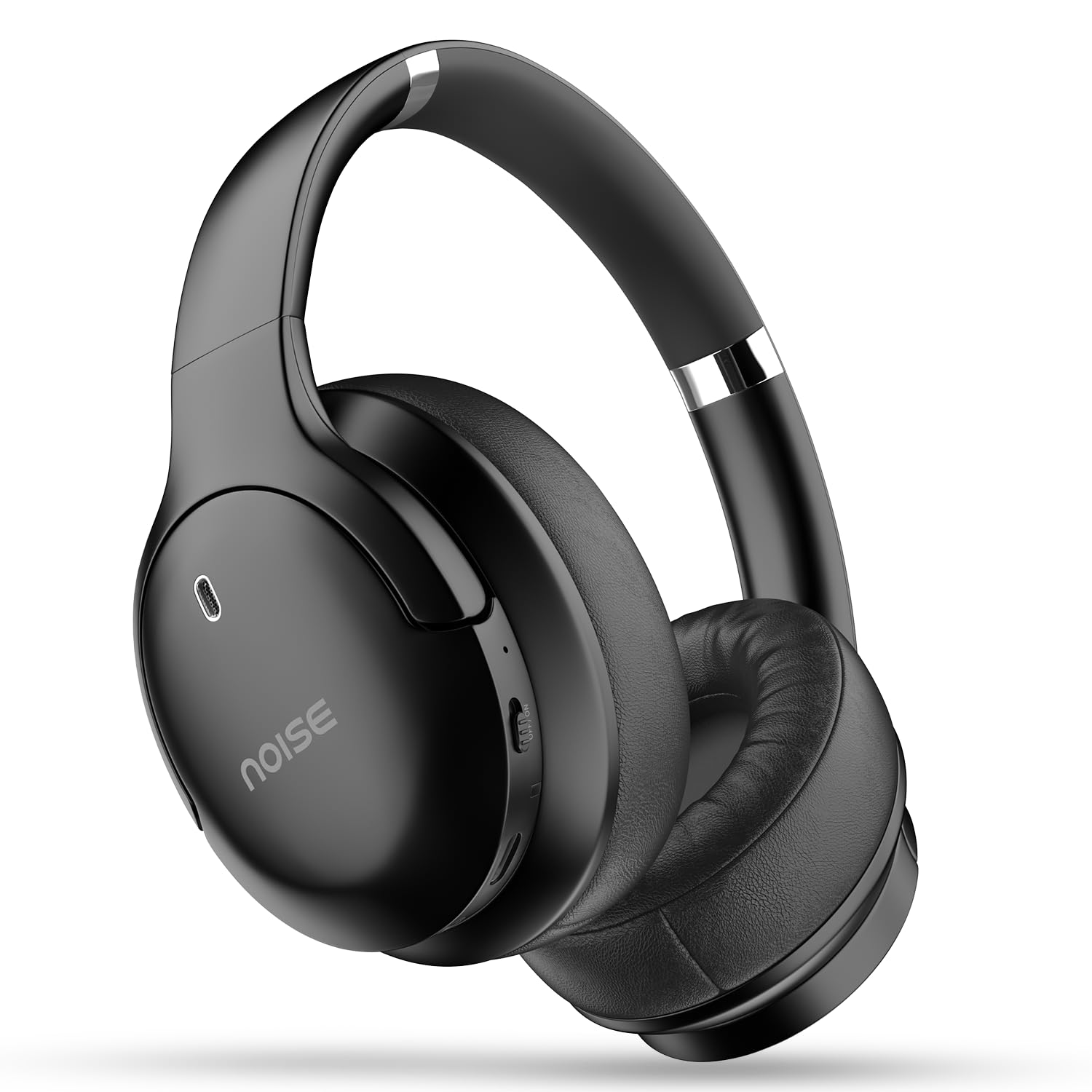
Image: Noise Airwave Max 4 Wireless Over-Ear Headphones.

ചിത്രം: കഴിഞ്ഞുview of Noise Airwave Max 4 headphones showcasing features like 70-hour playtime, Instacharge, IPX5 rating, Bluetooth 5.4, Dual Device Pairing, 40mm drivers, and Environmental Noise Cancellation.
ഹെഡ്ഫോൺ ഘടകങ്ങൾ
- പവർ ബട്ടൺ: പവർ ഓൺ/ഓഫ് ചെയ്യുന്നതിനും ജോടിയാക്കുന്നതിനും ഉപയോഗിക്കുന്നു.
- വോളിയം കൂട്ടുക/അടുത്ത ട്രാക്ക് ബട്ടൺ: ശബ്ദം കൂട്ടുന്നു, അടുത്ത ട്രാക്കിലേക്ക് പോകുന്നു.
- വോളിയം കുറയ്ക്കൽ/മുമ്പത്തെ ട്രാക്ക് ബട്ടൺ: Decreases volume, skips to previous track.
- മൾട്ടി-ഫംഗ്ഷൻ ബട്ടൺ: പ്ലേ ചെയ്യുക/താൽക്കാലികമായി നിർത്തുക, കോളുകൾക്ക് മറുപടി നൽകുക/അവസാനിപ്പിക്കുക, വോയ്സ് അസിസ്റ്റന്റ് സജീവമാക്കുക.
- USB-C ചാർജിംഗ് പോർട്ട്: ഹെഡ്ഫോണുകൾ ചാർജ് ചെയ്യുന്നതിനായി.
- 3.5mm AUX പോർട്ട്: വയർഡ് ഓഡിയോ കണക്ഷന്.
- മൈക്രോഫോൺ: കോളുകൾക്കും വോയ്സ് കമാൻഡുകൾക്കും.
- LED സൂചകം: പവർ, ചാർജിംഗ്, ജോടിയാക്കൽ നില എന്നിവ പ്രദർശിപ്പിക്കുന്നു.
സജ്ജമാക്കുക
1. ഹെഡ്ഫോണുകൾ ചാർജ് ചെയ്യുന്നു
Before first use, fully charge your headphones. Connect the provided USB charging cable to the USB-C port on the headphones and the other end to a compatible USB power adapter (not included) or a computer's USB port.
- The LED indicator will show red during charging.
- ഒരു ഫുൾ ചാർജ് ഏകദേശം 1.5-2 മണിക്കൂർ എടുക്കും.
- The LED indicator will turn blue or off when fully charged.
- Instacharge: A 10-minute charge provides approximately 300 minutes (5 hours) of playtime.

Image: Headphones connected for charging, highlighting the Instacharge capability.
2. ബ്ലൂടൂത്ത് ജോടിയാക്കൽ
- ഹെഡ്ഫോണുകൾ ഓഫാണെന്ന് ഉറപ്പാക്കുക.
- എൽഇഡി ഇൻഡിക്കേറ്റർ ചുവപ്പും നീലയും മാറിമാറി മിന്നുന്നതുവരെ ഏകദേശം 5-7 സെക്കൻഡ് നേരത്തേക്ക് പവർ ബട്ടൺ അമർത്തിപ്പിടിക്കുക, ഇത് ജോടിയാക്കൽ മോഡിനെ സൂചിപ്പിക്കുന്നു.
- നിങ്ങളുടെ ഉപകരണത്തിൽ (സ്മാർട്ട്ഫോൺ, ടാബ്ലെറ്റ്, കമ്പ്യൂട്ടർ), ബ്ലൂടൂത്ത് പ്രവർത്തനക്ഷമമാക്കി ലഭ്യമായ ഉപകരണങ്ങൾക്കായി തിരയുക.
- Select "Noise Airwave Max 4" from the list of found devices.
- Once connected, the LED indicator will flash blue slowly or turn solid blue (depending on model variant), and you will hear an audible confirmation.
3. ഡ്യുവൽ ഡിവൈസ് ജോടിയാക്കൽ
The Noise Airwave Max 4 supports simultaneous connection to two devices, allowing seamless switching between them.
- Pair the headphones with the first device as described in "Bluetooth Pairing" above.
- ആദ്യത്തെ ഉപകരണത്തിൽ ബ്ലൂടൂത്ത് പ്രവർത്തനരഹിതമാക്കുക. ഹെഡ്ഫോണുകൾ ജോടിയാക്കൽ മോഡിലേക്ക് വീണ്ടും പ്രവേശിക്കും.
- രണ്ടാമത്തെ ഉപകരണവുമായി ഹെഡ്ഫോണുകൾ ജോടിയാക്കുക.
- ആദ്യത്തെ ഉപകരണത്തിൽ ബ്ലൂടൂത്ത് വീണ്ടും പ്രവർത്തനക്ഷമമാക്കുക. ഹെഡ്ഫോണുകൾ രണ്ട് ഉപകരണങ്ങളിലേക്കും യാന്ത്രികമായി കണക്റ്റ് ചെയ്യണം.
When audio plays on one device, the headphones will prioritize that source. If a call comes in on one device while you are listening to audio on the other, the headphones will automatically switch to the call.

Image: Headphones connected to multiple devices, illustrating the dual device pairing feature.
പ്രവർത്തന നിർദ്ദേശങ്ങൾ
പവർ ഓൺ/ഓഫ്
- പവർ ഓൺ: പവർ ബട്ടൺ 3 സെക്കൻഡ് അമർത്തിപ്പിടിക്കുക.
- പവർ ഓഫ്: പവർ ബട്ടൺ 5 സെക്കൻഡ് അമർത്തിപ്പിടിക്കുക.
സംഗീത പ്ലേബാക്ക്
- പ്ലേ/താൽക്കാലികമായി നിർത്തുക: മൾട്ടി-ഫംഗ്ഷൻ ബട്ടൺ ഒരിക്കൽ അമർത്തുക.
- അടുത്ത ട്രാക്ക്: വോളിയം അപ്പ് ബട്ടൺ അമർത്തിപ്പിടിക്കുക.
- മുമ്പത്തെ ട്രാക്ക്: വോളിയം ഡൗൺ ബട്ടൺ അമർത്തിപ്പിടിക്കുക.
- വോളിയം കൂട്ടുക: വോളിയം അപ്പ് ബട്ടൺ ചുരുക്കി അമർത്തുക.
- വോളിയം താഴേക്ക്: വോളിയം ഡൗൺ ബട്ടൺ ചുരുക്കി അമർത്തുക.
കോൾ മാനേജുമെന്റ്
- ഉത്തരം/അവസാന കോൾ: മൾട്ടി-ഫംഗ്ഷൻ ബട്ടൺ ഒരിക്കൽ അമർത്തുക.
- കോൾ നിരസിക്കുക: മൾട്ടി-ഫംഗ്ഷൻ ബട്ടൺ 2 സെക്കൻഡ് അമർത്തിപ്പിടിക്കുക.
- വോയ്സ് അസിസ്റ്റന്റിനെ സജീവമാക്കുക: മൾട്ടി-ഫംഗ്ഷൻ ബട്ടൺ മൂന്ന് തവണ അമർത്തുക.
പരിസ്ഥിതി ശബ്ദം റദ്ദാക്കൽ (ENC)
The headphones feature Environmental Noise Cancellation (ENC) for clearer calls by reducing ambient noise around the microphone.
- ENC is automatically active during calls.
കുറഞ്ഞ ലേറ്റൻസി മോഡ്
For gaming or video consumption, activate Low Latency Mode to minimize audio delay.
- ലോ ലേറ്റൻസി മോഡ് സജീവമാക്കുക/നിർജ്ജീവമാക്കുക: Refer to the specific button combination in your quick start guide or product packaging.
Wired Mode (AUX)
Connect the provided 3.5mm AUX cable to the headphone's AUX port and to your audio source for a wired connection. This mode works even if the headphones are out of battery.
മെയിൻ്റനൻസ്
വൃത്തിയാക്കൽ
- മൃദുവായതും ഉണങ്ങിയതുമായ തുണി ഉപയോഗിച്ച് ഹെഡ്ഫോണുകൾ തുടയ്ക്കുക.
- അബ്രാസീവ് ക്ലീനറുകൾ, ആൽക്കഹോൾ, കെമിക്കൽ ലായകങ്ങൾ എന്നിവ ഉപയോഗിക്കരുത്.
- Keep the charging port and AUX port free of dust and debris.
സംഭരണം
- നേരിട്ടുള്ള സൂര്യപ്രകാശത്തിൽ നിന്നും കടുത്ത താപനിലയിൽ നിന്നും മാറി തണുത്തതും വരണ്ടതുമായ സ്ഥലത്ത് ഹെഡ്ഫോണുകൾ സൂക്ഷിക്കുക.
- ഹെഡ്ഫോണുകളിൽ ഭാരമുള്ള വസ്തുക്കൾ വയ്ക്കുന്നത് ഒഴിവാക്കുക.
ബാറ്ററി കെയർ
- ബാറ്ററിയുടെ ആരോഗ്യം നിലനിർത്താൻ, ഉപയോഗത്തിലില്ലെങ്കിലും ഹെഡ്ഫോണുകൾ പതിവായി ചാർജ് ചെയ്യുക.
- ബാറ്ററി ഇടയ്ക്കിടെ പൂർണ്ണമായും ഡിസ്ചാർജ് ചെയ്യുന്നത് ഒഴിവാക്കുക.
The headphones are rated IPX5 Water Resistant, meaning they can withstand low-pressure water jets. They are not designed for submersion.
ട്രബിൾഷൂട്ടിംഗ്
ഹെഡ്ഫോണുകൾ ഓണാക്കുന്നില്ല
- Ensure the headphones are charged. Connect them to a power source and try again.
- Press and hold the Power button for the required duration (3 seconds).
ഉപകരണവുമായി ജോടിയാക്കാൻ കഴിയില്ല
- Ensure the headphones are in pairing mode (LED flashing red and blue).
- നിങ്ങളുടെ ഉപകരണത്തിൽ ബ്ലൂടൂത്ത് പ്രവർത്തനക്ഷമമാക്കിയിട്ടുണ്ടെന്ന് ഉറപ്പാക്കുക.
- Place the headphones and your device close to each other (within 1 meter).
- നിങ്ങളുടെ ഉപകരണത്തിലെ ബ്ലൂടൂത്ത് ജോടിയാക്കൽ ലിസ്റ്റ് മായ്ച്ച് വീണ്ടും ജോടിയാക്കാൻ ശ്രമിക്കുക.
- If dual pairing is active, ensure the desired device is selected or try disconnecting from one device temporarily.
ശബ്ദമോ മോശം ശബ്ദ നിലവാരമോ ഇല്ല
- ഹെഡ്ഫോണുകളിലും കണക്റ്റുചെയ്ത ഉപകരണത്തിലും വോളിയം ലെവലുകൾ പരിശോധിക്കുക.
- ഹെഡ്ഫോണുകൾ ബ്ലൂടൂത്ത് അല്ലെങ്കിൽ AUX കേബിൾ വഴി ശരിയായി ബന്ധിപ്പിച്ചിട്ടുണ്ടെന്ന് ഉറപ്പാക്കുക.
- ബ്ലൂടൂത്ത് ഉപയോഗിക്കുകയാണെങ്കിൽ, വിച്ഛേദിച്ച് വീണ്ടും ബന്ധിപ്പിക്കാൻ ശ്രമിക്കുക.
- തടസ്സങ്ങൾ ഒഴിവാക്കാൻ നിങ്ങളുടെ ഉപകരണത്തിന് അടുത്തേക്ക് നീങ്ങുക.
- If using a Windows PC or Samsung Android device and experiencing distortion, try changing the Bluetooth codec in your device's developer options to SBC if AAC is causing issues.
ചാർജിംഗ് പ്രശ്നങ്ങൾ
- Ensure the USB cable is securely connected to both the headphones and the power source.
- മറ്റൊരു USB കേബിളോ പവർ അഡാപ്റ്ററോ പരീക്ഷിക്കുക.
- ചാർജിംഗ് പോർട്ടിൽ എന്തെങ്കിലും അവശിഷ്ടങ്ങൾ ഉണ്ടോ എന്ന് പരിശോധിക്കുക.
സ്പെസിഫിക്കേഷനുകൾ
| മോഡലിൻ്റെ പേര് | Airwave Max 4 |
| മോഡൽ നമ്പർ | AUD-HDPHN-4-BLK |
| കണക്റ്റിവിറ്റി ടെക്നോളജി | വയർലെസ്സ് (ബ്ലൂടൂത്ത് v5.4) |
| ബ്ലൂടൂത്ത് ശ്രേണി | 10 മീറ്റർ |
| ഓഡിയോ ഡ്രൈവർ തരം | ഡൈനാമിക് ഡ്രൈവർ (40mm) |
| ശബ്ദ നിയന്ത്രണം | പരിസ്ഥിതി ശബ്ദം റദ്ദാക്കൽ (ENC) |
| ബാറ്ററി ലൈഫ് | 70 മണിക്കൂർ വരെ |
| ചാർജിംഗ് സമയം | 10 minutes for 300 minutes playtime (Instacharge) |
| പ്രത്യേക സവിശേഷതകൾ | Fast Charging, Dual Device Pairing, Low Latency (up to 40ms) |
| ജല പ്രതിരോധ നില | IPX5 വാട്ടർ റെസിസ്റ്റൻ്റ് |
| മെറ്റീരിയൽ | പോളികാർബണേറ്റ് (PC) |
| ഇനത്തിൻ്റെ ഭാരം | 50 ഗ്രാം |
| ഉൽപ്പന്ന അളവുകൾ | 6.5 x 4.9 x 2.9 സെ.മീ |
| നിർമ്മാതാവ് | Nexxbase Marketing Pvt. Ltd |
| മാതൃരാജ്യം | ഇന്ത്യ |
വാറൻ്റിയും പിന്തുണയും
Your Noise Airwave Max 4 Headphones come with a warranty. Please refer to the included Warranty Card for detailed terms and conditions. For technical support, service, or warranty claims, please contact Noise customer service through their official webസൈറ്റ് അല്ലെങ്കിൽ നിങ്ങളുടെ വാറന്റി കാർഡിൽ നൽകിയിരിക്കുന്ന ബന്ധപ്പെടാനുള്ള വിവരങ്ങൾ.
You can also visit the official Noise Store for more information: Noise Official Store


