1. ഉൽപ്പന്നം കഴിഞ്ഞുview
The GreenYi 5G WiFi Wireless Solar Backup Camera offers a high-definition 1080P solution for rear and front vehicle monitoring. Designed for easy DIY installation, it features a built-in 4800mAh battery, solar charging capabilities, and connects wirelessly to your smartphone or tablet for display. Its versatile design allows for flexible mounting and adjustable viewing angles, making it suitable for various vehicle types including cars, vans, and RVs.

Image: The GreenYi 5G WiFi Wireless Solar Backup Camera, showing the camera unit, a remote control, and a smartphone displaying the camera feed with parking lines.
2. ബോക്സിൽ എന്താണുള്ളത്?
- Solar WIFI Wireless License Plate Camera
- Remote Control with Charging Cable
- സ്ക്രീൻ സെറ്റ്
- സ്റ്റിക്കർ
- ഉപയോക്തൃ മാനുവൽ (ഈ പ്രമാണം)
3. സജ്ജീകരണവും ചാർജിംഗും
പ്രാരംഭ ചാർജിംഗ്
Before final installation, ensure the camera's built-in 4800mAh battery is fully charged. You can charge it using the provided USB Type-C cable. The camera also features a solar panel for continuous charging when exposed to strong sunlight, extending its operational time.
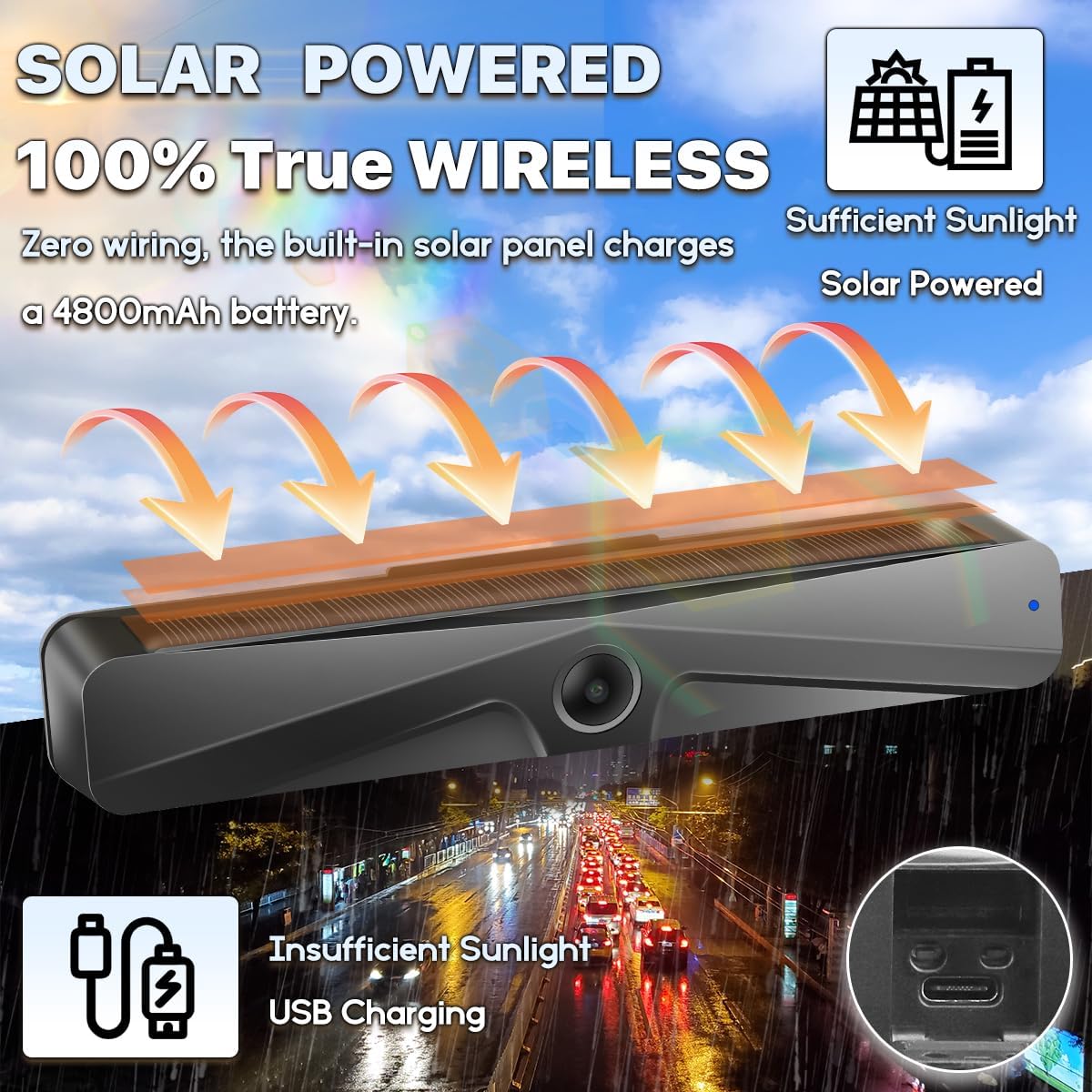
Image: Illustration of the camera's solar panel charging and a close-up of the USB Type-C charging port for when sunlight is insufficient.
അപ്ലിക്കേഷൻ ഡൗൺലോഡ്
To use the camera, download the 'Ebikam Driving' app from your device's app store:
(ഇതിനായി തിരയുക 'Ebikam Driving' or scan the QR code provided in the physical user manual.)
4. ഇൻസ്റ്റലേഷൻ
The GreenYi camera is designed for a quick 3-minute DIY installation without the need for complex wiring or drilling.
മൗണ്ടിംഗ്
- Attach the camera to your vehicle's license plate using the provided screw set. The flexible design allows for installation at either the bottom or top of your license plate.
- The camera body can be adjusted up to 150 degrees to achieve the desired viewing ആംഗിൾ.
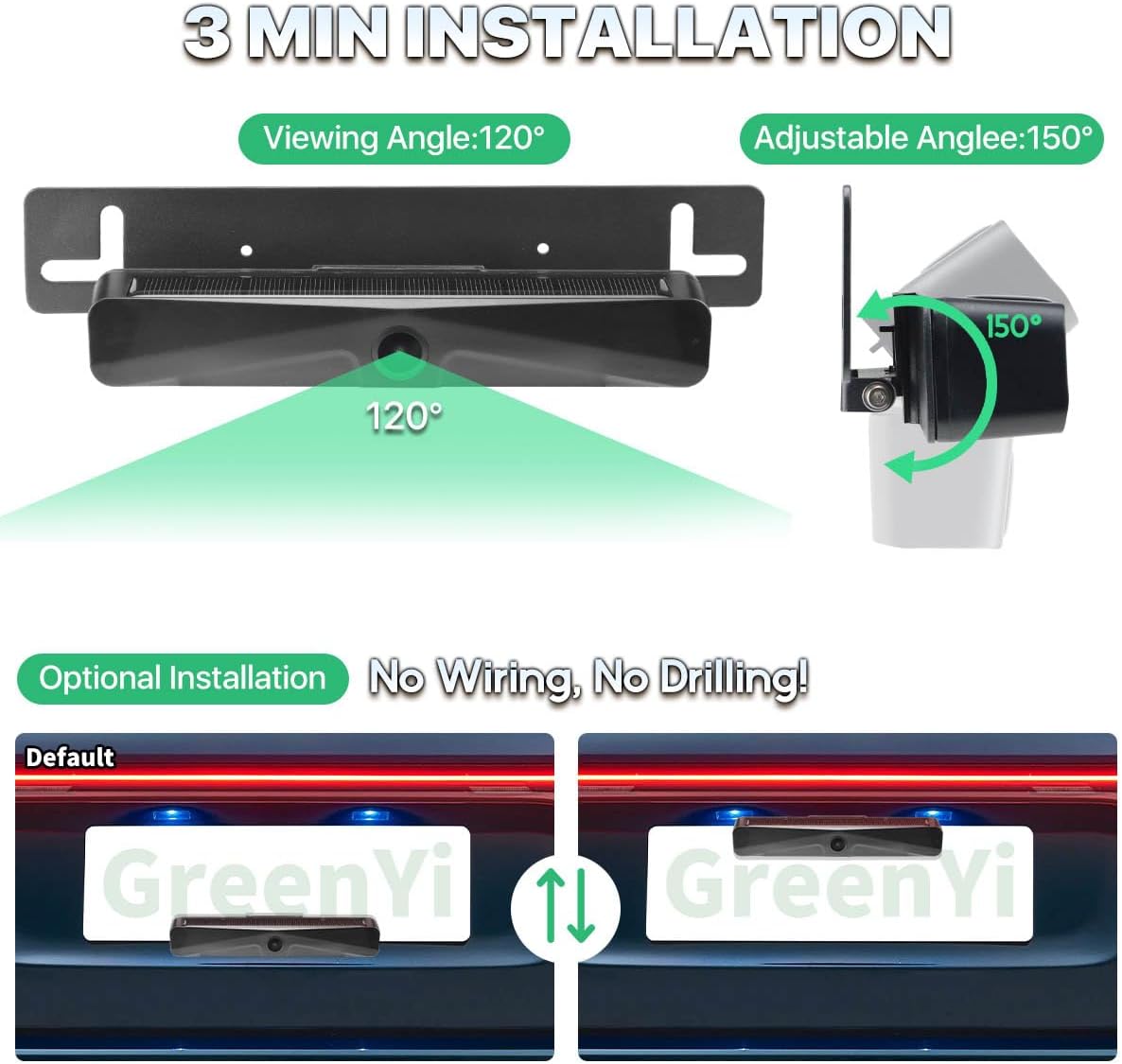
Image: Visual guide demonstrating the camera's 120-degree viewing angle and 150-degree adjustable angle, along with options for top or bottom license plate mounting.

Image: A graphic illustrating the time-saving benefit of wire-free installation (3 minutes) compared to traditional wired cameras (60 minutes).
5. App Usage & Connection
ക്യാമറയിലേക്ക് കണക്റ്റ് ചെയ്യുന്നു
- Long press the switch button on the camera to power it on.
- On your smartphone or tablet, go to your Wi-Fi settings and connect to the Wi-Fi hotspot starting with 'Ebikam-xxxxxx'.
- Open the 'Ebikam Driving' app to view ക്യാമറ ചിത്രം.
NOTE: Always perform a test connection before completing the final installation.

Image: A step-by-step visual guide on downloading the app, turning on the camera, connecting to its Wi-Fi hotspot, and viewing the live feed in the app.
Image Settings and Resolution
The camera provides a Full HD 1080P (1920x1080p) resolution for clear visuals. You can adjust the resolution within the app to 480P (720x480p), 720P (1280x720p), or 1080P (1920x1080p) based on your preference. The app also allows you to set the image as mirror or non-mirror, making it suitable for both front and rear camera use.

Image: A smartphone screen showing the camera's full HD 1080P resolution display, with adjustable resolution options.
Using Mobile Data with the App
Your phone can use internet even if the Wi-Fi has been connected to the camera's Wi-Fi. Just set it correctly:
- IOS ഉപകരണങ്ങൾക്കായി: If you want to use your mobile network data while using the app, please set it in "WLAN & Cellular" and allow the app to use "WLAN & Cellular".
- Android ഉപകരണങ്ങൾക്കായി: Please ignore the message "This WLAN network has no internet access. Connect anyway?" by clicking or skidding to somewhere else without pressing YES or NO. If you already pressed "YES", you can't use the mobile network data, but the camera will still work well. To reset it, ignore the connected Wi-Fi hotspot and reconnect.
If the setup still cannot be successful, please uninstall the app and reinstall it.

Image: A visual guide detailing how to configure iOS and Android devices to maintain internet access while connected to the camera's Wi-Fi.
6. പ്രവർത്തന നിർദ്ദേശങ്ങൾ
വിദൂര നിയന്ത്രണ പ്രവർത്തനങ്ങൾ
The included remote control provides convenient access to key camera functions:
- പവർ ബട്ടൺ: Long press for 3 seconds to turn the camera on/off.
- ക്യാമറ ഓൺ/ഓഫ്: Dedicated buttons to turn the camera on or off.
- ഫോട്ടോ എടുക്കുക: Capture still images from the camera feed.
- വീഡിയോ റെക്കോർഡ് ചെയ്യുക: വീഡിയോ റെക്കോർഡിംഗ് ആരംഭിക്കുകയും നിർത്തുകയും ചെയ്യുക.

Image: A detailed diagram of the remote control, highlighting its antenna, Type-C charging port, function indicator light, and buttons for power, photo, and video recording.
തത്സമയ ഡിസ്പ്ലേ
The camera transmits a wireless digital signal to your connected device, providing a real-time display for safer parking and maneuvering. For optimal transmission distance, maintain a range of about 20-26 feet. Beyond this range, the signal may weaken or fade.

Image: A graphic illustrating the wireless signal transmission from the camera to a smartphone, emphasizing zero interference within the optimal range.
Viewing, സേവിംഗ് മീഡിയ
The Ebikam Driving APP allows you to view the live camera feed, as well as download and save images and videos directly to your phone.

Image: A smartphone screen displaying a gallery of images and videos captured and stored within the Ebikam Driving app.
7. പരിപാലനം
- വൃത്തിയാക്കൽ: Gently wipe the camera lens and solar panel with a soft, damp വ്യക്തമായ കാഴ്ചയും കാര്യക്ഷമമായ സോളാർ ചാർജിംഗും ഉറപ്പാക്കാൻ തുണി ഉപയോഗിക്കുക. അബ്രസിവ് ക്ലീനറുകൾ ഒഴിവാക്കുക.
- ബാറ്ററി കെയർ: While the solar panel provides continuous charging, it is recommended to fully charge the camera via USB-C periodically, especially if the vehicle is parked indoors or in low-light conditions for extended periods.
- സംഭരണം: If storing the camera for a long time, ensure it is fully charged and turn it off to preserve battery life.
- സുരക്ഷ: The camera can be easily removed from its mounting bracket if you are concerned about theft.
8. പ്രശ്നപരിഹാരം
| ഇഷ്യൂ | സാധ്യമായ കാരണം | പരിഹാരം |
|---|---|---|
| ക്യാമറ ഓണാക്കുന്നില്ല. | കുറഞ്ഞ ബാറ്ററി. | Charge the camera fully using the USB Type-C cable. |
| Cannot connect to camera Wi-Fi. | Camera not powered on; incorrect Wi-Fi selection. | Ensure camera is powered on. Select the correct 'Ebikam-xxxxxx' Wi-Fi network. Try forgetting the network and reconnecting. |
| No image or frozen image in app. | Poor Wi-Fi signal; app glitch. | Ensure device is within 20-26 feet of camera. Close and reopen the app. Restart the camera. Reinstall the app if issues persist. |
| Solar charging is slow or ineffective. | Insufficient sunlight; dirty solar panel. | Ensure camera is exposed to direct, strong sunlight. Clean the solar panel. Use USB-C charging for faster results. |
| റിമോട്ട് കൺട്രോൾ പ്രവർത്തിക്കുന്നില്ല. | Remote battery low; not paired. | Charge the remote control. Refer to the manual for remote pairing instructions if applicable (not detailed in provided info). |
9 സ്പെസിഫിക്കേഷനുകൾ
- ഉൽപ്പന്ന അളവുകൾ: 9 x 1.22 x 1.22 ഇഞ്ച്
- ഇനത്തിൻ്റെ ഭാരം: 12.8 ഔൺസ്
- ഇനം മോഡൽ നമ്പർ: GreenYi-243
- ബാറ്ററി: 1 ലിഥിയം അയൺ ബാറ്ററി (ഉൾപ്പെടുത്തിയിരിക്കുന്നു), 4800mAh
- പ്രത്യേക സവിശേഷതകൾ: Built-in Battery, Remote Control, Solar Panel Charging, WIFI Wireless Connection
- പ്രദർശന സാങ്കേതികവിദ്യ: LED (for compatible devices)
- മറ്റ് ഡിസ്പ്ലേ സവിശേഷതകൾ: വയർലെസ്
- നിറം: കറുപ്പ്
- സ്ക്രീൻ വലിപ്പം: 6 Inches (for compatible devices)
- ലക്സ് റേറ്റിംഗ്: 0.1
- അനുയോജ്യമായ ഉപകരണങ്ങൾ: Smartphone, tablet, iPhone, iPad
- ഇൻസ്റ്റലേഷൻ തരം: ഉപരിതല മൗണ്ട്
- വീഡിയോ ക്യാപ്ചർ റെസല്യൂഷൻ: 1920*1080p (adjustable to 480P, 720P)
- വാല്യംtage: 5 വോൾട്ട്
- ഒപ്റ്റിക്കൽ സെൻസർ ടെക്നോളജി: CMOS
10. വാറൻ്റിയും പിന്തുണയും
For warranty information and customer support, please refer to the contact details provided on the product packaging or the official GreenYi webസൈറ്റ്. വാറൻ്റി ക്ലെയിമുകൾക്കായി നിങ്ങളുടെ വാങ്ങൽ രസീത് സൂക്ഷിക്കുക.


