1. ആമുഖം
Thank you for choosing the GAOMON Commercial Refrigerator Display Case. This manual provides essential information for the safe and efficient operation, installation, and maintenance of your new appliance. Please read this manual thoroughly before use and retain it for future reference.
1.1 സുരക്ഷാ വിവരങ്ങൾ
തീപിടുത്തം, വൈദ്യുതാഘാതം, പരിക്കുകൾ എന്നിവ കുറയ്ക്കുന്നതിന് വൈദ്യുത ഉപകരണങ്ങൾ ഉപയോഗിക്കുമ്പോൾ എല്ലായ്പ്പോഴും അടിസ്ഥാന സുരക്ഷാ മുൻകരുതലുകൾ പാലിക്കുക. ഈ ഉപകരണം വാണിജ്യപരമായ ഉപയോഗത്തിന് മാത്രമുള്ളതാണ്.
- വൈദ്യുതി വിതരണം വോള്യവുമായി പൊരുത്തപ്പെടുന്നുണ്ടെന്ന് ഉറപ്പാക്കുകtagഇ ആവശ്യകതകൾ (110V).
- കേടായ ചരടോ പ്ലഗോ ഉപയോഗിച്ച് ഉപകരണം പ്രവർത്തിപ്പിക്കരുത്.
- വെൻ്റിലേഷൻ ഓപ്പണിംഗുകൾ തടസ്സമില്ലാതെ സൂക്ഷിക്കുക.
- എയറോസോൾ ക്യാനുകൾ പോലുള്ള സ്ഫോടനാത്മക വസ്തുക്കൾ ഈ ഉപകരണത്തിൽ കത്തുന്ന പ്രൊപ്പല്ലൻ്റ് ഉപയോഗിച്ച് സൂക്ഷിക്കരുത്.
- വൃത്തിയാക്കുന്നതിനോ അറ്റകുറ്റപ്പണികൾ നടത്തുന്നതിനോ മുമ്പ് ഉപകരണം അൺപ്ലഗ് ചെയ്യുക.

Figure 1.1: GAOMON Commercial Refrigerator Display Case in a typical commercial environment.
2. ഉൽപ്പന്ന സവിശേഷതകൾ
The GAOMON Commercial Refrigerator Display Case is designed for optimal product visibility and preservation, featuring:
- മെച്ചപ്പെടുത്തിയ ദൃശ്യപരത: Glass panels on all four sides and vibrant LED lighting maximize the attractiveness of displayed items, encouraging impulse purchases.
- Customizable Shelving: Adjustable PVC shelves allow for personalized organization and accommodate items of various sizes, providing a versatile display.
- കൃത്യമായ താപനില നിയന്ത്രണം: A thermostatic control panel with a range of 32-53.6°F (0-12°C) enables precise temperature selection for stored foods.
- Freshness Maintenance & Anti-Fog: A ventilation cooling system and automatic defrost function maintain stable temperatures. Double-layer tempered glass and ventilation holes prevent condensation and fogging.
- കാര്യക്ഷമമായ സ്ഥല വിനിയോഗം: Compact dimensions optimize space in bakeries, cafes, and coffee shops while enhancing product presentation.
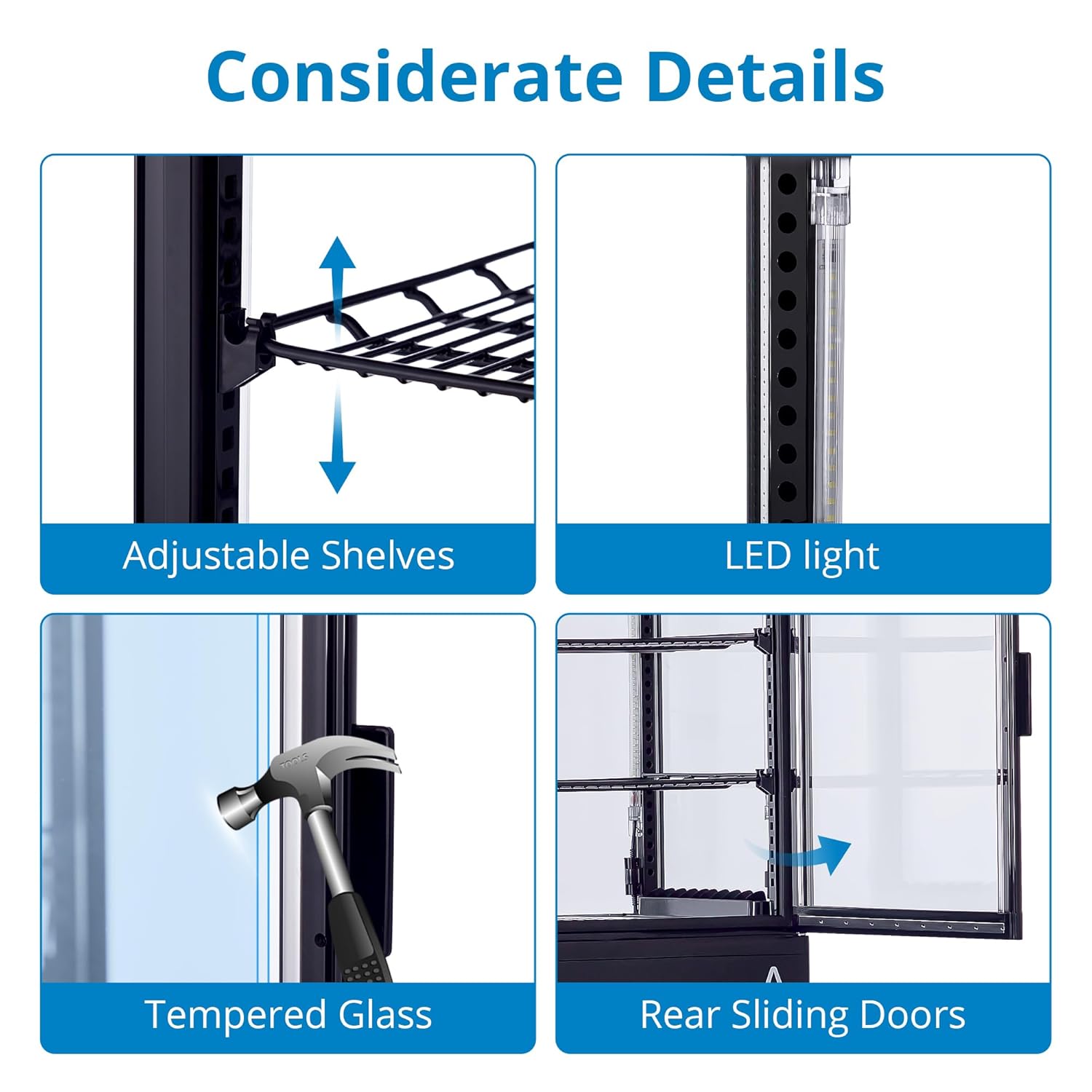
Figure 2.1: Key design details including adjustable shelves, LED lighting, tempered glass, and convenient rear sliding doors.

Figure 2.2: The display case maintains a temperature range of 35.6-53.6°F (2-12°C) with features for fast cooling and energy efficiency.
3 സ്പെസിഫിക്കേഷനുകൾ

ചിത്രം 3.1: ഉൽപ്പന്ന അളവുകളും പ്രധാന സാങ്കേതിക സവിശേഷതകളും.
| സ്പെസിഫിക്കേഷൻ | മൂല്യം |
|---|---|
| ഉൽപ്പന്ന അളവുകൾ | 18.9"D x 17.8"W x 34.57"H |
| ബ്രാൻഡ് | ഗാമോൻ |
| ശേഷി | 2.1 ക്യുബിക് അടി |
| കോൺഫിഗറേഷൻ | അടിയിൽ ഫ്രീസർ |
| BEE സ്റ്റാർ റേറ്റിംഗ് | 3 നക്ഷത്രം |
| നിറം | കറുപ്പ് |
| പ്രത്യേക ഫീച്ചർ | ക്രമീകരിക്കാവുന്ന ഷെൽഫുകൾ |
| ഇൻസ്റ്റലേഷൻ തരം | ഫ്രീസ്റ്റാൻഡിംഗ് |
| വാതിലുകളുടെ എണ്ണം | 1 |
| ഡിഫ്രോസ്റ്റ് സിസ്റ്റം | ഓട്ടോമാറ്റിക് |
4. സജ്ജീകരണം
- അൺപാക്ക് ചെയ്യുന്നു: Carefully remove the display case from its packaging. Inspect for any shipping damage. Retain packaging materials for future transport if needed.
- പ്ലേസ്മെൻ്റ്: Place the unit on a firm, level surface capable of supporting its weight when fully loaded. Ensure there is adequate ventilation around the unit (at least 4 inches from walls or other appliances) to allow for proper heat dissipation. Avoid direct sunlight or heat sources.
- ലെവലിംഗ്: Use the adjustable feet at the bottom of the unit to ensure it is perfectly level. This is crucial for proper door sealing and efficient operation.
- പ്രാരംഭ ക്ലീനിംഗ്: ആദ്യ ഉപയോഗത്തിന് മുമ്പ്, പരസ്യം ഉപയോഗിച്ച് അകവും പുറവും തുടയ്ക്കുക.amp തുണിയും മൃദുവായ ഡിറ്റർജൻ്റും. നന്നായി ഉണക്കുക.
- പവർ കണക്ഷൻ: Plug the unit into a dedicated 110V grounded electrical outlet. Do not use extension cords or adapters. Allow the unit to stand for at least 2 hours before plugging it in to allow refrigerants to settle.
5. പ്രവർത്തന നിർദ്ദേശങ്ങൾ
5.1 കൺട്രോൾ പാനൽ ഓവർview

Figure 5.1: The digital control panel for temperature and settings.
The display case features an intuitive digital control panel. The main display shows the current internal temperature. Buttons allow for temperature adjustment, LED lighting control, and defrost mode activation.
5.2 താപനില ക്രമീകരണം
- Press the 'SET' button once. The temperature display will flash.
- Use the 'Up' or 'Down' arrows to adjust the desired temperature. The recommended range for most products is 32-53.6°F (0-12°C).
- Press 'SET' again to confirm the new temperature. The display will return to showing the current internal temperature.
5.3 LED ലൈറ്റിംഗ് നിയന്ത്രണം
Press the 'Light' button (often indicated by a light bulb icon) on the control panel to turn the interior LED lighting on or off.
5.4 ഉൽപ്പന്നങ്ങൾ ലോഡുചെയ്യുന്നു
Ensure products are not blocking the internal air vents to allow for proper air circulation and consistent cooling. Arrange items neatly on the adjustable shelves for optimal display and temperature distribution.
6. പരിപാലനം
6.1 വൃത്തിയാക്കൽ
- ഇൻ്റീരിയർ: Regularly clean the interior with a mild, non-abrasive detergent and warm water. Rinse with clean water and dry thoroughly to prevent odors and mold growth.
- പുറം: ഒരു മൃദുവായ, ഡി ഉപയോഗിച്ച് ബാഹ്യ പ്രതലങ്ങൾ തുടയ്ക്കുകamp cloth. For glass surfaces, use a glass cleaner.
- കണ്ടൻസർ കോയിൽ: The condenser coil, typically located at the bottom rear of the unit, should be cleaned periodically (every 3-6 months) to ensure efficient operation. Unplug the unit, then use a brush or vacuum cleaner to remove dust and debris.
6.2 Automatic Defrosting System

Figure 6.1: The internal airflow for air-cooling and the automatic defrosting process.
This unit features an automatic defrost function. During defrost cycles, ice buildup on the evaporator coil is melted, and the water drains into an evaporation tray. Ensure the drain is not blocked. If excessive ice builds up, manually initiate a defrost cycle via the control panel (refer to control panel instructions for specific button).
7. പ്രശ്നപരിഹാരം
| പ്രശ്നം | സാധ്യമായ കാരണം | പരിഹാരം |
|---|---|---|
| യൂണിറ്റ് പവർ ഓണാക്കുന്നില്ല | വൈദ്യുതി ഇല്ല; സർക്യൂട്ട് ബ്രേക്കർ തകരാറിലായി; പ്ലഗ്/കോർഡ് തകരാറിലായി. | Check power outlet; reset circuit breaker; inspect plug/cord for damage. |
| താപനില വളരെ ഉയർന്നതാണ് | Door not closed properly; condenser coil dirty; insufficient ventilation; overloaded with warm products. | Ensure door is sealed; clean condenser coil; provide adequate space around unit; allow warm products to cool before loading. |
| അമിതമായ ശബ്ദം | യൂണിറ്റ് നിരപ്പല്ല; ഫാൻ തടസ്സം; അയഞ്ഞ ഘടകങ്ങൾ. | Level the unit; check for obstructions around fan; contact service if noise persists. |
| Condensation/Fogging on glass | High humidity; frequent door opening; faulty door seal. | Ensure proper ventilation; minimize door openings; check and clean door seals. |
ഈ പരിഹാരങ്ങൾ പരീക്ഷിച്ചതിനുശേഷവും പ്രശ്നം നിലനിൽക്കുകയാണെങ്കിൽ, ദയവായി ഉപഭോക്തൃ പിന്തുണയുമായി ബന്ധപ്പെടുക.
8. വാറണ്ടിയും പിന്തുണയും
Your GAOMON Commercial Refrigerator Display Case comes with a manufacturer's warranty. Please refer to the warranty card included with your purchase for specific terms and conditions, including coverage duration and what is covered. For technical support, parts, or service inquiries, please contact GAOMON customer service through the retailer where the product was purchased or visit the official GAOMON webബന്ധപ്പെടാനുള്ള വിവരങ്ങൾക്കുള്ള സൈറ്റ്.


