1. ആമുഖം
Thank you for choosing the AZDOME M580 5K 3 Channel Dash Cam. This device is designed to provide comprehensive vehicle surveillance with its advanced recording capabilities and integrated features. The M580 utilizes a super capacitor for enhanced durability and requires a continuous power supply, which is facilitated by the included 3-Lead USB C Hardwire Kit (JYX05). This manual will guide you through the installation, operation, and maintenance of your new dash cam system.
2 സുരക്ഷാ വിവരങ്ങൾ
- Do not operate the dash cam or access its settings while driving.
- ഡാഷ് ക്യാം സുരക്ഷിതമായി ഘടിപ്പിച്ചിട്ടുണ്ടെന്നും ഡ്രൈവറുടെ വാഹനത്തിന് തടസ്സമാകുന്നില്ലെന്നും ഉറപ്പാക്കുക. view അല്ലെങ്കിൽ എയർബാഗ് വിന്യാസം.
- Use only the original power cables and accessories provided by AZDOME.
- ഉപകരണത്തെ തീവ്രമായ താപനിലയിലോ, ദീർഘനേരം നേരിട്ടുള്ള സൂര്യപ്രകാശത്തിലോ, അമിതമായ ഈർപ്പത്തിലോ തുറന്നുകാട്ടുന്നത് ഒഴിവാക്കുക.
- ഉപകരണം സ്വയം ഡിസ്അസംബ്ലിംഗ് ചെയ്യാനോ നന്നാക്കാനോ ശ്രമിക്കരുത്. സഹായത്തിന് ഉപഭോക്തൃ പിന്തുണയുമായി ബന്ധപ്പെടുക.
- Regularly back up important video files to prevent loss.
3. പാക്കേജ് ഉള്ളടക്കം
പാക്കേജിൽ ഇനിപ്പറയുന്ന ഇനങ്ങൾ ഉണ്ടോ എന്ന് പരിശോധിക്കുക:
- AZDOME M580 5K Dash Cam Unit
- AZDOME 3-Lead USB C Hardwire Kit (JYX05)
- പിൻ ക്യാമറ (ബണ്ടിലിൽ ഉൾപ്പെടുത്തിയിട്ടുണ്ടെങ്കിൽ)
- Interior Camera (if included in bundle)
- പവർ കേബിൾ (USB-C)
- Mounting Bracket with Adhesive Pad
- ഉപയോക്തൃ മാനുവൽ
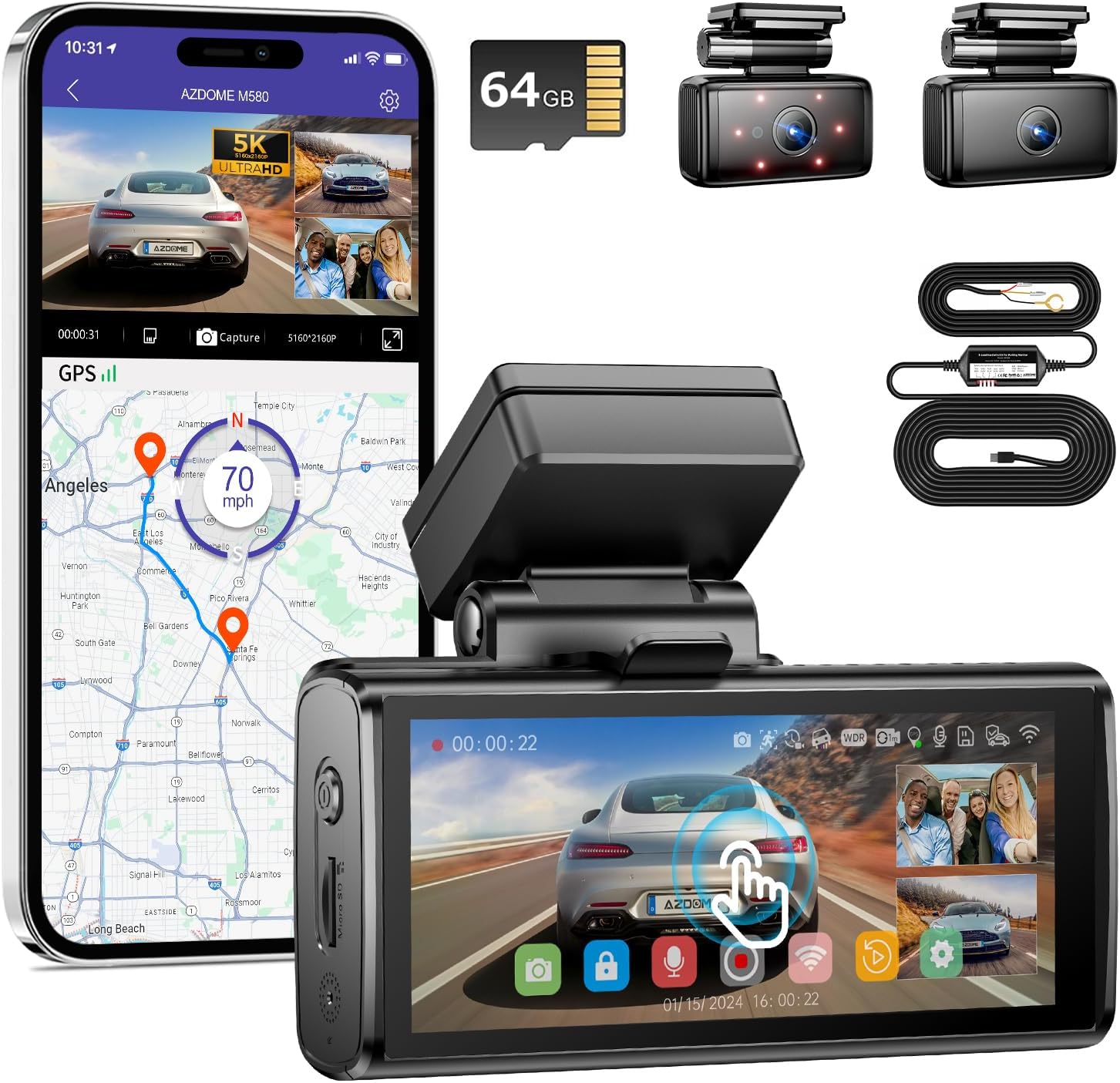
Image: AZDOME M580 Dash Cam with included accessories, including the main unit, rear camera, interior camera, and hardwire kit.

Image: The AZDOME 3-Lead USB C Hardwire Kit (JYX05), showing the main module and wiring.
4. ഉൽപ്പന്നം കഴിഞ്ഞുview
The AZDOME M580 is a high-performance 3-channel dash cam system designed to capture comprehensive video footage around and inside your vehicle. Key features include:
- 5K Front Recording: Captures ultra-high-definition video from the front camera.
- 3-Channel Recording: Simultaneous recording from front, interior, and rear cameras (configuration dependent).
- 4 ഇഞ്ച് ടച്ച്സ്ക്രീൻ: എളുപ്പത്തിലുള്ള നാവിഗേഷനും പ്ലേബാക്കിനുമുള്ള അവബോധജന്യമായ ഇന്റർഫേസ്.
- ബിൽറ്റ്-ഇൻ 5G വൈഫൈ: Fast wireless connectivity for video transfer and app control.
- 24H പാർക്കിംഗ് മോണിറ്റർ: Continuous surveillance even when the vehicle is parked, requiring the hardwire kit.
- ജി-സെൻസർ: Automatically detects impacts and locks video files.
- സൂപ്പർ കപ്പാസിറ്റർ: Provides enhanced durability and reliability compared to traditional batteries.

Image: Visual representation of the AZDOME M580 dash cam highlighting its key features such as 3-channel recording, 5G WiFi, 64GB card support, IR night vision, 4-inch touchscreen, built-in GPS, 24H parking mode, and G-Sensor.
5. സജ്ജീകരണം
5.1 Installing the Dash Cam
- ഒരു ലൊക്കേഷൻ തിരഞ്ഞെടുക്കുക: Select a spot on your windshield that does not obstruct your view or interfere with airbags. Typically, near the rearview mirror is ideal.
- വിൻഡ്ഷീൽഡ് വൃത്തിയാക്കുക: Ensure the mounting area is clean and dry for optimal adhesive adhesion.
- മൗണ്ട് ഘടിപ്പിക്കുക: Secure the adhesive mount to the chosen location on the windshield. Press firmly for at least 30 seconds.
- ഡാഷ് ക്യാം അറ്റാച്ചുചെയ്യുക: Slide the AZDOME M580 onto the mounting bracket until it clicks into place.
- ആംഗിൾ ക്രമീകരിക്കുക: Adjust the lens angle to ensure it captures the road ahead clearly.
5.2 Installing the 3-Lead Hardwire Kit (JYX05)
The hardwire kit is essential for enabling the 24-hour parking monitor feature and providing continuous power to the dash cam. It connects directly to your car's fuse box.
- ഫ്യൂസ് ബോക്സ് തിരിച്ചറിയുക: Locate your vehicle's fuse box (refer to your car's owner's manual).
- വയറുകൾ ബന്ധിപ്പിക്കുക: The JYX05 hardwire kit has three wires:
- കറുത്ത വയർ (GND): Connect to a metal bolt or screw on the car's chassis for ground.
- Yellow Wire (ACC): Connect to a fuse that is only powered when the ignition is on (Accessory power).
- Red Wire (BAT+): Connect to a fuse that has constant power, even when the ignition is off (Battery power).
- റൂട്ട് കേബിളുകൾ: Carefully route the cables along the vehicle's interior trim to conceal them and prevent interference.
- ഡാഷ് കാമിലേക്ക് കണക്റ്റുചെയ്യുക: Plug the USB-C connector from the hardwire kit into the dash cam's power port.

Image: Diagram illustrating the connection points for the 3-lead hardwire kit: Black (GND) to metal, Yellow (ACC) to ignition-switched fuse, and Red (BAT+) to constant power fuse.
The hardwire kit also features optional 4 levels of low voltage protection to prevent draining your car battery. Users can set these according to their needs.

Image: Close-up of the 3-Lead Hardwire Kit module, showing the battery drain protection settings and voltage options for 12V and 24V batteries.
5.3 ഒരു മെമ്മറി കാർഡ് ഇടുന്നു
The AZDOME M580 requires a microSD card (not included) for recording. Ensure the card is a high-speed Class 10 or U3 card (up to 256GB recommended).
- Locate the microSD card slot on the dash cam.
- Insert the microSD card with the gold contacts facing the back of the dash cam until it clicks into place.
- Format the card via the dash cam's settings menu before first use to ensure optimal performance.
6. പ്രവർത്തന നിർദ്ദേശങ്ങൾ
6.1 പവർ ഓൺ/ഓഫ്
- The dash cam will automatically power on and begin recording when your vehicle's ignition is turned on (if connected via ACC power).
- It will automatically power off shortly after the ignition is turned off.
6.2 ടച്ച്സ്ക്രീൻ പ്രവർത്തനം
The AZDOME M580 features a responsive 4-inch touchscreen display. Navigate through menus, view തത്സമയംtage, and play back recorded videos by tapping and swiping on the screen.
6.3 റെക്കോർഡിംഗ് മോഡുകൾ
The M580 supports various recording configurations:
- മുന്നിൽ മാത്രം: 5K (5160x2160P) resolution.
- മുന്നിലും പിന്നിലും: 4K (Front) + 1080P (Rear).
- Front and Inside: 4K (Front) + 1080P (Interior).
- Front, Rear, and Inside: 4K (Front) + 1080P (Rear) + 1080P (Interior).

Image: Illustration of the 3-channel recording capabilities, showing views from the front (4K), cabin (1080P), and rear (1080P) cameras.
6.4 24-Hour Parking Monitor
With the hardwire kit installed, the dash cam can monitor your vehicle even when parked. There are three parking mode options:
- Auto Turn Off Parking Mode: The G-sensor detects collisions and records video while the camera is off.
- സാധാരണ റെക്കോർഡിംഗ് പാർക്കിംഗ് മോഡ്: The G-sensor detects collisions and locks the video, while the camera continues recording.
- ടൈം-ലാപ്സ് പാർക്കിംഗ് മോഡ്: ഡാഷ് ക്യാം 24 മണിക്കൂർ തുടർച്ചയായി കുറഞ്ഞ ഫ്രെയിം റേറ്റിൽ (ഉദാഹരണത്തിന്, 1fps) റെക്കോർഡുചെയ്യുന്നു, ദീർഘമായ വീഡിയോകളെ ഹ്രസ്വ വീഡിയോകളാക്കി ചുരുക്കുന്നു.

Image: Visual explanation of the 24-hour parking mode, detailing collision detection and time-lapse recording options.
6.5 Built-in 5G WiFi
The M580 features 5GHz WiFi for faster data transfer. Use the AZDOME app on your smartphone to connect to the dash cam's WiFi network. This allows you to:
- തത്സമയം View: തത്സമയ ഫൂ കാണുകtagഡാഷ് ക്യാമറയിൽ നിന്ന് ഇ.
- റീപ്ലേ: Play back recorded videos directly on your phone.
- പങ്കിടുക: Easily share video clips to social media or messaging apps.
- ഡൗൺലോഡ്: Quickly download video files to your phone (5.8GHz WiFi allows downloading 800Mb video within 10 seconds).

Image: Depiction of the dash cam's 5G WiFi capabilities, showing a smartphone connected to the dash cam for live view, replay, sharing, and downloading videos.
7. പരിപാലനം
- വൃത്തിയാക്കൽ: Use a soft, dry cloth to clean the dash cam lens and screen. Avoid abrasive cleaners.
- മെമ്മറി കാർഡ്: Format the microSD card regularly (e.g., once a month) to maintain optimal performance and prevent data corruption. Replace the card if it shows signs of degradation or errors.
- ഫേംവെയർ അപ്ഡേറ്റുകൾ: AZDOME ഉദ്യോഗസ്ഥനെ പരിശോധിക്കുക website periodically for firmware updates to ensure your dash cam has the latest features and bug fixes.
8. പ്രശ്നപരിഹാരം
| പ്രശ്നം | സാധ്യമായ കാരണം | പരിഹാരം |
|---|---|---|
| ഡാഷ് ക്യാം പവർ ഓൺ ചെയ്യുന്നില്ല. | വൈദ്യുതി ഇല്ല; കണക്ഷൻ നഷ്ടപ്പെട്ടു. | Check power cable connection; ensure hardwire kit is correctly installed and receiving power from the fuse box. |
| റെക്കോർഡിംഗ് നിർത്തുകയോ മരവിപ്പിക്കുകയോ ചെയ്യുന്നു. | Faulty/slow microSD card; card full; firmware issue. | Use a high-speed Class 10/U3 microSD card; format the card; try a new card; check for firmware updates. |
| മോശം വീഡിയോ നിലവാരം. | വൃത്തികെട്ട ലെൻസ്; ലെൻസിലെ സംരക്ഷണ ഫിലിം; തെറ്റായ റെസല്യൂഷൻ ക്രമീകരണങ്ങൾ. | ലെൻസ് വൃത്തിയാക്കുക; ഏതെങ്കിലും സംരക്ഷണ ഫിലിം നീക്കം ചെയ്യുക; മെനുവിൽ വീഡിയോ റെസല്യൂഷൻ ക്രമീകരണങ്ങൾ പരിശോധിക്കുക. |
| വൈഫൈ കണക്ഷൻ പ്രശ്നങ്ങൾ. | Incorrect password; too far from device; app issue. | Ensure correct WiFi password; stay within close proximity; restart dash cam and phone app. |
| പാർക്കിംഗ് മോഡ് പ്രവർത്തിക്കുന്നില്ല. | ഹാർഡ്വയർ കിറ്റ് ശരിയായി ഇൻസ്റ്റാൾ ചെയ്തിട്ടില്ല; പാർക്കിംഗ് മോഡ് പ്രവർത്തനക്ഷമമാക്കിയിട്ടില്ല. | Verify hardwire kit installation (especially constant power connection); enable parking mode in settings. |
9 സ്പെസിഫിക്കേഷനുകൾ
| ഫീച്ചർ | വിശദാംശങ്ങൾ |
|---|---|
| മോഡൽ | M580 |
| Front Video Capture Resolution | 5K (5160x2160P) |
| Multi-Channel Resolution | 4K+1080P (Front+Rear/Inside), 4K+1080P+1080P (Front+Rear+Inside) |
| സ്ക്രീൻ വലിപ്പം | 4 ഇഞ്ച് |
| നിയന്ത്രണ രീതി | സ്പർശിക്കുക |
| കണക്റ്റിവിറ്റി ടെക്നോളജി | വൈഫൈ (5GHz) |
| പ്രത്യേക ഫീച്ചർ | Parking Monitor, G-Sensor |
| പവർ ഉറവിടം | Super Capacitor (requires continuous power from car) |
| ഉൾപ്പെടുത്തിയ ഘടകങ്ങൾ | Hardwire Kit (JYX05) |
| വാഹന സേവന തരം | കാർ |
10. വാറൻ്റിയും പിന്തുണയും
AZDOME products come with a standard manufacturer's warranty. For specific warranty terms, registration, or technical support, please refer to the warranty card included with your product or visit the official AZDOME website. If you encounter any issues not covered in this manual, please contact AZDOME customer service for assistance.
ഇപ്പോൾ എംബെഡ് ചെയ്യുന്നതിനായി ഔദ്യോഗിക ഉൽപ്പന്ന വീഡിയോകളൊന്നും ലഭ്യമല്ല.


