1. ആമുഖം
വാങ്ങിയതിന് നന്ദി.asing the Mikado MD-95BT 2.1 Multimedia Speaker System. This speaker system is designed to provide high-quality audio from various sources, including Bluetooth, USB, SD card, FM radio, and auxiliary input. Please read this manual carefully before using the product to ensure proper operation and to maximize your listening experience. Keep this manual for future reference.
2 സുരക്ഷാ വിവരങ്ങൾ
- മഴ, ഈർപ്പം, അല്ലെങ്കിൽ തീവ്രമായ താപനില എന്നിവയിൽ യൂണിറ്റ് തുറന്നുകാട്ടരുത്.
- സ്പീക്കർ തുറക്കരുത് casing. എല്ലാ സേവനങ്ങളും യോഗ്യതയുള്ള ഉദ്യോഗസ്ഥർക്ക് റഫർ ചെയ്യുക.
- വൈദ്യുതി വിതരണം വോളിയം ഉറപ്പാക്കുകtage യൂണിറ്റിൽ വ്യക്തമാക്കിയ ആവശ്യകതകളുമായി പൊരുത്തപ്പെടുന്നു.
- Keep the unit away from heat sources, direct sunlight, and strong magnetic fields.
- മൃദുവായതും ഉണങ്ങിയതുമായ തുണി ഉപയോഗിച്ച് യൂണിറ്റ് വൃത്തിയാക്കുക. ലിക്വിഡ് ക്ലീനറുകൾ ഉപയോഗിക്കരുത്.
- Place the speakers on a stable, flat surface to prevent accidental falls.
3. പാക്കേജ് ഉള്ളടക്കം
പാക്കേജിൽ എല്ലാ ഇനങ്ങളും ഉണ്ടോ എന്ന് ദയവായി പരിശോധിക്കുക:
- 1 x Mikado MD-95BT Main Subwoofer Unit
- 2 x സാറ്റലൈറ്റ് സ്പീക്കറുകൾ
- 1 x ഉപയോക്തൃ മാനുവൽ (ഈ പ്രമാണം)
4. ഉൽപ്പന്നം കഴിഞ്ഞുview
The Mikado MD-95BT system consists of a central subwoofer unit and two satellite speakers. The main unit houses the controls, input ports, and the primary ampജീവൻ.
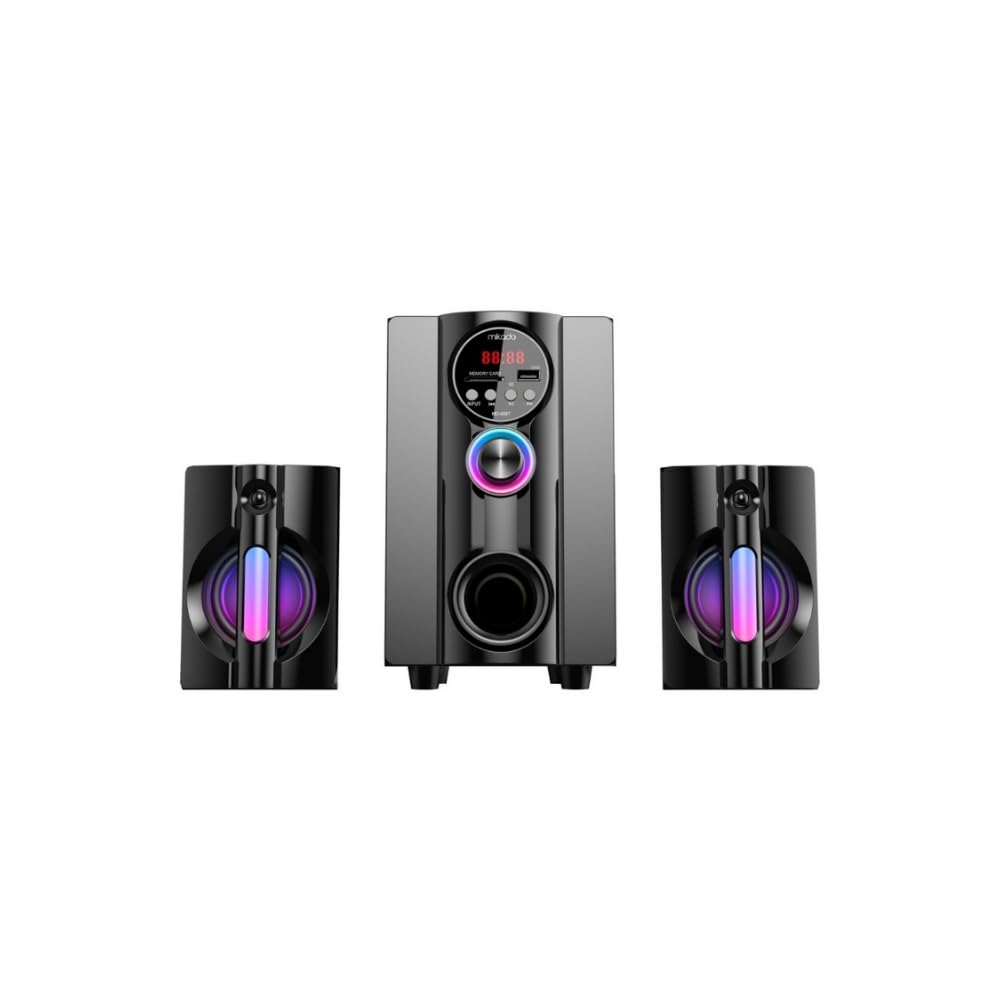
ചിത്രം 4.1: Mikado MD-95BT 2.1 Speaker System (Angled View). This image shows the main subwoofer unit flanked by two satellite speakers, highlighting the overall design and LED lighting.

ചിത്രം 4.2: Mikado MD-95BT 2.1 Speaker System (Front View). This image provides a clear view of the main unit's front panel, including the digital display, control buttons, USB port, SD card slot, and volume knob.
Main Unit Controls and Ports (Refer to Figure 4.2):
- ഡിജിറ്റൽ ഡിസ്പ്ലേ: Shows current mode, track number, FM frequency, etc.
- USB പോർട്ട്: യുഎസ്ബി ഫ്ലാഷ് ഡ്രൈവുകളിൽ നിന്ന് ഓഡിയോ പ്ലേ ചെയ്യുന്നതിന്.
- SD കാർഡ് സ്ലോട്ട്: For playing audio from SD memory cards.
- ഇൻപുട്ട് ബട്ടൺ: Switches between Bluetooth, USB, SD, FM, and AUX modes.
- പ്ലേ/താൽക്കാലികമായി നിർത്തുക ബട്ടൺ: Controls playback in media modes, auto-scans in FM mode.
- മുൻഭാഗം/ശബ്ദം കുറയ്ക്കൽ ബട്ടൺ: Skips to previous track, decreases volume when held.
- അടുത്തത്/വോളിയം അപ്പ് ബട്ടൺ: Skips to next track, increases volume when held.
- Rotary Volume Knob: മാസ്റ്റർ വോളിയം ക്രമീകരിക്കുന്നു.
- ബാസ് പോർട്ട്: Front-facing port for enhanced bass output.
- Satellite Speaker Outputs (Rear): Connects the two satellite speakers.
- AUX Input (Rear): 3.5mm കേബിൾ വഴി ബാഹ്യ ഓഡിയോ ഉപകരണങ്ങൾ ബന്ധിപ്പിക്കുന്നതിന്.
- FM Antenna Port (Rear): For connecting an external FM antenna (if applicable).
- Power Cable (Rear): Connects to the AC power outlet.
5. സജ്ജീകരണം
5.1 പ്ലേസ്മെൻ്റ്
Place the main subwoofer unit on a stable surface. Position the two satellite speakers to the left and right of the main unit for optimal stereo separation. Ensure adequate ventilation around all units.
5.2 സ്പീക്കറുകൾ ബന്ധിപ്പിക്കുന്നു
- Connect the cables from the two satellite speakers to the corresponding output ports on the rear of the main subwoofer unit. Ensure a secure connection.
5.3 പവർ കണക്ഷൻ
- Ensure the main volume knob is set to minimum.
- Plug the power cable from the main unit into a standard AC power outlet.
6. പ്രവർത്തന നിർദ്ദേശങ്ങൾ
6.1 പവർ ഓൺ/ഓഫ്
Press the power button (if available, otherwise rotate the volume knob) to turn the unit on. The digital display will light up. To turn off, reverse the process or unplug the unit.
6.2 മോഡ് തിരഞ്ഞെടുക്കൽ
അമർത്തുക ഇൻപുട്ട് ലഭ്യമായ മോഡുകളിലൂടെ സൈക്കിൾ ചെയ്യാൻ ബട്ടൺ ആവർത്തിച്ച് അമർത്തുക: ബ്ലൂടൂത്ത് (ബിടി), USB, SD കാർഡ്, എഫ്എം റേഡിയോ, ഒപ്പം AUX ഇൻപുട്ട്. The current mode will be indicated on the digital display.
6.3 വോളിയം നിയന്ത്രണം
വലിയ മധ്യഭാഗം തിരിക്കുക വോളിയം നോബ് clockwise to increase volume and counter-clockwise to decrease volume. You can also use the മുമ്പത്തെ/വോളിയം ഡൗൺ ഒപ്പം അടുത്തത് / വോളിയം കൂട്ടുക buttons by holding them down to adjust volume.
6.4 ബ്ലൂടൂത്ത് പ്രവർത്തനം
- Switch the speaker to ബ്ലൂടൂത്ത് (ബിടി) mode using the Input button. The display will show "BT" and an audible prompt may indicate pairing mode.
- നിങ്ങളുടെ ബ്ലൂടൂത്ത് പ്രാപ്തമാക്കിയ ഉപകരണത്തിൽ (സ്മാർട്ട്ഫോൺ, ടാബ്ലെറ്റ്, കമ്പ്യൂട്ടർ), ബ്ലൂടൂത്ത് പ്രാപ്തമാക്കി ലഭ്യമായ ഉപകരണങ്ങൾക്കായി തിരയുക.
- "തിരഞ്ഞെടുക്കുക"MD-95BT" കണ്ടെത്തിയ ഉപകരണങ്ങളുടെ പട്ടികയിൽ നിന്ന്.
- Once paired, an audible confirmation will sound. You can now play audio from your device through the speaker system.
- ഉപയോഗിക്കുക പ്ലേ/താൽക്കാലികമായി നിർത്തുക, മുമ്പത്തെ, ഒപ്പം അടുത്തത് buttons on the speaker to control playback.
6.5 യുഎസ്ബി/എസ്ഡി കാർഡ് പ്ലേബാക്ക്
- Insert a USB flash drive or SD card (pre-loaded with MP3/WMA audio files) into the respective port/slot on the main unit.
- The speaker will automatically switch to USB or SD mode and begin playing audio. If not, press the ഇൻപുട്ട് ശരിയായ മോഡ് തിരഞ്ഞെടുക്കാൻ ബട്ടൺ.
- ഉപയോഗിക്കുക പ്ലേ/താൽക്കാലികമായി നിർത്തുക, മുമ്പത്തെ, ഒപ്പം അടുത്തത് പ്ലേബാക്ക് നിയന്ത്രിക്കുന്നതിനുള്ള ബട്ടണുകൾ.
6.6 എഫ്എം റേഡിയോ പ്രവർത്തനം
- Switch the speaker to FM mode using the Input button. The display will show the FM frequency.
- For the first use, or to rescan, press and hold the പ്ലേ/താൽക്കാലികമായി നിർത്തുക button. The speaker will automatically scan and save available FM stations.
- ഉപയോഗിക്കുക മുമ്പത്തെ ഒപ്പം അടുത്തത് സംരക്ഷിച്ച സ്റ്റേഷനുകൾക്കിടയിൽ നാവിഗേറ്റ് ചെയ്യാനുള്ള ബട്ടണുകൾ.
6.7 AUX ഇൻപുട്ട്
- Connect an external audio device (e.g., MP3 player, computer, TV) to the AUX ഇൻപുട്ട് port on the rear of the main unit using a 3.5mm audio cable (not included).
- Switch the speaker to ഓക്സ് mode using the Input button.
- നിങ്ങളുടെ ബന്ധിപ്പിച്ച ബാഹ്യ ഉപകരണത്തിൽ നിന്ന് നേരിട്ട് പ്ലേബാക്ക് നിയന്ത്രിക്കുക.
7. പരിപാലനം
- വൃത്തിയാക്കൽ: Wipe the speaker surfaces with a soft, dry, lint-free cloth. Do not use abrasive cleaners, waxes, or solvents.
- സംഭരണം: If storing the unit for an extended period, unplug it from the power outlet and store it in a cool, dry place away from direct sunlight and dust.
- വെൻ്റിലേഷൻ: അമിതമായി ചൂടാകുന്നത് തടയാൻ യൂണിറ്റിലെ വെന്റിലേഷൻ ഓപ്പണിംഗുകൾ അടഞ്ഞിട്ടില്ലെന്ന് ഉറപ്പാക്കുക.
8. പ്രശ്നപരിഹാരം
| പ്രശ്നം | സാധ്യമായ കാരണം | പരിഹാരം |
|---|---|---|
| ശക്തിയില്ല | പവർ കേബിൾ ബന്ധിപ്പിച്ചിട്ടില്ല; പവർ ഔട്ട്ലെറ്റ് സജീവമല്ല. | Ensure power cable is securely plugged in; Check power outlet with another device. |
| ശബ്ദമില്ല | Volume too low; Incorrect input mode; Audio cable loose/faulty; Bluetooth not paired. | Increase volume; Select correct input mode; Check audio cable connections; Re-pair Bluetooth device. |
| ബ്ലൂടൂത്ത് ജോടിയാക്കൽ പരാജയപ്പെടുന്നു | സ്പീക്കർ ജോടിയാക്കൽ മോഡിലല്ല; ഉപകരണം വളരെ അകലെയാണ്; തടസ്സം. | Ensure speaker is in BT mode; Move device closer; Turn off other Bluetooth devices. |
| USB/SD പ്ലേബാക്ക് പ്രശ്നങ്ങൾ | പിന്തുണയ്ക്കുന്നില്ല file ഫോർമാറ്റ്; കേടായി files; USB/SD card not inserted correctly. | ഉറപ്പാക്കുക files are MP3/WMA; Try another USB/SD card; Reinsert the media. |
| മോശം എഫ്എം സ്വീകരണം | Weak signal; Antenna not positioned correctly. | Adjust the position of the FM antenna; Try rescanning for stations. |
9 സ്പെസിഫിക്കേഷനുകൾ
- മോഡൽ: MD-95BT
- സ്പീക്കർ തരം: 2.1 മൾട്ടിമീഡിയ സ്പീക്കർ സിസ്റ്റം
- കണക്റ്റിവിറ്റി: Bluetooth, USB, SD Card, FM Radio, AUX Input
- ഊർജ്ജ സ്രോതസ്സ്: കോർഡഡ് ഇലക്ട്രിക്
- Ampജീവിത തരം: സജീവമാണ്
- നിയന്ത്രണ രീതി: Buttons, Rotary Knob
- നിറം: കറുപ്പ്
- ഉൽപ്പന്ന അളവുകൾ (പ്രധാന യൂണിറ്റ്): ഏകദേശം 14D x 14W x 24H സെ.മീ.
- ഉൽപ്പന്ന ഭാരം: ഏകദേശം 2.85 കി.ഗ്രാം
- അനുയോജ്യമായ ഉപകരണങ്ങൾ: Laptops, Desktop Computers, Smartphones, Tablets, Televisions
10. വാറൻ്റിയും പിന്തുണയും
The Mikado MD-95BT speaker system comes with a limited warranty. Please refer to the warranty card included with your product for specific terms and conditions. For technical support, service, or warranty claims, please contact your local Mikado dealer or authorized service center. Keep your purchase receipt as proof of purchase.
Note: Warranty terms may vary by region.


