ആമുഖം
Thank you for choosing the Baseus AirGo 1 Ring Open-Ear TWS Headphones. This manual provides detailed instructions on how to set up, operate, and maintain your new headphones. Please read this manual carefully before use to ensure optimal performance and longevity of your device.
The Baseus AirGo 1 Ring Open-Ear TWS Earphones offer a unique open-ear design, providing comfort and situational awareness. Enjoy approximately 28 hours of playback time with the charging case, and about 6 hours of music playing time on a single charge (at 70% volume). The frequency response range is 20 Hz to 20 kHz, ensuring clear audio.
ബോക്സിൽ എന്താണുള്ളത്
പാക്കേജ് തുറക്കുമ്പോൾ, ഇനിപ്പറയുന്ന എല്ലാ ഇനങ്ങളും ഉൾപ്പെടുത്തിയിട്ടുണ്ടെന്ന് ദയവായി ഉറപ്പാക്കുക:
- Baseus AirGo 1 Ring Open-Ear TWS Headphones (Left and Right Earbuds)
- ചാർജിംഗ് കേസ്
- യുഎസ്ബി ചാർജിംഗ് കേബിൾ
- ഉപയോക്തൃ മാനുവൽ (ഈ പ്രമാണം)
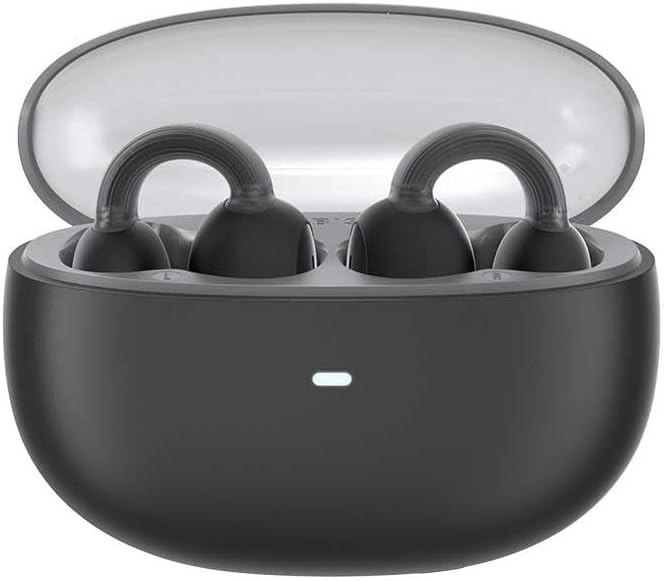
Image: The Baseus AirGo 1 Ring Open-Ear TWS Headphones, including the charging case, earbuds, and USB charging cable, displayed alongside their retail packaging.
ഉൽപ്പന്നം കഴിഞ്ഞുview
Familiarize yourself with the components of your Baseus AirGo 1 Ring Open-Ear TWS Headphones.

Image: The Baseus AirGo 1 Ring Open-Ear TWS Headphones charging case, closed, with an indicator light on the front.

ചിത്രം: ഒരു ക്ലോസ്-അപ്പ് view of the Baseus AirGo 1 Ring Open-Ear TWS Headphones earbuds, highlighting their unique open-ear design with a ring-shaped ear hook and the speaker component.

Image: Another detailed view of the Baseus AirGo 1 Ring Open-Ear TWS Headphones earbuds, showcasing the ergonomic design intended for comfortable open-ear wear.

Image: A pair of Baseus AirGo 1 Ring Open-Ear TWS Headphones earbuds, viewed from a different angle, emphasizing their compact and curved form factor.
സജ്ജമാക്കുക
1. ഹെഡ്ഫോണുകളും കേസും ചാർജ് ചെയ്യുന്നു
ആദ്യ ഉപയോഗത്തിന് മുമ്പ്, ഹെഡ്ഫോണുകളും ചാർജിംഗ് കേസും പൂർണ്ണമായും ചാർജ് ചെയ്യുക.
- രണ്ട് ഇയർബഡുകളും ചാർജിംഗ് കേസിൽ വയ്ക്കുക. അവ അവയുടെ സ്ലോട്ടുകളിൽ ശരിയായി സ്ഥാപിച്ചിട്ടുണ്ടെന്ന് ഉറപ്പാക്കുക.
- USB ചാർജിംഗ് കേബിൾ കേസിലെ ചാർജിംഗ് പോർട്ടിലേക്കും മറ്റേ അറ്റം ഒരു USB പവർ അഡാപ്റ്ററിലേക്കോ (ഉൾപ്പെടുത്തിയിട്ടില്ല) അല്ലെങ്കിൽ കമ്പ്യൂട്ടറിന്റെ USB പോർട്ടിലേക്കോ ബന്ധിപ്പിക്കുക.
- The indicator light on the charging case will illuminate to show charging status. Once fully charged, the light may change color or turn off.
- A full charge provides approximately 28 hours of total playback time with the charging case.

Image: The Baseus AirGo 1 Ring Open-Ear TWS Headphones earbuds placed inside their open charging case, with an illuminated indicator light on the case.
2. നിങ്ങളുടെ ഉപകരണവുമായി ജോടിയാക്കുന്നു
The headphones will automatically enter pairing mode when taken out of the charging case.
- ചാർജിംഗ് കെയ്സ് തുറന്ന് രണ്ട് ഇയർബഡുകളും നീക്കം ചെയ്യുക. അവ സ്വയമേവ ഓണാകുകയും പരസ്പരം ജോടിയാക്കാൻ ശ്രമിക്കുകയും ചെയ്യും.
- നിങ്ങളുടെ സ്മാർട്ട്ഫോണിലോ ബ്ലൂടൂത്ത് പ്രവർത്തനക്ഷമമാക്കിയ ഉപകരണത്തിലോ, ബ്ലൂടൂത്ത് ക്രമീകരണങ്ങളിലേക്ക് പോകുക.
- ഇതിനായി തിരയുക new devices and select "Baseus AirGo 1" (or similar name) from the list of available devices.
- കണക്റ്റ് ചെയ്തുകഴിഞ്ഞാൽ, നിങ്ങൾക്ക് ഒരു കേൾക്കാവുന്ന സ്ഥിരീകരണം കേൾക്കാൻ കഴിയും, ഇയർബഡുകളിലെ ഇൻഡിക്കേറ്റർ ലൈറ്റ് മാറിയേക്കാം.
- ജോടിയാക്കൽ പരാജയപ്പെട്ടാൽ, ഇയർബഡുകൾ വീണ്ടും കേസിൽ വയ്ക്കുക, ലിഡ് അടയ്ക്കുക, കുറച്ച് നിമിഷങ്ങൾ കാത്തിരിക്കുക, തുടർന്ന് ഘട്ടങ്ങൾ ആവർത്തിക്കുക.
പ്രവർത്തന നിർദ്ദേശങ്ങൾ
ഹെഡ്ഫോണുകൾ ധരിക്കുന്നു
The Baseus AirGo 1 headphones are designed for open-ear wear, resting comfortably on your ear without entering the ear canal.

Image: A diagram illustrating how the Baseus AirGo 1 Ring Open-Ear TWS Headphones are worn, showing the earbud resting on the outer ear with sound directed towards the ear canal at a 20-degree angle.
- Gently place the earbud over your ear, ensuring the ring-shaped hook rests securely behind your ear.
- Adjust the earbud until the speaker is positioned comfortably near your ear canal, allowing for clear audio while maintaining awareness of your surroundings.
ടച്ച് നിയന്ത്രണങ്ങൾ
The headphones feature touch-sensitive controls on each earbud. The specific functions may vary slightly based on your device and app settings.
| ആക്ഷൻ | ഫംഗ്ഷൻ |
|---|---|
| ഒറ്റ ടാപ്പ് (ഇടത്/വലത്) | സംഗീതം പ്ലേ ചെയ്യുക/താൽക്കാലികമായി നിർത്തുക, കോൾ സ്വീകരിക്കുക/അവസാനിപ്പിക്കുക |
| ഡബിൾ ടാപ്പ് (ഇടത്) | മുമ്പത്തെ ട്രാക്ക് |
| ഡബിൾ ടാപ്പ് (വലത്) | അടുത്ത ട്രാക്ക് |
| ട്രിപ്പിൾ ടാപ്പ് (ഇടത്/വലത്) | വോയ്സ് അസിസ്റ്റൻ്റ് സജീവമാക്കുക |
| ദീർഘനേരം അമർത്തുക (2 സെക്കൻഡ്) | കോൾ നിരസിക്കുക |
കുറിപ്പ്: നിങ്ങളുടെ കണക്റ്റുചെയ്ത ഉപകരണം വഴിയാണ് സാധാരണയായി വോളിയം നിയന്ത്രണം നിയന്ത്രിക്കുന്നത്.
മെയിൻ്റനൻസ്
Proper care will extend the life of your Baseus AirGo 1 headphones.
- വൃത്തിയാക്കൽ: ഇയർബഡുകളും ചാർജിംഗ് കെയ്സും വൃത്തിയാക്കാൻ മൃദുവായതും ഉണങ്ങിയതും ലിന്റ് രഹിതവുമായ തുണി ഉപയോഗിക്കുക. അബ്രാസീവ് ക്ലീനറുകൾ, ആൽക്കഹോൾ, കെമിക്കൽ ലായകങ്ങൾ എന്നിവ ഉപയോഗിക്കരുത്.
- സംഭരണം: ഉപയോഗത്തിലില്ലാത്തപ്പോൾ, ഇയർബഡുകൾ സംരക്ഷിക്കുന്നതിനും ചാർജ്ജ് ചെയ്ത നിലയിൽ നിലനിർത്തുന്നതിനും എല്ലായ്പ്പോഴും ചാർജിംഗ് കേസിൽ സൂക്ഷിക്കുക.
- താപനില: ഹെഡ്ഫോണുകൾ തീവ്രമായ താപനിലയിലോ (ചൂടോ തണുപ്പോ) ഉയർന്ന ആർദ്രതയിലോ തുറന്നുകാട്ടുന്നത് ഒഴിവാക്കുക.
- ജല പ്രതിരോധം: ഈ ഹെഡ്ഫോണുകൾ വാട്ടർപ്രൂഫ് അല്ല. ദ്രാവകങ്ങളുമായുള്ള സമ്പർക്കം ഒഴിവാക്കുക.
ട്രബിൾഷൂട്ടിംഗ്
നിങ്ങളുടെ ഹെഡ്ഫോണുകളിൽ എന്തെങ്കിലും പ്രശ്നങ്ങൾ നേരിടുകയാണെങ്കിൽ, ഇനിപ്പറയുന്ന പൊതുവായ പരിഹാരങ്ങൾ പരിശോധിക്കുക:
| പ്രശ്നം | സാധ്യമായ പരിഹാരം |
|---|---|
| ഹെഡ്ഫോണുകൾ ഓണാകുന്നില്ല | Ensure the charging case and earbuds are fully charged. Place earbuds back in the case and remove them again. |
| ഉപകരണവുമായി ജോടിയാക്കാൻ കഴിയില്ല | Make sure Bluetooth is enabled on your device. Place earbuds back in the case, close, then reopen and try pairing again. Ensure earbuds are close to the device. |
| ഒരു ഇയർബഡ് മാത്രമേ പ്രവർത്തിക്കൂ | Place both earbuds back into the charging case, close the lid, and then open it again. This often re-syncs them. Check battery levels of both earbuds. |
| കുറഞ്ഞ ശബ്ദം അല്ലെങ്കിൽ മോശം ശബ്ദ നിലവാരം | Adjust the volume on your connected device. Ensure earbuds are clean and properly positioned on your ears. Check for obstructions. |
| ഇടവിട്ടുള്ള കണക്ഷൻ | Move closer to your connected device. Avoid environments with strong Wi-Fi or other wireless interference. Disconnect and reconnect Bluetooth. |
ഈ പരിഹാരങ്ങൾ പരീക്ഷിച്ചതിന് ശേഷവും പ്രശ്നം നിലനിൽക്കുകയാണെങ്കിൽ, ദയവായി ഉപഭോക്തൃ പിന്തുണയുമായി ബന്ധപ്പെടുക.
സ്പെസിഫിക്കേഷനുകൾ
| ഫീച്ചർ | വിശദാംശങ്ങൾ |
|---|---|
| മോഡലിൻ്റെ പേര് | AirGo 1 Ring Open-Ear TWS |
| മോഡൽ നമ്പർ | A00069201113-00 |
| കണക്റ്റിവിറ്റി ടെക്നോളജി | വയർലെസ് (ബ്ലൂടൂത്ത്) |
| ഫോം ഫാക്ടർ | ട്രൂ വയർലെസ്, ഓപ്പൺ-ഇയർ |
| നിറം | കറുപ്പ് |
| ഫ്രീക്വൻസി റെസ്പോൺസ് റേഞ്ച് | 20Hz-20kHz |
| സംഗീതം പ്ലേ ചെയ്യുന്ന സമയം (ഇയർബഡുകൾ) | ഏകദേശം 6 മണിക്കൂർ (70% വോളിയത്തിൽ) |
| ആകെ പ്ലേബാക്ക് സമയം (ചാർജിംഗ് കേസിനൊപ്പം) | ഏകദേശം 28 മണിക്കൂർ |
| ബാറ്ററി തരം | ലിഥിയം അയോൺ (ഉൾപ്പെടുന്നു) |
| ഇനത്തിൻ്റെ ഭാരം | 200 ഗ്രാം / 7.1 ഔൺസ് |
| നിർമ്മാതാവ് | ബേസിയസ് |
വാറൻ്റിയും പിന്തുണയും
Baseus products come with a standard warranty. Please refer to the warranty card included in your product packaging for specific terms and conditions, including the warranty period and coverage details.
ഉപഭോക്തൃ പിന്തുണ
For technical support, warranty claims, or any other inquiries, please contact Baseus customer service through the following channels:
- Webസൈറ്റ്: ഔദ്യോഗിക ബേസിയസ് സന്ദർശിക്കുക webപതിവുചോദ്യങ്ങൾ, പിന്തുണാ ഉറവിടങ്ങൾ, ബന്ധപ്പെടാനുള്ള വിവരങ്ങൾ എന്നിവയ്ക്കുള്ള സൈറ്റ്.
- ഇമെയിൽ: നിങ്ങളുടെ ഉൽപ്പന്ന പാക്കേജിംഗ് അല്ലെങ്കിൽ ബേസിയസ് കാണുക. webഉപഭോക്തൃ പിന്തുണ ഇമെയിൽ വിലാസത്തിനായുള്ള സൈറ്റ്.
- ഓൺലൈൻ സ്റ്റോർ: For purchases made on Amazon, you can also visit the ആമസോണിലെ ബേസിയസ് സ്റ്റോർ ഉൽപ്പന്ന വിവരങ്ങൾക്കും പിന്തുണ ഓപ്ഷനുകൾക്കും.
Please have your product model number (A00069201113-00) and proof of purchase ready when contacting support.


