ഉൽപ്പന്നം കഴിഞ്ഞുview
The beyerdynamic MMX 300 PRO is a high-performance wired gaming headset designed for professional studio sound quality and clear communication. It features Stellar.45 drivers for precise audio reproduction and a high-quality condenser microphone for outstanding speech intelligibility. Built for extended gaming sessions, it offers maximum comfort with soft velour earpads and an ergonomic headband. This headset is handmade in Germany, ensuring durability and reliability.

Image: The beyerdynamic MMX 300 PRO Gaming Headset, showcasing its black design and attached microphone.
സജ്ജമാക്കുക
The MMX 300 PRO headset is designed for broad compatibility and easy setup across various gaming platforms. It includes all necessary cables for connection.
ഉൾപ്പെടുത്തിയ ഘടകങ്ങൾ:
- Wired Gaming Headset MMX 300 PRO
- പിസി കേബിൾ
- കൺസോൾ അഡാപ്റ്റർ
- Microphone Pop Protection Filter
നിങ്ങളുടെ ഹെഡ്സെറ്റ് ബന്ധിപ്പിക്കുന്നു:
The headset connects via a 3.5 mm jack. Use the appropriate cable for your device:
- പിസി: Use the PC cable which typically splits into separate microphone and headphone jacks. Connect the green plug to your audio output and the pink plug to your microphone input.
- Xbox, PlayStation, Nintendo Switch: Use the console adapter to connect the headset's single 3.5mm jack to your controller or console's audio port.

Image: The MMX 300 PRO headset shown with icons indicating compatibility with PC, Mobile, Xbox, PlayStation (PS4/PS5), and Nintendo Switch.
ഹെഡ്സെറ്റ് പ്രവർത്തിപ്പിക്കുന്നു
The MMX 300 PRO is engineered for optimal audio performance and user comfort during gaming and communication.
ഓഡിയോ പ്രകടനം:
Experience professional studio sound with the integrated Stellar.45 drivers, providing a wide frequency response for immersive gaming audio, from deep bass to clear trebles.

Image: A hand holding the MMX 300 PRO headset against a background of gaming-themed visuals, emphasizing professional sound for gaming.

ചിത്രം: പൊട്ടിത്തെറിച്ച ഒരു view of the headset's ear cup, highlighting the Optimized STELLAR.45 driver for competitive gaming moments.
മൈക്രോഫോൺ ഉപയോഗം:
The high-quality condenser microphone ensures outstanding speech intelligibility, crucial for clear team communication. The microphone arm is flexible and can be adjusted to your preferred position. An integrated remote control on the cable allows for easy volume adjustment and microphone muting.

Image: A close-up of the headset's microphone, indicating its broadcast quality for best speech intelligibility.
വീഡിയോ: ഒരു ഔദ്യോഗിക ബെയർഡൈനാമിക് വീഡിയോ ഷോasing the features of the MMX 300 PRO Gaming Headset, including its professional sound, microphone quality, and comfort.
ധരിക്കാനുള്ള സുഖം:
The MMX 300 PRO is designed for maximum comfort during long gaming sessions. It features soft velour ear pads that prevent heat build-up and an ergonomic headband with a snap fastener for a secure yet comfortable fit.

ചിത്രം: വിശദമായ ഒരു ചിത്രം view of the headset highlighting its ergonomic headband and soft velour ear pads, designed for unparalleled wearing comfort.
മെയിൻ്റനൻസ്
To ensure the longevity and optimal performance of your beyerdynamic MMX 300 PRO headset, regular maintenance is recommended.
വൃത്തിയാക്കൽ:
- Wipe the surfaces of the earcups and headband with a soft, dry cloth.
- For the velour earpads, a lint roller or a soft brush can be used to remove dust and debris.
- കഠിനമായ രാസവസ്തുക്കളോ അബ്രാസീവ് ക്ലീനറുകളോ ഉപയോഗിക്കുന്നത് ഒഴിവാക്കുക, കാരണം ഇവ വസ്തുക്കൾക്ക് കേടുവരുത്തും.
പരസ്പരം മാറ്റാവുന്ന ഭാഗങ്ങൾ:
The MMX 300 PRO is designed with user-replaceable components to extend its lifespan. Ear pads, the headband, and the cable are available as interchangeable replacement parts. This allows for easy replacement in case of wear or damage, maintaining the headset's comfort and functionality over time.
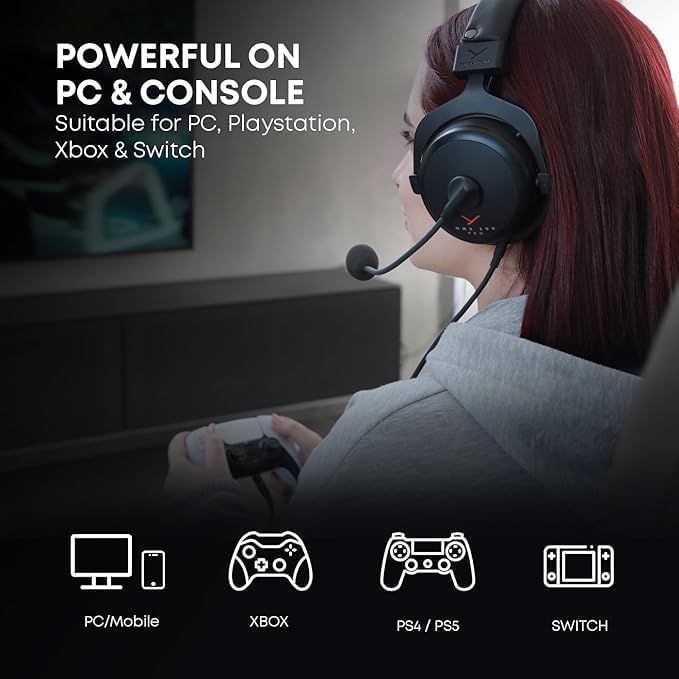
Image: A close-up showing the internal components of the headset, emphasizing its "Handmade in Germany" quality and robust construction.
ട്രബിൾഷൂട്ടിംഗ്
If you encounter any issues with your MMX 300 PRO headset, please refer to the following common troubleshooting steps:
- ശബ്ദമില്ല/കുറഞ്ഞ ശബ്ദം:
- Ensure the 3.5mm jack is fully inserted into the audio port of your device.
- Check the volume control on the headset's inline remote and your device's system volume settings.
- നിങ്ങളുടെ കമ്പ്യൂട്ടറിന്റെ ശബ്ദ ക്രമീകരണങ്ങളിൽ ശരിയായ ഓഡിയോ ഔട്ട്പുട്ട് ഉപകരണം തിരഞ്ഞെടുത്തിട്ടുണ്ടെന്ന് ഉറപ്പാക്കുക.
- Microphone Not Working/Low Volume:
- Ensure the microphone is not muted via the inline remote.
- Check your device's microphone input settings and ensure the MMX 300 PRO microphone is selected as the default input device.
- Adjust microphone levels and boost settings in your operating system's sound control panel.
- Ensure the microphone pop protection filter is correctly attached and not obstructing sound.
- വികലമായ ഓഡിയോ:
- Reduce the volume on both the headset and your device.
- Ensure the audio cable is not damaged or kinked.
- Test the headset with another device to rule out a device-specific issue.
- Physical Noise (e.g., Creaking):
- While the headset is built for durability, minor creaking can sometimes occur with movement. This typically does not affect audio performance.
- Ensure all adjustable parts are clean and free of debris.
If these steps do not resolve your issue, please contact beyerdynamic customer support for further assistance.
സ്പെസിഫിക്കേഷനുകൾ
| ഫീച്ചർ | വിശദാംശങ്ങൾ |
|---|---|
| മോഡലിൻ്റെ പേര് | MMX 300 PRO |
| കണക്റ്റിവിറ്റി ടെക്നോളജി | വയർഡ് |
| ഹെഡ്ഫോണുകൾ ജാക്ക് | 3.5 mm ജാക്ക് |
| പ്രതിരോധം | 48 ഓം |
| Frequency Response (Headphone) | 5 - 35,000 ഹെർട്സ് |
| ഫ്രീക്വൻസി റെസ്പോൺസ് (മൈക്രോഫോൺ) | 20 - 20,000 Hz (typical for condenser mics) |
| നിയന്ത്രണ തരം | Volume Control (Inline Remote) |
| അനുയോജ്യമായ ഉപകരണങ്ങൾ | PC, Xbox, PlayStation, Nintendo Switch |
| മെറ്റീരിയൽ | Plastic (with metal components) |
| ഇനത്തിൻ്റെ ഭാരം | 1 പൗണ്ട് (ഏകദേശം 453 ഗ്രാം) |
| ഉൽപ്പന്ന അളവുകൾ | 8.66 x 4.72 x 5.91 ഇഞ്ച് |
| നിർമ്മിച്ചത് | ജർമ്മനി |
വാറൻ്റിയും പിന്തുണയും
beyerdynamic products are manufactured to the highest quality standards. For detailed information regarding your product's warranty, please refer to the warranty card included with your purchase or visit the official beyerdynamic webസൈറ്റ്.
For technical support, replacement parts, or further inquiries, please visit the official beyerdynamic store or contact their customer service directly.


