1. ആമുഖം
Thank you for choosing the MASTECH MY75 Digital Multimeter. This device is a professional, handheld instrument designed for accurate measurement of AC/DC voltage, AC/DC current, resistance, capacitance, frequency, diode, continuity, and transistor hFE. Please read this manual thoroughly before use to ensure safe and proper operation.
1.1 സുരക്ഷാ വിവരങ്ങൾ
Always adhere to safety precautions when using any electrical testing equipment. Failure to do so may result in injury or damage to the meter or equipment under test.
- Do not exceed the maximum input values specified for each range.
- വോള്യവുമായി പ്രവർത്തിക്കുമ്പോൾ അതീവ ജാഗ്രത പാലിക്കുകtag60V DC അല്ലെങ്കിൽ 30V AC RMS-ന് മുകളിലാണ്.
- Ensure the test leads are in good condition and properly connected.
- മീറ്റർ കേടായതായി തോന്നിയാലോ കേസ് തുറന്നിരിക്കുകയാണെങ്കിലോ അത് പ്രവർത്തിപ്പിക്കരുത്.
- കൃത്യമായ റീഡിംഗുകൾ ഉറപ്പാക്കാൻ കുറഞ്ഞ ബാറ്ററി സൂചകം ദൃശ്യമാകുമ്പോൾ ബാറ്ററികൾ മാറ്റിസ്ഥാപിക്കുക.
- This meter is rated CAT III 600V.
2. ഉൽപ്പന്നം കഴിഞ്ഞുview
The MASTECH MY75 is a compact and versatile digital multimeter suitable for domestic, industrial, and electronics applications.
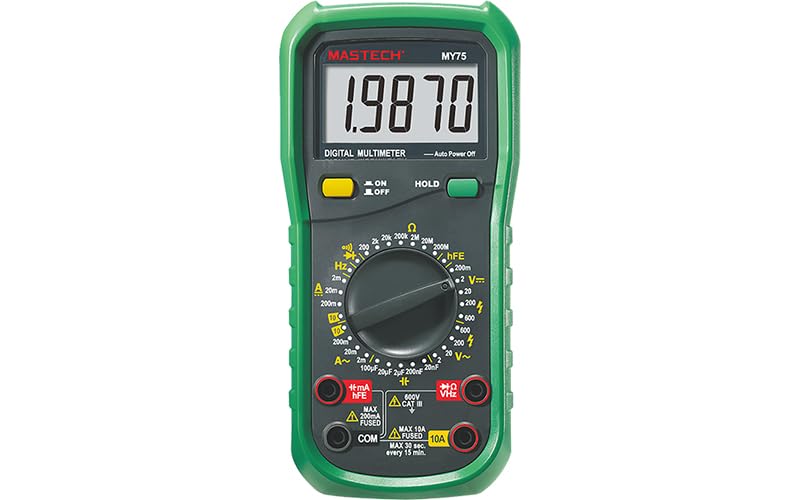
ചിത്രം 2.1: മുൻഭാഗം view of the MASTECH MY75 Digital Multimeter, showing the LCD display, rotary switch, function buttons, and input jacks.
2.1 പ്രധാന ഘടകങ്ങൾ
- LCD ഡിസ്പ്ലേ: 20000 counts display for clear readings.
- റോട്ടറി സ്വിച്ച്: Used to select measurement functions and ranges.
- ഫംഗ്ഷൻ ബട്ടണുകൾ: Includes ON/OFF, HOLD, and other specific function buttons.
- ഇൻപുട്ട് ജാക്കുകൾ: Terminals for connecting test leads (COM, VΩHz, 10A, mA/µA/hFE).

ചിത്രം 2.2: ഓവർview of MY75 features, main applications (domestic, industrial, electronics), and package contents.
3. സജ്ജീകരണം
3.1 പാക്കേജ് ഉള്ളടക്കം
Before starting, verify that all items are present in the package:
- MASTECH MY75 ഡിജിറ്റൽ മൾട്ടിമീറ്റർ
- ടെസ്റ്റ് ലീഡുകൾ (ചുവപ്പും കറുപ്പും)
- Multi-function Socket (for hFE testing)
- 2 x LR44 ബാറ്ററികൾ (മുൻകൂട്ടി ഇൻസ്റ്റാൾ ചെയ്തതോ പ്രത്യേകം ഉൾപ്പെടുത്തിയതോ)
- ദ്രുത-ആരംഭ ഗൈഡ്
- കാലിബ്രേഷൻ സർട്ടിഫിക്കറ്റ്

Figure 3.1: The MASTECH MY75 Multimeter shown with its retail packaging and included accessories.

Figure 3.2: The MASTECH MY75 Multimeter with its essential accessories: test leads, LR44 batteries, and the multi-function hFE socket.
3.2 ബാറ്ററി ഇൻസ്റ്റാളേഷൻ
The MASTECH MY75 uses 2 LR44 batteries. If the low battery indicator appears on the display, replace the batteries immediately to maintain measurement accuracy.
- Turn off the multimeter and disconnect all test leads.
- യൂണിറ്റിന്റെ പിൻഭാഗത്ത് ബാറ്ററി കമ്പാർട്ട്മെന്റ് കവർ കണ്ടെത്തുക.
- നിലനിർത്തുന്ന സ്ക്രൂ(കൾ) അഴിച്ച് കവർ നീക്കം ചെയ്യുക.
- Remove the old batteries and insert new LR44 batteries, observing correct polarity.
- ബാറ്ററി കമ്പാർട്ട്മെന്റ് കവർ മാറ്റി സ്ക്രൂ(കൾ) ഉപയോഗിച്ച് ഉറപ്പിക്കുക.
3.3 ടെസ്റ്റ് ലീഡുകൾ ബന്ധിപ്പിക്കുന്നു
Always connect the black test lead to the "COM" (Common) jack. Connect the red test lead to the appropriate input jack based on the measurement function:
- VΩHz: വാല്യംtage, Resistance, Frequency, Capacitance, Diode, and Continuity measurements.
- mA/µA/hFE: മില്ലിക്ക്ampഎറെ/മൈക്രോampere current measurements and transistor hFE testing.
- 10A: ഉയർന്ന കറന്റ് (10A വരെ) അളവുകൾക്ക്.
4. പ്രവർത്തന നിർദ്ദേശങ്ങൾ
To operate the multimeter, turn the rotary switch to the desired function. The meter features auto-ranging for most functions, simplifying operation.
4.1 ഡിസി വോളിയംtage Measurement (V=)
- Connect the black test lead to the COM jack and the red test lead to the VΩHz jack.
- Turn the rotary switch to the "V=" position.
- Connect the test leads across the DC voltagഇ ഉറവിടം അളക്കണം.
- വാല്യം വായിക്കുകtagഡിസ്പ്ലേയിലെ ഇ മൂല്യം.
4.2 എസി വോള്യംtage Measurement (V~)
- Connect the black test lead to the COM jack and the red test lead to the VΩHz jack.
- Turn the rotary switch to the "V~" position.
- എസി വോള്യത്തിലുടനീളം ടെസ്റ്റ് ലീഡുകൾ ബന്ധിപ്പിക്കുക.tagഇ ഉറവിടം അളക്കണം.
- വാല്യം വായിക്കുകtagഡിസ്പ്ലേയിലെ ഇ മൂല്യം.
4.3 DC Current Measurement (A= / mA= / µA=)
- സർക്യൂട്ടിലേക്കുള്ള പവർ ഓഫ് ചെയ്യുക.
- ബ്ലാക്ക് ടെസ്റ്റ് ലീഡ് COM ജാക്കിലേക്ക് ബന്ധിപ്പിക്കുക.
- For currents up to 200mA, connect the red test lead to the mA/µA/hFE jack. For currents up to 10A, connect the red test lead to the 10A jack.
- Turn the rotary switch to the appropriate "A=", "mA=", or "µA=" position.
- Break the circuit and connect the meter in series with the load.
- സർക്യൂട്ടിലേക്ക് വൈദ്യുതി പ്രയോഗിച്ച് നിലവിലെ മൂല്യം വായിക്കുക.
4.4 AC Current Measurement (A~ / mA~ / µA~)
- Follow the same steps as DC Current Measurement, but select the appropriate "A~", "mA~", or "µA~" position on the rotary switch.
4.5 പ്രതിരോധ അളവ് (Ω)
- സർക്യൂട്ട് ഡീ-എനർജൈസ് ചെയ്തിട്ടുണ്ടെന്നും എല്ലാ കപ്പാസിറ്ററുകളും ഡിസ്ചാർജ് ചെയ്തിട്ടുണ്ടെന്നും ഉറപ്പാക്കുക.
- Connect the black test lead to the COM jack and the red test lead to the VΩHz jack.
- റോട്ടറി സ്വിച്ച് "Ω" സ്ഥാനത്തേക്ക് തിരിക്കുക.
- അളക്കേണ്ട ഘടകത്തിലുടനീളം ടെസ്റ്റ് ലീഡുകൾ ബന്ധിപ്പിക്കുക.
- ഡിസ്പ്ലേയിലെ പ്രതിരോധ മൂല്യം വായിക്കുക.
4.6 Capacitance Measurement (F)
- അളക്കുന്നതിന് മുമ്പ് കപ്പാസിറ്റർ പൂർണ്ണമായും ഡിസ്ചാർജ് ചെയ്തിട്ടുണ്ടെന്ന് ഉറപ്പാക്കുക.
- Connect the black test lead to the COM jack and the red test lead to the VΩHz jack.
- Turn the rotary switch to the "F" position.
- കപ്പാസിറ്റർ ടെർമിനലുകളിലുടനീളം ടെസ്റ്റ് ലീഡുകൾ ബന്ധിപ്പിക്കുക.
- ഡിസ്പ്ലേയിലെ കപ്പാസിറ്റൻസ് മൂല്യം വായിക്കുക.
4.7 ഫ്രീക്വൻസി മെഷർമെന്റ് (Hz)
- Connect the black test lead to the COM jack and the red test lead to the VΩHz jack.
- Turn the rotary switch to the "Hz" position.
- സിഗ്നൽ സ്രോതസ്സിലുടനീളം ടെസ്റ്റ് ലീഡുകൾ ബന്ധിപ്പിക്കുക.
- ഡിസ്പ്ലേയിലെ ഫ്രീക്വൻസി മൂല്യം വായിക്കുക.
4.8 Diode Test (→|)
- സർക്യൂട്ട് ഡീ-എനർജൈസ്ഡ് ആണെന്ന് ഉറപ്പാക്കുക.
- Connect the black test lead to the COM jack and the red test lead to the VΩHz jack.
- Turn the rotary switch to the Diode symbol position.
- ചുവന്ന ലെഡ് ഡയോഡിന്റെ ആനോഡിലേക്കും കറുത്ത ലെഡ് കാഥോഡിലേക്കും ബന്ധിപ്പിക്കുക. ഒരു ഫോർവേഡ് വോള്യംtage drop will be displayed (Diode Open Voltagഇ 3.0V).
- Reverse the leads. The display should show "OL" (Open Loop) for a good diode.
4.9 Continuity Test ())))
- സർക്യൂട്ട് ഡീ-എനർജൈസ്ഡ് ആണെന്ന് ഉറപ്പാക്കുക.
- Connect the black test lead to the COM jack and the red test lead to the VΩHz jack.
- Turn the rotary switch to the Continuity symbol position.
- സർക്യൂട്ടിലോ ഘടകത്തിലോ ഉടനീളം ടെസ്റ്റ് ലീഡുകൾ ബന്ധിപ്പിക്കുക.
- If the resistance is less than approximately 60Ω, the buzzer will sound, indicating continuity.
4.10 Transistor hFE Test
- Connect the multi-function socket to the mA/µA/hFE and COM jacks.
- Turn the rotary switch to the "hFE" position.
- Insert the transistor's emitter, base, and collector leads into the corresponding holes on the multi-function socket (NPN or PNP).
- Read the hFE value (0-1000) on the display.
5. സവിശേഷതകൾ
- Display 20000 Counts: Provides high resolution for precise measurements.
- ഡാറ്റ ഹോൾഡ്: Press the "HOLD" button to freeze the current reading on the display. Press again to release.
- ഓട്ടോ പവർ ഓഫ്: The meter automatically turns off after a period of inactivity to conserve battery life.
- കുറഞ്ഞ ബാറ്ററി ഡിസ്പ്ലേ: An icon on the display indicates when the batteries are low and need replacement.
6. പരിപാലനം
6.1 വൃത്തിയാക്കൽ
പരസ്യം ഉപയോഗിച്ച് കേസ് തുടയ്ക്കുകamp cloth and mild detergent. Do not use abrasives or solvents. Keep the input terminals free from dirt and moisture.
6.2 ബാറ്ററി മാറ്റിസ്ഥാപിക്കൽ
Refer to Section 3.2 for detailed instructions on replacing the LR44 batteries.
6.3 സംഭരണം
If the meter is not used for an extended period, remove the batteries to prevent leakage and damage. Store the meter in a cool, dry place away from direct sunlight.
7. പ്രശ്നപരിഹാരം
| പ്രശ്നം | സാധ്യമായ കാരണം | പരിഹാരം |
|---|---|---|
| ഡിസ്പ്ലേ ഇല്ല അല്ലെങ്കിൽ മങ്ങിയ ഡിസ്പ്ലേ | കുറഞ്ഞതോ ഡെഡ് ആയതോ ആയ ബാറ്ററികൾ; തെറ്റായ ബാറ്ററി ഇൻസ്റ്റാളേഷൻ. | ബാറ്ററികൾ മാറ്റിസ്ഥാപിക്കുക; ബാറ്ററി പോളാരിറ്റി പരിശോധിക്കുക |
| "OL" (ഓവർലോഡ്) പ്രദർശിപ്പിച്ചിരിക്കുന്നു | Input value exceeds selected range; Open circuit | Select a higher range; Check circuit connections |
| തെറ്റായ വായനകൾ | Low batteries; Incorrect function/range selected; Poor test lead connection | Replace batteries; Verify function/range; Ensure secure connections |
| കണ്ടിന്യുറ്റി ബീപ്പ് ഇല്ല | Resistance too high; Open circuit | Check circuit for breaks; Ensure resistance is below 60Ω |
8 സ്പെസിഫിക്കേഷനുകൾ
The following table details the technical specifications of the MASTECH MY75 Digital Multimeter.

Figure 8.1: Detailed specifications including range, resolution, and accuracy for various measurement functions of the MY75.
| അളക്കൽ തരം | പരിധി | റെസലൂഷൻ | കൃത്യത |
|---|---|---|---|
| ഡിസി വോളിയംtage | 200mV / 2V / 20V / 200V / 600V | 0.01mV / 0.1mV / 1mV / 10mV / 0.1V / 1V | ±(0.05%+3) മുതൽ ±(0.15%+3) വരെ |
| എസി വോളിയംtage | 2V / 20V / 200V / 600V | 0.1mV / 1mV / 10mV / 0.1V | ±(0.5%+3) മുതൽ ±(1.0%+15) വരെ |
| ഡിസി കറൻ്റ് | 2mA / 20mA / 200mA / 10A | 0.1µA / 1µA / 10µA / 1mA / 10mA | ±(0.5%+50) മുതൽ ±(2.0%+10) വരെ |
| എസി കറന്റ് | 2mA / 20mA / 200mA / 10A | 0.1µA / 1µA / 10µA / 1mA / 10mA | ±(0.8%+50) മുതൽ ±(2.5%+10) വരെ |
| പ്രതിരോധം | 200Ω / 2kΩ / 20kΩ / 200kΩ / 2MΩ / 20MΩ / 200MΩ | 0.01Ω / 0.1Ω / 1Ω / 10Ω / 100Ω / 1kΩ / 10kΩ | ±(0.5%+10) മുതൽ ±(5.0%+10) വരെ |
| കപ്പാസിറ്റൻസ് | 2µF / 20µF / 100µF / 20nF / 200nF | 0.1nF / 1nF / 10nF / 1pF / 10pF | ±(4.0%+20) |
| ആവൃത്തി | 20kHz | 1Hz | ±(1.5%+5) |
| Diode Open Voltage | 3.0V | N/A | N/A |
| തുടർച്ച ബസർ | <60Ω | N/A | N/A |
| ട്രാൻസിസ്റ്റർ hFE | 0~1000 | N/A | N/A |
| പ്രദർശിപ്പിക്കുക | 20000 എണ്ണം | N/A | N/A |
| പവർ ഉറവിടം | 2 x LR44 batteries | N/A | N/A |
| അളവുകൾ (L x W x H) | 16 x 9 x 5 സെ.മീ | N/A | N/A |
| ഭാരം | 500 ഗ്രാം | N/A | N/A |
| സുരക്ഷാ റേറ്റിംഗ് | ക്യാറ്റ് III 600 വി | N/A | N/A |
| സർട്ടിഫിക്കേഷനുകൾ | CE, RoHS | N/A | N/A |
9. വാറൻ്റിയും പിന്തുണയും
MASTECH products are designed for reliability and performance. For warranty information or technical support, please refer to the contact details provided with your purchase documentation or visit the official MASTECH webവാറന്റി ക്ലെയിമുകൾക്കുള്ള വാങ്ങലിന്റെ തെളിവായി നിങ്ങളുടെ വാങ്ങൽ രസീത് സൂക്ഷിക്കുക.
EU Spare Part Availability Duration: 1 Year.


