1. ആമുഖം
The Mastech MS8233A is a compact, battery-powered digital multimeter designed for measuring AC/DC voltage, DC current, resistance, diode, continuity, and temperature. It features a 2000-count display, data hold function, and a low battery indicator, making it suitable for various electrical testing applications.
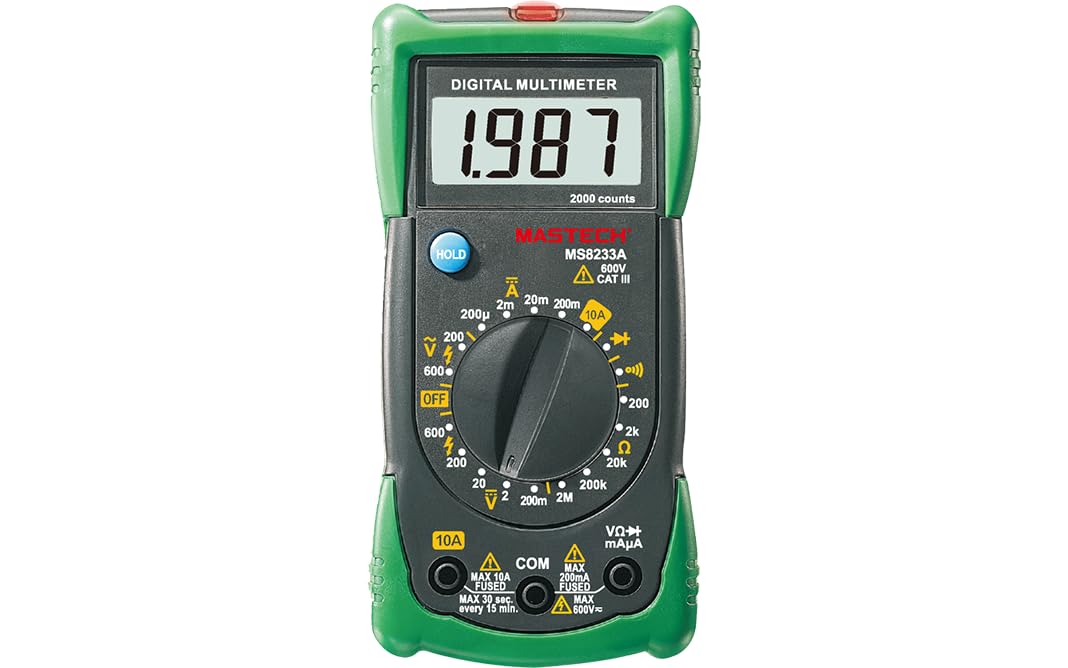
ചിത്രം 1: മുൻഭാഗം view of the Mastech MS8233A Digital Multimeter, showing the display, rotary switch, and input jacks.
2 സുരക്ഷാ വിവരങ്ങൾ
മീറ്ററിന്റെ സുരക്ഷിതമായ പ്രവർത്തനവും സേവനവും ഉറപ്പാക്കാൻ, ഈ നിർദ്ദേശങ്ങൾ പാലിക്കുക:
- Always ensure the meter is in good working condition before use.
- വോളിയം പ്രയോഗിക്കരുത്tage അല്ലെങ്കിൽ മീറ്ററിന് പരമാവധി നിർദ്ദിഷ്ട പരിധികൾ കവിയുന്ന കറന്റ്.
- വോള്യവുമായി പ്രവർത്തിക്കുമ്പോൾ ജാഗ്രത പാലിക്കുകtag60V DC അല്ലെങ്കിൽ 30V AC RMS ന് മുകളിലാണ്, കാരണം ഇവ ഷോക്ക് അപകടമുണ്ടാക്കുന്നു.
- ഫംഗ്ഷനുകൾ മാറ്റുന്നതിനുമുമ്പ് എല്ലായ്പ്പോഴും സർക്യൂട്ടിൽ നിന്ന് ടെസ്റ്റ് ലീഡുകൾ വിച്ഛേദിക്കുക.
- കൃത്യമായ റീഡിംഗുകൾ ഉറപ്പാക്കാൻ കുറഞ്ഞ ബാറ്ററി സൂചകം ദൃശ്യമാകുമ്പോൾ ഉടൻ ബാറ്ററി മാറ്റിസ്ഥാപിക്കുക.
- Do not operate the meter if the case is open or if it appears damaged.
- പ്രാദേശികവും ദേശീയവുമായ സുരക്ഷാ കോഡുകൾ പാലിക്കുക.
3. ഉൽപ്പന്ന സവിശേഷതകൾ
- ഡിസ്പ്ലേ: 2000 എണ്ണം
- Diode Open Voltagഇ: 3.0V
- Continuity Buzzer: Sounds at less than 60Ω
- ഡാറ്റ ഹോൾഡ് പ്രവർത്തനം
- Low Battery Display indicator
- AC/DC വോളിയം അളക്കുന്നുtage, DC current, resistance, diode check, continuity test, and temperature.
4. പാക്കേജ് ഉള്ളടക്കം
പാക്കേജിൽ എല്ലാ ഇനങ്ങളും ഉണ്ടെന്ന് ഉറപ്പാക്കുക:
- Mastech MS8233A Digital Multimeter
- ടെസ്റ്റ് ലീഡുകൾ
- 1x 9V 6F22 Battery (pre-installed or included separately)
- കാലിബ്രേഷൻ സർട്ടിഫിക്കറ്റ്
- ദ്രുത ആരംഭ ഗൈഡ്

Figure 2: Illustration of package contents and main applications for the MS8233A multimeter.
5. സജ്ജീകരണം
5.1 ബാറ്ററി ഇൻസ്റ്റാളേഷൻ
The MS8233A requires one 9V 6F22 battery. If the battery is not pre-installed or needs replacement:
- മൾട്ടിമീറ്റർ ഓഫാക്കിയിട്ടുണ്ടെന്ന് ഉറപ്പുവരുത്തി എല്ലാ ടെസ്റ്റ് ലീഡുകളും വിച്ഛേദിക്കുക.
- യൂണിറ്റിന്റെ പിൻഭാഗത്ത് ബാറ്ററി കമ്പാർട്ട്മെന്റ് കവർ കണ്ടെത്തുക.
- റിട്ടൈനിംഗ് സ്ക്രൂ(കൾ) അഴിച്ച് കവർ ശ്രദ്ധാപൂർവ്വം നീക്കം ചെയ്യുക.
- ശരിയായ പോളാരിറ്റി നിരീക്ഷിച്ചുകൊണ്ട് 9V ബാറ്ററി ബാറ്ററി ക്ലിപ്പുമായി ബന്ധിപ്പിക്കുക.
- ബാറ്ററി കമ്പാർട്ടുമെന്റിൽ വയ്ക്കുക, കവർ മാറ്റി സ്ക്രൂ(കൾ) ഉപയോഗിച്ച് ഉറപ്പിക്കുക.
5.2 ടെസ്റ്റ് ലീഡുകൾ ബന്ധിപ്പിക്കുന്നു
Insert the test leads into the appropriate input jacks:
- Insert the black test lead into the “COM” (common) jack.
- മിക്ക അളവുകൾക്കും (വാല്യംtage, resistance, diode, continuity, temperature), insert the red test lead into the “VΩmA” jack.
- For DC current measurements up to 10A, insert the red test lead into the “10A” jack.
6. പ്രവർത്തന നിർദ്ദേശങ്ങൾ
To operate the multimeter, turn the rotary switch to the desired function. The display will show the measurement value.
6.1 ഡിസി വോളിയംtage അളവ് (V–)
- റോട്ടറി സ്വിച്ച് ആവശ്യമുള്ള ഡിസി വോള്യത്തിലേക്ക് സജ്ജമാക്കുക.tage range (e.g., 200mV, 2V, 20V, 200V, 600V).
- സർക്യൂട്ടിന്റെ പോസിറ്റീവ് (+) വശത്തേക്കും കറുത്ത ടെസ്റ്റ് ലീഡ് നെഗറ്റീവ് (-) വശത്തേക്കും ചുവന്ന ടെസ്റ്റ് ലീഡ് ബന്ധിപ്പിക്കുക.
- വാല്യം വായിക്കുകtagഡിസ്പ്ലേയിലെ ഇ മൂല്യം.
6.2 എസി വോള്യംtage അളവ് (V∼)
- റോട്ടറി സ്വിച്ച് ആവശ്യമുള്ള എസി വോള്യത്തിലേക്ക് സജ്ജമാക്കുക.tage range (e.g., 200V, 600V).
- എസി വോള്യത്തിലുടനീളം ടെസ്റ്റ് ലീഡുകൾ ബന്ധിപ്പിക്കുക.tagഇ ഉറവിടം.
- വാല്യം വായിക്കുകtagഡിസ്പ്ലേയിലെ ഇ മൂല്യം.
6.3 DC Current Measurement (A–)
- Set the rotary switch to the desired DC Current range (e.g., 200µA, 2mA, 20mA, 200mA, 10A).
- പ്രധാനപ്പെട്ടത്: For 10A measurements, move the red test lead to the “10A” jack. For other current ranges, use the “VΩmA” jack.
- Open the circuit where current is to be measured and connect the meter in series.
- ഡിസ്പ്ലേയിലെ നിലവിലെ മൂല്യം വായിക്കുക.
6.4 Resistance Measurement (Ω)
- Set the rotary switch to the desired Resistance range (e.g., 200Ω, 2kΩ, 20kΩ, 200kΩ, 2MΩ).
- പ്രതിരോധം അളക്കുന്നതിന് മുമ്പ് സർക്യൂട്ട് അല്ലെങ്കിൽ ഘടകം ഡീ-എനർജൈസ് ചെയ്തിട്ടുണ്ടെന്ന് ഉറപ്പാക്കുക.
- അളക്കേണ്ട ഘടകത്തിലുടനീളം ടെസ്റ്റ് ലീഡുകൾ ബന്ധിപ്പിക്കുക.
- ഡിസ്പ്ലേയിലെ പ്രതിരോധ മൂല്യം വായിക്കുക.
6.5 Diode Test (→|–)
- Set the rotary switch to the Diode Test function.
- ചുവന്ന ടെസ്റ്റ് ലീഡ് ആനോഡിലേക്കും കറുത്ത ടെസ്റ്റ് ലീഡ് ഡയോഡിന്റെ കാഥോഡിലേക്കും ബന്ധിപ്പിക്കുക.
- ഡിസ്പ്ലേ ഫോർവേഡ് വോളിയം കാണിക്കുംtage drop. Reverse the leads to check for open circuit (OL) indication.
6.6 Continuity Test (♫)
- Set the rotary switch to the Continuity Test function.
- സർക്യൂട്ടിലോ ഘടകത്തിലോ ഉടനീളം ടെസ്റ്റ് ലീഡുകൾ ബന്ധിപ്പിക്കുക.
- If the resistance is below approximately 60Ω, the buzzer will sound, indicating continuity.
6.7 Temperature Measurement (℃/℉)
The MS8233A can measure temperature using a K-type thermocouple (not always included, check package contents).
- Set the rotary switch to the Temperature function.
- Connect the K-type thermocouple to the input jacks, observing polarity.
- Place the thermocouple probe at the point where temperature is to be measured.
- ഡിസ്പ്ലേയിലെ താപനില മൂല്യം വായിക്കുക.
6.8 ഡാറ്റ ഹോൾഡ് പ്രവർത്തനം
Press the “HOLD” button to freeze the current reading on the display. Press it again to release the hold function and resume live readings.
7. പരിപാലനം
7.1 ബാറ്ററി മാറ്റിസ്ഥാപിക്കൽ
When the low battery indicator appears on the display, replace the 9V battery as described in Section 5.1.
7.2 വൃത്തിയാക്കൽ
പരസ്യം ഉപയോഗിച്ച് കേസ് തുടയ്ക്കുകamp തുണിയും നേരിയ ഡിറ്റർജന്റും ഉപയോഗിക്കുക. അബ്രാസീവ് വസ്തുക്കളോ ലായകങ്ങളോ ഉപയോഗിക്കരുത്. ഉപയോഗിക്കുന്നതിന് മുമ്പ് മീറ്റർ പൂർണ്ണമായും ഉണങ്ങിയെന്ന് ഉറപ്പാക്കുക.
7.3 ഫ്യൂസ് മാറ്റിസ്ഥാപിക്കൽ
The current input jacks are typically protected by fuses. If the meter fails to measure current, the fuse may need replacement. Refer to the specific fuse ratings printed on the meter or in the detailed specifications. Fuse replacement should only be performed by qualified personnel.
8. പ്രശ്നപരിഹാരം
If the multimeter does not function correctly, consider the following:
- ഡിസ്പ്ലേ ഇല്ല അല്ലെങ്കിൽ മങ്ങിയ ഡിസ്പ്ലേ: Check battery charge and ensure it is correctly installed. Replace if necessary.
- തെറ്റായ വായനകൾ: Verify the correct function and range are selected. Ensure test leads are properly connected and making good contact. Check battery level.
- Cannot measure current: Check the fuse for the current input. Ensure the red test lead is in the correct current jack (e.g., 10A).
- “OL” (Overload) displayed: The measured value exceeds the selected range. Switch to a higher range or verify the circuit is not open.
പ്രശ്നങ്ങൾ നിലനിൽക്കുകയാണെങ്കിൽ, ഉപഭോക്തൃ പിന്തുണയുമായി ബന്ധപ്പെടുക.
9 സ്പെസിഫിക്കേഷനുകൾ
9.1 പൊതു സവിശേഷതകൾ
- Power Source: 2 LR44 batteries required (included) - Note: Product description states 1x 9V 6F22 battery. Please verify with actual product.
- ഉൽപ്പന്ന അളവുകൾ: 16 x 9 x 5 സെ
- ഇനത്തിന്റെ ഭാരം: 0.5 കിലോഗ്രാം
- Manufacturer: MASTECH/MGL
- Safety Rating: CAT III 600V
- സർട്ടിഫിക്കേഷനുകൾ: CE, RoHS
- Upper Temperature Rating: 50 Degrees Celsius
9.2 ഇലക്ട്രിക്കൽ സ്പെസിഫിക്കേഷനുകൾ
| സ്പെസിഫിക്കേഷനുകൾ | പരിധി | റെസലൂഷൻ | കൃത്യത |
|---|---|---|---|
| ഡിസി വോളിയംtage | 200mV/2V/20V/200V 600V | 0.1mV/1mV/10mV/100mV 1V | ±(0.5%+3) ±(0.5%+3) |
| എസി വോളിയംtage | 200V 600V | 100 മി 1V | ±(1.2%+10) ±(1.2%+10) |
| ഡിസി കറൻ്റ് | 200µA/2mA/20mA/200mA 10എ | 0.1µA/1µA/10µA/0.1mA 0.01എ | ±(1.0%+3) ±(3.0%+5) |
| പ്രതിരോധം | 200Ω/2kΩ/20kΩ/200kΩ 2MΩ | 0.1Ω/1Ω/10Ω/100Ω 1kΩ | ±(0.8%+4) ±(0.8%+4) |
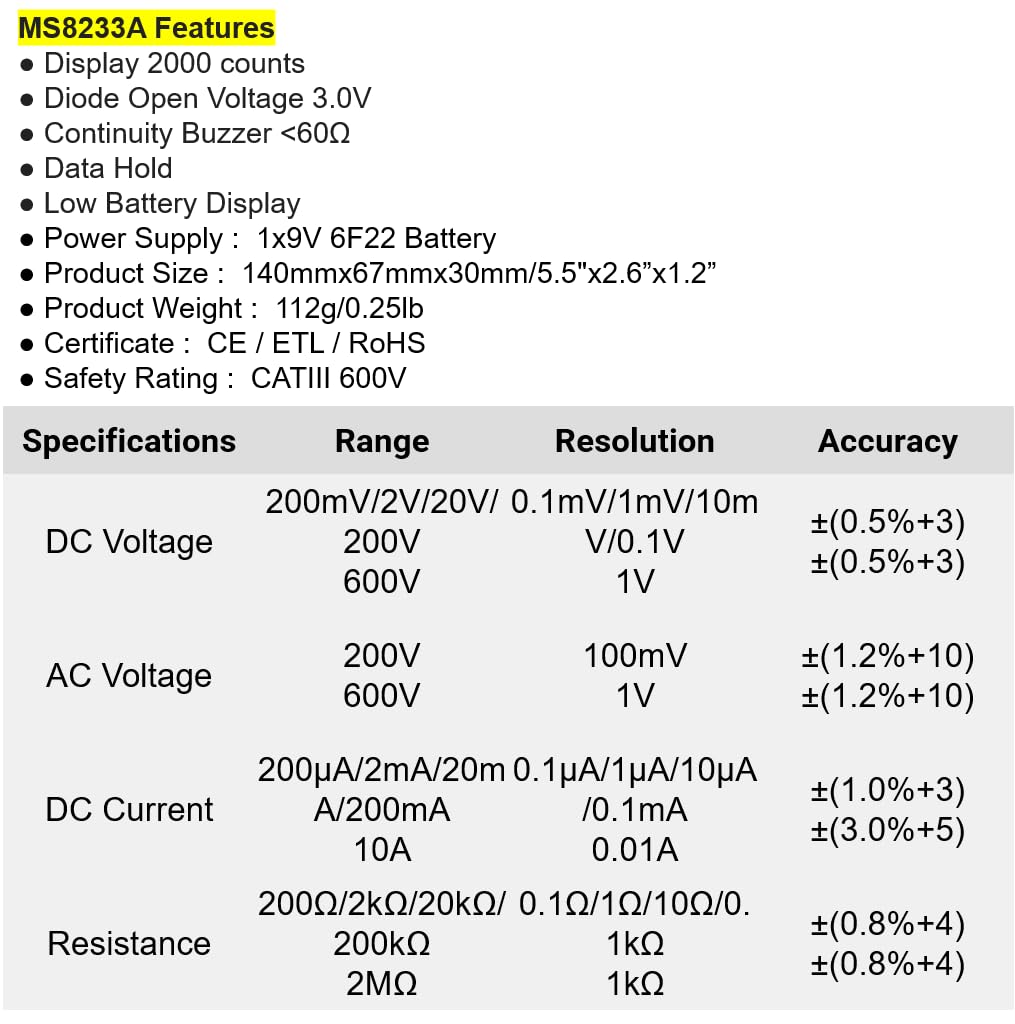
Figure 3: Detailed electrical specifications for the Mastech MS8233A.
9.3 Related Models Comparison

Figure 4: Comparison table of various Mastech manual ranging digital multimeters, including the MS8233A.
10. വാറൻ്റിയും പിന്തുണയും
Mastech products are designed for reliability and performance. For warranty information or technical support, please refer to the warranty card included with your product or contact Mastech customer service through their official webവാറന്റി ക്ലെയിമുകൾക്കുള്ള വാങ്ങലിന്റെ തെളിവായി നിങ്ങളുടെ വാങ്ങൽ രസീത് സൂക്ഷിക്കുക.


