ആമുഖം
The MLOVE D5 Professional Karaoke Machine is a versatile and portable audio system designed for both home entertainment and outdoor events. It features powerful sound output, dual wireless microphones, and extensive connectivity options for various audio sources and instruments. This manual provides detailed instructions to help you set up, operate, and maintain your MLOVE D5 karaoke machine.

Figure 1: MLOVE D5 Professional Karaoke Machine with included accessories.
പാക്കേജ് ഉള്ളടക്കം
- 1 x MLOVE D5 Karaoke Machine
- 2 x UHF വയർലെസ് മൈക്രോഫോണുകൾ
- 1 x യുഎസ്ബി-സി ചാർജിംഗ് കേബിൾ
- 1 x ഉപയോക്തൃ മാനുവൽ
സജ്ജമാക്കുക
1 ഉപകരണം ചാർജ് ചെയ്യുന്നു
The MLOVE D5 karaoke machine and its wireless microphones are equipped with rechargeable batteries. Ensure all devices are fully charged before first use.
- പ്രധാന യൂണിറ്റ്: Connect the provided USB-C charging cable to the USB-C charging port on the rear panel of the karaoke machine and to a compatible USB power adapter (not included). The charging indicator will illuminate.
- വയർലെസ് മൈക്രോഫോണുകൾ: Each microphone has a USB-C charging port at its base. Connect the USB-C cable to the microphone and a power source. The microphones offer over 12 hours of continuous use on a full charge.

Figure 2: USB-C charging port on the wireless microphone.
2. പവർ ഓൺ/ഓഫ്
Locate the power switch on the control panel. Flip the switch to the 'ON' position to power on the device. The display screen will activate. Flip to 'OFF' to power down.
3. ഓഡിയോ ഉറവിടങ്ങൾ ബന്ധിപ്പിക്കുന്നു
The MLOVE D5 offers multiple ways to connect your audio sources:
- ബ്ലൂടൂത്ത്: The machine will automatically enter Bluetooth pairing mode upon startup (indicated by 'BLUE' on the display). On your device (smartphone, tablet, etc.), search for 'MLOVE D5' in the Bluetooth settings and connect.
- സഹായ ഇൻപുട്ട്: Connect an external audio device using a 3.5mm audio cable to the 'AUX' port on the rear panel.
- USB Drive/Micro SD Card: Insert a USB flash drive or a micro SD card into the respective slots on the rear panel for direct music playback.
- വയർഡ് മൈക്രോഫോണുകൾ/ഉപകരണങ്ങൾ: Use the 6.35mm jacks on the rear panel for wired microphones or musical instruments like guitars, keyboards, or electronic drums.

Figure 3: Rear panel connections for audio input and charging.
4. Wireless Microphone Pairing
The two UHF wireless microphones are pre-paired with the machine. If re-pairing is needed:
- Power on the karaoke machine.
- Power on the wireless microphone. The microphone display will show its channel (e.g., CH08).
- The microphone should automatically connect. If not, press the 'MIC Control' button on the main unit's control panel to initiate pairing.
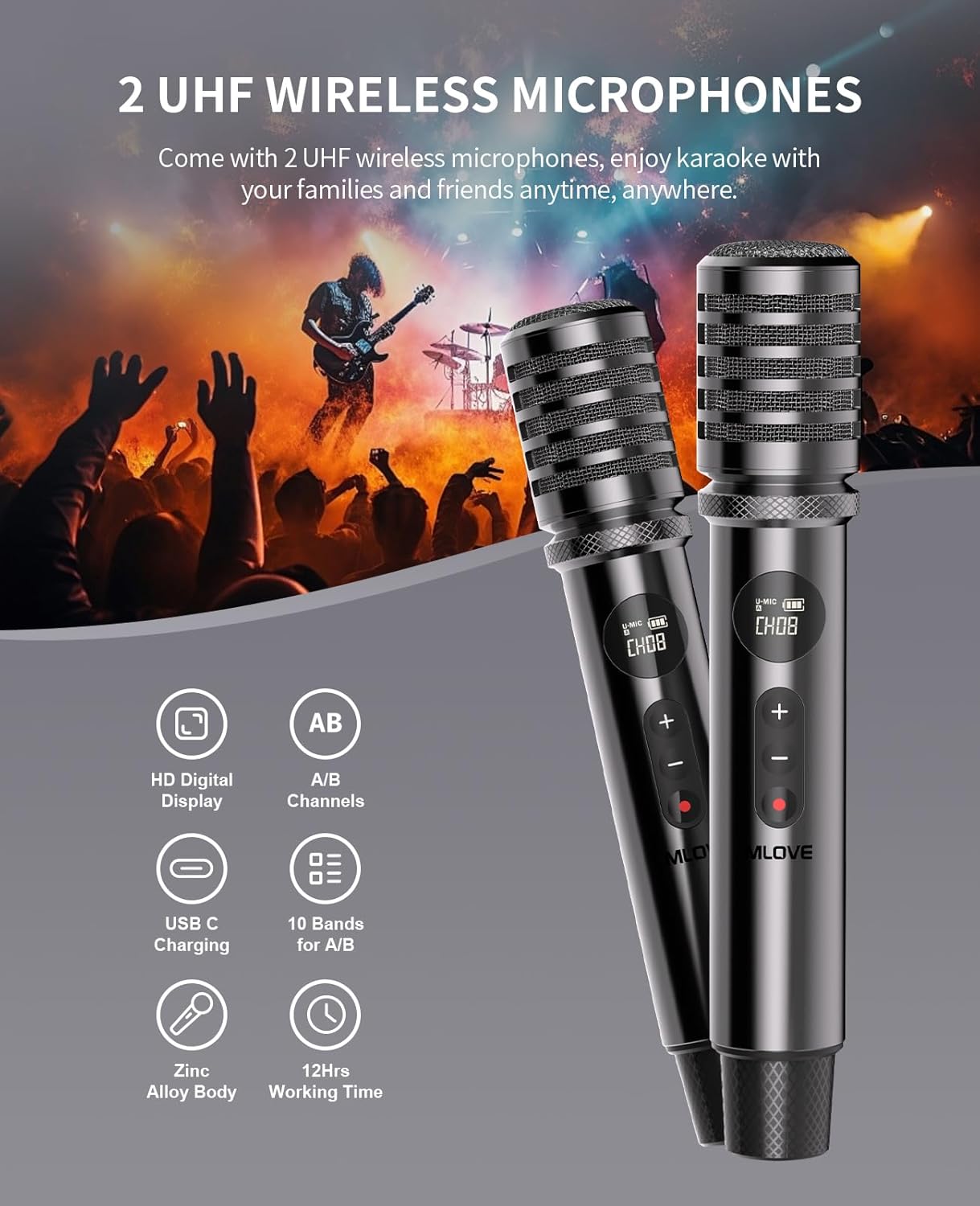
Figure 4: MLOVE D5 wireless microphones.
Operating the MLOVE D5
1. നിയന്ത്രണ പാനൽ ഓവർview
The top panel of the MLOVE D5 features a comprehensive set of controls for audio adjustment and playback:

Figure 5: MLOVE D5 Control Panel.
- മാസ്റ്റർ വോളിയം: Large knob on the right for overall system volume.
- Accompanying Volume: Large knob on the left for music playback volume.
- OTG Gain: Knob for adjusting the gain of the live streaming output.
- CH1 Controls (Microphone): Treble, Reverb, Bass, and Gain knobs for the wireless microphones.
- CH2 Controls (Instrument/Wired Mic): Reverb, Gain, and Tone knobs for the instrument or wired microphone input. A 3-position switch allows selection between wired microphone, acoustic guitar, and electronic instruments.
- പ്ലേബാക്ക് നിയന്ത്രണങ്ങൾ: Buttons for Previous Track, Play/Pause, Next Track, Loop Play, Local Record, Record Replay, and Mute.
- MIC Control: Button to pair wireless microphones or activate mic priority.
- മോഡ്: Button to switch between input modes (Bluetooth, Aux, USB, Micro SD).
- Music Busking (EQ): Button to switch between Indoor and Outdoor EQ modes.
2. EQ Modes (Indoor & Outdoor)
The MLOVE D5 features two distinct EQ modes:
- ഇൻഡോർ മോഡ്: Enhances deep bass for a rich, immersive sound experience.
- ഔട്ട്ഡോർ മോഡ്: Emphasizes mid and high frequencies, ensuring vocals and instruments are clear and cut through ambient noise.
3. Recording and Live Streaming
- വൺ-ടച്ച് റെക്കോർഡിംഗ്: Press the 'Local Rec' button to record your performance directly to a connected USB drive or micro SD card.
- USB-C OTG Live Streaming: Connect your smartphone or computer to the 'LIVE' USB-C port on the rear panel to stream your audio directly. Adjust the 'OTG Gain' knob for optimal levels.

Figure 6: Live streaming and recording setup.
4. ഹെഡ്ഫോൺ മോണിറ്ററിംഗ്
For private monitoring, connect headphones to the 3.5mm headphone jack on the rear panel.
Video: MLOVE Karaoke Machine Features Introduction
ഈ വീഡിയോ ഒരു ദൃശ്യാവിഷ്കാരം നൽകുന്നുview of the MLOVE D5 karaoke machine's key features and functionalities, including its controls, connectivity, and sound capabilities.
മെയിൻ്റനൻസ്
- വൃത്തിയാക്കൽ: Use a soft, dry cloth to clean the exterior of the machine and microphones. Avoid using abrasive cleaners or solvents.
- സംഭരണം: ഉപയോഗത്തിലില്ലാത്തപ്പോൾ നേരിട്ടുള്ള സൂര്യപ്രകാശത്തിൽ നിന്നും കടുത്ത താപനിലയിൽ നിന്നും മാറി തണുത്തതും വരണ്ടതുമായ സ്ഥലത്ത് ഉപകരണം സൂക്ഷിക്കുക.
- ബാറ്ററി കെയർ: To prolong battery life, avoid fully discharging the device frequently. Charge it regularly, even if not in active use.
ട്രബിൾഷൂട്ടിംഗ്
| പ്രശ്നം | സാധ്യമായ പരിഹാരം |
|---|---|
| സ്പീക്കറിൽ നിന്ന് ശബ്ദമില്ല | Check master volume, accompanying volume, and ensure audio source is playing. Verify Bluetooth connection or wired input. |
| മൈക്രോഫോൺ പ്രവർത്തിക്കുന്നില്ല | Ensure microphone is charged and powered on. Press 'MIC Control' button to re-pair. Check microphone gain knob. |
| ബ്ലൂടൂത്ത് കണക്ഷൻ അസ്ഥിരമാണ് | Ensure device is within range (approx. 10 meters). Avoid obstacles. Disconnect and reconnect Bluetooth. |
| രേഖപ്പെടുത്താൻ കഴിയില്ല | Ensure a USB drive or micro SD card is inserted and has sufficient free space. Check file ഫോർമാറ്റ് അനുയോജ്യത. |
സ്പെസിഫിക്കേഷനുകൾ
- ബ്രാൻഡ്: MLOVE
- മോഡൽ: D5
- പവർ ഔട്ട്പുട്ട്: 200W (പീക്ക്)
- സ്പീക്കറുകൾ: 5-inch subwoofer, two 2-inch tweeters
- ബാറ്ററി: 10,000mAh Lithium Ion (main unit), 1500mAh USB-C rechargeable (microphones)
- കളിസമയം: 10-12 hours (main unit), over 12 hours (microphones)
- കണക്റ്റിവിറ്റി: Bluetooth, 3.5mm Aux Input, USB Port, Micro SD Card Slot, 6.35mm Jack (Wired Mic/Instrument), USB Type C (OTG Live Streaming)
- മൈക്രോഫോണുകൾ: 2 x UHF Wireless Microphones (A/B dual channels, 10 selectable frequencies)
- മെറ്റീരിയൽ: Acrylonitrile Butadiene Styrene (ABS), Metal, Wood
- അളവുകൾ: 9.4 x 6.4 x 13.4 ഇഞ്ച്
- ഇനത്തിൻ്റെ ഭാരം: 8.97 പൗണ്ട്
വാറൻ്റിയും പിന്തുണയും
വാറൻ്റി വിവരങ്ങൾ
- 30 ദിവസം: തിരികെ നൽകൽ നയം
- 90 ദിവസം: മാറ്റിസ്ഥാപിക്കൽ നയം
- 360 ദിവസം: വാറൻ്റി കവറേജ്
ഉപഭോക്തൃ പിന്തുണ
MLOVE offers 24x7 customer support, including weekends, to assist with any product-related inquiries or issues.
For further assistance, please refer to the contact information provided with your purchase or visit the official MLOVE webസൈറ്റ്.


