1. ആമുഖവും അവസാനവുംview
The LIORQUE G0181R-P is a versatile projection alarm clock radio designed to enhance your daily routine. It features a large digital display, dual alarms, FM radio, a convenient snooze function, and a projection feature to display the time on your ceiling or wall. Additionally, it includes two USB ports for charging your devices.

ചിത്രം 1.1: കഴിഞ്ഞുview of the LIORQUE G0181R-P Projection Alarm Clock Radio, highlighting its main features including time projection, FM radio, dual alarms, snooze, infinite brightness adjustment, and dual USB charging ports.
2. സജ്ജീകരണം
2.1 പവർ കണക്ഷൻ
Connect the provided power adapter to the DC IN port on the back of the alarm clock and plug it into a standard wall outlet. The display will light up, indicating the device is receiving power.

Image 2.1: The alarm clock connected to its power adapter, which is plugged into a wall socket. This illustrates the initial power setup.
2.2 ബാറ്ററി ബാക്കപ്പ്
The unit includes a built-in CR2032 button cell battery. This battery serves as a backup to retain time and alarm settings during a power outage. It does not power the main display or functions.
3. പ്രവർത്തന നിർദ്ദേശങ്ങൾ
3.1 സമയ ക്രമീകരണം
- അമർത്തിപ്പിടിക്കുക ടൈം സെറ്റ് ബട്ടൺ. മണിക്കൂർ അക്കങ്ങൾ മിന്നുന്നു.
- ഉപയോഗിക്കുക VOL+ or വോൾ- മണിക്കൂർ ക്രമീകരിക്കാനുള്ള ബട്ടണുകൾ.
- അമർത്തുക ടൈം സെറ്റ് വീണ്ടും. മിനിറ്റുകണക്കുകൾ മിന്നിമറയും.
- ഉപയോഗിക്കുക VOL+ or വോൾ- മിനിറ്റ് ക്രമീകരിക്കാൻ ബട്ടണുകൾ.
- അമർത്തുക ടൈം സെറ്റ് a third time to confirm and exit time setting mode.
- 12 മണിക്കൂർ, 24 മണിക്കൂർ ഫോർമാറ്റുകൾക്കിടയിൽ മാറാൻ, അമർത്തുക 12/24എച്ച് സാധാരണ സമയ പ്രദർശന സമയത്ത് ബട്ടൺ.
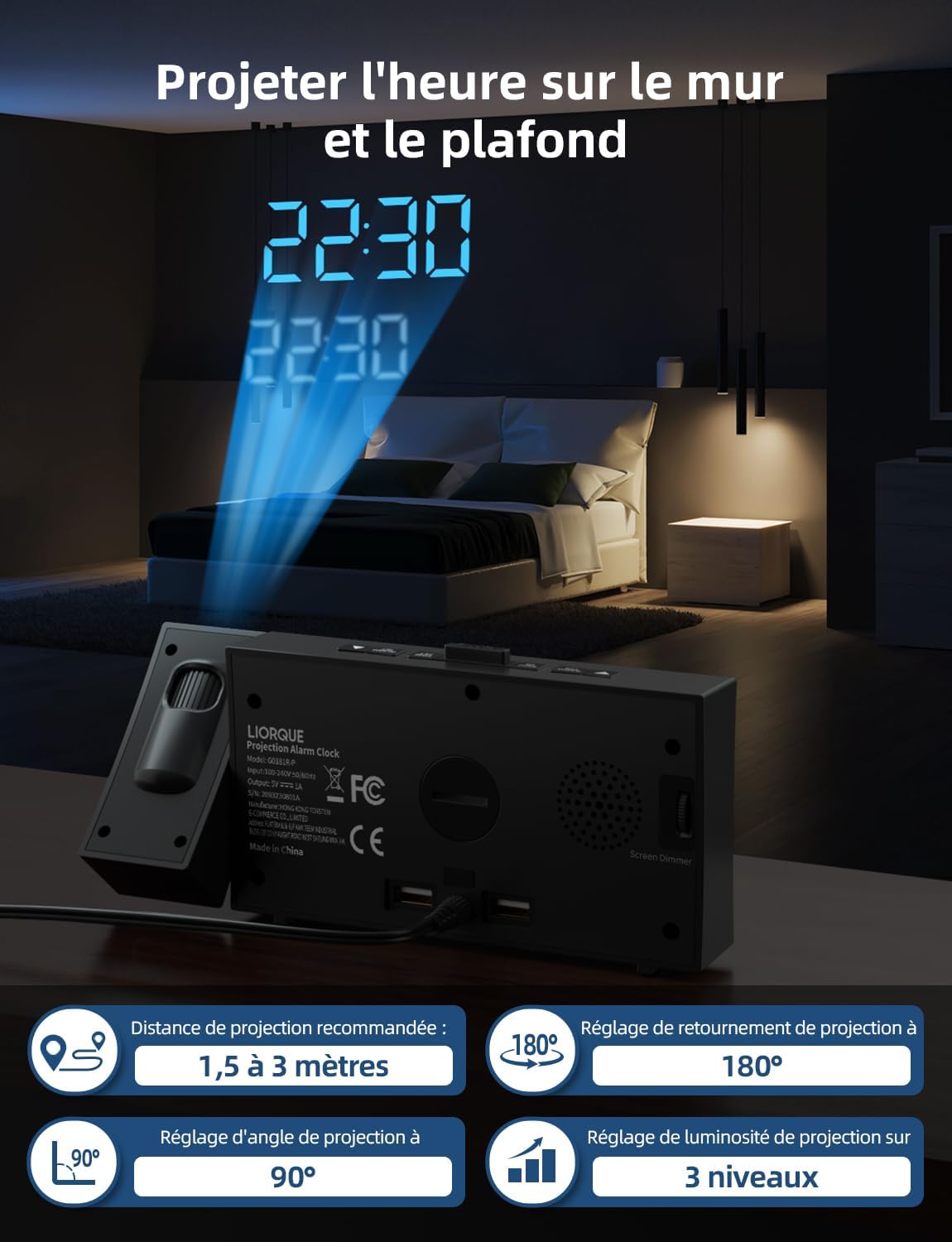
Image 3.1: The front display of the alarm clock, showing the digital time. This is the primary interface for time and alarm settings.
3.2 Alarm Setting (Dual Alarms)
This clock features two independent alarms (Alarm 1 and Alarm 2).
- അമർത്തിപ്പിടിക്കുക അലാറം 1 സെറ്റ് or അലാറം 2 സെറ്റ് ബട്ടൺ. തിരഞ്ഞെടുത്ത അലാറത്തിന്റെ മണിക്കൂർ അക്കങ്ങൾ മിന്നിമറയും.
- ഉപയോഗിക്കുക VOL+ or വോൾ- അലാറം സമയം ക്രമീകരിക്കാനുള്ള ബട്ടണുകൾ.
- ബന്ധപ്പെട്ടത് അമർത്തുക അലാറം സെറ്റ് വീണ്ടും ബട്ടൺ അമർത്തുക. മിനിറ്റുകണക്കുകൾ മിന്നിമറയും.
- ഉപയോഗിക്കുക VOL+ or വോൾ- അലാറം മിനിറ്റ് ക്രമീകരിക്കാനുള്ള ബട്ടണുകൾ.
- ബന്ധപ്പെട്ടത് അമർത്തുക അലാറം സെറ്റ് button a third time to confirm.
- ഒരു അലാറം സജീവമാക്കാനോ നിർജ്ജീവമാക്കാനോ, അമർത്തുക അലാറം 1 ഓൺ/ഓഫ് or അലാറം 2 ഓൺ/ഓഫ് button. An indicator icon will appear on the display when an alarm is active.

Image 3.2: The display showing two distinct alarm settings, illustrating the dual alarm capability of the clock.
3.3 സ്നൂസ് ഫംഗ്ഷൻ
അലാറം മുഴങ്ങുമ്പോൾ, വലിയ ബട്ടൺ അമർത്തുക സ്നൂസ് ചെയ്യുക button on top of the clock to temporarily silence the alarm. The alarm will sound again after the set snooze duration. The default snooze time is 5 minutes and can be adjusted from 5 to 60 minutes in the settings.

Image 3.3: A person pressing the snooze button on the alarm clock, with an overlay indicating the adjustable snooze duration.
3.4 എഫ്എം റേഡിയോ പ്രവർത്തനം
- അമർത്തുക റേഡിയോ ഓൺ/ഓഫ് എഫ്എം റേഡിയോ ഓണാക്കാനുള്ള ബട്ടൺ.
- അമർത്തുക സ്കാൻ ചെയ്യുക button to automatically scan and save available FM stations (up to 10 stations).
- ഉപയോഗിക്കുക മെമ്മറി സംരക്ഷിച്ച സ്റ്റേഷനുകളിലൂടെ സൈക്കിൾ ചെയ്യാൻ ബട്ടൺ.
- ഉപയോഗിച്ച് വോളിയം ക്രമീകരിക്കുക VOL+ or വോൾ- ബട്ടണുകൾ.
- റേഡിയോ ഓഫ് ചെയ്യാൻ, അമർത്തുക റേഡിയോ ഓൺ/ഓഫ് വീണ്ടും ബട്ടൺ.

Image 3.4: The alarm clock displaying FM radio frequencies, with visual cues indicating radio waves, demonstrating its FM radio functionality.
3.5 സമയ പ്രൊജക്ഷൻ
The projector allows you to display the time on a wall or ceiling.
- അമർത്തുക പ്രൊജക്ഷൻ ഓൺ/ഓഫ് button to activate or deactivate the projection.
- പ്രൊജക്ഷൻ ആംഗിൾ ക്രമീകരിക്കുന്നതിന് പ്രൊജക്ടർ ലെൻസ് തിരിക്കുക.
- അമർത്തിപ്പിടിക്കുക പ്രൊജക്ഷൻ റൊട്ടേറ്റ് button to rotate the projected image 180 degrees for optimal viewing.
- Adjust the projection brightness using the dedicated projection brightness control (often a small wheel or button near the projector lens).

Image 3.5: The alarm clock projecting the time onto a bedroom ceiling, demonstrating its projection feature.
3.6 ഡിസ്പ്ലേ ബ്രൈറ്റ്നസ് അഡ്ജസ്റ്റ്മെന്റ്
The main display brightness can be adjusted to your preference.
- അമർത്തുക ഡിമ്മർ button repeatedly to cycle through different brightness levels (e.g., High, Medium, Low, Off).
- Some models may feature an infinite dimmer wheel or button for precise adjustment.

Image 3.6: The alarm clock with a visual representation of its infinite brightness adjustment feature, allowing users to set the display intensity from 0% to 100%.
3.7 യുഎസ്ബി ചാർജിംഗ് പോർട്ടുകൾ
Two USB charging ports are located on the back of the unit. These ports provide power to charge compatible electronic devices such as smartphones or tablets. Simply connect your device's USB charging cable to one of the ports.

Image 3.7: The alarm clock charging two smartphones simultaneously via its integrated USB ports, demonstrating its charging capability.
4. പരിപാലനം
4.1 വൃത്തിയാക്കൽ
To clean the alarm clock, gently wipe the surfaces with a soft, dry cloth. Do not use abrasive cleaners, waxes, or solvents as they may damage the finish. Ensure the device is unplugged before cleaning.
4.2 ബാറ്ററി മാറ്റിസ്ഥാപിക്കൽ
The CR2032 backup battery typically lasts for several years. If you notice that time and alarm settings are not retained after a power outage, the battery may need replacement. To replace, locate the battery compartment on the bottom of the unit, open it, and replace the old CR2032 battery with a new one, ensuring correct polarity. Dispose of old batteries responsibly.
5. പ്രശ്നപരിഹാരം
- ഡിസ്പ്ലേ ഇല്ല / യൂണിറ്റ് ഓണാക്കുന്നില്ല: Ensure the power adapter is securely plugged into both the clock and a working wall outlet. Check if the outlet is functional.
- അലാറം മുഴങ്ങുന്നില്ല: Verify that the alarm is activated (check for the alarm icon on the display). Ensure the alarm volume is not set to zero.
- Radio Static / Poor Reception: Extend the FM antenna fully. Try repositioning the clock to improve reception. Perform an auto-scan to find stronger stations.
- പ്രൊജക്ഷൻ വ്യക്തമല്ല: Adjust the focus of the projector lens (if available) and ensure the projection distance is within the recommended range (typically 1.5 to 3 meters). Clean the projector lens if it appears dusty.
- Time/Settings Lost After Power Outage: The CR2032 backup battery may be depleted and needs replacement.
6 സ്പെസിഫിക്കേഷനുകൾ
| ബ്രാൻഡ് | ലിയോർക്ക് |
| മോഡൽ നമ്പർ | G0181R-P |
| അളവുകൾ (L x W x H) | 5.8 x 3.81 x 10 സെ.മീ |
| ഭാരം | 360 ഗ്രാം |
| ഡിസ്പ്ലേ തരം | ഡിജിറ്റൽ |
| പ്രത്യേക സവിശേഷതകൾ | Alarm, Radio, Snooze, Time Projection, USB Charging |
| പവർ ഉറവിടം | കോർഡഡ് ഇലക്ട്രിക് |
| മെറ്റീരിയൽ | പ്ലാസ്റ്റിക് |
| ബാക്കപ്പ് ബാറ്ററി | CR2032 (ഉൾപ്പെടുന്നു) |
7. വാറൻ്റിയും പിന്തുണയും
This product comes with a standard manufacturer's warranty. For specific warranty details, please refer to the documentation included with your purchase or contact LIORQUE customer support. If you encounter any issues not covered in this manual, please reach out to the manufacturer's support team for assistance.
For further support, please visit the official LIORQUE webസൈറ്റ് അല്ലെങ്കിൽ അവരുടെ ഉപഭോക്തൃ സേവന വിഭാഗവുമായി ബന്ധപ്പെടുക.


