1. ആമുഖം
The Creality CR-Scan Raptor is a high-precision 3D scanner designed for various applications, including 3D printing, industrial inspection, and reverse engineering. It features a hybrid scanning technology combining blue laser and near-infrared (NIR) structured light, offering exceptional accuracy and versatility for scanning objects of different sizes and materials.
This manual provides detailed instructions for setting up, operating, maintaining, and troubleshooting your CR-Scan Raptor 3D scanner to ensure optimal performance and longevity.

Figure 1: Creality CR-Scan Raptor 3D Scanner in operation.
2. ഉൽപ്പന്നം കഴിഞ്ഞുview
2.1 ഘടകങ്ങൾ
The CR-Scan Raptor integrates advanced optical and electronic components to deliver precise 3D scanning capabilities. Key components include:
- Blue Laser Emitters: Multiple parallel blue laser lines for high-accuracy scanning of small to medium objects.
- NIR Projector: Infrared structured light for marker-free scanning, suitable for larger objects and human bodies.
- ഉയർന്ന മിഴിവുള്ള ക്യാമറ: A 2.3-megapixel camera captures detailed surface data.
- Color Camera: Captures 24-bit full-color texture information.
- Supplemental Lights: 12 white LED lights enhance color mapping in various environments.
- മെക്കാനിക്കൽ ബട്ടണുകൾ: For intuitive control during scanning.
- ഇൻഡിക്കേറ്റർ ലൈറ്റുകൾ: Provide real-time status feedback.
- എർഗണോമിക് ഡിസൈൻ: Lightweight (372g) with an optimized grip to reduce fatigue during extended use.

Figure 2: Internal components and light sources of the CR-Scan Raptor.
2.2 ബോക്സിൽ എന്താണുള്ളത്
അൺബോക്സിംഗ് ചെയ്യുമ്പോൾ, എല്ലാ ഘടകങ്ങളും ഉണ്ടെന്ന് ഉറപ്പാക്കുക:
- Creality CR-Scan Raptor 3D Scanner
- പവർ അഡാപ്റ്റർ
- USB 3.0 Data Cable (Type-C/USB3.0)
- Reflective Marker Points
- സ്കാനിംഗ് പാഡ്
- High-Precision Glass Calibration Board
- ഉപയോക്തൃ മാനുവൽ (ഈ പ്രമാണം)
3. സജ്ജീകരണം
3.1 സിസ്റ്റം ആവശ്യകതകൾ
Before connecting the scanner, ensure your computer meets the following specifications for optimal performance with the Creality Scan software:
- ഓപ്പറേറ്റിംഗ് സിസ്റ്റം: Windows 10/11 (64-bit) or macOS 11.7.7 and above (Big Sur/Monterey/Ventura).
- Processor (Windows): Recommended 7th Gen Intel Core i7 CPU or equivalent.
- Processor (macOS): Apple M1/M2/M3 series processors.
- Graphics Card (Windows): NVIDIA graphics card with 6GB VRAM or higher.
- റാം: 16GB or higher.

Figure 3: System requirements for Creality Scan software.
3.2 സോഫ്റ്റ്വെയർ ഇൻസ്റ്റലേഷൻ
- Download the latest version of Creality Scan software from the official Creality webസൈറ്റ്.
- Follow the on-screen instructions to install the software. Ensure all necessary drivers are installed during this process.
3.3 ഹാർഡ്വെയർ കണക്ഷൻ
- Connect the power adaptor to the scanner and a power outlet.
- Connect the USB 3.0 data cable from the scanner to a compatible USB 3.0 port on your computer.
- Once connected, the scanner's indicator lights should activate, signaling it is powered on and recognized by the system.
4. പ്രവർത്തന നിർദ്ദേശങ്ങൾ
4.1 കാലിബ്രേഷൻ
Before your first scan and periodically thereafter, calibrate the scanner using the provided high-precision glass calibration board to maintain accuracy. Follow the calibration steps within the Creality Scan software.
4.2 സ്കാനിംഗ് മോഡുകൾ
The CR-Scan Raptor offers two primary scanning modes:
- Blue Laser Mode: Ideal for high-precision scanning of small to medium objects (minimum 5x5x5mm). This mode may require reflective marker points for optimal tracking, especially on featureless surfaces. It offers an accuracy of up to 0.02mm and a scanning speed of up to 60fps.
- Infrared (NIR) Mode: Suitable for marker-free scanning of larger objects (minimum 150x150x150mm), faces, and human bodies. This mode provides faster scanning speeds of up to 20fps and is effective for objects with rich geometric features.

Figure 4: Blue Laser mode for small items and Infrared mode for large items.
4.3 Scanning Process
- Prepare the Object: Clean the object to be scanned. For blue laser mode, apply reflective marker points if the object lacks sufficient geometric features. For black or metal objects, the scanner can often capture data without powder spraying.
- Launch Creality Scan Software: Open the software and select the desired scanning mode (Blue Laser or NIR).
- ദൂരം ക്രമീകരിക്കുക: Position the scanner at the recommended working distance from the object (150-400mm for Blue Laser, 170-1000mm for NIR). The software will provide visual feedback on optimal distance.
- സ്കാനിംഗ് ആരംഭിക്കുക: Press the scan button on the device or within the software. Move the scanner smoothly around the object, ensuring consistent coverage. The anti-shake tracking technology helps maintain a stable scan.
- പുരോഗതി നിരീക്ഷിക്കുക: Observe the real-time scan data on your computer screen. The indicator lights on the scanner provide status information.
- Capture Full-Color Texture: The 24-bit full-color scanning capability, aided by 12 white LED supplemental lights, captures realistic textures.
- പോസ്റ്റ്-പ്രോസസ്സിംഗ്: After scanning, use the Creality Scan software for data alignment, merging, hole filling, and texture mapping to create a complete 3D model. Output formats include OBJ, STL, and PLY.

Figure 5: High-precision scanning with blue laser lines.

ചിത്രം 6: ഉദാample of 24-bit full-color scanning.

Figure 7: Scanning black and metal objects without spray.
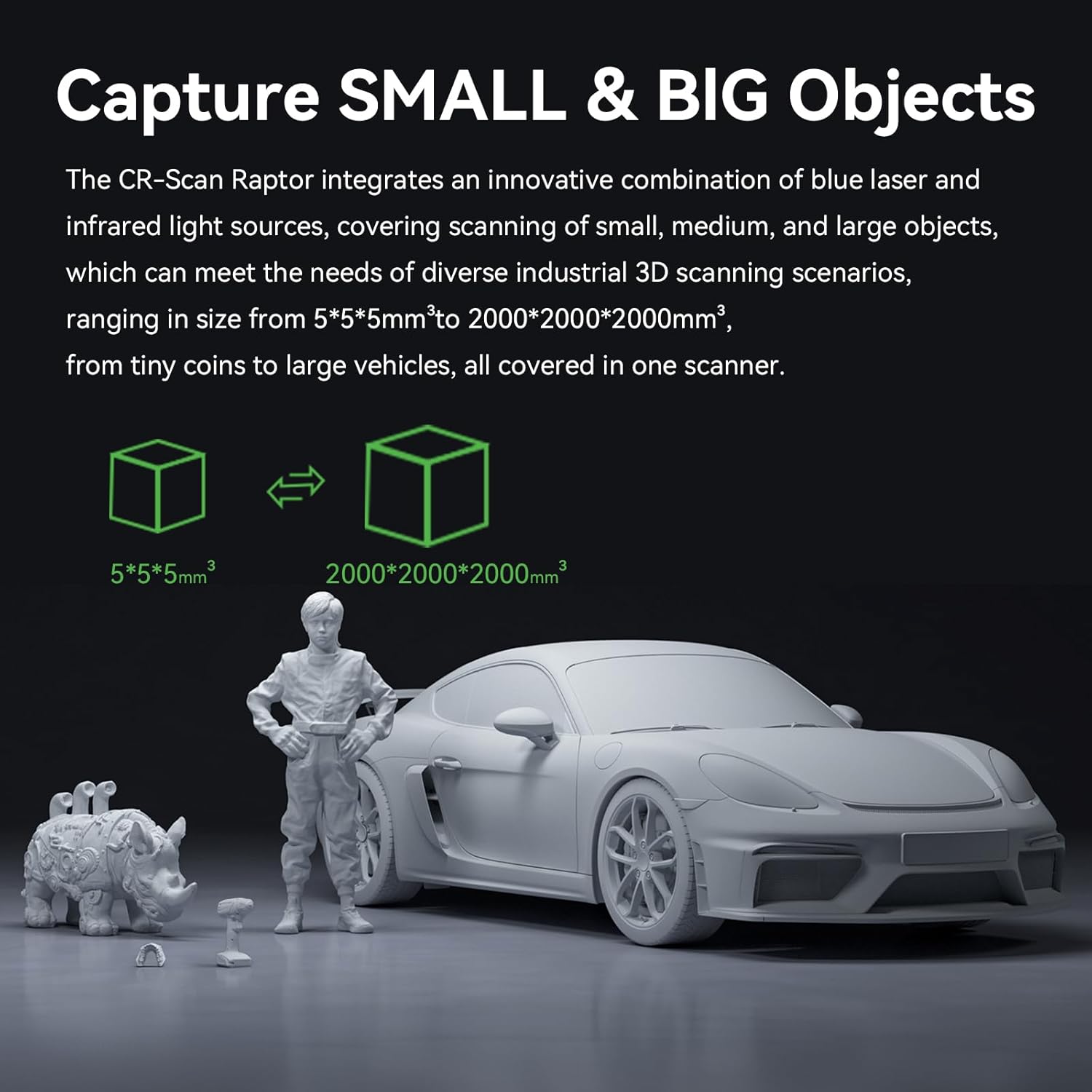
Figure 8: Versatile scanning for small and large objects.
4.4 അപേക്ഷകൾ
The CR-Scan Raptor is suitable for a wide range of applications, including:
- Metrology Grade Inspection
- Auto Parts Design and Analysis
- റിവേഴ്സ് എഞ്ചിനീയറിംഗ്
- Action Figure and Sculpture Creation
- Medical Applications (e.g., prosthetics, orthotics)
- Mold Manufacturing
- Augmented Reality (AR) / Virtual Reality (VR) Content Creation
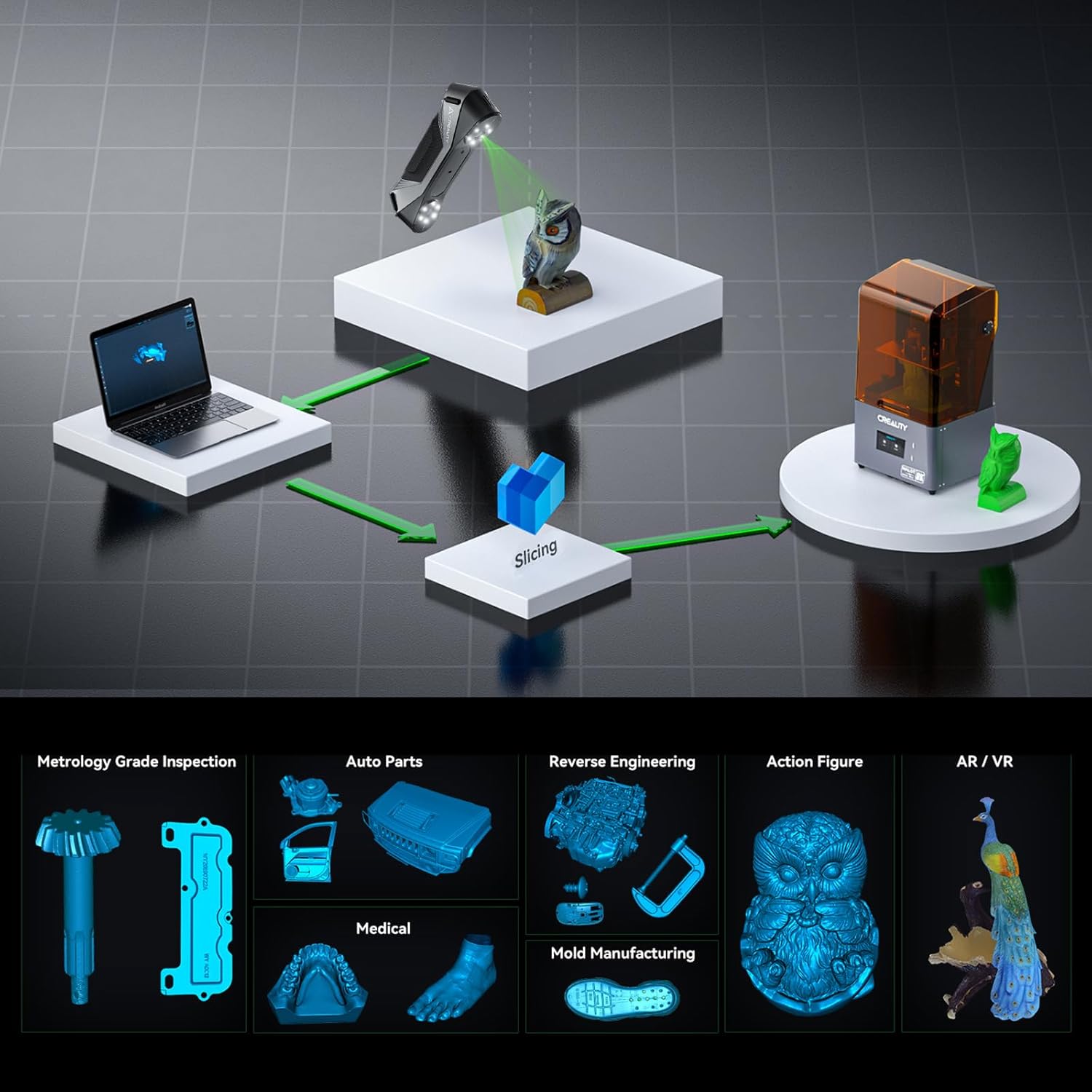
Figure 9: Diverse applications of the CR-Scan Raptor.
5. പരിപാലനം
Proper maintenance ensures the longevity and accuracy of your Creality CR-Scan Raptor 3D scanner:
- വൃത്തിയാക്കൽ: Gently wipe the scanner's exterior and lens surfaces with a soft, lint-free cloth. Avoid abrasive materials or harsh chemicals.
- സംഭരണം: Store the scanner in a clean, dry environment, away from direct sunlight, dust, and extreme temperatures. Use the original packaging or a protective case when not in use.
- കൈകാര്യം ചെയ്യൽ: Handle the scanner with care to prevent drops or impacts, which can affect its internal components and calibration.
- സോഫ്റ്റ്വെയർ അപ്ഡേറ്റുകൾ: Regularly check for and install the latest Creality Scan software updates to benefit from performance improvements, bug fixes, and new features.
- കാലിബ്രേഷൻ: Perform calibration periodically, especially if you notice any discrepancies in scan accuracy or after transporting the scanner.
6. പ്രശ്നപരിഹാരം
This section addresses common issues you might encounter with the CR-Scan Raptor 3D scanner.
6.1 പൊതുവായ പ്രശ്നങ്ങളും പരിഹാരങ്ങളും
- പ്രശ്നം: കമ്പ്യൂട്ടർ സ്കാനർ തിരിച്ചറിഞ്ഞില്ല.
പരിഹാരം: Ensure the USB 3.0 cable is securely connected to both the scanner and a compatible USB 3.0 port on your computer. Verify that the power adaptor is connected and providing power. Reinstall the Creality Scan software and drivers if necessary. - Issue: Frequent tracking loss during scanning.
പരിഹാരം:- Ensure adequate lighting in the scanning environment, avoiding overly bright or dark conditions.
- For Blue Laser mode, apply sufficient reflective marker points to the object, especially on featureless or uniform surfaces.
- Maintain a steady scanning motion and keep the scanner within the optimal working distance.
- Calibrate the scanner if tracking issues persist.
- Issue: Software crashes or error messages (e.g., GPU driver out of date).
പരിഹാരം:- Ensure your computer meets the minimum system requirements, particularly for GPU and RAM.
- Update your graphics card drivers to the latest version directly from the manufacturer's website (NVIDIA, AMD, Intel).
- Close other demanding applications while scanning.
- Restart the Creality Scan software and your computer.
- Issue: Inaccurate or distorted scan results.
പരിഹാരം:- Perform a thorough calibration of the scanner.
- Ensure the object is stable and does not move during scanning.
- Verify that the scanning distance is within the recommended range for the selected mode.
- For objects with complex geometries or reflective surfaces, consider using scanning spray or additional marker points.
- Issue: Wireless scanning issues (if applicable with future accessories).
പരിഹാരം: Ensure the wireless accessory is properly connected and configured. Check for specific software updates related to wireless functionality, especially for macOS users, as compatibility can vary.
7 സ്പെസിഫിക്കേഷനുകൾ
The following table details the technical specifications of the Creality CR-Scan Raptor 3D Scanner:
| ഫീച്ചർ | Blue Light (7-line laser) | NIR (ഇൻഫ്രാറെഡ് ബൈനോക്കുലർ ഘടനാപരമായ പ്രകാശം) |
|---|---|---|
| കൃത്യത | Up to 0.02mm @ 100mm | 0.1 മില്ലിമീറ്റർ വരെ |
| 3D Resolution | 0.02-2 മി.മീ | 0.1-2 മി.മീ |
| സ്കാനിംഗ് വേഗത | 60fps വരെ | 20fps വരെ |
| Min. Scan Volume | 5mm x 5mm x 5mm | 150mm x 150mm x 150mm |
| സിംഗിൾ ക്യാപ്ചർ ശ്രേണി | 270mm x 170mm @ 300mm | 930mm x 580mm @ 1000mm |
| ജോലി ദൂരം | 150mm-400mm | 170mm-1000mm |
| വർണ്ണ മാപ്പിംഗ് | അതെ | അതെ |
| അലൈൻമെന്റ് മോഡ് | മാർക്കർ | Marker / Geometry / Texture |
| പൊതു സവിശേഷതകൾ | |
|---|---|
| 3D Imaging Camera Resolution | 1920x1200 |
| കളർ സപ്ലിമെൻ്റൽ ലൈറ്റ് | 12 വെളുത്ത എൽ.ഇ.ഡി |
| Marker Recognition Enhancement | 12 നീല LED-കൾ |
| ലേസർ സുരക്ഷ | ക്ലാസ് I (കണ്ണ് സുരക്ഷിതം) |
| ബട്ടൺ | മെക്കാനിക്കൽ |
| ഐ.എം.യു | അതെ |
| ഔട്ട്പുട്ട് ഫോർമാറ്റ് | ഒബിജെ/എസ്ടിഎൽ/പ്ലൈ |
| ഇൻപുട്ട് പവർ | 12V 2A |
| ഡാറ്റ ഇൻ്റർഫേസ് | Type-C/USB3.0 |
| ഉപകരണത്തിൻ്റെ അളവുകൾ | 215mm x 50mm x 74mm |
| ഉപകരണ ഭാരം | 372 ഗ്രാം |
| സിസ്റ്റം പിന്തുണ | Windows 10/11 (64-bit), NVIDIA graphics card (6GB video memory), 16GB memory or higher; macOS 11.7 and above, Apple M1/M2/M3 series processors, RAM: 16GB or higher |
| വയർലെസ് സ്കാനിംഗ് | ഭാവിയിലെ വയർലെസ് സ്കാനിംഗ് ആക്സസറികളുമായി സംയോജിച്ച് പിന്തുണയ്ക്കുന്നു |
| പ്രവർത്തന താപനില | -10°C മുതൽ 40°C വരെ |
| പ്രവർത്തന ഹ്യുമിഡിറ്റി | 0-90%RH |
Note: Accuracy is evaluated in laboratory conditions (measurement object is 100mm sphere pair) and actual results may be affected by operating environments such as temperature, vibration, and other factors.
8. വാറൻ്റിയും പിന്തുണയും
വാറന്റി വിവരങ്ങൾ, സാങ്കേതിക പിന്തുണ അല്ലെങ്കിൽ സേവന അന്വേഷണങ്ങൾ എന്നിവയ്ക്ക്, ദയവായി ഔദ്യോഗിക ക്രിയാലിറ്റി പരിശോധിക്കുക. website or contact Creality customer service directly. Keep your purchase receipt as proof of purchase for warranty claims.
Creality Official Webസൈറ്റ്: www.creality.com


